Buy anything from 5,000+ international stores. One checkout price. No surprise fees. Join 2M+ shoppers on Desertcart.
Desertcart purchases this item on your behalf and handles shipping, customs, and support to Cyprus.
🖥️ Elevate your workspace, triple your productivity!
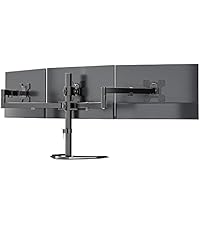
The WALI Triple Monitor Mount is a robust, adjustable stand designed for 13-27 inch monitors, supporting up to 22 lbs per arm. Featuring 360° rotation, tilt, and swivel adjustments, it fits VESA 75x75mm and 100x100mm mounts and installs easily on desks up to 3.5 inches thick with dual clamp options. This mount optimizes desk space and ergonomics, making it ideal for professionals seeking a sleek, efficient multi-monitor setup.


| ASIN | B072N1MFJK |
| Best Sellers Rank | #21 in Computer Monitor Arms |
| Brand | WALI |
| Built-In Media | mount, hardware kit and installation instructions. |
| Color | Black |
| Compatible Devices | Monitor |
| Customer Reviews | 4.6 out of 5 stars 9,016 Reviews |
| Enclosure Material | Metal |
| Global Trade Identification Number | 00811278020955 |
| Item Type Name | computer-monitor-stands |
| Manufacturer | WALI |
| Material | Metal |
| Maximum Tilt Angle | 15 Degrees |
| Maximum-Supported Screen Size | 27 Inches |
| Mfr Part Number | M003 |
| Minimum-Supported Screen Size | 13 Inches |
| Model Number | M003 |
| Mounting Type | Tabletop Mount |
| Movement Type | Swivel,Tilt,Rotation |
| UPC | 811278020955 |
| Warranty Description | 10 years |
J**R
Fantastic Product
The Wali Single Monitor Desk Mount works better than I expected. First, the basics. The mount comes well packed and the instructions are very simple to understand. There is so little assembly required that the instructions are almost not needed. Assembly and installation can be done in less than ten minutes (not including cable management if you choose to use that feature). Adjusting everything is easy. Overall quality of the parts and the assembled product are quite good. I have two monitors that I wanted to mount on a flat desktop. I needed to be able to get the monitors right next to each other and still have the desk flat against the wall. Most double monitor stands will not allow for this unless your monitors are the perfect size for the spread of the arms. The movable arms will usually flex toward the wall if you want the monitors to be edge-to-edge with each other. The result is the desk having to be offset from the wall to accommodate this. By using two single monitor stands, I am able to move the posts to positions that allow the arms to be extended in such a way that everything is flat with the wall. The other frequently stated issue with most monitor stands is that the arms have hydraulic pistons and/or springs to deal with the weight of the attached monitors so they are easy to move up and down. These pistons and springs are often of poor quality and either fail quickly or don't work as expected from the get-go. This is not a problem with the Wali Single Monitor Desk Mount. The arm is solidly attached to the 16" pole and only moves up and down by loosening the arm mounting and sliding the arm up or down on the pole. The arm, once set to the desired height, can be move forward, backward, side-to-side and tilt. This makes for a much sturdier setup with no pistons or springs. This system works very well, since I (and I think most people) have little need to move a monitor up or down after the initial installation. I leave the included Allen wrench stuck in one of the vertical facing screws behind a monitor so that it is always handy but out of sight. If I do need to move the monitors up or down, the tool is right there. I will buy two more of these for my wife's desk.
K**Y
Rock-solid tall mount to hold a monitor above a large monitor
I bought the 31.5 model to mount a 27" monitor above a 32" monitor on my desk. This is the first monitor mount I have ever purchased and I am thrilled with the entire mount! The installation instructions were simple to follow. All hardware was clearly notated and packaged by part number. The mount holds the 27" monitor (which isn't all that light) perfectly above my desk monitor and is very stable. Adjustment is easy and effective and It doesn't wobble one bit. The cable routing clips work well and are literally a snap to install. I used the clamp mount but a screw-down desk mount is included.
N**.
Quality Stand
Solid, heavy duty and well made. I purchased this as I was adding a third monitor to my setup. So I had to choose between buying a 2nd mount that had one arm on it, or just replace my 2 arm setup with a single 3 arm setup. I'm glad I went this route. Very easy to assemble and it feels heavy duty. I've been using it daily for about 2 months now and it's held up perfectly. Zero issues with assembly and the instructions are well written. The mount options are solid and the metal is thick. Quality product at an amazing price.
T**Y
Overall, very good for the price.
For the price, I’m pleased with it. Overall, it’s a sturdy stand with quality machining. All the screws went in easily, poorly machined products have crooked holes or bad threads. The mount base comes with 2 types, standard mount for a desktops surface. The other one is for desktops with monitor holes/cabling drilled through them. All the parts are heavy gauge and I encountered no difficulty during assembling. There seems to be a tension screw for the tilt feature. I had to tighten the screw that holds the tilt joint together because out of the box, the monitor flopped forward hard. I had to be mindful while mounting it to the main arm so it wouldn’t slam into my glass desktop. The 2 arms that allow you to move the monitor forwards and back, left and right were a little stiff, I loosened the screw a bit on the main arm, at the pole. That seemed to be all that was required. I tried to loosen the bolt where the 2 arms meet, and it wouldn’t budge. I didn’t force the issue. The instructions were adequate for assembly without covering anything else, like adjusting the tilt bolt for the weight of the monitor. So, while I think this was a good mount for the investment, there are tradeoffs to mention. I’m accustomed to swinging my monitors upward and dusting underneath them. Height is fixed by a screw on this one. I was struggling to install the monitor cables when I realized you can tilt the bottom toward you until the top or the monitor hits the pole, or, until it’s sitting nearly flat like a table. Elevated several inches above the desktop. I consider this a Pro / Con feature. Where the arm ties into the VESA mount, the fit is a little sloppy. It’s not a safety concern but I can wiggle the monitor backwards and forwards at the outer edges “About ¾ inch “before feeling any resistance from the mount. Same goes for tilting. I don’t see this as much of an issue. Normally, I don’t foresee any outside forces acting in the monitor to create a problem. However, there’s room for improvement. The rest of the machining seemed steller. I have multiple computers in different rooms. 32” monitors are used as primary monitors with 32” to 23” as secondaries. I like mine roughly 1” above the desk. That places the top of the monitor at my eye level and the ideal viewing angle. I have fully articulated, hydraulic mounts on most of my monitors. Nice ones for large heavy monitors run $75 to $100 and up. I paid $36 for this one. The……… WALI Monitor Arm Mount for Desk, Single Extra Tall Computer Desk Mount, Monitor Bracket Mount Stand Single, up to 32 inch, 22 lbs (M001XL), Black. Amazon lumps the reviews of similar products together, so I specified which mount I purchased. I’m using this one on a glass desktop, I’m attaching it to the same point I constructed from wood for a different mount. It didn’t lower the monitor low enough either. So, the top of that mounting point is 4” lower than the surface of the glass top. Despite being that low, I didn’t actually need the 32” pole / monitor mount, the 16” model would have worked. There’s still 2” of pipe available above the arm. The 32” was on sale & I didn’t know if the 16” would suffice. The pole is a screw together 2 piece. I unscrewed / removed the other pole as it looked out of place in my dual computer setup. That leaves a hole in the top of the pipe / mount. I wish they included a cap for that. The top pipe has a cap but of a different diameter. I’d like to give it 4 ½ Stars but Amazon won’t let me. I’ve got to go with 4. Height adjustments with heavy monitors and an Allen wrench can present a challenge, it’s the nature of the beast and I won’t give it 5 stars for a few reasons. The sloppy VESA mount and loose tilt motion. No instructions that cover that, or if I was supposed to loosen the arm at the pole to improve motion. I would recommend this mount to others.
J**I
Excellent mount, especially if you want your monitor mounted higher above the desk.
This is the monitor mount I should have had all along. The extra tall pole allowed me to mount my 32" monitor at the correct height (something I couldn't do with the spring-mount I previously had. It came with good directions, everything needed for install except for a Phillips head screwdriver and a 10mm wrench for one cap nut. The arm that holds the monitor is highly adjustable, and once everything is tightened down, very sturdy. I recommend this one without reservations.
R**N
Easy and Functional for 3 Monitor Setup
Some assembly required. Used this to re-configure my 3 monitor setup. 2 27" monitors across the bottom and a 20-ish" monitor up top. First and foremost, anything bigger than 27" on the bottom two and it will not work. The span was just barely long enough for my application and still allow for any articulation of the monitors. I would prefer to have them angle towards me just a little more, but it works. Assembly was straight-forward. Instructions were pretty clear as far as the pictures go. I didnt actually read the text, but thats pretty much how obvious it is to assemble and mount the monitors. The tubing and clamps feel heavy-duty. With the exception of a drill, drill bits, and phillips head screw driver, they provide the tools and hardware necessary to assemble, mount and adjust the monitors, to include longer screws and offsets for the monitors if required. Installation on my desk went well. I used the through hole option strictly due to the desk not being able to accomodate the clamp. Word of caution... with all three monitors hung on the mount, this thing is HEAVY and all supported by just the main tube. If you use the clamp option, make sure your desktop/tabletop will allow the clamp to fully seat. Otherwise, you run the risk of it slipping loose and you'll be wearing the monitors if you happen to be sitting in front of them when it comes down. Once all the monitors are mounted, the overall setup is surprisingly sturdy considering the size of the main support tube. Yes, it will wobble some, but overall, it works pretty well and once the clamps are locked into place the monitors stay in place. Took a couple of hours for me to get it all set up, but it could be done quicker I'm sure. All in all, me likey!
M**.
Good value, well made, easy assembly.
Well made, easy assembly, very versatile and cable management included.
P**K
Overdo is what I do
Since my 50" monitor is under the 22lb weight limit, I decided to give this arm a shot. Nobody seems to make an arm for something as big as a 50-inch even if they don't actually weigh that much. So what happened? The arm CAN support that weight and size. The manufacturer did a great job on the materials and it assembles very easily. For a regular monitor, this arm should work great. But the clamp design is not exactly sturdy enough for my bigger screen that exceeds the intended use. Clamped to the table top alone, the pole had a serious and unsafe lean to it. I ended up reinforcing my table with three layers of plywood secured with lag bolts right through the table top. Between the layers of plywood is the table top and a steel beam that the table top sits on. So this is a ridiculously strong base. With that in place, the arm does hold the monitor in the fully retracted position. Extended, there is way too much leverage and the arm starts to lean. So don't do that. It needs to stay totally retracted to the pole. To fit my monitor, I had to get VESA extension wings and those worked fine. This provides the solution I am going to use: angle irons bolted to the wings and running down to the table. I have room to do this. The angle irons will take up most of the weight and let the arm stay vertical and let me move it around. So it will be a three-legged mount instead of one. Eh. It will work fine for me until I come up with something better. Very tempted to drill holes in the clamp base and lag bolt that to the table. Nothing is going to beat that except welding it.
K**N
Good quality
Bought this to hold 32in monitor above imac 27in, does the job and very good quality.
J**H
Great quality - suits static monitor
This is great - all metal and very solid. It’s probably not as adjustable as others, but for the price it’s great value and works best for a monitor that won’t be moved often.
Z**R
Very robust and well made
You can buy cheaper items than this but the arms sag. This is solid as a rock. My only caveat is that if you should want to return it because you have changed your mind you will end up paying the postage back to the States! Also note that the pole on these items has a larger diameter than some other makes so beware if you are adding extra arms etc.
P**L
Excelente producto
Fuerte y masiso como lo esperaba Lo tengo montado para sostener un monitor de 34" sobre otro de 34" . Ahí pa que le chequen altura, lo recomiendo
M**L
Perfekt
Gute Qualität benutze sie mindestens schon ein halbes Jahr. Ohne Probleme halten Sie einfach anzubringen und man kann schön die Kabel hinten verstecken.
Trustpilot
1 month ago
1 week ago