Desertcart purchases this item on your behalf and handles shipping, customs, and support to Cyprus.
💼 Elevate your storage game—fast, cool, and effortlessly scalable.
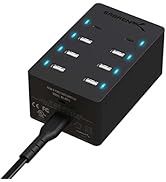
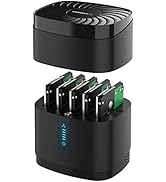
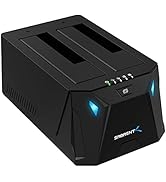
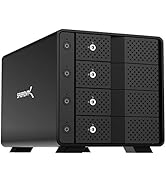
The SABRENT USB 3.0 4-Bay Docking Station (DS-4SSD) is a professional-grade storage hub supporting up to four 2.5" SATA SSDs or HDDs with a combined capacity of 80TB. Featuring ultra-fast 5Gbps USB 3.0 connectivity, tool-free drive swapping, and a whisper-quiet cooling fan, it’s engineered for seamless, reliable 24/7 operation across Windows, macOS, and Linux platforms.


| ASIN | B0711L68MS |
| Best Sellers Rank | #3 in Hard Drive Docking Stations |
| Brand | SABRENT |
| Built-In Media | Docking Station |
| Color | Black |
| Compatible Devices | Laptops, Tablets, Desktops |
| Connectivity Technology | usb |
| Customer Reviews | 4.2 out of 5 stars 3,178 Reviews |
| Data Transfer Rate | 5000 megabytes_per_second |
| Enclosure Material | Plastic |
| Global Trade Identification Number | 00819921013187 |
| Hard Disk Form Factor | 2.5 inches |
| Hardware Interface | SATA 1.5 Gb/s, SATA 3.0 Gb/s, USB |
| Hardware Platform | Mac |
| Item Dimensions L x W x H | 4.4"L x 4.4"W x 6.3"H |
| Item Weight | 1 pounds |
| Manufacturer | SABRENT |
| Material | Plastic |
| Memory Storage Capacity | 80 TB |
| Mfr Part Number | DS-4SSD |
| Model Number | DS-4SSD |
| Number of Items | 1 |
| Product Dimensions | 4.4"L x 4.4"W x 6.3"H |
| Supported Devices Quantity | 4 |
| UPC | 819921013187 |
| Warranty Description | 1 year limited |
S**A
This is an EXCELLENT quality product! ..
The title doesn't even cover it! This product was beautifully and thoughtfully packaged and shipped. It is beautiful, rugged and performs as advertised and exceeded my expectations. I put 4 (2) TB drives in it, spinning seagate drives and realized when you turn the unit on, the fan doesn't automatically come on, - you will need to press the button for the fan. What I do is, turn the fan on first, then power on the drives. The fan isn't hardly noticeable or beyond what you would expect for a small desk fan and you definitely need to run the fan, - it makes a difference. Without the fan the drives were hot to the touch. After running all four drives on a several hour copy job on my Mac, the drives were cool to the touch when I detached them. I got the non-raid version which was the best version. At USB 3.0 speeds files copied quicker from the finder from Mac to drive or drive to drive then using Stellar Clone Drive or another program. So, I recommend if you don't want to run the unit with the fun, you just leave the top off. If the drives are enclosed and the top on, you gotta run the fan. The unit is solid, and not flimsy, just beautiful. Like a tiny mainframe core on your desktop, - humming away softly. I didn't test the hot-swappable feature as I've learned with Mac OS that it doesn't handle dismounting from ANY multiple drive dock with out ejecting them all, - as this is an issue with the USB BUS and the OS, not the dock so I didn't even bother attempting that in the middle of a data copy. If I could give this review 20 stars, I would. It delivered beautifully on my iMac running El Capitan. The price as well.. was an EXCELLENT investment for the quality and functionality of this product, - once you start moving data around in the Terabytes you need reliability and stability in a product to protect your information that matters most.
M**.
Better than a NAS.......In Many Ways
I needed a better storage option than a NAS, we were hitting the road fulltime in our RV and a NAS just was not logical Looking for in purchase: -Sturdy -Value -Multiple drive bays -Power through USB (not mandatory) -SSD compatible -Compact Design: The Sabrent USB 3.0 nailed almost all the boxes. Small, compact, great price, 4 drives, had a fan (which you could turn off) and it looked good. It has a separate power cord, which was not a deal breaker (and actually I liked that after I thought about plugging it into my UPS) Issues: The fan is a bit loud, but honestly I don’t even turn it on unless I am writing a significant amount to it. Positives: ++Material ++Look ++Design ++Build Quality ++Cost ++Transfer speeds ++Fan (when needed) Negatives: --None Final Thoughts: I love this it is exactly what a person needs, if you don’t need the NAS for distributed use or a security system. The product looks great and performs perfectly, transfer speeds are not limited to the 1Gig network line anymore, they are limited by the drive space. The other advantage is you can swap out drives as you need them, it works as if it is four separate portable SSDs. This is really a great option to a NAS and I pleased to downsize while upsizing my transfer rates. Would I recommend: Absolutely I would. Buy this now
P**K
overall I like it now that it stopped acting weird - have both 4 and 5 bay versions
It works now.... but for some reason when I first plugged in the drives it didn't let me access them all. I left it as is overnight and after a windows update reboot, it was all working properly. I've been looking for a good case or something for 2.5" drives rather than 3.5" which is almost all anyone makes. It's compact and quiet. The main complaint is the top doesn't latch on and it looks easy to pickup by the top, which results in the top popping off rather than lifting the case. As long as it actually works, it works well. Unfortunately there's nothing about it you can configure to "fix" things if it isn't working right. I'm going to assume it generally just works though. Otherwise it will just be return fodder. In truth maybe I should give this a 3 all things considered but it is working well now and fits the need for an SSD chassis really nicely -----UPDATE ---- Another complaint about the 4 slot version - if I reboot my PC it doesn't always detect the 4 slot case but does detect the 5 slot case. Actually now I'm wondering if the 4 slot case is just broken after only a few months. Or if maybe the 2 cased don't play well together if they're in the same USB hub. I later bought the 5 bay USB C version. Rather than being say 20-25% larger just adding 1 more slot. it is at nearly 50% bigger because each slot on it is wide enough to fit at least 2 drives in spite of just having 1 slot. The magnets on the lid though are much stronger so you can pick it up by the top and not have the bottom make a quick get away as it falls off. The trick I think to making these work the most seamlessly is format your drive BEFORE you put them into the case. Trying to find 5 uninitialized/unformated drives seems to be a problem for windows. So for formatting them before hand helps a lot
K**H
Meets my needs perfrectly....
I recently had a major failure of my gaming PC so needed to rebuild everything i.e. new gaming PC, etc. Over the years I have collected so many drives (mechanical hard drivers, SSD's and NVME) that I needed to purchase something to handle some of the leftover SSD drives my new motherboard and case couldn't handle. Thankfully all purchased BEFORE the spike in storage costs. I use this device when needed and it handles my old SSD'S . WORKS GREAT! AND VERY HAPPY WITH MY PURCHASE!
L**E
Had A Lot Of Promise. Only Provided a Lot of Frustration.
I have always liked, trusted and purchased Sabrent products. Thought I could purchase this as a cheap man's attached storage to use as a DVR to my mini Win 10 HTPC. I have Synology DS409slim and DS416slim 2.5" NAS boxes and thought this could give me similar capability as a side mounted USB external drive on the cheap. Tried though I might I could not make it work. Sadly, even with it's low price, because of its limitations I can't see any functional use for this product at all. In the end I purchased another DS416slim and relegated DVR duties to my DS409slim. As advertised the drives are accessible at flash SSD speeds. The drives are easily installed and it looks as if this enclosure can accommodate even 15mm tall drives. This product had the possibility of displacing the DS4XXslim series as the only 4 bay 2.5" device on the market. Sad that it misses this mark by a large margin Fan First of its certainly nice that it has a fan, however you'll probably never want turn it on. It is very loud. If you fill this box with SSD's you don't need it. However if you use HDD's with the lid on without the fan they will surely overheat. Just one HDD in this box without the fan, ran so hot I was concerned the drive would fail prematurely. They should have given the option to set the fan speed. LED lights. The LED's are overly bright. It would be nice to dim them or turn them off entirely. Surely a minor issue but annoying when you turn off the lights and watch TV with this in the room. Not Hot Swappable This was the deal breaker. When drives are plugged in, the other installed drives rebooted. Sometimes the drives did not reinstall themselves and remained offline. I used a mix of SSD's from Samsung, Crucial and Silicon Power and a WD HDD. Although the ardvert says "Hot Swappable" I did not find it to be the case. If I formatted a drive and then unplugged and then reinstalled to the same slot, frequently the drive would not reappear in Windows Explorer. I could take that same drive and put it into a different enclosure (Sabrent EC-RDSV) and it would display with a drive letter properly in Explorer. Put it back into the DS-4SSD and the drive is still unreadable. Move a drive to any of the other slot of the DS-4SSD and you risk it being unreadable. I tried combining multiple drives into one using Disk Manager. Win 10 would not allow this. I tried doing the same thing in Storage Spaces in Win 10. Often it would fail to work though I tried many different drive combinations. Each and every time when it did allow the DS-4SSD to create a Storage Space, in a short time it would post an error saying one of the drives was not available. Often the Storage Space could not be removed and the SSD's and HDD were "bricked". I had to find a Win 7 computer and use Disk Manager and the Diskpart command to recover them. Once some of these drives had been "bricked" and recovered, the DS-4SSD would not only not recognize them, but plugging these in would sometime make the other "unbricked" drives disappear. Incidentally I was able to use two Sabrent EC-RDSV enclosures and create and remove Storage Spaces with my drives without incident. There is something wrong with the product or my copy of it. It is not easy to reach out to Sabrent to get support. No tech support phone number. This product in my opinion has a lot of promise. If it worked it could have been valued much higher. However as it is it was a waste of a week of my time and $60.00. My wife after seeing all my frustrated attempts to get this working urged me to buy another $300 DS416slim. I put all of my "bricked" and "un-"bricked" drives into it. It formatted them without incident, combined them into a RAID5 partition using SHR. I created an iSCSI share that was designated as the D drive. I configured my Silicon Dust DVR onto the iSCSI share and went to bed peacefully for the first time in a week. Sabrent, sorry. Wanted to like this. Couldn't. Regards All and Good Night
B**N
Quality product
I use this product daily. Glad the fan has a switch, it can be noisy but it does cool the drives. Quick and easy setup and connection. The throughput is ok for what I use it for.
A**Y
Don't pick it up by the top...
I bought this unit to repurpose several SSDs from an older tower computer. It does its job well enough, but the design of the unit isn't very sturdy. It comes in rather fancy packaging - a "book wrap" printed box with a hidden magnet closure, with foam inserts. The unit is smaller than it looks in pictures, about the size of a zoom camera lens or a medium old-style thermos. It is molded in a slightly cheap-looking black plastic, particularly the top vent grille that houses the cooling fan which has ripply mold lines. It is very lightweight, which means it will easily fly off a desk if you accidentally hook the cables, which seem sturdier than the actual device. The top part which houses the fan is secured to the bottom by a single magnet along the front edge, which presumably also passes DC current to the fan as there are no other connectors. This is semi-clever until you discover, as I did, that if you pick the unit up from the top, it will come apart instantly. My unit hit a thankfully carpeted floor, but as it did the SSDs flew straight out. That brings me to the second issue: the SSD slots. They are made to accommodate 2.5" SATA III hard disks or SSDs. As these come in various thicknesses depending on the device, the slots are over-large to accommodate them, with a flimsy-feeling spring-mounted half-door that I presume is to keep dust out of it when a drive is present. The SATA data and power connector at the bottom of each slot is hard to align properly - it takes several tries to get a drive seated, and you don't want to force one in. All that said, once you have drives in, and hook it up to your computer, the drives appear in the system as they should. I did not test transfer speeds. It is important to note that this is NOT a RAID enclosure, it is 'just a bunch of disks' or JBOD. Another design quirk are the power and fan buttons, which are labelled very dark grey on black. There are no temperature sensors or variable speed controls, it's just unit on/off, fan on/off. I guess you'd need SMART monitoring software on your computer to warn you if a drive is overheating, so you can manually turn the fan on. It is not a quiet fan, either. The LEDs are bright blue (in case you want to avoid blue light for sleep purposes) and shine through the vents at the back of the case, which is... cool looking? In total: This is a somewhat unique product that solves a unique problem - if you have a bunch of SSDs or 2.5" hard drives you want to repurpose and hook up to a new computer. It seems to do that bit fairly well for the price. But I'd definitely not swap drives in and out of it too often, or try to take the unit on the road or move it too much. It will definitely look nice next to your 2013-vintage Mac Pro cylinder. If I were to make recommendations to Sabrent, I would say: • Invest in better quality plastics or make it from metal instead.. • Redesign it with a weighted base that has a non-marking, nonslip foot, maybe of a natural material like wood or cork? • Retool the SATA connectors to be more solid. • Maybe include drive caddies that slide in on rails, to ensure proper alignment? • Magnets alone cannot secure the top - maybe, like a thermos, make it like a screw cap? • Use quieter, magnetic bearing fans, at least 120mm to move more air at lower RPMs • Control the fan on/off and speed automatically with a temperature sensor • Move the power switch to the back • I'm not sure if there are individual drive activity lights, but they'd be welcome. UPDATE DEC 7 2020: One other thing you'll want to note is that the fan button is unlit, and at the top of the front panel. You might accidentally hit the power button, which *is* lit, when you're trying to turn the fan on, which will disconnect all your drives. Another thing to redesign - give it a solid physical power switch located on the back, and make the fan control lit, properly labelled / iconned, and far away from the power switch.
K**R
It works forme
I received this device several days ago. It was shipped promptly and perfectly. Appearance of product to me was perfect. Size is such that it can be placed such that it does not use up valuable space on your desk. I wear hearing devices, and when turning the sound on the device up to max was not in the least bothersome. When the volumn was turned down fan sound faded in the background. Let that issue of noise be put away from your concerns. the fan DOES IT WORK I pluged in 3 SSD that were previously initialized, and I found the devices at once with file explorer, and when I applied a right click of the mouse to a device and all the details including drive letter came back . Read writing though no professional test were applied are acceptable and will help your work. I also installed a 2.5 mechanical drive, and that worked the same. I ran the device all day and the fan took care of all possible heat problems. When using the device the indication and operation of what disk is active are placed on blue leds in small bars. You can use the button to turn down drives, or select them, but you must visually the drive by noting top bar is the left most drive, etc. when selecting them I probably have a 1tb solid state drive installed. Sabrent isan excellent source of devices to manage disk, and that company in all respects does not deserve anything much less that 5 stars. Just put out of your minds will this device work questions. I will be able to use it in my work when I want, believe me I work with disk management every move I make. By the way get a copy of Disk Management Made Easy used only to determine if this device works. I don't care for carping critics, as long as I don't have to wait for write or read so long as no cobwebs grow from my head to my shoulder - I like this device, and it WORKS, IS MY NONE PROFFESSIONAL OPINION, I JUST LOVE WINDOWS 10 AND THIS DEVICE, AS A ELDERLY RETIRED PERSON FROM A INFRARED SOFTWARE BUSINESS YEARS AGO SO GUYS THIS THINGS WORKS. THANK YOU SABRENT FOR ANOTHER GOOD DEVICE. JUST ACCEPT MY OPINION IT WORKS ENOUGH TO GET MY WORK DONE. WIHOUT BEING HYPER CRITICAL JUST NOTE IT WORKS FOR ME. If the fan does bother you just turn it off and lay your drives all over your valuable space, but do use a Sabrent Sata drive connector if you just have to it is your lack of space problem.
J**Z
Sabrent 4 Bay USB funciona. Reviví discos duros.
Llegó en tiempo y forma, se siente un poco fragil, pero cumple lo prometido, el ventilador hace un zumbido muy discreto (es de esperarse) lo puedes encender mediante botón, facil instalación, tiene unos pequeños leds cuando enciende y cuando el ventilador está en función. Le doy 4 estrellas por el material de fabricación, es plastico y pues no se siente tan resistente. Honestamente no lo movería de mi estación de trabajo, así que me perdurará bastante. Es de cuidarlo mucho de golpes accidentales y movimientos bruscos. Tiene su conector a corriente electrica y un conector USB 3.0 suficientemente largos, empacado resistente por si lo usas eventualmente, como se ve en las imágenes, lo tengo en función justo ahora con 4 discos de 2.5 mm. 320gb + 500gb + 1TB +1TB lo cuales tenía sin usar 1 año.
M**O
Works perfect so far.
I am using 2 of these since about 2 to 3 month and they just work fine.
J**O
ultra simple
Bon produit, fonctionne tres bien! Le ventilateur fait un peu de bruit, si vous ne laissez pas allumé tout le temps, il suffi t de retirer le capot , comme ça c'est sans bruit.
L**M
Noisy but otherwise great piece of hardware!
Seller: Sold as used at half price. Original packaging, complete and spotless. Great bargain. Product: The 4-bay dock is used with four 8 tb Samsung QVO ssd:s and connected to USB 3.0. Read speed a satisfying 350 MB/s. No write speed data yet. When idling or reading, drive temps are under 50C with the lid taken off. Continous writing gets them up to 58C. Then the lid comes on and noisy fan activates, reducing temp to 48C. This thing is better than I expected.
M**C
Acquisto consigliato
Dopo qualche anno di utilizzo quotidiano confermo la qualità la silenziosità assoluta non necessita attivare la ventilazione perché gli ssd non scaldano. Consiglio l'acquisto.
Trustpilot
1 week ago
1 month ago