

🚀 Navigate your 3D world like a pro—because your models deserve the best.
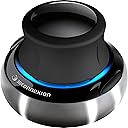
The 3Dconnexion SpaceNavigator 3D Mouse offers advanced 6 degrees-of-freedom optical sensing, enabling simultaneous pan, zoom, and rotation of 3D models. Featuring a heavy stainless steel base for stability and two programmable function keys, it supports Windows, Mac, and Linux platforms. Ideal for CAD engineers, architects, and 3D designers, it streamlines complex workflows while saving desk space.
| Best Sellers Rank | #4,073 in Computer Mice |
| Customer Reviews | 4.5 out of 5 stars 1,265 Reviews |
R**R
(Updated) Minus 1 for flawed installers - Read for my fix.
Update: I recently had to re-install this on a new computer, and the current software install, 3.16.3 is packaged properly and installs fine right from the download, so my -1 is mooted. It is indispensable in the programs where I use it. I just wish more supported it. --- The Mouse came nicely packaged, but of course, it needs its drivers installed before you can do anything with it in the few programs that can take advantage of it. This was to prove the most frustrating part of installing it, but I found a solution which I will share. As of this writing, the driver version is 3.16.1. The CD in the package was version 3.7.18, which dates back to 2009. This isn't too horrible a problem, because the first thing the installer does is prompt you to check for a newer driver. Does it download the driver? No, it sends you to the web page. Does it send you to the driver download page? No, just the home page. But again, not a big deal, it's easy enough to navigate to the appropriate download link. This is fairly standard. Where it goes terribly wrong is after you download the file. The download, "3DxSoftware32_v3-16-1_r1342 . exe" will extract the installer, put it in your temp files, and run it. The big problem there is the installer it extracts, "3DxSoftware32 . exe" is part installer, part archive, but it doesn't know that. Immediately the installer will ask you to insert a disk because it can't find "layout.bin". Since you don't have that disk or that file, you're stuck. Installation fails. The one previous installer available suffers the same problem. After considerable poking around, trying to open a few stray .cab files that appeared, I found out about a free program called PeaZip on SourceForge. It does things that 7-Zip doesn't. And aside from opening .cab files, it did the one thing I needed to make this install work. I was able to select "3DxSoftware32 . exe" and choose "Open as archive" and then I did "Extract all files" into the same directory, and THERE was everything I needed to do the install. Run the setup file that appears and the install proceeds just as it would from the CD. Keep these files, because you might need to re-install if you add new 3d software that needs specific plugins. Having successfully slain the installer dragon, everything else from there was smooth sailing. I ran through the Demos, played the Puzzle game, and then set off into Second Life to try the Flycam. That was tremendously cool, but clearly I need a better video card. Next I went into Google Sketchup, apparently now owned by Trimble, and navigation was so much easier than trying to remember what chord of modifier keys would make things move the way I wanted. I have yet to use it with Blender, but that's next on the agenda. It is not a substitute for the mouse. It won't control the arrow cursor (although apparently there is a beta driver out there that might) but for 3D programs that support it, it is the perfect thing for moving your view around and manipulating selected objects along and around all three axes. So it's an adjunct to your regular mouse. It is delicately sensitive, a feather touch is all that is needed to fly your viewpoint around. So once you get past the terrible driver install issues, it works precisely as advertized. I can see it as an essential tool for anyone who works with 3D models.
P**O
Never Going Back
I work as a manufacturing engineer, and I'm on CAD programs nearly all day. I've used this mouse at work for 6 months now, and I cannot imagine using any 3D modelling application with out it. At first it was very weird to get used to, but as you become acclimated to it, it's an invaluable aid. I highly recommend doing the 3D puzzle that comes with the software often until you get the hang of the controls; it's a simple and fun way to practice. Once the controls become second nature, it's hard to remember how you ever got along without using one. Very well designed product. The software allows you to easily adjust the sensitivity, and map the two side keys to whatever you want, with application specific support and multiple available profiles, and the weighted base and rubber feet keep it from moving while you're using the mouse. I can't think of a single bad thing to say about it, though I would highly reccommend this product over the notebook counterpart, which is smaller, and much easier to lift. Now that I've used this 3D mouse, I am never going back to just using a conventional mouse. These 3dconnexion mice make it so much easier to move parts around in 3D modelling software, and I've just purchased one for myself to use at home, because I really can't do without it.
M**E
Works beautifully with MAC OS X
There are some older reviews from MAC users who experienced problems with this device, but you may not experience those yourself with the newest software/updates available online. Then again, I have only tested it on Sketchup. Also, I contacted 3Dconnexion directly with a question and received a detailed, thoughtful response less than 2 days later (even though I bought this item used and had no purchase order number). This is a fine piece of interface technology and is designed/built very well. The feel is solid, sturdy, and responsive. It also appears to be very sensitive, adjusting magnitude on screen depending on the levels of pressure applied. A very precise and smooth instrument. I cannot imagine a better way to navigate around 3D space. I use this for architecture and industrial design. I feel like this provides me with my own personal helicopter to "fly" in and around my models at will. You can customize the settings to your liking. It took me a few hours to find an intuitive combination of controls (that worked for me) and overcome the learning curve, but now I can't imagine modeling without it. My adjustments are listed below. If you don't like the default settings, try reversing the axes and adjust from there (NOTE: I always invert the y-axis in video games, so I'm naturally inclined to control the Space Navigator the same way... your mileage may vary). 3D Mouse Right change to: 3D Mouse Left 3D Mouse Left change to: 3D Mouse Right 3D Mouse In change to: 3D Mouse Out 3D Mouse Out change to: 3D Mouse In 3D Mouse Down change to: 3D Mouse Up 3D Mouse Up change to: 3D Mouse Down 3D Mouse Tilt Backward: change to: 3D Mouse Tilt Forward 3D Mouse Tilt Forward: change to: 3D Mouse Tilt Backward 3D Mouse Roll Left: change to: 3D Mouse Roll Right 3D Mouse Roll Right: change to: 3D Mouse Roll Left 3D Mouse Spin Clockwise: change to: 3D Mouse Spin Counter-Clockwise 3D Mouse Spin Counter-Clockwise: change to: 3D Spin Clockwise If you are on the fence, give this thing a try. I wish I had it in college. It cuts down on my drawing/modeling time and allows me to rotate, spin, and navigate a model without changing tools or exiting out of a command. A must have for all heavy illustrators, 3D modelers, etc.
W**N
An excellent choice for 3D
I am a hobby user. I'll say that up front. I'm not a designer or a modeler or anything like that. I do have a few modeling programs, but I mostly use this device in Poser Pro 2012. To be honest, I was kind of down on Poser before that because posing always took so long. I see now that this was because I didn't have one of these. It really helps when it comes to speeding up my workflow. Now when I'm working with models and props, my left hand stays on the Spacenavigator, while I'm using the regular mouse with my right. It took me about 15 minutes to get the hang of moving it around, but once I did, it was like flying a camera through the scene. It cut my time to pose a model down to a few minutes versus a couple of hours because you're constantly having to go to the left panel, move the camera, try to get a good view of the body part or prop, then turn back to the pose controls. The Spacenavigator really did away with all those headaches. It does require a little practice to be able to move slowly so you have to develop a light touch, but that doesn't take away from the device's performance. They have higher dollar versions, but I think if you want something to try out, then buy this one first before thinking of buying the 3-400 dollar ones. It will give you an opportunity to see the difference for a price that doesn't devastate your wallet. I'm buying the laptop version to take with me, I like it so much...
C**S
Great, fun, useful, but my expectations were too high - could be made better with non-symmetry
Update: This mouse could be better. One major detail I've noticed is that if it is rotated even slightly on my desk, it is impossible to use. It's radial symmetry makes it nearly impossible to get an intuitive and permanent use of it ingrained in your head. If it was slightly ovular or egg shaped I think it would form a better usage map in the brain and be far easier to use and more intuitive to learn and adjust to. I've been using this continuously since I first purchased it for almost 8 hours per day. Future versions should take into consideration how the brain works when they design it. Really an amazing and useful piece of technology, but without some non-symmetry, it has to be carefully positioned and you have to sit the exact same way to get a solid use on it. I've seen my boss have the same issues with his. I won't say this is the end all be all of doing things, but it is highly useful and fun. I'm a CAD drafter so I use it a lot, I'm about a full week into using it and I caught on pretty quick. Not all programs deal with the input well so it has limited use, but for making assemblies in solidworks and inventor it is a HUGE timesaver thanks to the easy rotating. Giving presentations and showing others design issues and problems is extremely fast with this compared to old methods, so I have to say it is absolutely wonderful. I also feel like I think more in 3d when using the mouse as opposed to not, although it is still faster and more accurate to zoom in and out with a regular mousewheel.
B**E
Great tool for 3D work
Note to the uninitiated: this is not a replacement for your regular mouse, nor is it a gaming device (with one or two exceptions). Its usefulness is pretty much limited to 3D modeling programs. I mainly use this with Sketchup and sometimes with Google Earth and Adobe Acrobat. It's great for smooth navigation and getting the exact view you want in tight spaces. I don't end up flying off in to empty space or getting lost inside a wall like I sometimes did using the mouse. It doesn't take long to learn to maneuver with multiple simultaneous pans and rotations. Once you've used it, you miss it in other applications. It works pretty well for panning around large documents in Adobe Acrobat, and I wish someone would make a Firefox plugin for it. They do provide an SDK for anyone who wants to add 3D nav support to their software. Check their website for the full list of supported applications. This model is the consumer end of their product line. If you're going to be using this professionally, skip straight to the 3D connexion SpaceExplorer 3D Navigation Device with USB Interface ( 3DX-700026 ) or the 3Dconnexion SpacePilot PRO - 3D motion controller - 31 button(s) - wired - USB . You'll want all those buttons so you don't have to move your hand between your navigator and your keyboard constantly. I couldn't justify the cost just to mess around with Sketchup, but I have no doubt they'd pay for themselves quickly in a professional setting. This one only has two buttons, but they're both fully programmable on a per-application and per-user basis. (I've found them most useful for X-ray mode and Zoom Extents in Sketchup.) Your options for controlling the various axises (beyond sensitivity adjustment and reversing) are application dependent. While it wouldn't hurt to make it just a hair heavier, it is pretty heavy and stays put when you pull up pretty well. The included software installed painlessly and automatically does the necessary configuration as you open or switch between programs so you don't have to tell it which profile to use.
T**N
The coolest thing since...
This was an easy 5-star to give. The SpaceNavigator gets as much use as my mouse. Yeah, really. You wouldn't think so until you get one to go along with 3D development environments (SecondLife, Maya, Google Earth, others). If I had to summarize what it's like to use, it's like a complete flight-simulator in your left hand. Push down, you go down; pull up, you go up; twist it and you turn; push left right back and forth and you go those directions. You can even control the rate of motion. After using it for a day in a 3D environment it's almost like thinking and you see the motion happen in front of you. For SecondLife users, you can move your avatar naturally. None of that "bumping into doorways" thing. Click the side button and you start moving the in-world camera like you've got it in the nose of a helicopter. For users of 3D modeling systems, you gain that same easy camera motion for looking at your models and scenarios. Google Earth is a fun free thing that uses SpaceNavigator and you just fly yourself around. What's crazy fun is to use the mouse and the SpaceNavigator simultaneously. I've used it with photoshop, but frankly it's a bit robust a tool to use with Photoshop. Perhaps a bit like getting a swiss army knife when the only thing you really need is a screwdriver. There are games available that take advantage of the SpaceNavigator, but they aren't any that I own currently, so I can't comment on how it works with them yet. Maybe later I can come back and add a video review that shows the SpaceNavigator in action. [followup] I returned to edit my review. It was quite nice of Amazon to let me know that I convinced another person to get one of these. The manufacturer officially owes me one *grin*. Since I originally reviewed space navigator, Blender (the free 3D modeling program) went through a life-changing revision and this is a great too for that application. So, the groove is there. Those of us fans of FPS games need to get game makers to support the 3D mouse. Imagine playing Half-life or Bioshock (sure... version 3 of both) where your left hand fluently moves your character via 3D mouse and your right hand uses the conventional mouse to aim and shoot. How more real is that? The future is at our fingertips: does anyone besides me see it?
R**N
if you use 2D or 3D CAD or Sketchup then buy this NOW
Really heavy construction with great feel. I have been using with 2D and 3D AutoCAD and Sketchup and it works great with both. The mouse software knows which design program you are using and allows a different set up for each. I wish I had been using one for years as it saves so much time allowing you to move around the drawing and still be drawing with your mouse hand. It took me a little while to get used to the left handed operation (a few days), and a few tens of minutes to get the settings correct, but I couldn't be without it now. If you are having trouble getting used to it, try the puzzle game that comes with it. This gets you used to the operation and is good fun too. I don't play PC games, but I imagine this would be great on those if there is a call to move camera location. I had to adjust the 3D Connexion default settings for use with Sketchup, as the auto horizon stops the mouse acting as it should. It works really well in 2D mode as well as 3D. You can move your mouse simultaneously with the 3D connexion allowing you to pan, zoom, and select at the same time which really speeds things up. The side buttons are completely configurable as well, which gives you even more functionality. As with all programs you use the 3D connexion with, you need to configure how the Connexion works with that bit of software. It remembers the settings each time you start a particular program, so if you like to zoom with a pull/push on Sketchup and an up down with CAD it's no problem. Everything is configurable with each different program you use, and the 3D Connexion software has a neat config program that sits in your task tray to allow you to make changes when required. By Default, it is turned off in 2D CAD, so if you want to run it with 2D type NAVBAR in the command line, then type ON. Your Connexion will now work.
M**O
Indispensabile
Avevo sentito parlare di questo mouse, non lo avevo mai provato ed all'inizio ammetto che ero un po' scettico. Premetto che lo utilizzo per lavoro nell'ambito della progettazione/disegno 3D. Si presenta ben rifinito e pesante con base in acciaio, sembra di ottima qualità. Nell'utilizzo non è subito immediato, ma già dopo qualche giorno diventa veramente indispensabile. Io non ne posso più fare a meno, lo consiglio a tutti soprattutto per lavoro. Addirittura dopo averlo provato ne ho comprato un altro. Provare per credere.
R**K
Extremely useful for all those who works in 3D environment
After getting this I can't work on CAD without this stuff ! Extremely useful for all those who works in 3D environment! Just go for it!
K**B
Small learning curve, great product.
Modelling Experience: 1 Semester Solidworks, 1 year using Inventor, now using Fusion 360 at my new employment. Still a novice. I saw my favorite youtube modelling channel use this product (I was wondering how he was moving around the object like he was), figured I would see what the fuss was about. After 2-3 days of use, you get to really appreciate this mouse. It makes it way easier to navigate your models, a more fluid experience as opposed to mouse and keyboard zooming and panning. It takes time, initially it is really strange to say the least. What impressed me the most at first was the build quality. Heavy base, doesn't move around. If you reef upwards it will move, but feathering the controller will be more beneficial, if you have issues with it moving, up the sensitivity. I'm never maxing the joystick in any direction. Although I wouldn't go for the wireless or the lighter version. Blue light a nice touch, not obnoxiously bright. Pricey for many, though worth the money for sure.
A**R
Do Cad or 3D? Get one of these
Amazon reviews here: http://www.amazon.com/3Dconnexion-3DX-700028-SpaceNavigator-3D-Mouse/product-reviews/B000LB7G00 Used one at work for the first time using Inventor and knew had to get one for the house. Advertising blurb says using it is like "holding the model in your hand" and its true. A much more intuitive and productive way to work with your 3D models. Only downside for me (and this in only in comparison to the much more expensive models higher in teh range) is only having two customisable buttons. That said, its very handy putting the two main features you use the most in your application on the mouse. Software works quite well, no glitches on Win 8.1 with Inventor, 3DS max, Rhino or Lightwave and each application has its own "profile", so you can have seperate customised buttons for each bit of software. Works great for photoshop, able to pan and zoom around your image which is a lot better than you might imagine when you start using it like that. Great product, brings basic usability at a good price compared to the more expensive models, which really only add more buttons.
く**ね
仕事で使用
3DCAD-CAMで使用しています。 複数のCADソフトを使うとパンやズームの操作が違い不満がありました。 このマウスで全てのソフトが同じ操作でできるので非常に満足しています。 最初は操作が難しいですが使っていればすぐに慣れます。 右手の負担も減ったので作業効率も上がりました。 難点はこれ無しだと仕事にならないことです。
Trustpilot
3 days ago
1 week ago