Desertcart purchases this item on your behalf and handles shipping, customs, and support to Cyprus.
🖨️ Print smarter, print longer — the future of home printing is here!
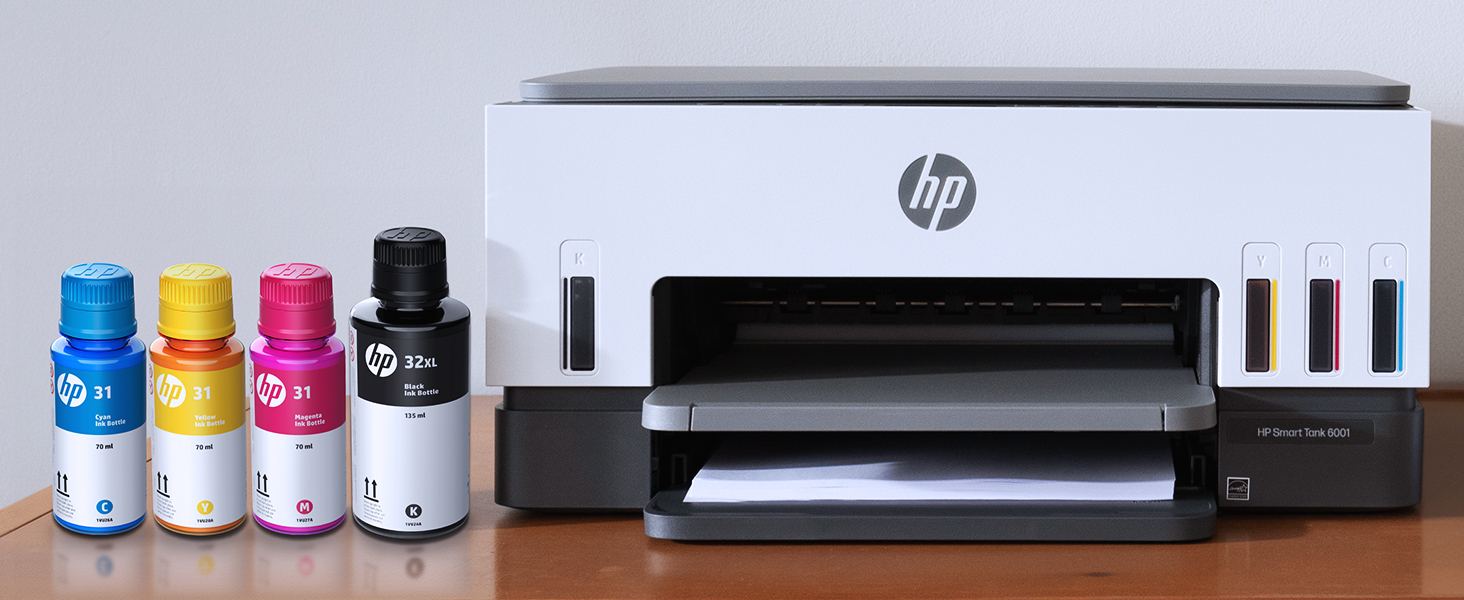
The HP Smart Tank 6001 is a wireless all-in-one ink tank printer designed for high-volume home and home office use. It delivers sharp black-and-white prints at 1200x1200 dpi and vibrant color prints at 4800x1200 dpi. With up to 2 years of original HP ink included, it supports cartridge-free refilling for thousands of pages, enhanced by AI technology for optimized printing layouts. Featuring auto-duplex, borderless printing, and seamless mobile connectivity, it combines efficiency, convenience, and cost savings in one sleek, reliable device.


| Additional Printer Functions | Copy, Scan |
| Asin | B09TPZ3HLZ |
| B W Pages Per Minute | 12 pages_per_minute |
| Best Sellers Rank | #3,946 in Office Products (See Top 100 in Office Products) #9 in Ink Tank Printers |
| Brand | HP |
| Built In Media | HP Smart Tank 6001 All-in-One Printer; HP 32XL Black Original Ink Bottle; HP 31 Cyan Original Ink Bottle; HP 31 Magenta Original Ink Bottle; HP 31 Yellow Original Ink Bottle; Ink caution flyer; Setup guide; Reference guide; Regulatory flyer; Power cord |
| Color | OOV White / Portobello |
| Color Depth | 24 bits |
| Color Pages Per Minute | 7 pages_per_minute |
| Compatible Cartridge | HP 32XL 135-ml Black bottle (~6000 pages), HP 31 70-ml Cyan bottle (~8000 pages), HP 31 70-ml Magenta bottle (~8000 pages), HP 31 70-ml Yellow bottle (~8000 pages) |
| Compatible Devices | Laptops, PC, Smartphones, Tablets |
| Control Method | App, Touch |
| Controller Type | HP Smart app, Apple Airprint |
| Customer Reviews | 3.6 3.6 out of 5 stars (3,201) 3.6 out of 5 stars |
| Display Type | LCD |
| Duplex | Automatic |
| Eu Spare Part Availability Duration | 2 years |
| Hardware Interface | USB 2.0 |
| Initial Page Print Time | A4 Black 15 sec; A4 Color 18 sec seconds |
| Ink Color | Black; Magenta; Cyan; Yellow |
| Item Dimensions D X W X H | 14.33"D x 16.83"W x 7.82"H |
| Item Type Name | Inkjet Printer |
| Item Weight | 14.1 pounds |
| Manufacturer | HP |
| Maximum Copies Per Run | Up to 99 copies |
| Maximum Copy Resolution Black And White | 600 dpi |
| Maximum Copy Resolution Color | Up to 600 dpi |
| Maximum Copy Speed Black And White | 11 pages_per_minute |
| Maximum Media Size | 8.5 x 14 |
| Maximum Print Resolution Black And White | 1200 x 1200 dots_per_inch |
| Maximum Print Resolution Color | 4800 x 1200 dots_per_inch |
| Maximum Sheet Capacity | 150 |
| Model Name | Smart Tank 6001 |
| Model Number | 6001 |
| Model Series | Smart Tank 6001 |
| Number Of Trays | 2 |
| Other Special Features Of The Product | Auto-Duplex, Borderless Printing, Network-Ready, Refillable Ink Tank |
| Output Sheet Capacity | 100 |
| Paper Size | 3.5 x 5 to 8.5 x 14 inches |
| Power Consumption | 2 watts |
| Print Media | Envelopes, Glossy film, Glossy photo paper, High-resolution paper, Paper (plain) |
| Printer Connectivity Type | wired, wireless |
| Printer Output Type | Color |
| Printer Type | HP Thermal Inkjet |
| Processor Count | 1 |
| Resolution | Black 1200 x 1200 rendered dpi; Color 4800 x 1200 optimized dpi color (When printing from a computer and 1200 input dpi) |
| Scanner Type | Flatbed |
| Series Number | 6001 |
| Specific Uses For Product | Home and home office |
| Total Usb 2 0 Ports | 1 |
| Total Usb Ports | 1 |
| Unit Count | 1 Count |
| Upc | 196188310359 |
| Warranty Description | One year limited hardware warranty from the date of purchase; user replaceable parts have separate warranty periods |
| Warranty Type | Limited |
| Wattage | 2 watts |
User
Best printer I've owned!
I bought this printer after wanting to decrease my ink cost from a laser printer. I expect my print quality to be high, and I figured I wouldn't be able to find a quality printer.Boy was I wrong! After trying a few other brands with liquid ink, I bought this one and it did not disappoint. The ink is super easy to install, and the quality is near laser, but it's difficult to know the difference! I bought this so I could print my own cards for birthdays, anniversaries and anything else. Now I'm printing quality cards that I make myself, and I couldn't be happier!Once my husband found out I wasn't worried about ink consumption and how cheap the refills were, he's printed hundreds of pages of color for his classes, and they come out just beautiful! He wasn't too sure about me wanting to upgrade to a color printer, but now he loves it as much as I do!I have only used the scanner a few times because I have a document scanner that does more. However, the scanner works fine for larger or book scans. If you don't have another scanner, you will like at least having the option to scan.I especially like this printer over its larger models because the paper is SUPER easy to load! The larger ones need you to remove the entire front of the tray before putting paper in. This one you just take a stack of paper and slip it into the front of the paper tray. I can load it very easily from my chair without removing any parts.The printer connected to the wireless network pretty easy, and adding it to our phones and other computers was a breeze! I do notice every once in a while when the network is having trouble, it will scan for wireless networks and disconnect & reconnect. That usually isn't a problem, just something for you to know.After owning the printer a few weeks now and printing about 400 sheets of color AND about 50 greeting cards, the ink still reads full. I'm really looking forward to saving money on ink.I use the IP address to connect to the printers' interface, and I love that more than its software. Both work fine and similar.I highly recommend this HP SmartTank Printer for anyone who wants to save on money and have quality printed products.
User
Finally ink tank style HP printer w/replaceble heads! The software, OMG, total crap!
Get this: you buy the printer but HP owns its use to some degree. Forget the fact it says it has WIFI, you'll find it has turned this off and doesn't recover when you need the printer. You have to go press buttons to get it 'back'. The printer's web page logs you out in under 5 min. and no way to stop that either. So you'll find yourself constantly entering a complex (upper/lower/number/etc) password just to access what you bought and paid for. This thing is a pain in the arse, thank you HP for such secure printing in my home office.SO, my only solution was to drag out the USB cable extension and plug it into my computer, just like the old days, this limits where it can be placed of course, so it's on the desk again and i put a potted plant on the printer stand over in the corner. Once directly plugged into my computer it works well as printers did in the 90's. HP is really blown out on their software specifications now days, real junk and problematic.HOWEVER I like the all in one scanner, copier, printer and ink tank concept having now abandoned the new EPSON I had (90 days) and got fed up with too, again lousy software issues. The EPSON does not have easy to replace print heads so if I forget to print a page weekly it's dried up junk. The HP at least for around $100 can have new heads just snapped in, great, but high priced as per HPs plan to sell supplies.Maybe next time I'll try Canon again to see how their software works out. Shame, good hardware but lousy software that some bungling marketing pastie demanded such great features be included...Be prepared to order a 20' USB cable to go along with this purchase, forget BLE and WIFI uses....Also have a coffee ready to bide your time with, the WIFI (EWS) pages take sometimes several minutes to come up in the browser, sip that coffee. The ADMIN password says once set is required to mess with the EWS settings pages, well if you don't set it you have to enter a long code from the sticker inside.Printer firmware update page, you see another check box to "automatically install updates" but you can't uncheck this, so when HP wants to further mess up your purchase they can just jump into your printer and have at it...next day you are left wondering what the heck happened to your nice $400 printer that now refuses to do any work for you as it demands it's own rest periods and equity, equality and such...?A side note, doc's say if you connect with Ethernet/USB the printer will stay more 'awake' for you when you need it. So simply adding a USB cable to your computer helps keep it running and WIFI up, however dang slow that turns out to be. Just imagine, HP is making millions of people sit idle while their product responds to their wishes with it's built-in slowness? How is this 'energy efficient or green'? What gives?I might also point out HP claims "Self-healing-WIFI", what is this supposed to mean? Marketing dumbo jumbo from the pastie division or what? Why would a device need this? I ask self-heal from what wound? If it worked correctly you wouldn't need this feature, its almost like claiming that a design defect is a 'feature' you are getting for the buck spent. I might invest in a WIFI to USB dongle and plug that in to the HP to get working WIFI ability with all modern HP printers. I have relatives and friends that also have HP printers ALL with these same quibbles going on for them, having a printer has never been more frustrating or time consuming that with the modern HP software we see today!I suspect many users that initially love this thing don't get back on and update their review to comment on all the sour issues that crop up with HP's latest software provided which is counterproductive!
User
13 Months After Purchase
Many of us review products shortly after receiving them, but I am reviewing this product after owning it for 13 months. What prompted me to review this now? Well, I came to Amazon to order more black ink for the printer. It showed my purchase date as August 2023, so I figured it was time. Let me tell you that this is my first time I have needed to add ink to this printer, and I print a lot, like seriously, a lot!! I purchased this printer after staying in an AirBnB & needing to print some large quantities fast. The host had a similar printer (maybe exact same, but it was definitely HP Smart Tank) & we were told we were welcome to it. If I had tried to print this quantity at home with my Brother printer, that I was constantly having to replace ink cartridges on, Not only would it have used more than one cartridge it would have taken all day at the speed that the Brother printed at!! I could not believe the speed and the little amount of ink it took to print the quantity of booklets that I needed to print for this event I was going to! I was amazed & ordered one immediately upon coming home from my trip. I can tell you after 13 months, I have not had one problem, and it was the best decision I ever made for my productivity! I feel like I was living in the dark ages before! If you are even on the fence about this, don’t be!! You will be so glad you made this purchase! I’m not an extremely tech savvy girl (girl in my mid 50’s lol) But it was easy to set up and easy to use. No confusion or hours trying to figure it all out! I’m really a little ashamed that I love a product this much and that I didn’t come back a little earlier and tell you all how much I actually do love it. Shame on me! I’ll try to do better!! I didn’t include photos of the ink levels to show you where they are now after 13 months and printing, like a crazy person & in color always!
User
Love it
I’ve only had for a week but it’s a vast improvement over my previous HP Envy. The print quality and scanning quality are excellent. There was a bit of a learning curve with the setup but I tried to do things manually. I highly recommend connecting to the HP online setup which totally simplified things once I did.
User
Quality Printer. Easy Setup. Ink longevity claims questionable.
I have owned many HP printers. There is great variability in the longevity of the ink packages as well as the printer itself. Too often these printers have a high cost and yet still have little flimsy plastic parts (trays etc.) that snap way too easily. This 6001 printer appears to have less of these kind of parts than others I have owned in the past. The marketing for this printer claims that it comes with 2 years worth of ink. Since this is the first ink tank printer I have ever owned, I suppose I could be wrong, but watching the levels lower after a minimum amount of printing in the little status window brings this claim into question. If this doesn’t last 2 years, it is not a deal breaker, but probably on par with all printers of this class (regardless of manufacturer) that claim a far longer ink game than they really deliver. In truth, too often it’s a ploy to get one committed to an ink subscription (which some might call a scam).The ink bottles that come with the printer are easy to unpack and were easy to use spill free for the initial filling. This activity is a good one while removing all the little plastic restrictors and brackets inside the printer initially to that it will function. There will be one larger black bottle (with a corresponding tank and level indicator window on the left) and 3 color bottles (corresponding to the level indicator windows on the right).This printer was easy to setup and if you are using MacOS, as is typical, there’s no need for a bunch if silly driver/software install nonsense - it just works. Bear in mind that this printer does NOT come with a USB cable or other interface standard in the box, but relies on wireless as it comes. The copies and scans on this machine do well, and the print quality is ok… I was disappointed in some photo paper prints (using HP photo paper) in terms of color saturation, but overall this isn’t too bad. Some reviewers mentioned wireless issues and frequent connectivity problems. I have not experienced this, and I have successfully been printing wirelessly to this printer from a variety of desktop-based and mobile devices.
User
I hate this printer!!
I am a homeschool mom who essentially prints out basic worksheets or recipes from online. Occasionally I want to print a photo from a vacation. My needs aren't crazy.This printer has been a booger from day one. To start, there isn't ANYTHING you can do with the information on the screen. It's useless. The only function that you can do from the printer itself is make a copy, either color or B&W, IF the button decides to work. If the printer is asleep or offline (I never understand how that's even a thing), it won't copy. I have to turn it off...but then I can't turn it back on with the same button. I have to unplug it and plug it back in. Then I can make a basic copy.If you hit the wrong button, or do the wrong button order trying to figure something out, all of the buttons start to flash. Again, unplug and plug back in to fix it.The HP app is the only way you can scan...and the program will either do a great job, or crash after a page, or make you start over for some reason, or...forget that it's supposed to be scanning and will just freeze. Again, unplug and plug back in to reset.Edited to add: as a photo printer, it's abysmal. I tried every way I could think of to print a few 4x6 pictures. It recognized the photo paper size, but it cut off the top of the picture once, created a 1/2" border on the top the second try...the colors were completely different on both. I tried a different picture, using a different program, and got the same issues. So no two pictures printed were the same, even though the settings for the printer were. Sad.Are you seeing a theme? This is the most un-user-friendly printer I've ever owned. I now miss my old Epson that I had before this that was about 10 years old. At least on that, I could manage things on its display screen.On a plus, this HP does seem to sip the ink, so I like the bottles instead of having to buy cartridges. It's also only lost wifi connection once. Buuuuttt, good luck making things easy if you want to switch networks. THAT was ridiculously convoluted (my situation was simply connecting to an extender that was closer to the printer).Would I buy this printer again? Heck no. I am no longer going to have a printer that relies solely on app programming. I want to be able to use a display screen. Would I recommend this to someone? Only if I wanted them to suffer with technology. This was absolutely not worth the ~$250 I paid for it. Boo.
User
Great printer
Reliable printer. Has worked well for me. I use it weekly to print multiple copies. I make dual sided copies. The ink is easy to fill and is so much more convenient than the frequent changes that ink cartridges require. I would recommend.
User
Excellent Printer, Useless App
We ordered this printer because our 12-year-old OfficeJet Pro 8600 needed a new printhead and I didn't want to put $150 into a 12-year-old printer. I love the idea of having ink tanks instead of cartridges, and HP makes really good printers, so I had no qualms about ordering this one. The printer comes with enough ink to fill all four tanks - a LOT more ink than comes in any ink cartridge - and was pretty easy to set up.I like that the printer has automatic 2-sided printing built in , and that the paper loads and eject in front. I do miss the paper tray on my old printer, but I don't print as much as I used to, so that's a small compromise.My biggest complaint is that you have to use the HP Smart app to set up the wifi connection. I would very much prefer to do that manually on the printer or on my PC, especially since I'll probably never use the app again. My phone and tablet use the HP Print Services (which are also required to print using the Smart app), so I don't need the app to be able to print from them. Installing an app just to set up the wifi connection is absurd.Once I had everything set up, my Linux PC saw the printer immediately and prints to it no problem. It does not show the ink levels, but a glance at the front of the printer shows how full they are. My wife's Windows laptop and Android tablet also connected easily and she has no trouble printing from either, even without the HP Smart app installed.The print quality on this printer is quite good, although the ink can bleed through thin paper. I suspect there's some setting I could change to avoid that, but it doesn't bother me enough to worry about it. If I have to print something important, I'll use better paper.If you're concerned about the cost, keep in mind that it ships with a full load of ink. A set of cartridges for my old printer ran upwards of $70, and included MUCH less ink, so this printer will be less expensive in the long run.
User
Huge upgrade from an Epson ET-2850
In 2017 I bought an Epson ET-2850, because for years before that Epson never let me down and I was off of HP at the time. Anyway, things have really changed and that printer was a nonstop source of frustration.Fast forward 6 years and I had just had enough. Settled on the HP Eco Tank 6001, and it's just so much better in every way. Prints much, much faster. It can do two sided printing. The WiFi connection is actually usable without jumping though hoops. Photo printing quality is on par but takes less than a quarter of the time.I can say setup wasn't exactly a breeze and was a bit frustrating, but that's a one time thing. Printer had to be online for the setup to complete.My printer's IP is now blocked by my firewall. It will never speak to anything on the internet again. This ensures no unwanted firmware updates that disable functionality, which is apparently an issue some people have faced.The printer didn't come with a USB cable but I had one lying around. It's the old square type. When you set the printer up, you're forced to "choose between USB and WIFI" and it disables whatever option you don't choose. I was able to reenable the USB right after however, and both work fine side by side. This made my life a lot easier because printing from PCs is a pain over WiFi (can't cross LAN segments) and printing over USB is nearly impossible for mobile devices.I can't speak for ink costs as I'm not a heavy user, but once you've used an eco tank type printer, the idea of having to pay for cartridges every few months is just a bad memory. You are saving HUNDREDS of dollars.One of my main gripes with my old printer was trying to clean the print heads when nozzles clogged. At first it was possible, but it got to a point where nothing I did worked. If that ever happens with this printer, the print heads are replaceable, easily.
User
Works Great.
I've had my printer for a few days now. My only gripe was when it came time to close the cartridge print head door after I put the print heads into it's compartment. The print heads wouldn't sit far enough down into it's slots, so I could close the door. I eventually forced the door closed, but I had ink spillage all over my hands and desk. Setup was easy using the HP Smart App downloaded from the Microsoft Store. I've had problems in the past going to a wireless printer, so I was glad I could connect my ethernet cable to it. All told from start to finish (from filling the ink wells/installing the print heads/downloading from the Microsoft store, the whole process took less than 10 minutes when I was up and printing again. I recommend this product if you arenlooking for a smart Tank Printer.
User
Great Printer, But Be Prepared for Slow Speeds and Occasional Jams
The HP Smart Tank 6001 is a solid all-in-one printer with a lot of great features, but there are a few things to keep in mind before buying.First, the good stuff—the print quality is excellent, and having up to two years of ink included is a huge bonus. Once set up, it works flawlessly for everyday printing, scanning, and copying. The cartridge-free ink system is efficient, and refilling is mess-free compared to traditional cartridges. Wireless printing from my phone or laptop has been smooth, and I love not having to deal with constant ink replacements.Now, the downsides—the printing speed is incredibly slow. If you’re in a hurry, this might not be the best choice, especially for large documents. Additionally, paper jams happen occasionally, which can be frustrating, though they’re not a constant issue. The initial setup was also a pain, taking longer than expected to get everything connected and working properly.That said, once the setup is done, it’s a hassle-free printer that does exactly what it’s supposed to do. If you can deal with slow speeds and the occasional jam, this is a great long-term printer with excellent ink efficiency.
User
Printhead Failure
Printhead failures constantly continue HP does this support/reset every time and they get it working but it fails the next time I go to print. So I go through it again and again and they won't do anything to resolve the real issue. This is not how this product should work. When it does print the print quality is excellent. Very disappointed with the service from HP they actually closed my support case without resolving the issue. Not cool for such large company. They have seen the issue by accessing the camera on my phone during the support call and still not getting the issue resolved is very frustrating. Very frustrating to have to unplug and leave it unplugged for 1 minute then take out the printheads and reinstall everytime I want to print. If the product is clearly defective then replace it! Call centre in India certainly doesn't help. I wish these things were disclosed upfront before purchasing a product so the consumer can make an informed decision. I have asked for everything to be in English and they continue to send every email in French I feel this is very disrespectful.
User
Avoid this printer. Just past my 1 year warranty and I'm unable to print
After 1 year, I changed my WiFi ssid and now I can't connect to my printer.Tried a factory reset from the printer web page and now it's not even broadcasting an SSID for WiFi direct.Support tried to sell me a new printer. LOL. No more HP products for me.
Trustpilot
5 days ago
1 month ago