Desertcart purchases this item on your behalf and handles shipping, customs, and support to Cyprus.
🔊 Silence the noise, amplify your vibe.
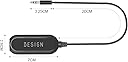
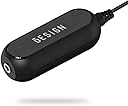
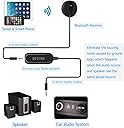
The BESIGN Ground Loop Noise Isolator is a compact, plug-and-play device designed to eliminate annoying ground loop interference in car and home audio systems. Compatible with any 3.5mm audio jack device or Bluetooth receiver, it delivers clear, buzz-free sound without requiring batteries or complicated setup. Lightweight and portable, it’s a must-have for audiophiles seeking flawless sound clarity on the go or at home.

| ASIN | B06XQYN77L |
| Additional Features | Ground Loop Noise Isolator |
| Audio Input | 3.5mm Audio Cable |
| Audio Output Mode | Stereo |
| Audio Output Type | 3.5mm Aux jack |
| Best Sellers Rank | #1 in Car Amplifier Noise Filters |
| Brand | BESIGN |
| Built-In Media | 2Pack Ground Noise Filter |
| Color | Black |
| Compatibility Options | Ground loop noise Isolator for Car Audio or Home stereo system or speakers |
| Compatible Devices | Devices with a 3.5mm audio jack or Bluetooth capabilities, such as smartphones, tablets, mp3 players, speakers, Bluetooth receivers, and Bluetooth Hands-free Car Kits. |
| Compatible with Vehicle Type | Any |
| Connectivity Technology | 3.5mm Aux jack |
| Connector Type Used on Cable | Auxiliary |
| Control Method | Touch |
| Customer Reviews | 4.4 out of 5 stars 9,271 Reviews |
| Data Link Protocol | 3.5mm Aux jack |
| Enclosure Material | Plastic |
| Hardware Interface | 3.5mm Audio |
| Human Interface Input | Buttons |
| Installation Type | Aux Jack |
| Item Weight | 0.03 kg |
| Manufacturer | BESIGN |
| Material | Plastic |
| Model Name | GLNI-1Pack |
| Number of Channels | 1 |
| Number of Ports | 1 |
| Power Source | No Power required |
| Special Feature | Ground Loop Noise Isolator |
| Supported Application | Ground loop noise Isolator for Car Audio or Home stereo system or speakers |
| Supported Media Type | [StandardAudioFormats] |
| UPC | 611677349110 |
| Unit Count | 1 Count |
| Warranty Description | 12 months |
| Wireless Compability | Bluetooth |
J**Y
Impressive Noise Reduction for My Docked Setup
I recently purchased the UGREEN USB Audio Adapter to solve an issue I was having with noise in my docked computer speakers setup for my MacBook Pro. This little device worked like a charm and completely eliminated the annoying static and interference that was plaguing my sound system. Instant Noise Reduction The main reason I bought this adapter was to address the persistent noise that I would hear through my speakers when my MacBook was docked. It didn’t matter what I was doing—whether listening to music or joining a Zoom call—the interference was always present. As soon as I connected the UGREEN adapter, the difference was immediate. The noise disappeared completely, leaving me with crisp, clean sound. Easy Setup and Plug-and-Play The setup couldn’t have been easier. It’s truly plug-and-play—just plug it into the USB port, connect the speakers or headphones, and you’re good to go. There were no drivers to install or any complicated setup process. Within seconds, the audio quality improved dramatically. This was a simple, effective solution to a frustrating problem. Compact and Convenient Design The adapter itself is small and sleek, which is great because it doesn’t add any bulk to my setup. It’s easy to toss in a bag if I need to move around, and its design feels durable. Despite its compact size, it packs a punch in terms of performance. Great for Multiple Devices While I mainly use it with my MacBook Pro, I’ve also tested the adapter on other devices, including a Windows laptop and a desktop, and it worked just as effectively. The versatility of this adapter is a bonus, as it can solve audio issues across various platforms. Affordable and Effective Solution Given its affordable price point, the UGREEN USB Audio Adapter is an excellent value for what it offers. If you’re dealing with audio issues related to interference or static in your speakers, this is a quick and reliable fix without breaking the bank. Final Thoughts Overall, I’m extremely pleased with this purchase. The UGREEN USB Audio Adapter solved my noise issue perfectly, and the sound quality has been significantly improved on my docked MacBook Pro setup. It’s a must-have for anyone experiencing similar problems with audio interference. Highly recommended!
Y**A
Killing my buzz
Tried two other similar products to eliminate buzz in my home theater subwoofer and neither worked at all. I have a long RCA running through the wall and ceiling from the amp to subwoofer that was already installed when I moved in. Doesn’t appear to be a shielded cable. Even the slightest increase on the subwoofer volume dial would produce a loud buzz basically making the subwoofer useless. This isolator made an enormous difference. Still a very slight buzz when I turn the volume up high, but at reasonable volume levels no noise at all. I can now use the subwoofer with pretty much no noticeable interference. Because this item has 3.5 mm input and output I had to use RCA adapters and the setup worked perfectly. Definitely recommend trying this product if you’re having a similar home audio problem.
E**C
Simple and immediate solution to unwanted noise!
I bought two of these. I had two different sound issues and they were both resolved by this ground loop noise isolator. One was used with a work laptop. The 1/8" audio cable from the laptop to my mixer was the first place I used it. It immediately resolved my issues. The 2nd isolator was plugged into my gaming pc that runs into a mixer. It had low level static. This fixed the issue completely. Highly recommended!
A**S
Reduced the Noise, but Didn’t Completely Eliminate It
I bought this to deal with an annoying humming/whining noise coming through a 3.5mm audio connection. Installation couldn’t be much easier—just connect it inline between the audio source and the stereo. It made an immediate difference and reduced most of the background noise. However, in my setup I could still hear a faint amount of interference when the volume was turned up with nothing playing. I also noticed a slight change in the sound compared with connecting the cable directly, although it wasn’t significant enough to bother me during normal listening. For such a small and inexpensive device, it did a good job solving most of the problem without requiring any changes to the wiring. Just don’t expect it to magically fix every type of audio interference. Useful little adapter and worth keeping around, but because it didn’t completely eliminate the noise in my setup, I’m giving it 4 stars.
D**C
Mine worked, really worked GREAT. I am shocked, but happy, would recommend to others.
I paid full price; I am not a professional reviewer or paid by Amazon or the manufacturer. I have a speaker/subwoofer PC sound system made by Phillips. It has 2 speakers & a woofer, fed by a 3.5mm input jack. I had no noise until I added a splitter so I could have 2 laptops share the same speaker system. This is when the noise, which was hum & other random noise that was very apparent through the speakers. Even at low volumes, you could hear the noise, I might make a video to show how bad it was.. In the past I purchased a similar device to get rid of background noise, I think it was related to a USB powered speaker I used in the past. Well, the other unit did not work, and the noise persisted. I am pleased to report that this model noise defeating device worked great. Once I plugged it in, the noise is 100% gone. Not reduced, but back to the way it was before I added the splitter. I am not sure why using a Y cable between 2 laptops would create this situation (the noise), but this device did what I intended it to do. Just my experience, I am sure others will have different results. I am happy and I would buy this model again if needed. EDIT: 1 month update: Still working GREAT! Like another reviewer, null/Toddi, said: "Noise from GPU and mouse movements, and background noise from the laptop especially full screen". That is exactly what I was hearing BEFORE I installed this device. I like it so much I bought a spare just in case. It eally kills the PC noise that comes from a desktop of laptop. I actually tried the USB powered speakers from before, and without the device the USB powered speakers pickup USB noise. When I installed this with the USB speakers, it once again killed the noise. Whatever "magic" is inside this unit, it really works. I was going to try a isolator power plug device and ferrite loops, but I am glad I tried this first. I think someone in the questions said that they tried the ferrite cores and ISO power to no avail. I would have wasted a lot more money if I went that route. I would suggest anyone with noise try this FIRST. The price more than justifies an attempt at letting this device get rid of your noise. As for killing low end, I do use Spotify to listen to 80's rock and jazz, and I have not heard any low end problems. I do have a woofer and 2 speakers/drivers in my Phillip[s PC sound system.
A**A
4.5/5
Just received. It removed the majority of the static, not all, but most. Also, it made my speakers a bit louder and increased bass in which I appreciate. Overall, I’m satisfied.
C**C
How to get rid of the hum! Plus a pro-tip
This thing does exactly what it says it does. The fat little section has an inductor that creates the magnetic field that makes sure when current (sound in this case) flows through it, it is normalized and doesn't have any potential difference (which causes the hum we all hate). It's cheap and works on the 3.5MM input that I plugged it into and no matter how much power I throw at it now, there is no more hum. A good buy and I recommend. Pro-tip: Where do I put this thing in the sequence? The age old question of before or after that amp??? Well, conventional wisdom usually says add this inline as close to the amp as possible between the head (stereo) and amp. In other words, put this on the input side of the amp. Stereo --> Isolator --> Amp --> Speakers. This works in the vast majority of cases. There are some instances where there might be components after the amp besides the speakers, perhaps some kind of Bluetooth adapter, or game console, or something. This situation is more rare but in that case you'd put an isolator after the amp (out put side) but as close to the speakers as possible so Stereo --> Amp --> Component X ---> Isolator --> Speakers. There is also a third scenario where you put an isolator before the amp AND after the amp but before the speakers because you are getting two kinds of issues like potential current differences from a bad ground on the stereo feeding into the amp (corrected with the input side isolator) and then a shielding problem on the way to the speakers or another component that is leaking on to the line with a bad ground or the like (corrected with the output side isolator closest to the speakers). Why not just add one single isolator as close to the speakers as possible to correct it all? I'm glad you asked. This is because unless you get super high quality and usually powered isolators, you can't expect miracles and the potential difference might get so high that one isolator just isn't enough to correct it all so you correct it one step at a time after each component that is causing an issue. Bottom-line: One isolator on the input side of the amp or right before the speakers is usually enough and this thing works great for that.
A**0
For audio lovers
Noticeable difference. Purchased this to correct the audio I was receiving from my audio amplifier. It worked, no longer hear a white noise in my audio. It is sleek and works. Noticed it worked better by putting it closer to the earpiece than closer to the audio source. Recommend this to anyone as it does make your audio sound better and hearing is one of the five great human senses.
D**D
Funciona!
Lo adquirí con algo de escepticismo, pero que bueno que me decidí. Lo uso para corregir un conmutador de audio porque este genera un zumbido al conectar la segunda o tercera fuente de audio. Entre la fuente de audio y el conmutador conecto este aparato y elimina el zumbido. Para un total de 4 entradas de audio, creo que al menos 3 fuentes necesitan este aparato antes de entrar al conmutador, porque no funciona si lo conecto a la salida del conmutador, sino que debe ir justo en la entrada (este conmutador de audio tiene 4 entradas). Lo recomiendo y probablemente lo vuelva a comprar.
P**A
Recomendado
Cumple su funcion, al principio tenia dudas de si funcionaria de verdad, pero la verdad es que aisla el ruido por completo, muy practico y mas teniendo en cuenta lo poco que ocupa y su precio.
A**H
Isolateur de bruit sur GOXLR
Cet objet est tout à fait excellent. Je stream sur la plate-forme Twitch (adrishh), j’utilise une table « son » de la marque GOXLR pour relier mes deux PC en son (mon pc principal est mon pc qui est chargé de récupérer mon flux plus vidéo). Je n’ai eu aucun problème pendant un an. Jusqu’au jour où un viewer m’indiquer pendant ma pause café (moment où il y avait aucun bruit) qu’il y avait un bruit vraiment désagréable. J’utilisais des câble, jack 3,5 mm mal mal basique pour faire le raccord Line in / Line out. Je les ai donc changé et je suis passé sur les cables blindé. J’ai donc accoupler ces deux cables a l’isolateur des bruit. J’en ai acheté deux (isolateur de bruit), un que j’ai appliqué à l’entrée Line in de ma GOXLR, puis le second a l’entre Line out de mon PC de stream. Quand j’ai testé avec un seul isolateur de bruit sur l’entrée Line in de ma GOXLR ça réduisez déjà à 95 % le bruit! Mais en appliquant un deuxième isolateur de bruit sur l’entrée Line out de mon pc de stream, alors ça éliminer 100 % du bruit entendu. Voilà les streamers, en espérant vous avoir aidé. Enjoy
I**K
Werkt uitstekend
Werkt uitstekend inbde auto. De ground loop ruis verdween als sneeuw in de zon. Stond versteld van de kwaliteit. Echte aanrader voor diegenen denken dat de ruis door de ground loop komt.
F**O
ottimo prodotto!
ha eliminato tutti i fruscii tra l'uscita audio del pc e le casse audio!!!! ottimo!!!!
Trustpilot
1 week ago
2 weeks ago