Desertcart purchases this item on your behalf and handles shipping, customs, and support to Cyprus.
❄️ Stay cool, stay ahead — because your tech deserves the best breeze.
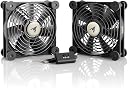
The AC Infinity MULTIFAN S7 is a UL-certified, ultra-quiet dual 120mm USB fan system delivering 104 CFM airflow at just 19 dBA noise. Featuring a multi-speed controller and durable dual-ball bearings rated for 67,000 hours, it offers customizable, long-lasting cooling for gaming consoles, AV equipment, and electronics. Its compact 4.7 x 4.7 x 1 inch design with rubber feet allows flexible placement, powered conveniently via USB for effortless integration into any setup.


| ASIN | B00JLV4BWC |
| Air Flow Capacity | 104 cfm |
| Best Sellers Rank | #13 in USB Fans |
| Brand | AC Infinity |
| Brand Name | AC Infinity |
| Compatible Devices | Gaming Console |
| Cooling Method | Air |
| Customer Reviews | 4.7 out of 5 stars 8,127 Reviews |
| Included Components | item |
| Item Dimensions L x W x H | 4.7"L x 1"W x 4.7"H |
| Item Highlight | UL-Certified, Dual-Ball Bearings, Noise-Absorption Pads for Receiver DVR, PlayStation, Xbox, Computer, Cabinet Cooling |
| Manufacturer | AC Infinity |
| Material Type | Rubber |
| Maximum Rotational Speed | 1300 rpm |
| Model | AI-MPF120A2 |
| Noise Level | 19 db |
| Number of Items | 1 |
| Part Number | ACAIMPF120A2 |
| Power Connector Type | 2-Pin |
| Product Dimensions | 4.7"L x 1"W x 4.7"H |
| UPC | 854759004341 |
| Unit Count | 1 Count |
| Voltage | 12 volts |
| Wattage | 5 watts |
M**O
Reduced the temperatures on my router from 92c to 64c.
Our home has a Linksys WRT32X wireless router which is passively cooled, meaning that there is only a large heatsink without a cooling fan. While this is great for absolute silence, it does affect temperatures quite a bit. I have installed OpenWRT on the WRT32X for more control and features over the router and this includes temperature monitoring. On idle, the router stays at 92c in an ambient of 30. Take note, the router is placed in the open in the TV console, so it's not like it is closed up in a cabinet with zero ventilation. On maximum load tests, it can reach a maximum of around 110c (!!). Temperatures like this would significantly affect the lifespan of electronics so I am compelled to do something about it. Here is where I decided to get these cooling fans to help reduce temperatures to more sensible levels. I wasn't expecting what a difference it could make. I simply placed the fan on the top of the router where it sucks out the hot air from the router. Idle temperatures dropped from 92c to 64c. You can take a look at the temperature graph I have included. You can see when I plugged it in and the temperatures starting to decline gradually. I tried reversing the orientation of the fan such that it blows cool air into the router instead of sucking hot air out of it, but there didn't seem to be much difference, so I just let it suck the hot air out. The fans themselves are very easy to use. It is powered by a USB port, and the router conveniently has a USB port that I'm not using otherwise, so I plugged in the fan there. There is also an inline speed controller that allows you to set it to off, low, medium and high. I noticed that if I set it on low, the controller gets just a little warm, while on high it is cool. I'm guessing there's some kind of resistor in there that reduces the speed of the fan by diverting some of the electrical power to heat instead. Speaking of the fan speed, even on the high setting, it is still fairly quiet and moves a generous amount of air per fan. The fans come in a set of two, so I'm using one for the router, and the other for general ventilation to keep air moving around. The fans themselves have rubber feet and a metal grating in front to prevent accidental contact with the fan blades. The rubber feet also provids some distance between the fan and the device it is cooling so that air can pass through more easily. Overall, this is a really good buy and helps so much in keeping our electronics cool and extending their life.
K**K
PRO tips for the PS4 PRO
These fans are great for ensuring circulation, cooling, and minimizing fan noise for your PS4. I’ll list some PRO TIPS below (pun intended). READ BELOW FOR THE TIPS. Though it’s completely normal for your PS4 to get medium-hot, it never hurts to maximize cooling for any electronic... ESPECIALLY in enclosed places. When the system is cooler, the internal fan don’t need to work as hard, maximizing efficiency and naturally prolonging the life expectancy and overall reducing its noise. These fans are super quiet and by keeping the system cool, the internal fans don’t need to work half as hard, thus reducing overall noise significantly... Which is a great bonus. With these fans on high setting, placed like in my photos, my PS4 never exceeds a mild warmth. These fans are versatile, allowing you to link more fans if you’d like, and allowing you to set them up however you’d like depending on your setting. NOW FOR THE TIPS: 1. Do this first! You’re probably aiming to reduce noise and/or keep the system as cool as possible, so I’d HIGHLY recommend to begin by dusting out the internal fan just for the added benefit. It’s very simple with the PS4 PRO. Simply pop off the top cover and air dust or lightly wipe off the fans and place the cover back in. (Refer to how-to videos online). This’ll keep the internal fans running efficiently. 2. USB tips: (1). There is a hidden USB port in the BACK of the PS4 PRO use that one to keep it out of the way and to leave your front two USB ports free. (It can turn on and off with your PS4) (2). You’re likely using a 4K TV or any TV with many ports these days, so chances are you have a USB port in the back of your TV, that is another convienent option for you. I use this option. (It can turn on and off with your TV) (3). You can simply use an adapter to plug into the wall, but you’ll have to remember to turn it off and on manually. 3. Fan placements: (The side that blows out is the side where the wire is visible) The placements I personally recommend and use myself (pictured) is one fan on the bottom holding up the PS4, blowing UP onto the bottom of the PS4 and one fan sitting on top blowing DOWN onto the PS4. Creating an external fan sandwich. Having the PS4 lifted will also allow the bottom to get some proper air flow. (I found a foam and plastic piece that I placed under the front of the PS4 as well, just to make sure the PS4 sits comfortably & with better balance.. I’d recommend something like that too). Side note: if you’re gonna set it up like this, put something under the feet of the fans if you’re placing it on wood.. Otherwise, it could leave light rings in the wood from the pressure. Alternative placements: (1). You can sit up one of the fans so it blows right into the vents on the right side of the PS4, this’ll help get cold air into your PS4. Not a bad option. (2). You can also sit up a fan at the back of the PS4 (where air escapes from the system), blowing air AWAY from the PS4 - helping suck the air out. But honestly, i think the other methods are more effective. I’d probably only recommend this one if your PS4 is in an enclosed area and you want to help the hot air escape from the area (like fan cutouts at the back of your enclosed area). Otherwise, the other methods work better in my experience. If you found this review helpful, please thumbs up this review! Thank you.
M**S
Excellent product
They help to keep my PS5 cooler and they are very quiet.
J**D
Absolutely perfect cooling fan kit
This might be a long review, but it might help someone that could use this product. I live in a hot summer place and before leaving on a camping trip I will start up my fridge for the trip. I noticed it wasn't cooling like it normally would. I asked AI and it explained that a 2 way fridge needs to have air to cool it. Of which right now don't have. I was worried with one review that said it caught fire, as I am using it in my travel trailer to cool my 2way fridge. Our last trip I thought i needed to replace it, at 1500, I was looking for alternatives so I was using a rechargeable fan prior to leaving to get it cold and I was relieved that it actually work. The AC Infinity fan kit came the same day we were leaving so I took it on our camping trip and installed it there. I had noticed in the past the countertop would be warm to really warm. Last thing I wanted was a fire trap. So I installed it on the top vent panel and dropped the USB line down the left side away from the real heat and out to one of my power banks. It worked better then I had imagined. Most reviews were about Xbox and other electronics, way off from what I was needing these for. I did need to remove the rubber pads to fit, which to my surprise didn't effect vibration. I am very pleased so far. I zip tied both units to the grill, dropped the USB down and out the bottom grill. This 2pk was an amazing kit. Like that they are UL certified. There is NO fan noise no matter the mode. Very easy to use and with the USB connection I find it a better way to go for me. They look and feel of good quality. Very stable and compatible for almost any heat removal. I want to give 5 stars but I've only used it for 48hr. But if this saves me from damaging my trailer fridge I would give it a 10 star. I'll update this review when I put it to test when the ambient temperature is hotter. But for now super pleased so far with how they are very quiet and do their job.
R**N
Awesome fans for cooling random devices that are fan-less.
I bought these fans to cool my 700 watt surround sound system receiver that produces a lot of heat, so this review will be in depth and thorough. I ran two tests, the first with the receiver on top of the cabinet with open airflow, and the second inside the cabinet with closed airflow. I will also use an Infrared Laser thermometer to test temperatures inside of the receiver, from whence the heat is created and is at its hottest, especially on heat sinks and chips. My receiver is vented all over the top and bottom so peeking through isn't a problem. Test 1 - For test one the receiver will sit on top of the cabinet with open airflow. Since heat rises i have placed the fans on top of the receiver blowing upwards since there is no room underneath it and the weight of it will crush these two fans even though they are built pretty tough. With no fans my receiver idles around 150 F and at loud volume rises to 200ish F. That's just too much. Now i throw in the dual AC Infinity fans and start them out at low and move to medium and them high, taking temperatures as i go. On low speed, temperatures only came down to about 190 F, so still no cigar. On medium i got more result, down to 150 F, which is what i call the green zone. And on high, the temps came down to a whopping 98 F. Also, the only time i could hear noise from the fans was on high, so they are indeed quiet and powerful. The static pressure wasn't bad either, i have more powerful inside my PC but you can actually feel some air coming from these. Test 2 - For test two the receiver went inside the cabinet. I expected results to be worse in there due to the restriction of airflow but i was surprised. With the fans in the same place i started with low speed and measured 180 F inside the receiver. I'm guessing the fans get better directional airflow inside a cabinet without things like a ceiling fan interfering. Medium speed is where it got interesting, 125 F is what i measured from the laser. And then on high speed, i measured a chilling 88 F on the heat sink around the power supply inside the receiver, usually the hottest spot i can point at with the laser. Very impeccable results. The only thing is that after 30 - 45 minutes there is a build up of heat inside my entertainment cabinet, so must leave the glass door open for heat to escape while in use, but now i wont haft to worry about it catching fire. Conclusion - Totally awesome fans. Their performance is impeccable. Also, they construction is very very solid and nice. If my reciever was just a little smaller and lighter i could sit it on top of these and have them blowing from the bottom. The grills are child finger proof and easy to clean, and the wiring and switch has nice thick cable and strong plastic. And the extra female USB port is great for when you need that third fan, or another set of AC Infinity fans. The only thing i could see improving here, other than the obvious like RPM's and static pressure, is making a true AC wall jack powered version of these with the double - triple - quadruple fan setup for devices that don't have USB ports. I know AC Inf. makes AC powered fans but they're all singles. Need multiples! I would highly recommend tese fans to anyone who needs extra cooling for their non-desktop PC electronic devices. You wont be disappointed.
S**I
Ultra quite and durable.
I can testify to the quality of this product. I bought the first AC Infinity MULTIFAN S4 80MM version in 2016 and it's till running and even more quite than a mouse. This year i bought 2 of the 120 and 1 80mm to keep the Tp_link BE800 and ATT BWG600 cool. So far to date both Routers have maintained stability.
P**B
Good product with trusted seller.
The fans push a fair amount of air and are silent. I needed to return the 1st set because a blade broke. I had no issues at all in doing so. This is a trusted seller.
S**T
really “cool” cabinet fan system - highly reccommend
This is a really “cool” cabinet fan system. We have a custom built-in entertainment cabinet in our family room. The top section has the flat screen LCD TV with the Wii equipment and the middle section has an audio system, TiVo, CD player and a VCR, (I know why a VCR). The new TiVo and the 25-year old audio system generate a fair amount of combined heat that I wanted to remove. I did a search on Amazon for cooling fans and looked at several options. Having a system that was temperature controlled and could adjust the speed of the fans was very attractive so I decided to focus on that solution and was very impressed with the features of the AC Infinity products. I ordered the AC Infinity AI-ATC, Fan Thermostat and Speed Controller, MULTIFAN S7, Quiet Dual 120mm USB Fan, and MULTIFAN S5, Quiet Dual 80mm USB Fan. Everything arrived in two days; the three items were well packed and arrived safely. Now I could actually see and test what I got and found they were even better than I had expected. The controller is a perfect size and flush mounts in my equipment cabinet. The temperature probe has a long enough wire to run it down and over to place on the audio amp and under the TiVo where the maximum heat is generated. The fans have large rubber grommets on each corner to stand on or mount with and no vibration is transmitted through. One set of fans are in the equipment section behind the equipment blowing air out through the equipment towards the open room. The second set is located in the TV section also blowing from inside through the TV towards the room. Running at full speed in a quiet room you can of course hear the mechanical fan and wind noise. However, when the audio is on, even at a comfortably low, watch the news level, the fan sound level drops below the audio program level and is no longer discernable. With the controller running in the “smart” mode the fan speed is reduced when the equipment temperature is within two-degrees (or four) of the desired set temperature. As they say on TV “Just set it and forget it”, the controller keeps the fans running as long as the equipment is generating heat above the set point. When the audio amp is turned off and the TiVo goes into stand-by the fans cool them down and then shut off. When I am able to locate my hole cutting drill I will add some ventilating holes in the top of the cabinet and between the sections in order to improve the circulation of fresh cooler air into the cabinet to improve the efficiency. I am so pleased with this cooling solution that I am ordering another setup for our weekend summer cottage up north at the lake. Again, there is an audio system but in addition there is a Magic Jack phone module and the cable modem / WiFi router generating heat. They are in a confined space that gets hot so I had placed a small fan in there to circulate the air. When we are there, I plug in the Magic Jack and turn on the fan. Now I will be able to automate the cooling. If you are looking for a great way to cool down your expensive equipment this is an inexpensive solution that I highly recommend.
C**5
AC Infinity Fun
Acquistate assieme al suo controller per il raffreddamento di un sito amplificatore all'interno di un mobile. Davvero sorprendente la differenza di temperatura all'interno, si accendono automaticamente al raggiungimento di una determinata a temperatura. Consiglio assolutamente questo prodotto.
R**E
Does there purpose perfectly.
I don't always right a review but was so impress by these fans that I to write a few words. I use these on top a Denon X3400H receiver that only has about 2.5" of space left above the AVR well in the TV unit, so not much airflow even though theirs plenty of space for air flow on the sides of the AVR like most receivers these days theirs no internal fans, so the hot air just dissipates out the top of the AVR naturally and if your units in a TV unit odds are its gonna run quite warm to the touch. These fans work amazing! simply place them on top your AVR (infinity logos facing up) to pull the hot air out of your unit and it will stay nice and cool to the touch. The fans rubber isolation feet are a nice feature, as well as the built in metal fan grills/dust shields (little touches like that along with its ease of use and fair price was the reason I want with this infinity fan set over making a DIY setup using spare PC fans) and the ease of use/versatility is a big plus, being that these are USB fans you can plug them either directly into your AVRs USB port (so they power on with the unit) or into a USB power block plugged into a wall/power-strip and you can simply use the controller to turn them off when not in use or just run them switched on all the time... personally I never use my AVRs USB port so I just plug the fans directly into it and being that I only have a front USB port on my AVR, to keep things as clean as possible I choose to run the cord under the AVR tucked behind one of the AVR feet and out the side of the unit, twist tying the excess wire which leaves the controller nice and handy beside my AVR. I was worried that with the fans on top of my AVR that there wouldn't be enough space left to actually allow the fans to circulate the air out side of my TV unit... there's likely only about 1/2" of space left above the fans but to my surprise even on the low setting they keep my AVR vary nice and cool for hours... vary silent fans and vary efficient I haven't really had the need to even go above the lowest setting to keep my AVR cool, 90% of the time its low and odd times i'll set it to med or high to really exhaust any stagnant hot air that might be inside. Overall I highly recommend these for the price they're a must to keep any of your expensive electronics that run hot nice and cool... its a small investment to prolong the life of your much more expensive gear.
E**K
Sessiz ve etkili
Ürünü ses sistemime ilave soğutma sağlaması için aldım ve gerçekten etkisini hemen gösterdi. Çift fanlı versiyonu en hızlı kademede bile rahatsız etmiyor ve üfleme hızları da gayet tatmin edici. Mataryel tasarımları kalitesini belli ediyor.
Ñ**N
AC Infinity®
El diseño, calidad y acabados de los ventiladores en sí es excepcional muy en la línea habitual de la marca aunque quizá la construcción del cableado y especialmente del conector usb podrían mejorarse estando un poquitín por debajo. Personalmente me parecen bastante silenciosos a velocidad máxima aunque obviamente en contrapartida no mueven demasiado aire, quiero entender que están diseñados para disipar entornos que no produzcan un calor demasiado contundente, diría que para refrigerar un amplificador AVR cumplen sobradamente su propósito.
S**S
Quiet and effective
Probably the most efficient USB fans out there. Good to cool AV or server racks that are not in their dedicated rooms (which is really what most people have to work with). There should be more AC Infinitys!
Trustpilot
1 week ago
1 week ago