โก Power up your home networkโfast, reliable, and effortlessly wired!
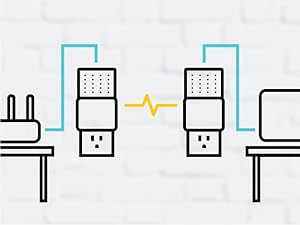
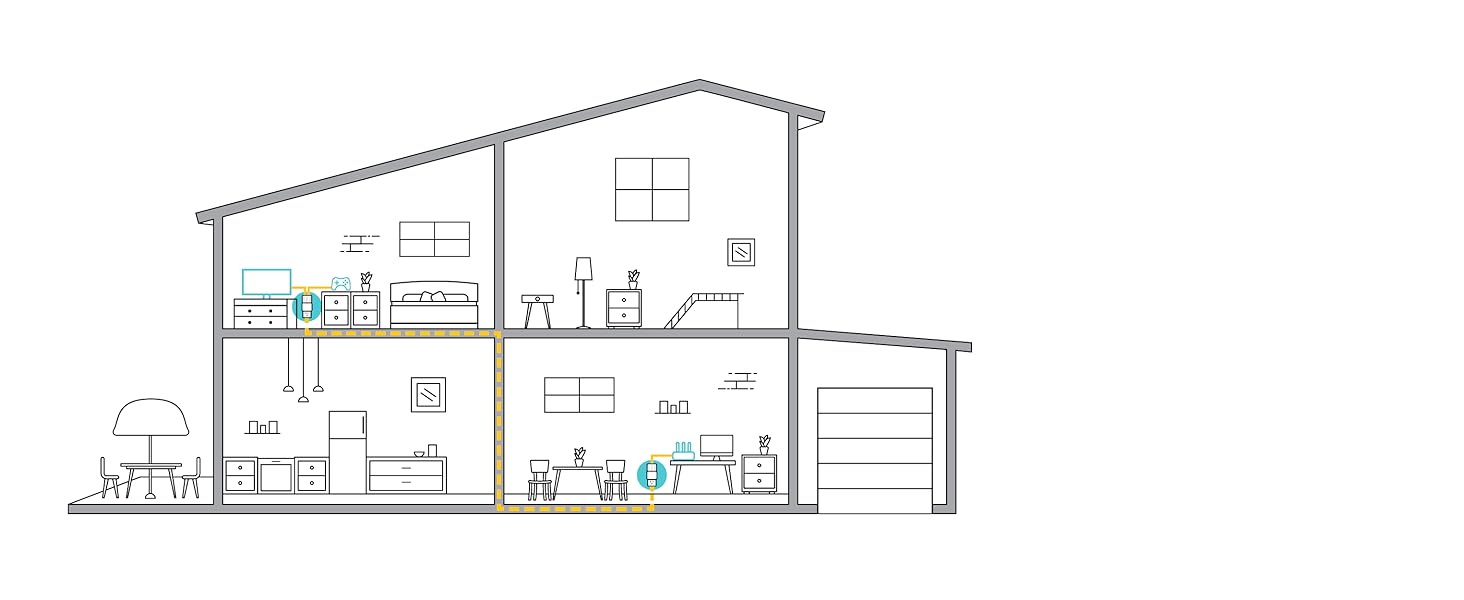
The TP-Link AV1000 TL-PA7020 KIT_V2 transforms your homeโs electrical outlets into high-speed Ethernet ports delivering up to 1000 Mbps. Featuring two gigabit Ethernet ports per adapter, it supports multiple devices with reliable wired connections. Easy plug-and-play setup, expandable network with up to 16 adapters, and an energy-saving mode that cuts power use by up to 85% make it perfect for professionals demanding seamless streaming, gaming, and work-from-home performance.


| ASIN | B01MUBC5F2 |
| Best Sellers Rank | #649 in Powerline Network Adapters |
| Brand | TP-Link |
| Built-In Media | 2x Powerline Ethernet Adapters, 6. |
| Color | white |
| Compatible Devices | Desktop, Laptop, Smart TV |
| Compatible Operating System Family | Linux, Windows |
| Customer Reviews | 4.3 out of 5 stars 365 Reviews |
| Data Link Protocol | Ethernet , Gigabit Ethernet |
| Data Transfer Rate | 100 megabits_per_second |
| Global Trade Identification Number | 00845973099169 |
| Hardware Interface | Ethernet |
| Item Dimensions L x W x H | 4.84"L x 4.85"W x 1.18"H |
| Item Type Name | TP-Link TL-PA7020 KIT_V2 AV1000 2-Port Gigabit Powerline Adapter |
| Item Weight | 12 ounces |
| Manufacturer | TP-LINK USA |
| Mfr Part Number | TL-PA7020 KIT_V2 |
| Model Number | TL-PA7020 KIT_V2 |
| Number of Items | 1 |
| Product Dimensions | 4.84"L x 4.85"W x 1.18"H |
| UPC | 845973099169 |
| Unit Count | 2 Count |
| Warranty Description | 2 Year Warranty |
B**B
Stella performance and ease of set up ( fast, good, and cheap )
My AT&T internet access bandwidth was just upgraded to 50MB and the speed at the AT&T router direct plug in speed tested at 49-51MB most of the time. I setup my fist TP-Link right near the AT&T router off a regular power strip I bought from Target , and the other TP-Link is in my room upstairs in another corner of the house, I plug it into a 40 years old cheap power strip. I make sure the polarity of is identical. Sync both device is like a REALLY EASY, press the 1st device SYNC button ONCE for 1 second, run to my room press the 2nd device SYNC button for 1 second, DONE ! all light is GREEN ! My house is build in the 60s. I think the circuit breaker in the garage is still the same old same old. The rest of my testing starts, for the past 3 days, I got full 49-52 MB speed result during 8am to 5pm, and as everyone in the neighborhood return from work and everyone starts surfing, I still get 42-43MB most of the time . Then the speed pick back up to 47-49MB after 11pm when most starting to go to bed. This is absolutely a must have device for every house for room far away from the internet base wi-fi router. I am going to tell everyone I know. AT&T Master Technician told me most wi-fi will cut out 50% of your download speed unless you get a full signal and when your router has dual speed, 2Gig and 5 Gig, the 2G connection max out at 25MB download speed (you cannot enjoy the higher 50MB AT&T speed), ONLY the 5G connection will take advantage of your higher internet bandwidth, 50MB and more up to 100MB max. He recommend us use 2G wifi connection for simple stuff things like email, banking, utility, shopping, social network, reserve using the 5G wifi connection for watching movie like Amazon Prime, Netflix, Hulu ect. I just use the 5 feet Cat 5 cable that come with the TP-Link and it work like a charm ! I will buy more for my house. Now I plug my Roku player into TP-Link to get the maximum download speed when I watch movies, this is like HOG HEAVEN ! If you have several folks watching movie at the same time in the house, Even everyone is using TP-link everyone is still sharing the pipe going to AT&T internet infrastructure. Still it is better than wi-fi with limited signal going through the walls, floor, with interference from all the copper piping, copper electrical wiring in the house, floor insulation sheet (the silver thin sheet to block humidity) . I hope this sharing of 1st hand experience helps everyone. Have a GREAT SURF ! (PS. My device is the 1000 MB version ), By the way, I now can just plug my TP-Link into any room I need full speed internet download, I only have 2 of them, so I need to get more device or move my current device around the house as I need. This is very flexible.
C**.
Works like magic!
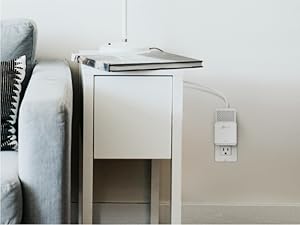
I got the TL-PA7020 AV1000 2-Port Gigabit (V2) kit. The "V2" appears to be a recent model, released around January 2017. PROS: + Works like magic, between my upstairs and downstairs on my 1400 s.f. house. I first paired them in the same room, then re-plugged in separate rooms/floors, no problem. + Two prong design (no ground pin). Can install pointing up or down. Works with old ungrounded wiring! See my pics. + Reliable. No outages, no rebooting or re-pairing needed so far (over 1 month). + Low power draw of around 6 Watts total for both ends (~ 0.07 Amps per pair. Tested on a Kill-A-Watt meter). Should cost me less than $6 per YEAR in electricity cost. Note that's at full power. My constant network traffic means mine will never enter low-power sleep mode. + Runs cool. (I was afraid they'd run hot and draw lots of power. No worries). + Small size. Doesn't obscure the other electrical plug holes. See my pics. + Two Ethernet ports. Better than one. + Gigabit ports! I haven't needed or tested speed, but Gb is potentially better than old 100 Mb). The app reports that I'm getting 310 to 350 Mbps. + Good price at around fifty-five bucks. Good considering many gigabit devices are 70 to 100 bucks. + Came with two white 6-foot-long CAT 5 cables. CONS: - Kinda unpredictable. Each outlet in a house seems to work at a different speed. - Other electrical devices can affect the signal speed. For example: When my Netgear router's wall-wart power adapter was plugged into the same wall outlet, it cut these adapter's reported speed by 50%. I moved the Netgear plug to a different wall outlet and speed went back up. - No complaints, really. Just other observations (see below). OTHER: - The TP-link optional computer app for configuring these devices is not very useful or intuitive. On Mac it's called "tpPLC.app". Also, I noticed the app would not run properly unless it was installed directly in my Mac's Applications folder (wouldn't run if it was launched from a sub folder. That might be a security feature). But good news is you don't need to use the app for basic setup. See next bullet point for app extras. - The tpPLC software allows you to manually set QoS priority from 4 options: (1) Internet, (2) Online Game, (3) Audio or vido or (4) Voice over IP. The app also allows you to view reported line-network speed, rename each device, update firmware, disable power-save mode, and turn on/off each device's status LEDs. - "All magic comes at a price, dearie." --Rumpelstiltskin UPDATE March 2019: After 1.5 years of continuous use, I'm happy to say I've only had ONE day where I had to touch these devices (I simply unplugged and replugged them one time because they seemed locked up.) Other than that, I've had ZERO problems, interruptions. Despite many power outages, and old house wiring, these have been very reliable. I've now ordered another pair, and knock-on-wood, they've been showing good results after a week, too.
A**R
Good solution to reduce gaming/streaming WiFi bandwidth. Some intermittent connection issues.
Pros Easy to install. Worked right out of the box. Good speed when working Good value for reducing WiFi bandwidth Cons Have to find the right outlet. Tried two or three different outlets on the same and different circuits before it worked. Sometimes the connection drops and the plug needs to be reset or moved to a new outlet. Issues seem to be random, but only happen once every few weeks.
V**C
Great solution for me - much more stable connection
I mainly purchased this because I live in a rental house and as I cannot drill holes for ethernet cables to be ran, I figured this would be worth trying. I know there are mixed reviews depending on the wiring of your home, but these seem to work great with one plugged up in one end of the house connected to router and and the other in opposite end of house connected to a smart tv and laptop. This house was built in 2000 and is about 1,142sq ft. I got these because I was using a wifi extender to connect TV and laptop, but I was having buffering issues and was looking a more stable, consistent connection. While I haven't really compared exact speed numbers, after about a month of use - these seem to work great.. Haven't had to touch them since pairing and plugging them in. I've had maybe one small buffer on smart tv since using them so I'll definitely take that over the very frequent buffer of the extender and laptop speeds definitely seem increased. I'd suggest if you're thinking about it, then give them a try.. Maybe they'll work with your wiring, maybe they won't.. Worst case scenario you have to return them. I would definitely recommend these tho 100%. Also, it shouldn't matter as these are compatible with any router but I am using them with thr TP Link Archer A9.
A**R
Much More Stable Than WiFi
I used this product to connect to my PS4 as the wifi signal was very weak for where I play. I have a 100mbps internet and with the wifi I was at 13 down and 2 up. Basically all online games were not playable. With this little gadget, I was able to get 95 down and 12 up with a very steady connection. For me it was literally plug and play, the two synced automatically and worked right away. I used the second port to hook up my fire and I have found it to be more stable there as well too. Have not tested speeds as much, but has quicker buffering from the eye test. I also bought a single outlet port (tp-link same model type as these) and it synced right out of the box as well perfectly. So now I have the PS4 and two fire sticks on ethernet running super smooth, which allows my other devices connected to the wifi to run faster as well. Seriously happy with this product.
N**R
Great Solution Nobody Mentions
We just bought a new house and of course the first step in place is to figure out the wifi situation works. Unfortunately our TV and electronics were on the other end of the house which zapped the wifi signal and running hard cords was not an attractive option either. After some research we came across this solution which uses your electrical outlets to transmit internet signal through the house electrical system. I was skeptical as I never heard of it but for us it works great. Basically you have a pair of adapters, you plug one near your router, and the other near our target. You plug an Ethernet cord directly from the router into adapter #1 and plug that into the outlet. Then on the opposite side of the house you plug in adapter #2 to the outlet and then plug in another Ethernet cord from the adapter #2 to electronic. The devices connect through the electrical and pass the internet signal. Two items to consider: 1) Probably worth the extra money to get some with an electrical plug so you don't waste the outlet. The units are fairly big and difficult if you need to use the outlets. 2) Helpful to have two people for install since they need to connect and signal a certain light it's annoying to have to run to both sides of the house to install. Very happy with the purchase though!
B**N
Works somewhat as advertised.
I purchased these to get a better connection for my streaming device to my desktop, as wifi had some dropped frames. Unfortunately the speed was even worse than wifi. It seems like it has everything to do with distance. In the same room as the adapter connected to the router, the receiving adapter got a similar speed to my average wifi connection. Moving progressively down the hall outlet by outlet the speed got worse and by the time I got to where I had intended to install it, it was unusable. This was only 2 rooms away. I tried several other configurations, and all had the same result. The TP-Link's range limitations were bottle-necking my speed. I suppose if one wanted to use them in the same room it would be fine, but at that point you're better off connecting to wifi or just running some cables. Returned.
C**Y
Works surprisingly very well.
We have a 300 amp service for our house that is split up between 2 150amp panel boxes. I have 4 of these devices and can say the ones on the same panel will transmit data easily at 100Mbs+. Unfortunately, if it has to jump panels and go back out to the main feed panel outside where it is split to come back into the other panel the data rates plummet to 10Mbs at best. This is the reason for giving 4 stars, but honestly, most homes would not have the setup I do and if you only have one internal breaker panel I think you would be very happy with these devices over wireless setup.
B**N
Nice and easy
Easy and simple to use. Plug into a wall socket not an extention cord and will work like a charm. With my Wi-Fi I was getting 15-16 mbps. Now with this I'm getting 60-70 mbps
J**.
A little disapointed
These units were purchased to replace older 500Mbps units, and I was expecting them to be compatible with the others and use them all from the same network port but they are not. It should say that in the package or in the description. Also had a hard time installing them as well cause red light kept indicating a bad reception even when connected on the same line 5 feet from each other. Reset a few times seemed to have resolved the problem. Compatibility is my main issue. I now have to use 2 network ports on router instead of 1.
F**C
100% network speeds VS their WiFi cards
I recommend this product over a wireless network card. This gives me my full network speeds compared to 60-70% off a wireless card (the router was decently far)
A**H
Five Stars
Good
G**P
Four Stars
Seems to work just fine. Wish I could buy one more without having to buy set of two.
Trustpilot
3 weeks ago
5 days ago