
🔌 Upgrade your workspace with flawless connectivity — don’t get left behind!
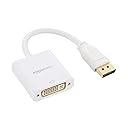
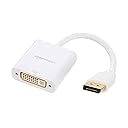
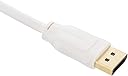
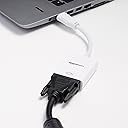
The Amazon Basics DisplayPort to DVI Adapter is a compact, passive converter designed to connect DisplayPort-enabled devices to DVI monitors or projectors. Supporting resolutions up to 1920x1200 (Full HD), it features gold-plated, corrosion-resistant connectors and secure locking mechanisms for reliable, high-quality signal transfer. Ideal for professionals bridging modern GPUs with legacy displays, this adapter offers hassle-free, plug-and-play performance.


| ASIN | B013PWJKQ4 |
| Best Sellers Rank | #15,521 in Our Brands ( See Top 100 in Our Brands ) #1,853 in DVI-HDMI Adapters #76,016 in Computer Cables & Interconnects |
| Brand | Amazon Basics |
| Color | White |
| Customer Reviews | 4.4 4.4 out of 5 stars (963) |
| Date First Available | August 1, 2016 |
| Item Dimensions LxWxH | 3.5 x 1.57 x 0.51 inches |
| Item Weight | 1.44 ounces |
| Item model number | HL-007254 |
| Manufacturer | Amazon Basics |
| Product Dimensions | 3.5 x 1.57 x 0.51 inches |
D**S
Quick working adapter
Needed to change a displayport port from my GPU over to HDMI so I could run a matched triple monitor setup on one computer. This does the trick. No cons, no pros, just plug and go, quick! Signal is fine, quality feels okay, seems compatible with any monitor I've put on it.
A**R
Works with EVGA RTX 3060 and Wacom Cintiq 21UX (DTZ-2100D)
I finally got an EVGA GeForce RTX 3060 XC GAMING (12G-P5-3657-KR) video card. I waited five months on the EVGA queue for a chance to purchase one. When it arrived, I re-remembered that this modern graphics cards did not have a DVI port for my 11-year old Wacom Cintiq 21UX monitor. I ordered this passive converter. I trusted that the EVGA card's DisplayPort 1.4a specification would have the Dual-mode (DP++) support required to support passive converters, and it did. I did not need an active converter to get a signal out from my new card and into my ancient Wacom Cintiq monitor. This adapter also works directly on the DVI-I output of my Wacom Cintiq monitor. I was able to remove the DVI-I to DVI-D adapter that shipped with this Cintiq and replace it with the Amazon Basics DVI to DisplayPort adapter. I've used this adapter for 12 days now without any display issues. I'm running my Wacom Cintiq at its native 1600x1200 resolution in addition to two other monitors on this graphics card. So far, so good.
D**T
Yuuup Not bidirectional. Can't use to connect DVI GPU to DP monitor, e.g,
Boyscout-like, I bought three of these almost two years ago and just now finally had cause to use one. Good news: Once the new GPU comes, I'll be able to use two of 'em. I'm sure they'll work fine going from RTX 3070 to a couple of old 1080p DVI monitors. Bad news: My new monitor doesn't have DVI, so I tried to use one of these to convert the DVI cable to displayport. No dice. Sure enough, these don't claim to do what I was trying to do.
J**M
Cheap and Works! Can't say much more than that but I will anyway....
It's an adapter/converter! There's not much to it. It works and it's easy! I needed it to go from my work laptop dock to my IOGEAR 2-Port USB DVI-D Cable KVM, GCS932UB so my monitor would sense when I was switching between systems. Since my dock didn't have DVI I was running VGA and DBI into the monitor from each system and I had to manually switch inputs on the monitor. This plugged right in and worked great. Never had any issues with the AmazonBasics adapters!
M**R
No hassle and less waste
Just upgraded to a new computer and video card with one DVI port and multiple displayport ports, and since my dual monitor setup are VGA/DVI displays and I already had plenty of perfectly fine DVI cables, I just got this adapter rather than getting an entirely new cable. Plain and simple solution with no problems.
J**K
Doesn't Work As Advertised
I installed this adapter in the hopes that using the display port output of my laptop would yield better results than the HDMI port relative to available resolutions. I simply cannot get the monitor to work with this adapter. The monitor is a DVI, when I put an HDMI adapter on the end, I get a picture. When I use this adapter, the computer sees that there is a monitor connected, but no video is displayed on the screen. I thought this was a driver problem. I installed countless versions of the driver to no avail. Now I am outside of the return policy, so I have a useless displayport adapter. Normally amazon basic items are great, this one is a no go for me.
A**N
Good convertor
I have an old monitor with just DVI input and this worked great to get it working with my PC!
T**U
Eh... Hit or miss...
So this was a needed item, because my new EVGA video card didn't have a DVI connection, and only have HDMI Displayport, and a USB Type-C.... However, the adapter has short cord from video card to the square "converter" where the DVI connects to the adapter. This of course might cause some pulling on the video card, and would have been better if the cord was a bit longer from the video card, to that adapter block. Other than that, it works as intended, and wasn't expensive. However, I also wish I had known that the video card already came with a Display Port to DVI.
D**R
Nice build & quality and its does the job for me.
C**T
Excellente qualité, belle finition. Semble solide. Aucuns problèmes pour la mise en route sur ma carte graphique, écrans DVI-I connectés en DisplayPort. A mon avis c’est pas la peine de mettre plus cher dans un autre produit similaire, cette gamme va parfaitement. Merci Amazon
V**X
Es compatible con un monitor que ya tengo desde hace mucho rato que usa conexion DVI, tuve que comprar este producto debido a que hice cambio de tarjeta grafica, pasando de una AMD RX 560 a una Nvidia RTX 3070, esta ultima no cuenta con puertos DVI, por lo que este adaptador logro hacer que aun mantuviera vigente mi monitor DVI. Recomendado al 100%.
R**K
xxx
博**手
HPの機器にはdisplayportによる出力のものがある。hdmiだとケーブルの入手も容易なのだが、displayportのケーブルは少ない。せめてmini displayportならば mac や surface がそれなのでいいのだが... というわけで変換コネクタが必要になる。displayportには爪がひっかかるようになっていて、ボタンを押さないと抜けないようにできているのが一般的だが、この製品のdisplayport側には爪がない。これは故障という面からはたいへんうれしい。ケーブルを間違ってボタンを押さずに引っ張ってしまってコネクタを壊してしまったことがある。壊れるような機能なら無い方がずっといい。というわけでこの製品には爪がない。すばらしい。もちろん、問題なく機能する。信頼性も十分確保されていると思う。壊れにくい(壊しにくい)という意味での耐久性も高いと判断する。
Trustpilot
2 months ago
2 weeks ago