Desertcart purchases this item on your behalf and handles shipping, customs, and support to Cyprus.
🎥 Capture Every Moment, Relive Every Memory — No PC, No Hassle!
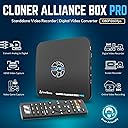
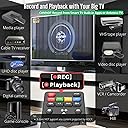
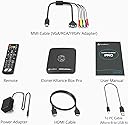
The ClonerAlliance Box Pro is a versatile standalone 1080p@60fps video recorder and digital converter that supports HDMI, RCA, YPbPr, and VGA inputs. Designed for easy use without a PC, it enables direct recording to USB storage and playback on TV. Ideal for digitizing analog media, capturing gameplay, or recording live streams, it features ultra-low latency, scheduled recording, and broad device compatibility, backed by a 90-day return and 2-year replacement warranty.

| Antenna Location | Video Recording |
| Asin | B012T1D0IG |
| Av Output | MPEG-4 |
| Best Sellers Rank | #38 in Internal TV Tuner & Video Capture Cards |
| Brand | ClonerAlliance |
| Built In Media | Capture Card |
| Compatible Devices | Television |
| Customer Reviews | 4.0 4.0 out of 5 stars (2,122) 4.0 out of 5 stars |
| Hardware Interface | 3.5mm Audio, Component Video, Composite Video, HDMI, Micro USB 2.0 Type B, USB 2.0 Type A, VGA |
| Item Dimensions | 4.3 x 4.3 x 0.6 inches |
| Item Weight | 6.8 ounces |
| Manufacturer | ClonerAlliance |
| Mfr Part Number | CA-998P |
| Minimum System Requirements | No PC Required |
| Model Name | ClonerAlliance Box Pro |
| Model Number | CA-998P |
| Number Of Items | 1 |
| Operating System | Windows |
| Other Special Features Of The Product | Passthrough Latency, Schedule Recording |
| Platform | Windows |
| Tuner Type | NTSC, PAL |
| Unit Count | 1 Count |
| Upc | 712395957967 |
| Video Capture Resolution | 1080p |
| Warranty Description | 90-Day No Hassle Return (at our cost) and 2-Year replacement Service. |
User
I LOVE MY CLONER BOX PRO!
I initially purchased the HDML Cloner Box (non Pro) because of the good Amazon reviews. I was looking for an HD DVR device and the HDML Cloner Box reviews said that it would record virtually anything across an HDMI connection with excellent video quality. I ran into the common issue of the “blank screen” after hooking up the Cloner Box and went the manufacturer web site (Cloner-Alliance) for help and found the “Pro” model with Remote Control, Timer Recordings, and Instant Playback. The Pro being a new product had no reviews on Amazon so I didn’t see it on first pass. After testing the Cloner Box and seeing for myself that recorded everything I tried (CATV, Blue Ray, PC Stream) with Excellent Quality, I instantly purchased the Pro Model and arranged to return the Box version. The blank screen on the Box version was resolved by pressing the 1080/720 button for 5 seconds (you do the same with the Input button on the Pro).In addition to wanting an HD DVR, I also am in the process of moving my owned DVDs and Blue Rays to MP4 files for my Home Theater Server. I have another software solution for moving my Blue-Ray movies to MP4, but the Cloner Box can do that too. I have found using the Cloner Box for the “Extras” is nice because I have to view them to choose which one to copy and it is easier on the Cloner than the software solution.I LOVE the HDML Cloner Box Pro. Similar to the non-Pro Box, it records EVERYTHING coming across the HDMI port with EXCELLENT Video quality. The Remote functionality is fantastic. I have yet to test the Timer recording, but understand how it works. The Pro also allows you to Record on the PC through a 2nd Mini-USB port using their HDML-Cloner Pro Helper Application. The PC recording functions worked perfectly, giving you a mirror image of the HDMI stream on the PC (with a slight delay) and full recording control (with the addition of a Pause that you do not get on the USB Drive recordings). The recordings on the PC were as perfect as the ones on the USB flash drive. I can see one advantage of the PC recording is that you can record without having an HD monitor handy. I’m going to test recording from my DSLR Camera where that functionality will come in handy. The Cloner Box Pro Also has a Mic AND Headphone Jack (Mic Jack also on the Box), adding a headphone monitoring capability I currently do not have on the DSLR. The PRO also allows you to control the volume of the HDMI stream and Mic to get a perfect mix. One thing I noticed is my initial recordings had low volume (the Box recordings were slightly louder than the original program). I had to adjust the HDMI volume higher (controlled via remote) to get my recorded volumes back to “normal.”The file sizes on the recorded videos are very large. Cloner-Alliance obviously made a decision to provide the best possible MP4 video quality and did not try to over-compress the video. I’m seeing that the Pro files are about 2G per half hour of video. You can choose between 1080 or 720 recording quality, but the file size does not change a whole lot. The Pro also has a 2G file size limit so it creates a new file every 2G (or 30 minutes). Cloner-Alliance recently removed that restriction on the Box version and is promising new Pro firmware soon that removes that restriction. I had a problem trying to record baseball games where the recording stopped after 1 hour and it appeared the Pro had trouble creating that 3rd file after filling 2 2G files. Cloner-Alliance support was excellent and suggested a different USB flash drive. That appears to have been the problem. Since changing flash drives I have been able to record two 2 hour movies without issue. After the All-Star break I will try baseball again.Cloner-Alliance also provides another software application “MP4-Cloner” which allows you to “Trim” “Combine” “Convert” and “Burn” (to Disk). The Trim and Combine function do not re-compress the video so they work very fast, and do not diminish the quality. “Trim” allows you to remove extra things that are recorded at the beginning or end of the file (lead-in and recordings after the program had ended). Trim on a 30 min 2G file only took a few minutes. Combine allows you to combine the 2G MP4 files together into one file. The last 1.5 hour movie that I combined only took about 10 minutes to complete. “Convert” allows you to convert the native MP4 streams into other formats, although what I used it for was to reduce the 6G movie file down to 3G by decreasing the BPS setting. “Convert” does re-compress the video so it takes a bit longer. The video quality of the 3G file was still very good.The Pro also allows you to record from various other input types: VGA, RGB, and standard AV signals. This is accomplished by a provided cable with those various plugs that feed into a multi-purpose plug (reusing a 2nd HDMI-looking physical connector). Of course I purchased the Cloner-Box to get away from an older RGB recorder so I don’t see using anything other than HDMI.If you’re looking for a device that will record Full HD Video from your Game Console, Cable TV Box, PC Streams, or Blu-Ray Player, the Cloner Box and Cloner Box Pro is the device you have been looking for.
User
Pretty great
An update on 6/1/17: Nothing has changed with my 5-star product review, but I had to mention how impressed I am by manufacturer's customer support. A recent software update added a cool new streaming capability. I had trouble getting this to work in a specific environment so sent a message to support. Honestly, since everything worked in a different environment it may not have been a Cloner Box Pro issue at all but an issue with software at the other end of the streaming chain.. Nonetheless, over the next few days Cloner Alliance worked diligently with me, ultimately providing a new version of their software that resolved my issue completely. Communication along the way was excellent; I cannot imagine a better support experience.My original product review:For me the HDML-Cloner Box Pro works exactly as advertised, and to day I could hardly be more pleased.It's small but heftier than you would expect, and the buttons and ports are marked well. It comes with all of the cables you'll need.and a very reasonable remote control. The manual is basic but very clear.If you've read up on the box you know it captures video to a USB drive. It will also work with a computer using theincluded software.Check the various Amazon reviews to discover capabilities. I've had no problems with any input source.Customer service has emailed me regularly since I placed my order, most recently to ask whether there were any features that I'd like to see added to the menu. The only one I could conjure up was 5.1 surround sound; currently the box only captures in stereo. Customer service replied quickly and said they were passing on my suggestion to the software team.Since I've had no problems I haven't needed to invoke customer service, but they promise a 24-hour response. No reason to doubt this--very nice.I've just had the box running for several hours, and all of the captured video is flawless: no dropouts or other errors.So far I've only played with a limited number of functions and features, and I haven't spent much time with the included software. However, everything works as far as I can tell.If they ever get surround sound installed the box will replace all of my other capture devices. Already it's perfect for 90% of my needs. This is an impressive product at an attractive price.
User
Does what it should do- 720 or 1080P - recording and playback produce excellent results. Remote control is intuitive and buttons are ...
I am a serious A/V hobbyist and Audiophile. This is my 2nd purchase over a two year period and this product and works well. Let me summarize:Pros: Does what it should do- 720 or 1080P - recording and playback produce excellent results.Remote control is intuitive and buttons are well placed. Only criticism is that there is no “stop” button and instead, a workaround is to press the reverse arrow or “return” equivalent, to step back the operation until you get to the desired screen.Cons:1- I still needed to upgrade the firmware (to v1.35) via a PC which worked, but not as intuitive as a normal firmware upgrade operation, due to bugs in it’s initial operation out of the box.2- My biggest gripe hence (4) stars, is that even after the upgrade, the unit will not allow playback of recorded files when using a (NTFS formatted) hard drive of 500 gb or larger, as the main USB storage device. It will recognize the drives and allow files to be stored but will freeze when accessing the files via the playback button when you get to the playback screen.NOTE: I checked the playback by disconnecting the drive and connecting it to a laptop and playing the files with VLC, and the files played back fine in 1080P, so the Cloner recognizes and stores the mp4 files correctly, but has playback issues. The only way out for normal operation from the “ frozen state” was to recycle power. I did not try to format the drives with FAT32 due to the 2 gig file size limit which I dislike.The good news is that the unit works fine for all operations, storing and playback, for drives (thumb drives, SATA SSD’s, or mechanical drives) with capacities of 250 gb. and lower.3- The unit responds very slowly between commands (record, playback.. etc..) from 2-10 sec. delays (due to slower hardware used) but this is excusable considering the price.Overall a satisfactory experience as long as you can live with the limitations.
User
good as far as it goes
Not bad for the price, but not good either. Pros -- It does what it claims. Cons -- There are real problems with data dropsOkay, this will give you a nice video, BUT if you are going to do any editing of the raw video produced, you are probably looking at a lot of work unless you have some expensive editing software. This is my main gripe after using this a couple of days. Yes, other reviewers are correct, the unit can get hot, but this is easily addressed by just making a little carriage for the unit so that you can stand it on end (or you could just lean it against something. It is a thin unit, so when standing on end you effectively double the surface area exposed for heat dissipation. The heat problem is easily resolved and I don't know why the manufacturer doesn't supply a small stand to operate the unit on end. Ok, now for the complaints.Video quality produced is good, but the unit drops data whether you use the supplied USB cable and a fast computer, or a SATA III flash drive. The processor in the unit simply can't handle the heavy data streams of HD video without the occasional buffer overrun. In the raw video produced, these just seem like an occasional pause or hiccup but if you are editing they are a nightmare. The reason they are such a problem is because the overworked processor doesn't insert any key frames into the video! The result is that every data drop isn't just a momentary glitch but puts the audio and video streams out of synch for the remainder of the clip when recoded on editing! So when you edit, you have to go through the entire video, identify each data drop and patch it. It is simple, but VERY tedious and the main reason for the three stars.A second problem is that new televisions don't like the signal from this cloner when connected to a cable box. There are two possible solutions: The first (suggested by the TV manufacturer) is to used the supplied component cable rather than HDMI to feed the cloner box. Yea, converting digital to analog to digital is just peachy! not to mention an even bigger strain on an already overworked processor. So I tried a different approach, which is to use a powered HDMI splitter. This actually works really well, and you don't have to use a split signal, but can cable the TV directly to the cloner when the cloner is receiving the signal through the spitter rather than directly from the cloner box.So yea, it is better than a Hauppage card for quality, but you can probably get a pci-e card that is just a little more expensive than this box that will not suffer from the data loss issues (if you have a decent computer). So this is good, but it could be better and needs some updating. I feel like I am in a time warp editing in 1999 when I am using this thing,
User
Impressive little Device A Few Small Issues
2021 update ive bought another one. Yes another one. These little boxes accept line in inputs from everything. I uad to jave another one. This little box has processed 5000 recprdings so far. And is still humming along at warp speed. Really impressive. This is tue only model out of all tue game recorders out tuere to have multiple line hook ups. Of you have old dvds vhs vhs c laser discs ect. You can process them all. Worth your time. This little box is. Software can be wonky but effective. Use sandisk thumb drives 32gb to 116gb best response to recordings. Thos will record from all game systems as well. Though you may have to tweak your consoles settings depending on what you have. Customer service is in it for the long haul too. They actually have humans. Can take a day or 2 to respond but its a human....2019 review Okay I had to order a second box as the first one was somewhat defective.. The USB port was very loose. So Getting a replacement for it. Helpful Solution to this problem. Buy an added angled USB Extender And hook up your USB stick to that. USB sticks can be kind of heavy on the port It managed to record one tv Program and Game capture before it failed to do anything.. The picture Quality is nothing short of spectacular... Amazon has left and Right switchable angled Cables to aid in your quest for perfection.. https://www.amazon.com/gp/product/B06W56VLLY/ref=ox_sc_act_title_1?smid=A2IME0Z5O2LH6Y&psc=1 This device so far performs well But it does have Its Quirks.. First Recording in NTFS Mode can be problematic. Your likely better off In FAT32 mode. Cloner box provides software via download from its web portal.. This will allow you to assemble your recordings nearly issue free. and they also offer Burning software to burn to disc. My issue is no ability to title your projects unless you use a PC to do it. Its a thing they are most likely working on to add in the future. The remote that comes with the unit does not have batteries with it. those are AAA in size so be sure you have some on hand. as you will need the remote almost immediately upon first use. Be sure to format your thumb drive to NTFS or FAT 32 Fat 32 being your better option.. And make sure your USB stick or drive does not exceed 2 Terabytes But make sure the USB is larger than 32 Gigabytes As most recordings will be large. You are recording in HD format MP4 video. You can lower your bit rate to make files smaller. This device does require that you have a bit of Know how to set it up. But a little bit of internet reading allows you to easily understand Bit rates and Formats for video. Not that hard to do. Make sure you read up on those as the instructions could be a little bit more descriptive. that come with the product. Cloner box does have an online instruction manual and how to section that is very easy to understand. That will allow you to save the PDF to your PC for future review. Suggestion also For a very good picture use the component in of this box or HDMI port in. But you can not record HDCP protected content via HDMI. You can however do so Using a work around Or The component YPbPr Connection. You can also use the HDMI out on your preferred device into a converter which lowers it to YPbPr which is still 1080p resolution. You will need a converter for that but that method does not transport the HDCP signal to the Cloner box. or any recorder for that matter. https://www.amazon.com/gp/product/B01F6URXYY/ref=ox_sc_saved_title_3?smid=A3GE4HK1J73CN8&psc=1 Amazon has a huge array of converters so they are easy to find. You will find the picture quality is really good regardless.. until HDCP is eliminated this is the method you have to use to copy HDCP protect content.. Advisable if you are trying to copy Blue ray discs ect. Convert your signal down then back up to HDMI via a second converter. Though your image will be better via just the component Direct connection..Now that we have this out of the way. The unit itself is very small and very light.. All connections except the USB port are on the back of the device. The USB port is on the right side of the unit. Though it looks well constructed That USB port is in a very bad spot and the heavier your USA stick is the more it will weigh down on that port. The suggestion above solves this issue easily With an angled connector. All other ports were solid. But your PC Connector cable is way too short. I recommend an upgrade to this https://www.amazon.com/dp/B0143K4ZSK/ref=twister_B07CBVG4L8?_encoding=UTF8&psc=1 This will be a 10 FT cable. Reason being is the provided cable is really short. And really thin.. If your pc is far away from the cloner box and most peoples PCs are you will need the length to use the record to PC feature.. Its basically a long phone charger cable. Make sure its USB data capable. The MIC recording feature also works really well to capture your own audio over gameplay for recordings.All in all this is a good purchase once you figure out how to get it to do what you want it to do. And Cloner alliance has very good customer support. They can help you solve a lot of problems. Note this will be some culture shock to those users used to DVD recorders. its a bit more complex but for the picture quality its worth the time. to upgrade to this format. Im sure future releases of boxes will have newer features and smoother operation. I myself will be keeping my eye open on Cloner Box They are the top of the line when it comes to capture boxes..What I would like to see added to cloner boxes in the Future.. Longer cables for PC connections. An angled USB connector for the USB port.. Titling ability via the Remote.. But you can do this Via Your pc later its just an added annoyance The box itself could be about an inch or 2 larger to space out your connectors as they are really close on the back of the box. Also I would like to see smaller Formats added as most or large format recordings that are very high Gigabyte size More of a 300 to 700 Megabyte range. That would lower image quality But it would also allow Space saving for phones and Tablets.. Other than this the box is a great addition to a mediaphiles Equipment.. I hope this helps some of you to have a good experience with this device
User
Excellent capture device but watch your harddrive for corruption/bad sectors.
I mainly purchased this to take off recordings from my cable box so it doesn't fill up with the paltry server oriented 500gb offered. One nice thing about the ca pro is that it has a small profile so you can put it and your external hard drive on the same table top as your flat panel. It will not obstruct the tv viewing experience. Hookup was quick and easy and took 2 minutes to do it. You are basically putting the device between your cable box and flat panel.Once you turn the device on for the first time you will invariably get a dark screen with the words: "ouch blah blah". Just hold the source button (located on the front of the device) in for about 10 seconds, then release. It should then show a normal tv picture.I record at 1080 and a 12 bitrate. An average 1 hour show uses 4.15gb but the picture quality is superb on playback. I have a roku tv so you can plug the usb from your drive into your tv and use roku media player to watch your shows or watch them via the device itself. Why anyone would want to use a key drive is beyond me. At 4.15gb/hour you can't get much on one. An external hard drive is much easier and can hold much more data.Here is the rub. I use WD hard drives. The max you can use is up to 2TB. I use a 1 and a 2. They are only about a bit over a year old so should be no problem. For some reason or another I have had each of the two drives develop bad sectors and I MEAN BAD SECTORS. I have read about not disconnecting the drives w/out first turning off the ca pro. I always did that and still got bad sectors. This means once hooked up to a desktop you are unable to open the drive ie corrupted/bad sectors. Of course, you can format the drive and fill the bad sectors with 0's but say goodbye to your videos. How do you notice this "in action"? You hit record on the cloner box and you do not see any read/write via observing the lights on the hard drive. The easiest solution to fix this and still save your videos is via the command prompt. Use CHKDSK /f/r X: where X is the letter of your drive. This takes a long time so be patient. You will then be able to see the files. I recommend backing them up to a folder on your pc hard drive. All I can tell you is that sooner or later the drive is going to fail. This is the one and only reason why I did not give this product a "5". Correct this and I will amend my rating.You must format the drive in MBR (Master Boot Record) NTFS file system. If you don't know how to do this cloner has an excellent "how to" pictorial on their website.Although tech support had no clue regarding the constant bad sectors, their support and response time is excellent. If you send them an email you will get an answer in less than a day from Julia. The answers tend to be canned but when you are going through the short learning curve, they can be helpful.I have had ca pro for about 3 weeks now. I will change my rating if and when the hard drive issue is corrected via a software/firmware upgrade. Otherwise, it is an excellent product.UPDATE APRIL 13, 2020I have given this product a 5 star review. This has nothing to do with anything they did or advised. To avoid hard drive problems, you must and I REPEAT, you must plug your external hard drive into a ups device; they are available for about 50-70 bucks. I found out that after a power blip the external hard drive becomes corrupt. Hooking it up to the ups has fixed everything. On the safe side, I also turn the external hard drive off when not in use.UPDATE AUGUST 8, 2020I cannot recommend this anymore for anyone wanting to take off tv shows, movies, big time. For this, tiny flash drives will not suffice. The reason for dropping my 5 star rating to a 1 is simple. A COMPLETE AND UTTER NON COMPATIBILITY WITH NTFS FILE SYSTEMS when using an external 1 or 2TB drive. I cannot get more then 25-30 shows recorded w/out the thing crashing. It JUST stops recording. I have run CHKDSK /F/R from the dos prompt but that does no good outside of correcting bad sectors. You cannot use EXFAT file system. So all I do is swap out ext drives then use diskpart and win/r key to bring up disk management to run new volume/format. This is ridiculous. Until they get the product compatible with NTFS drives this device is basically worthless.
User
Works as advertised
Bought a Box Pro to replace my old VHS/DVD setup that finally bit the dust (and they stopped making new VHS recorders around 2014). Box Pro works great so far (see notes below) and I am able to record off my cable box as well as my Roku device. The Box Pro provides different input ports so I have both devices connected to the Box Pro simultaneously and use the Box Pro remote control to select the port/device I want to record from. Playback works as advertised and Box Pro provides two different playback resolutions. The company also provides digital editing SW that come free with the device ....I downloaded the SW but have not had time to use it yet.Things to be aware of:> You definitely need get a high quality flash drive or HD....Had an issue with an inexpensive flash drive but bought a Toshiba HD as recommended & so far no issues> User manual is cursory & needs to provide more detail> Box Pro can only Fast Forward at 10x in playback so 'zooming' through commercials is slower that I was able to do with VHS (a case where digital is not better than old school)>Playback always starts from the beginning so if you want to take a break during playback, you have to leave the Box Pro in the stopped screen mode....this means you can't record anything else until you jump back to the main menu (WHICH RESETS ALL PLAYBACKS TO START FROM THEIR BEGINNING...WHICH MEANS YOU LOSE YOUR PLACE).... in other words, you won't be able to return to watching a movie where you left off once to leave the 'stopped screen'...Note that the 10x 'fast forward' is ''lethargic' ... for example it takes 'multiple' minutes to get back to where you left off even if you remember where you left off (say you were 1 hour in to a movie)....This 'feature' also means you can't playback/save your place on multiple recorded sessions either....Box Pro only allows you to stop a single playback at a time.......I never had this issue with VHS, using multiple tapes but I guess this is progress!?Bottom line, I am happy with my purchase and it is worth the price.... thought it can be improved (I sent these suggestion in to the Box Pro customer service and they said they would pass them on to development).....We shall see
User
Records anything you throw at it in 1080p@30fps or 720p@60fps.
Initially I was skeptical that this little inexpensive video box would perform as well as promised, but fortunately for all involved I was wrong. It does everything as advertised and then some! I've had it for about two weeks now and have been testing it extensively by recording from the following input sources:VGA - Current Quad-Core Win7, Old Win98se, Older DOS box. Looks exactly as it does on the monitor.HDMI - Cable Box, BluRay Player, Roku 3. All work perfectly with no HDCP issues.Composite - VCR, LD Player, PlayStation, Dreamcast, etc. Everything looks as good as composite looks.Component - Cable Box, ATSC Tuner. Both record with crisp, bright colors, almost as good as HDMI.The remote is full-featured and allows switching between inputs, making it a nice hub-device for viewing old video devices on your new HDMI TV. It records in either 1080p@30fps or 720p@60fps, and I've found 60fps is necessary for all composite and SD sources (VCR, LD, SD Cable) to avoid stair-step and herring-bone patterns due to dropped fields (30fps @ 2 fields per frame), even if it wasn't actually interlaced. No real loss, 1080p is overkill for SD anyway. ^_^The recordings are standard MP4s (h264 video with AAC audio) and are between ~10 to ~15 MiB per second when recording to the USB. This results in ~4.5 to ~6+ GiB per hour of recording, which yields about 20 to 25 hours of recording on the 128 GiB MicroSD (formatted as NTSC @ ~117GiB) I paired it with for less than $40 (search 'Kingston USB microSDHC' for the best adapter out there). I've also used both a USB-powered 500GiB hard drive and an externally-powered 2TiB hard drive, neither of which it had a problem with.The system menu is intuitive and easy to use. It offers some nice perks like color, aspect, menu transparency, and equalizer settings. The playback menu is also nice, with full-motion thumbnails that provide file size, resolution, and stream information. It'll play MP3, WAV, FLAC, AAC and M4A audio, MP4, AVI, VOB, MKV, MOV, and MPG video, as well as show BMP, PNG, and JPG images. There's also some helper software you can download which allows a few more resolution and bitrate options (up to ~18MiB per second), as well as AAC, AC3, or MP3 for audio. When used as a USB capture device in this manner, it certainly out-performs every other USB video device I've ever used. Hands down.A few caveats and suggestions:* If you have no sound, be sure to increase the input volume using the left-right arrows on the remote.* If you get no video signal, be sure to select the appropriate source using the remote (it does not auto-select).* If you have HDCP issues, hold the 'source' button on the front of the box for five seconds to reset the HDMI.* If using scheduled recording, the box must be left on. It will not turn itself on to record.* If you have stair-step or herring-bone patterns on diagonal or curved images, use 720p @ 60fps.* If the light on top of the box if blue, it's set to record in 1080p. If it's green, it's set to record in 720p.* If the light on top of the box is blinking, it's recording. Wait for the light to stop blinking before doing anything.* Be sure to always turn the box off before removing the USB drive, otherwise the drive may become corrupt.* Be sure to avoid on-screen displays when recording, as it will record it's own menu overlays (why?).* Be sure you are running the latest firmware, otherwise recorded videos may be clipped into ~2GiB chunks.* Be sure to back-up any recordings before updating the firmware, otherwise you may lose them.* The files produced are huge! You will probably want to re-encode them before archiving or distributing.If I'm listing my disappointments:* You can only schedule one recording using the system menu. You'd think it'd be unlimited.* It records all of it's own on-screen display. It even records the 'Recording...' that appears when you hit record.* No S-Video input. I hate using composite video when recording from S-VHS and LaserDisc. *sigh** Max recording time is only available in the helper software, and not via the system menu.* When using scheduled recording, the device should turn itself on and off.That's actually a rather short list of disappointments considering the HDML-Cloner Pro's modest price. All in all, there's really nothing to complain about with this inexpensive little device. It does exactly what you'd expect of it. Just like the modern digital equivalent of the VCRs of yore, it will record any device that outputs video in one of it's many accepted sources. So far, there are no exceptions that I've found. I'm currently using it in an attempt to archive all of the bizarre stuff I have on VHS and LaserDisc before the media (and their requisite playing devices) crumble to dust. If you're looking to do the same, or wanting to snag some video from Cable TV, ATSC tuner, video game console, or any other archaic device, then this nice little box is currently the best thing out there.
User
Maravilloso aparato para grabar video.
Excelente producto. Graba con una calidad espectacular. El sonido es muy bueno también. Viene listo para usarse. Sólo conectas el cable HDMI del servicio de cable y un cable HDMI de la grabadora ClonerAlliance hacia tu televisor, le pones una memoria usb al aparato y listo. Tooooodo lo que ves en la pantalla lo puedes grabar instantáneamente, cuando digo TODO, es todo. No necesita softweare extra o puentear o formatear nada. Aprietas el botón de grabar en el control remoto y ya. Aprietas el botón de detener cuando quieres dejar de grabar y entonces guarda el video en segundos en la memoria usb. Desde ahí puedes reproducir lo que grabaste en la televisión sin necesidad de desconectar nada. Sólo aprietas el botón de reproducir en el control remoto y ya. Es una maravilla porque además graba en 1080 HD y se igual que el original.
User
The product does what the seller says it will do
I am a bit of a gadget collector, particularly when it comes to video and audio. One of the things I have not been able to do is transfer digital video files from the satellite pay TV box that we use. There is no way this can be done without streaming and capturing the stream. The only outputs from the box are AV and HDMI, and so something that captures from an HDMI output is precisely what I was looking for. When I saw this product, at first I baulked at the price, because it was a fair bit to pay for something that seemed too good to be true and hence might not do what the sellers said it would so. The really good things are:1. The cloner arrived very quickly after the order.2. The sellers followed up on a query about using 240 volts, rather than 110.3. When I connected it to the HDMI in and then out to my TV, with the USB connecting the cloner to a PC, it showed an error message. The first or second FAQ in the manual showed what to do to fix this, and it did.4. I have streamed and recorded several things, and it has been faultless.Downside? Nothing to report thus far, and I've given it a fairly good go.
User
Reasonable price easy to use Produces excellent quality now
Really nice device. Excellent results. Easy to use. I bought expensive apps for my MAC. The Cloner works much better. Unfortunately there is no MAC version of the software. I had to buy an extra updated PC. Typically when you go MAC you don’t go back. This was the only exception. Costumers support is excellent. HDMI to HDMIDVR recordings are excellent. Super Beta hi Band recordings are a little bit soft or lacking sharpness. I plan to buy a high end capture device to see if I can improve on the resolution from my super Beta high band recordings. This works excellent on my cable DVR HDMI connection. I highly recommend the Cloner box pro because of it’s reasonable price and ease-of-use and most importantly the quality that it produces that you should buy this device.
User
Perfeito
Estou encantado com o cloner alliance, muito fácil de usar, muito boa qualidade, não tive que fazer nada nos settings a não ser alterar o bitrate.Em conclusão uma ótima compra, recomendo.
User
Indispensabile.
Non avendo più la possibilita di salvare il mio contenuto sul DVD perche i registratori DVD non esistono più non sapevo cosa fare.Ho trovato questo goiello quest'anno, registra da qualsiasi fonte, DVD player/recorder, VCR, Decoder satellitare e persino l'Amazon firestick.Ottimo, 5 stelle.
Trustpilot
2 weeks ago
1 month ago