We remain fully operational. Our teams are working around the clock to ensure your deliveries continue safely.

DOWNLOAD THE APP


Customer Services
Copyright © 2025 Desertcart Holdings Limited
DOWNLOAD THE APP
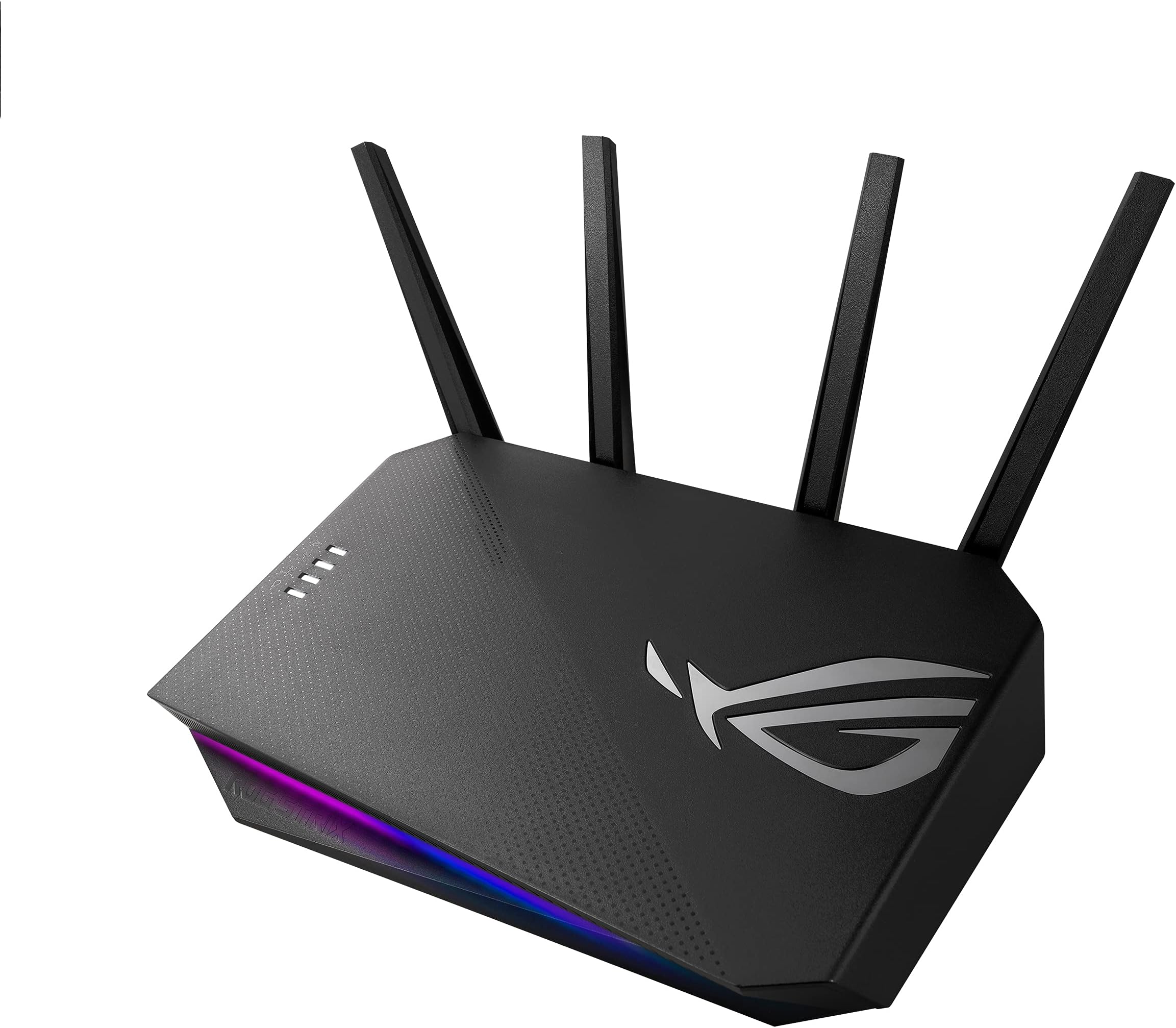





🎯 Dominate your game with speed, style, and security!
The ASUS GS-AX3000 is a dual-band WiFi 6 router delivering up to 5400 Mbps speeds, designed for gamers and power users. It features dedicated gaming enhancements like Mobile Game Mode, Adaptive QoS, and a Gaming Port, plus PS5 compatibility and advanced security with Instant Guard VPN. Its customizable ASUS Aura RGB lighting adds a sleek, modern aesthetic to any setup.














| ASIN | B098QZXNFF |
| Antenna Location | Gaming |
| Antenna Type | Fixed |
| Best Sellers Rank | 10,890 in Computers & Accessories ( See Top 100 in Computers & Accessories ) 83 in Routers |
| Box Contents | router, set up guide` |
| Brand Name | ASUS |
| Colour | Black |
| Compatible Devices | Laptop, Personal Computer, Smart Television, Smartphone, Tablet |
| Connectivity Protocol | Ethernet, Wi-Fi |
| Connectivity Technology | Ethernet |
| Control Method | App |
| Coverage | Extended |
| Customer Reviews | 4.4 4.4 out of 5 stars (119) |
| Data Transfer Rate | 3000 Megabits Per Second |
| Frequency | 2.4 GHz |
| Frequency Band Class | Dual-Band |
| Is Modem Compatible | Yes |
| Item Dimensions L x W x H | 24L x 69W x 2.5H centimetres |
| Item Weight | 599 g |
| LAN Port Bandwidth | 1000 Mbps |
| Manufacturer | ASUS |
| Manufacturer Part Number | GS-AX3000 |
| Maximum Upstream Data Transfer Rate | 3000 Megabits Per Second |
| Model Name | AX5400 |
| Model Number | GS-AX3000 |
| Number of Antennas | 4 |
| Number of Ports | 6 |
| Operating System | Windows Linux MAC |
| Other Special Features of the Product | QoS |
| Security Protocol | WPA2 |
| UPC | 195553173797 |
| Wi-Fi Generation | Wi-Fi 6 |
| Wireless Compability | 2.4 GHz Radio Frequency |
M**O
Brilliant Router, Plusnet FTTP connection
With me moving to FTTP instead of the copper cable Broadband, I wanted to get rid of my Fibre optic ADSL Router and have my setup like a Virgin Cable setup. Having FTTP I can now have a long Ethernet cable plugged into the BT ONT modem which is on the wall and the Ethernet plugged into the WAN Router. This ASUS router is amazing and now all the DSL settings have now gone it makes it a easier setup for myself being a WAN user over a FTTP (Fibre To The Property). Whether you are a FTTP or a Cable user this Router will work for both. I’m using this on my Plusnet FTTP and it is a brilliant router with lots of Wi-Fi signal too. I hope this answers your questions if you have any. Brilliant ASUS, I always swore by Netgear but no more, this is my third ASUS Router, I always use them now. Good Luck!
D**I
It's great Gaming Router
Wifi is stable. Asus mobile app appearance design is clean and let you easy control your Internet traffic. Delight on the OpenNet option, it pretty good to speed up the traffic for the specified PC,PS4,PS5 games.
A**X
Solved all my problems!
I upgraded from my virgin superhub 3 which was awful, but I didn't realise how bad it was until I tried this. My signal strength greatly improved, soo much so that I no longer need my tp link signal booster, it reaches even further than that does! I get no more intermittent wifi drops and get a constant stable WiFi speed now, which is essential for all the devices I have which is over 10 smart devices, a gaming pc, a working from home laptop, tvs, firesticks and many more attached to it at all times and it handles them all with no issues whatsoever.
M**R
Good route nice feature
Good route for gaming lots of features and easy to use but asus technical support is worse you will not get help from them no telephone support and if you email them the say return the item. I had TP-LINK router and the technical support are best phones or email but not asus.
R**I
Great dual band router with 160 Mhz signal
This router works very well with fantastic tests result. Compared with the normal modem (newest Sky Hub) it has best download speeds at 2.4 Ghz and 5 Ghz. On Sky Hub split the channels if you have a Sky Glass and config it to use the 5 Ghz. It has the option of 160 Mhz within 5 Ghz. The software and the app are absolutely fantastic and easy to use. 1000% recommended
A**J
This is quality
Easy to set up Very good Wi-Fi range Overhauled my Virgin Wifi broadband This is extremely good for gaming My Xbox pulls over 1gb of internet speed from a 500Mb virgin broadband when I use the gaming Ethernet port at back of the Gs-Ax3000. Highly recommended for gamers and for people who simply want better, faster connection.
T**N
A must for the modern household!
Not a single wifi blackspot in the house now, fast, stable & elegant, intuitive web admin, love it.
M**M
Advertised features do not work
Asus advertise the router as having excellent QoS and "game mode" to assist further with this. Turns out "game mode" simply turns on QoS adaptive, the default QoS mode. The thing is, QoS does not work on this device. No matter what settings you use, the amount of buffer bloat is ridiculous. A controlled download on another device taking up half my available bandwidth, with my gaming pc setup as the priority device, caused an extra 100ms ping on Rocket League along with mass delayed and lost packets. The experience on all games after extensive testing is unplayable the moment someone else does something on the network. The worst part? If I'm downloading a game the whole network slows to a crawl. This is on a full gigabit line from virgin, theoretically QoS shouldn't even be needed. But alas, this router allows any downloading device to reserve all bandwidth for itself whilst video streaming, internet browsing, messaging, etc, all stop working completely for every other device. Sadly Merlin is not available for this router, and seems to be the only conceivable way to fix this mess by setting up SQM in the custom firmware. Asus clearly don't care about their routers and are fine releasing and keeping buggy firmware active on their products. I went back to a £60 Google Nest router which has a form of SQM built into it's kernel. I can download at 110MB/s on Steam while the 4k netflix Steam downstairs goes on uninterrupted, and web browsing remains responsive. WiFi range took a small hit but the speed is faster than the Asus? 600mbps on my Pixel 5 at 2 bars on the Nest vs 500mbps at full bars on the Asus. Asus had a much higher link speed too. If you don't know what buffer bloat is I highly recommend doing a test or two on Google. It's the main issue most of us having when using the internet on a daily basis, especially those on low speed/capped connections. The best consumer option for those on a budget appears to be the Google Nest WiFi router. Amazon's eero pro 6e is a much more expensive option but also has full SQM to protect against buffer bloat and also supports full gigabit SQM like the Nest. Avoid Asus unless it supports Merlin and you're comfortable flashing 3rd party firmware in addition to configuring SQM manually.
N**N
perfect
K**D
الاداء
ف**ي
النت عندي يعتبر جيد الى ممتاز لكن مشكلته مو ثابت قلت الجهاز راح يحل المشكله هذا لكن للاسف وجوده زي عدمه لا انصح فيه ابدا
E**I
I use this as part of my Asus Mesh...
Trustpilot
2 weeks ago
2 weeks ago