Buy anything from 5,000+ international stores. One checkout price. No surprise fees. Join 2M+ shoppers on Desertcart.
Desertcart purchases this item on your behalf and handles shipping, customs, and support to Cyprus.
🎨 Elevate your art game with precision and color that commands attention!
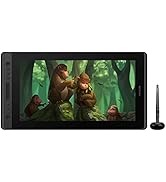
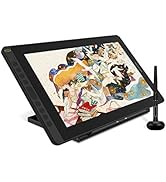
The HUION KAMVAS 16 is a 15.6-inch pen display tablet featuring a full-laminated anti-glare screen with 1920x1080 resolution and 120% sRGB color gamut. It offers 8192 levels of pen pressure sensitivity with tilt support via the battery-free PW517 stylus. Equipped with 10 customizable express keys and dual USB-C/HDMI connectivity, it supports Windows, Mac, and Android devices. Designed for professional and aspiring artists, it includes an adjustable stand and comes with a 1-year warranty.


| ASIN | B08L6428YK |
| Active Surface Area | 137.89 square inches |
| Additional Features | 60° Tilt Support, Anti-Glare Glass, Full Lamination, Programmable Press Key, Shortcut Key |
| Best Sellers Rank | #9,936 in Computers ( See Top 100 in Computers ) #49 in Graphic Tablets |
| Brand | HUION |
| Built-In Media | Digital Pen, Pen Holder, Replacement Nib, Stand, USB Cable |
| Color | Black |
| Compatible Devices | Desktop, Laptop, Tablet |
| Connectivity Technology | HDMI |
| Connectivity technology | HDMI |
| Country of Origin | China |
| Customer Reviews | 4.3 out of 5 stars 123 Reviews |
| Display Type | LCD |
| Item Dimensions L x W | 42.4L x 25.3W centimeters |
| Item Weight | 1.26 Kilograms |
| Manufacturer | HUION |
| Mfr Part Number | HUIONCAGS1562ZJ |
| Model Name | KAMVAS 16 |
| Model Number | KAMVAS 16(GS1562) |
| Model name | KAMVAS 16 |
| Native Resolution | 1920x1080 |
| Operating System | Mac OS 10.12 or later, linux(Ubuntu), Windows 7 or later, Android devices that support USB3.1 GEN1 and DP1.2 |
| Operating system | Mac OS 10.12 or later, linux(Ubuntu), Windows 7 or later, Android devices that support USB3.1 GEN1 and DP1.2 Operating system Mac OS 10.12 or later, linux(Ubuntu), Windows 7 or later, Android devices that support USB3.1 GEN1 and DP1.2 See more |
| Pressure Sensitivity | 8192 Levels |
| Pressure sensitivity | 8192 Levels |
| Screen Size | 15.6 Inches |
| Special features | 60° Tilt Support, Anti-Glare Glass, Full Lamination, Programmable Press Key, Shortcut Key |
| Specific Uses For Product | Painting |
| Target Audience | Artist, Designer, Student, Teacher |
| Warranty Description | 1 year warranty |
L**N
Best purchase ive ever made
Genuinely its the best purchase, ive been using it for almost a year, this is perfect for first timers as its very easy to use!
S**E
Great user experience so far
I received the tablet a couple of days ago and so far so good. Setting it up with the drivers was fairly straight forward and almost plug and play with the devices. Instructions are clear and to the point.
M**Y
Not tablet not rechargeable
It's not tablet. It's drawing bad. Don't have battery not rechargeable. Must be connected to PC or laptop or mobile to function. It's for professional not for young even it's written for beginners. Product itself is fine but not situated for anyone
N**E
Love it!
I first started drawing on an iPad Pro but wanted to upgrade to a drawing tablet so I can practice digital drawing on Photoshop. The great thing about this is that there are not a lot of wirings cluttered around my desk as I only need the USB-C connection to my Macbook and one power output. In the case of drawing, I love that it's smooth and its response is real-time. Great stuff from Huion!
D**D
No regrets
Never regretted buying this item.
S**N
Very high quality .
👍
M**.
Faulty screen.
Great for the most part but screen protector easily gets scratched but even worse the bottom part of screen is black after just a few days of heavy usage. So that's a major problem.
M**W
Great Product!
This product is really great, especially since it is so light and small, you can move it around easily. It is also easy to set up with the 3 in 1 cord, so less wires going around your computer. If you grew up drawing with pencil and paper, this product is probably for you. The adjustable stand is great for whatever angle you want to draw, and also the battery free pen is a great design. I have owned previous Huion products, and they improved their driver functions as well as adding function keys to the side of the tablet. They could improve it even further by improving the accessibility of having supporting multiple Huion products, as setting it up can be a little clunky if you owned previous Huion products, however, I'm sure that they will fix this problem soon. Fortunately, it was not that bad setting this one up, just had to uninstall the previous drivers, restart your computer, then install this new driver and it's complete. The colours of this product is spectacular and sharp. You can also adjust the colours and settings to fit your likings if you do not have a colourmunki to have accurate colours. Honestly, this device is much cheaper than Wacom tablets and I have been using Huion devices for a couple of years. The only thing that I think would improve this is to have longer cords. I am already enjoying this light and small device and brings me back to my childhood drawing with pencil and paper. I would definitely recommend this product! Other than some minor things such as cord length and a better driver support for multiple Huion products, I'm falling in love with this new drawing tablet already!
A**B
Original
Original
U**1
اداء كويس وشاشة مقاسها حلو بالنسبة لي مريح لشغل الزي برش
كويس جدا
L**T
I like it!
This year I get to upgrade my tablet! I thought my previous one was a bit too small and I was going a little crazy~! I’m a person that likes a lot of space to draw and I already have eye problems so the bigger size is much appreciated for these tired eyes! But I also didn’t wanna go too big and then it takes over my whole desk lol... I really like that this tablet has more express keys than my other one. I really love to use them. I still don’t know keyboard shortcuts well… Everything works well in the program I’m using; clip studio and fire alpaca and the pen feels really nice. I wish they kept the screen protector from their previous model though this screen protector is a lot smoother… but I really enjoyed the rough paper like texture on their kamvas 13 model… I loves it sooo much! But… I think I can learn to love this one though and still feels nice in its own way. I hope they offer rougher screen protector options for their tablets because id totally get one. Anyways, this tablet has a good number of extra goodies! The highlights being a tablet stand and cables so you can connect to an android device. The tablet stands good! You’re probably going to want to put some books under it though so you can get it to eye level. I still bend over a bit so it’s giving me a bit of back problems. putting it to eye level helps soo much! And the android cables…. Now, I’m no phone artist I have barely any idea how to use phone drawing apps but it’s an amazing feature if u don’t have a computer! It’s like basically giving you a pc experience, a doodle around a bit in huion sketch and if I didn’t have pc I wouldn’t feel very salty. There’s also an extra feature for Samsung Note user called Dex?? It’s like a remote desktop experience... I didn’t use it much but what I got out of it is that it puts a lot of my apps in horizontal perspective on the huion tablet and lets me change ratio, cool! Could be something useful if ur traveling, because man, this tablet is sooo much lighter than my laptop. If u have a Samsung device it’s something to look into if it’s available on ur model idk if its just a note series exclusive~ Overall great tablet, the last thing they gotta add on any upgrade models is touch that’d be so cool.
J**E
Excellent! Alternative for a Graphic Tablet!
I have reviewed few display tablet and I guess Kamvas 16 is an excellent option at a reasonable cost. The new 2021 Kamvas 16 has a very good response in its new P517 pen 3.0, more stable and less wobble than pen 2.0. The 10 programmable press keys is excellent for shortcut input. It has a USB-C to USB-C cable included and a 3-in-1 cable with USB and HDMI plug. The matte finish of the monitor is smooth to write on with a paper feel. There is a bit parallax when you use it but its negligible. It’s easy to set up and it almost plug and play when you properly install the driver. Color saturation is ok for me, although its not bright enough even when you set it the brightness and backlight in full range. The product is thin and light and recommended for artist on-the-go. Compatible with Android & Artist app such as Krita, Clip Studio and Sketch Book Pro. It is also a good compatibility when you use it in Sketch up Pro and in making technical drawings using sketch up. However, there are few small issues that I have observed. • The L shape usb plug become loose when you have used it for a while, it might be because the wire is hard and stiff and not flexible enough. • The wire is not long enough so you have to make sure you are very near to the PC where you plugged the tablet. • When using Autocad, the pen does not respond well and it has delay, the cursor is not centered and off by about few mm. I have calibrated it for Autocad use but still there is a difference along the left side of the monitor. • The monitor resolution is ok when using it as extended desktop, But it automatically change in Kamvas 16 when using is as duplicate desktop. • The upper right corner of the monitor becomes warm when you used it for a couple of hours, but I think its normal. • I also observed that in some area of the matte laminate, it looks like its popping up or the adhesive does not stick well to the glass, So I have to wipe it using the cloth with a little bit of pressure to make it stick to the glass. I understand that the product is still not perfect but in overall, the product is great and recommendable for digital artist. It might not work perfectly in vector drawings applications but I believe, it has a potential and still has a large room for improvement.
Trustpilot
2 weeks ago
1 month ago