Desertcart purchases this item on your behalf and handles shipping, customs, and support to Cyprus.
๐ Elevate your home calls with smart, crisp, and connected convenience!
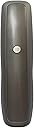
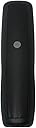
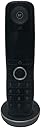
The BT Advanced Digital Home Phone is a sleek, cordless VOIP phone designed exclusively for BT Smart Hub 2 users. It delivers HD voice clarity, Alexa-enabled calling, and supports two handsets for simultaneous calls. With built-in nuisance call blocking and a large rear HD speaker, it combines ergonomic design with smart home integration, making it ideal for professionals seeking reliable, high-quality home telephony.
| ASIN | B092R2HC77 |
| Answering System Type | Digital |
| Best Sellers Rank | 7,357 in Electronics & Photo ( See Top 100 in Electronics & Photo ) 38 in Cordless Analogue & DECT Phones |
| Brand | EETU |
| Brand Name | EETU |
| Colour | black |
| Compatible Devices | BT Smart Hub 2, VOIP, Alexa |
| Conference Call Capability | basic |
| Country of Origin | China |
| Customer Reviews | 4.2 out of 5 stars 417 Reviews |
| Dialer Type | Single Keypad |
| Enclosure Material | Plastic |
| Is there Caller ID | Yes |
| Item Dimensions | 30 x 50 x 190 millimetres |
| Manufacturer | British Telecoms |
| Manufacturer Part Number | B092R2HC77 |
| Material | Plastic |
| Model Number | B092R2HC77 |
| Multiline Operation | Multi-Line Operation |
| Number of Batteries | 2 AAA batteries required. |
| Number of Items | 1 |
| Number of batteries | 2 AAA batteries required. |
| Power Source | AC adapter |
| Power source | AC adapter |
| Telephone Type | Cordless |
| Telephone type | Cordless |
| Unit Count | 1.00 Count |
J**K
Excellent for changeover to BT โDigital Voiceโ
I had long postponed switching over to "digital voice" because I had my own high spec router which was remote from the master socket. I was reluctant to change to a "standard" BT router and had a 5 handset DECT answer-phone system, all of which was well established and worked very well indeed. In the end I was forced to change by BT. Before the system was changed over, I researched routers with a built-in DECT base unit, but could only find some basic and quite "old" alternatives. So, I decided to give the BT Smart Hub 2 a try. I also ordered the โfreeโ BT Digital Voice adapter which I intended to use with my existing DECT phones. When the new BT router arrived, I installed it and set it up to mimic my own old router. I found that it was actually quite a good router. It was enabling faster, and more consistent, WAN download speeds than before and Wi-Fi coverage and speed was very good. My thoughts then turned to my old DECT phones. These were very old. Some had button problems, some had fading displays. It would also mean that using the BT adapter would re-introduce an analogue link into the digital phone system. Upon looking at the specification of the โBT Advanced Home Phoneโ I found that these would be ideal for my setup. The BT Hub would support 5 phones from its built in DECT base station. There would not be a local answering-machine, but 1571 would in fact work better. I bought five of these BT Advanced Home Phones from Amazon, and installed them with the BT Smart Hub 2 router. The phones I received were a mixed-bag. Three were BT branded with the BT logo and a purple screen display. Two were the later EE type of phone with โHDโ branding and a black screen display. This was rather odd, but all five phones worked in the same way, and looked much the same. Because they appeared to be โoldโ stock, sold at a reduced price, I updated the phones firmware from each handset to the latest version, and brought them up fully up-to-date. It was clear that the phones were old stock and the batteries were slow to charge. As a precaution I decided to change the batteries for some Panasonic Eneloop ones - which have a long service life. I have not enabled or used Alexa, so it is something I cannot comment on. It is not something I need or want. The phone is so very easy to use without it. The phones more than met my expectations. The sound is very good indeed โ of course provided both ends of the call are โdigitalโ. They are easy to use. There are many configurable settings with a lot of user options. The Contacts can be imported (into the BT router) via a .vcf file, or exported from the phones to a backup file from which the Contacts can be restored to the phones. Reviewing recorded messages is a one-button operation. The phones are very easy and logical to use. The phones themselves are excellent, but have one downside - they only work with the BT Smart Hub 2. If you want to keep, and improve, your telephone landline after Digital Voice changeover these phones are an excellent way of doing it. They are fully recommended, and will give you a far better solution than the old analogue landline.
R**S
A great broadband phone
I really like this phone. I found it very easy to set up and use, since I had a BT premium phone before.
R**B
Great phone ... BUT beware 1571 charge for returning Voicemail calls
Good handset, bought after we were converted to digital. Very clear reception. I had been told by BT I could no longer use the voicemail facility on my existing DECT phone system and would therefore be provided with the BT 1571 service "free-of-charge" ie as part of my package. Not entirely true, the DECT voicemail would still have worked. This was not a great problem as I wanted newer/better replacement phones anyway...Until I discovered the EVIL, UNDERHAND side-effect of using 1571...you cannot simply press a button to return a call to someone who has left a voicemail message without incurring an extra BT charge (size UNDISCLOSED at the time!!!). Sure, you can dib-dab to discover the number and phone it back manually to avoid the charge but this is very dishonourable of you BT ... VERY BAD SHOW !!!
M**B
BT Advanced Digital Phone - Import Contact List
This is a WiFi phone: easy to setup, just plug into the mains and follow on screen instructions. No problems with use, setup, or sound quality. But a couple of minor issues. . Buttons could be bigger, my wife finds her nails get in the way when trying to press the 'phone book' button. . The online manual mentions logging on to your BT hub to backup the phones contact list. But, you can also use this process to import a contact list: with some issues! Backup your mobile phone contact list (.vcf file) and import to a PC or MAC. The BT phone directory does not recognise +44, so edit the vcf file in Excel and replace +44 with either 0044 or 0 (same with International numbers). You can have a max of 3 numbers per contact, so also edit in 'work', 'mobile', 'home', etc, if needed. Logon to your BT router (instructions in the online phone manual), and import the edited vcf file - took me about an hour, but saves having to enter a long list manually into the phone. Problems with this process: do a web search and there's some help on the communty.bt web site.
F**N
Faulty phine
Brought this after upgrading broadband speed by BT. This phone said to be comparable dhith hub 2. I do not like by doing so your phones otherwise need adapter. You only get this by asking BT to supply. The digital phone is now now working that is not ring when being call,6 months and I cannot get it ring on being called. I hope BT will call to rectify this
P**D
Useful expansion of home system
At last running downstairs, only for voicemail to cut in first, is over.
A**Y
A good product.
A good product, works well with the BT WiFi.
P**S
Cordless telephone battery reliability.
Quite often the telephone would cut out as soon it was picked up - despite being on charge for more than one day. It turned out that the rechargeable batteries would not hold the charge - the problem being when the phone was further away from the hub. However replacing the batteries with higher quality ones solved the problem.
Trustpilot
3 weeks ago
1 month ago