We remain fully operational. Our teams are working around the clock to ensure your deliveries continue safely.

DOWNLOAD THE APP


Copyright © 2025 Desertcart Holdings Limited
DOWNLOAD THE APP
Buy anything from 5,000+ international stores. One checkout price. No surprise fees. Join 2M+ shoppers on Desertcart.
Desertcart purchases this item on your behalf and handles shipping, customs, and support to Cyprus.
🚀 Upgrade Your Connection, Leave Buffering Behind!
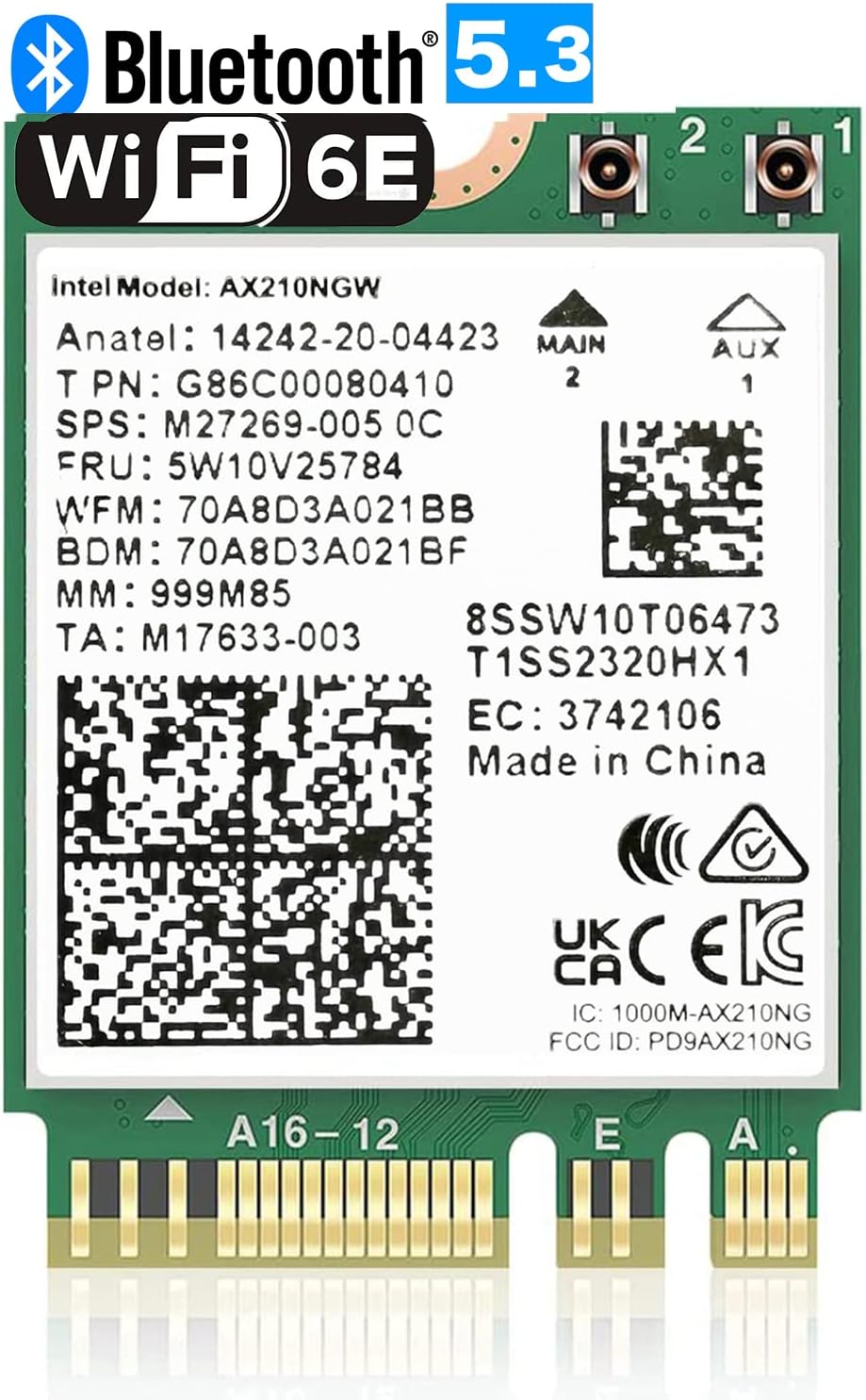
The OKN WiFi 6E AX210 NGW is a high-performance M.2 2230 wireless card that delivers tri-band Wi-Fi speeds up to 5400Mbps, leveraging the latest Wi-Fi 6E technology with ultra-low latency and MU-MIMO support. It integrates Bluetooth 5.3 for enhanced wireless device connectivity and supports WPA3 security for next-gen protection. Compatible with Windows 10/11 64-bit systems on Intel and newer AMD CPUs, this module is perfect for professionals seeking lightning-fast, reliable, and secure wireless performance.


| ASIN | B08MJLPZPL |
| Best Sellers Rank | #41,848 in Computers ( See Top 100 in Computers ) #97 in Network Cards |
| Brand | OKN |
| Color | Green: AX210 M.2 WiFi 6E |
| Compatible Devices | Laptop |
| Compatible Operating System Family | Windows |
| Customer Reviews | 4.6 4.6 out of 5 stars (966) |
| Data Link Protocol | 6GHz, BT 5.3 |
| Data Transfer Rate | 5400 Megabits Per Second |
| Hardware Interface | Memory Stick Micro (M2) |
| Item Dimensions L x W x H | 30L x 22W x 2H millimeters |
| Item Type Name | M.2 ngff wifi card |
| Item Weight | 14 Grams |
| Manufacturer | UFON |
| Mfr Part Number | AX210 |
| Model Number | AX210 |
| UPC | 650728511977 |
| Unit Count | 1 Count |
M**N
The item was exactly the same as I ordered.
Received with thanks.
O**A
لا يأتي معها انتينا
F**S
Before purchasing a Lenova Legion 5, I read several reviews of the PC. Among the many positive reivews, several people commented on problems with the original WiFi card dropping it's connection with no apparent reason. However, there were also recommendations for a good replacement of the WiFi card. As predicted, I did have problems with the original WiFi card. It would disconnect from a perfectly good connection, then jump from one connection point to another without ever regaining a good connection. Our streaming TV would be running continually throughout this same time, so it was apparent that there was no problem with the WiFi signal or our primary connection point. After doing some research regarding the best replacement WiFi card, I decided to order this card. The installation went fairly smoothly (see notes below), and whatever drivers were required seemed to load automatically. The WiFi card was immediately operational and the WiFi connection now seems very stable. And to my surprise, this new card seems to be faster than the original card. A win-win situation. While highly recommending this card for the Legion 5, I also recommend watching one of the Youtube videos to learn how to remove the bottom cover of the PC, and to learn how to replace the WiFi card. The whole process is resonably easy, but there is a specific technique for removal of the bottom cover--especially the vent hole areas along the sides. Additionally, the WiFi card antennas connections are very small and I found them to be a little difficult to reattach--but all was well in the end.
C**R
Replaced my motherboard's built-in wifi/bluetooth chip with this one. The swap was easy and it fit right in. Compatible with Linux (Bazzite, but should work for other distros). Also works fine with my AMD CPU. Wifi works, although I don't use it. Bluetooth works great, good for gaming.
K**.
A much needed card! I needed to add this card to my Optiplex 3090. Went in without any issues, seem by Win 10, works really well! Good price, fast delivery.
A**R
Works great with 2024 ASUS Zephyrus G14 GA403UI I wanted to replace the default mediatek wireless card on the laptop because it just seemed slower and had odd disconnect issues. I heard that the AX210 chip would work on AMD Zen3 or higher laptops so I purchased this card. Before when using the mediatek wireless nic, my speed test was coming in around 250mb/s. In the same location under the same circumstances, this intel wireless nic has boosted my download to 460mb/s. It just feels snappier and downloads are incredibly fast. Performed a steam download for a 4.4gb file in about 1 minute with a 1000mb internet connection. Random tips: —Remember to download the WiFi and bt driver first before swapping out the nic --Don't worry if the laptop doesn't boot up after you replace the wireless nic. It has to be plugged into a powercord before it'll power on again --I recommend removing all bluetooth devices before swapping it out. I didn't and now old BT devices are ghosted and unremovable in my BT device list --If you're using a Google Nest Pro router, I had to remove the 160mhz range setting and enable use WPA3 from advanced network settings. While this was 160mhz was enabled, i was getting incredibly poor wifi signal and sometimes even the router refused to let me connect. Once I changed those settings I had more reliable connections and faster speeds. Hope this helps future buyers and I hope ASUS and AMD will use a better wireless NIC than mediatek in the future.
Trustpilot
4 days ago
1 day ago