Desertcart purchases this item on your behalf and handles shipping, customs, and support to Cyprus.
๐ฎ Elevate your desk game with silent power and vibrant style!
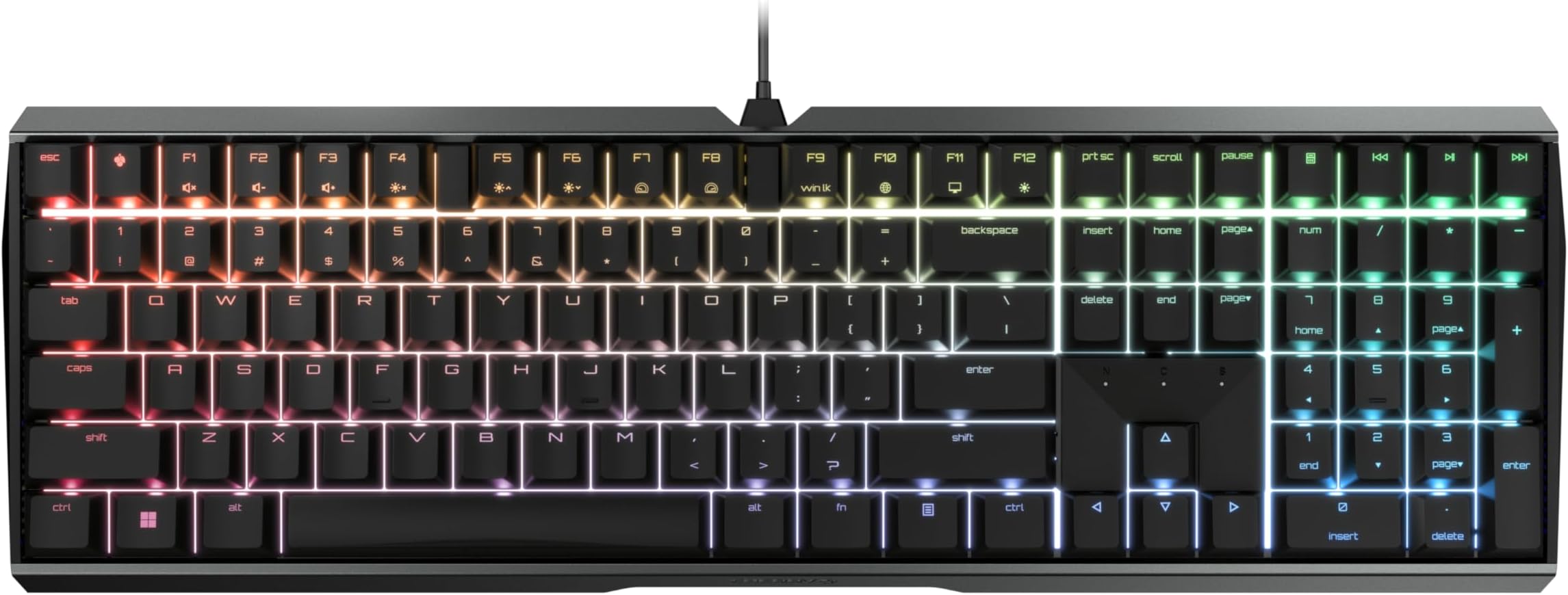
The CHERRY MX BOARD 3.0 S is a high-performance wired mechanical keyboard featuring ultra-durable MX2A Silent Red linear switches rated for over 50 million keystrokes. Its robust extruded aluminum housing combines sleek aesthetics with screw-free engineering for lasting stability. With fully customizable RGB backlighting supporting over 16 million colors and advanced gaming features like full N-key rollover and anti-ghosting, itโs designed for professionals and gamers seeking precision, quiet operation, and immersive style.


| ASIN | B08YRRLV25 |
| Additional Features | Backlit |
| Antenna Location | Gaming, Home Office, Office, Programming |
| Best Sellers Rank | #2,287 in Video Games ( See Top 100 in Video Games ) #236 in PC Gaming Keyboards |
| Brand | Cherry |
| Built-In Media | USB Cable |
| Button Quantity | 109 |
| Color | Black |
| Compatible Devices | PC |
| Compatible Operating System Family | Windows |
| Connectivity Technology | USB-A |
| Customer Reviews | 4.5 out of 5 stars 345 Reviews |
| Enclosure Material | Plastic |
| Generation | 3rd Generation |
| Hand Orientation | Ambidextrous |
| Item Dimensions L x W x H | 16.93"L x 5.51"W x 1.42"H |
| Item Type Name | Mechanical Gaming Keyboard |
| Item Weight | 2.3 pounds |
| Keyboard Backlighting Color Support | RGB |
| Keyboard Description | Gaming |
| Keyboard Layout | QWERTY |
| Keyboard Plate Material | Aluminum |
| Manufacturer | CHERRY |
| Mfr Part Number | G80-3874LWAUS-2 |
| Minimum Required Operating System Version | Windows 1 |
| Model Name | CHERRY MX BOARD 3.0 S |
| Model Number | G80-3874LWAUS-2 |
| Number of Items | 1 |
| Number of Keys | 109 |
| Number of Packs | 1 |
| Number of Sections | 7 |
| Processor Count | 1 |
| Recommended Uses For Product | Gaming, Home Office, Office, Programming |
| Special Feature | Backlit |
| Style Name | Contemporary |
| Switch Type | Linear |
| Theme | E-Sports |
| Unit Count | 1 Count |
| Warranty Description | 2 Years |
I**N
Most luxurious keyboard I've ever owned!
I broke down and bought this keyboard because three low-end models in a row had been pieces of crap, and this model was rated #1 on a "best of 2023" list for silent keyboards. So far, I love it, but it's taking some getting used to. All keyboards are slightly different, but the font on the letter keys is a sort of "NASA" space style font which is a little harder to read than your standard sans-serif keyboard letters. Even more different are the numbers and symbols on the number keys being reversed, so the symbols on each (! on the 1 key, @ on the 2 key, etc) are below the numbers rather than above. There are indicator lights for caps lock, scroll lock and number lock, but talk about subtle--I just found them! But I love the feel, I love the solid construction, I love how quiet the keys are, and I can type really fast on it. It's heavy and it doesn't slip or move while you work. I'm not using it for gaming, but I'm a writer and publisher, so I really need a good keyboard. The keyboard not only glows in rainbow colors, the colors continuously cycle in a slow pulse, which is definitely funky. When I get stuck on writing something I can take a break and watch the keyboard change colors while I think. :-) It works fine with my older Lenovo desktop, I just plugged it into an USB expander and zoom, it was good to go. The delivery was blindingly fast, it arrived the next day. The packaging...not so great. The keyboard had just been tossed into quite a large box with a couple of packing pillows. It arrived just fine (it didn't spend very long in transit!) but the manufacturers might want to know that Amazon is being a bit casual with their product.
G**D
Smooth and quiet typing - great customization
I was able change the keys individually to make it festive for The 4th of July. Itโs so quiet for my extremely quiet office. My last keyboard was so loud and embarrassing. It feels like the highest quality keyboard Iโve ever used. Well worth it the extra money. You get what you pay for.
D**D
Spacebar squeaked when tapped on one side, but I fixed it. Great keyboard anyway.
Pro: the keyboard is quiet. Not silent, but good. There are functions that disable windows key and other combos that gamers like me often hit by accident in the middle of the action. Press the combo key when done playing to easily restore the function. (By default, the keys glow red when disabled. Cool.) Con: The space bar squeaked! One side squeaked whenever I pressed it, whether it was slow or a fast tap. I may have fixed it. FIX (maybe): I removed the spacebar. The right support squeaked when I lifted it up and down. The left side was silent. In desperation, I put a drop of lightweight valve oil on the plastic post. It has stopped the squeak, but I'm not sure what effect that oil will have on the plastic, or if I will have to repeat it in the future. I like the feel and appreciate the aluminum base.
D**N
I never knew I missed a mechanical keyboard
I haven't had a keyboard this nice since our old IBM/Aptiva set up in '95. I'm not a computer nerd, but I am the proud father of such an unusual entity. My gaming days are over so when I decided to replace my tired old Logitech keyboard that had the AWSD characters worn off I consulted my Computer Engineer nerd son. I asked him what keyboard he liked and he went off on one of his lectures. Among the words I understood was Cherry keyboards, mechanical keys versus membrane something. He was deciding on a keyboard he could use for programming and the Cherry was on his short list. After doing some of my own research I was willing to give the Cherry a try. I really like the solidness of the keyboard. I have quite wide shoulders and big hands so the size of the keyboard surprised me when I opened the box, but I have found it comfortable to use for the amount I use it. It took two hours before I was landing my fingers on the keys correctly. My old keyboard had quite large keys, but they certainly didn't have that feel these keys do. I bought the red silent keys and they are a joy to use. I love the feel of these keys and the fact the keyboard stays put on my desk. My wife says I pound the keys, not depress them. I suppose I do, but at least this keyboard is sturdy enough for my big paws. The backlight is a fun addition. I'm not sure it serves a purpose, but it looks nice and if it brings a smile, that's purpose enough.
B**N
Greatness in a keyboard
I absolutely love this thing. It's got a great spring-back but is easy enough to press down that I can type really fast. It's the quietest keyboard I've ever had. The colors are really nice, too. My ONLY feedback for the creators would be: -Please make the font bigger on the keys, including the symbols -Make the home key nubs a smidge...nubbier In no way do these detract from the quality, but I WFH as well as run a business and am on the keyboard 60+ hours per week, large fonts and good home nubs are a must. These nubs are just good enough, and the font is just large enough, but if they could add those in that would be amazing. Still 5+ stars for the product. It's solid, non slip, quiet, nice and heavy, and I really like the amphitheater style curvature. It's a subtle curve, but nice and unique to my previous keyboards.
M**N
Quiet, responsive, great for gaming
I've always hated the aggressively clicky sound of mechanical keyboards, to the point where I eschewed them for membrane keyboards, despite knowing that those tend to be less responsive than mechanical ones. Well, cue my surprise when I learned that silent switches exist. Obviously, I knew that they wouldn't be truly silent and would still make noise, but if they were comparable to the noise level of membrane keyboards, that would be sufficient for me. I'd say these are indeed about as loud as a membrane, albeit with a different type of sound - more snappy than the mushy sort of sound that membrane keyboards generate. Sometimes, I can hear a spring being released after a keypress, but it's really not loud at all. Regardless, the Cherry MX Silent Red switches definitely have a pleasantly subdued volume, so I'm totally happy about my purchase already. But perhaps more importantly, is the performance good? Absolutely! It's very responsive and has NKRO, making it a worthy fit for gaming (I've been playing a lot of sidescrolling platformers, and it works great). Cherry's software is also thankfully very unobtrusive, and gives you control over the keyboard's functions and RGB (I always turn it off, haha). I suppose some people might not like the futuristic sort of font on the keys, but I don't really pay attention to that kind of stuff.
J**N
Feels AMAZING
Just received it and have been using it for 3 days. I have used many other keyboards with Cherry MX Red switches and NONE of them felt nearly as good as this Cherry keyboard. I know this one has the cherry silent red switches, but still, it feels WAY better than any corsair/hyperx, gaming keyboard I've ever used. The typing feels super comfortable ( Ive never felt a keyboard that's ACTUALLY comfy before). They key spacing is perfect, it makes typing just a joy. Gaming on this is perfection. The over all keyboard is nice and heavy made of full aluminum for a hefty, made-with-quality feel. There's plenty of RGB lighting profiles if you are so inclined. I use the white lighting with red WASD keys. Glad I found this keyboard, i will be going with Cherry keyboards for the rest of my life! Did I mention this keyboard is the most comfortable typing keyboard ever? The only gripe is , no removable USB type-C cord. I think the cord is the antiquated micro USB. But that's the only downside to this keyboard.
I**S
Comfortable, luxurious, top-notch keyboard. Only problem -- CORD SUCKS!
I've been using this keyboard for over a year now, and it's the best-feeling keyboard I've used to-date. The lights are individually customizable, the software is easy to use, you can even reprogram any key on the keyboard to be another (including their little Cherry button in between ESC and F1.) After 3 months of using it, the cord started to break and only work at specific angles. I messaged Cherry's USA branch for help and they sent an entire keyboard as a replacement for just the cord (as it's a proprietary micro-usb that they don't resell, I couldn't just replace it or order a new one.) As grateful as I was, it was short-lived as less than a year later I started to have the same problems again. The cord started working only at an angle, which makes it impossible to use this gaming keyboard for any real gaming. TL;DR -- Keyboard is great, both cords I've had for it have broken though. I recommend it unless you're bad with keeping your cords tidy.
B**E
Awesome keyboard. Best value for the price hands down.
If you like quiet, linear switches with a tight, high-quality feel, you won't do any better than this at the price point.
G**J
The type for me
The keyboard is sturdy and easy to use. Would recommend.
M**G
MX Red --> Silent <-- Switches, different from MX Red Switches
pros: - as the name advertised, very quiet keyboard, the linear key switch does not make noise when fingers touch the surface; this mechanical keyboard makes less noise than Cherry's own membrane version - the linear switches have right amount of resistant, do not require too much force to press down - fancy key labels, they look too pretty that I don't want to use customised key caps, but a few of them are not aligned very well (e.g.: brightness up and down, not sure if that's intentional but very ugly) - backlight, and fancy reflection of RGB LEDs from each key to the aluminum frame having a cyber feeling - full sized arrow keys - wired! keyboard (and the USB head has a keyboard mark to distinguish this device without tracing the wire) - wired keyboard with onboard memory! -- both backlights and key maps are stored onboard, persistently -- backlight setting can be configured without software -- the Cherry Utility Software ONLY changes the onboard memory configuration, no Windows background process nor registry alternation (however, the software cannot load the onboard memory, meaning if you delete the software, or running the first time, it will overwrite the existing configuration) - having all these features I care, this keyboard is surprisingly cheap cons: - minimum brightness is still too high; it's possible to use the software to change the HSV to dimmer the colour, but the main problem is the gap between key caps - there is a lighting mode called Single key, which turned off all backlight, and light up whenever a key is pressed, meaning the hardware is capable to adjust each key's brightness, instead of only the HSV value; also wish there is a mode works similar but keep all keys light up but changing their HSV or even only the brightness on press - pretty much the only real annoyance of this keyboard is the Cherry key's location -- between ESC and F1. My left hand looks up F2 and F4 by searching the gap between ESC and F1, so this was almost a blocker issue, but I found three workarounds: -- 1. first I take the Cherry key's cap off and mounted it upside down, so my finger can recognise it, downside of this method is there are more light leaking from the other side of key cap -- 2. mod the keys so Cherry key can act as F1, then F2 ...... but then there is no gap between ESC and F1 -- 3. good thing the Cherry key switches support key caps customisation, a low profile cap can help my finger to navigate around that area, and still keep the functionality of that key neutral: - there are 3 very bright LED indicators (for CapLock, ScrollLock, NumLock), located between DELETE END PAGE and arrow keys, cannot be disabled, cannot adjust brightness; I have to tape them to save my eyes, but to be fair, most keyboards have these annoying indicators - rectangular RETURN; and the label is just an arrow, how can we tell which one is RETURN which one is ENTER? - FN key is not at left bottom, but right to ALT key; mixing feeling of: volume controls are F1&F2&F3 (cannot mute with a single hand for average people), but CTRL is the left bottom as it should be; I mod the key right above NUM to mute and unmute(no idea that label meant for and don't care losing that function), so it's acceptable - the alternative function of keys are labelled counterintuitive (! is below 1, ; and : on the same line, where is the ? mark) - profile linking with applications does not work very well and require the software being running, I rather to manually switch profile than having a hidden Windows process
A**0
Feels like a quality keyboard
I really like the quality of the build. My only complaint is the ping noise I hear when typing.
J**R
It just works. No BS software or gimmicks
As a previous owner of multiple Razer, Steelseries and Corsair keyboards, this thing is like a breath of fresh air. The cherry red switches are as quiet as a membrane keyboard and I find myself making far less typos while speeding through typing. I honestly didn't think I would be nearly as impressed as I am with this little keyboard. No extra software, macro keys or any of that nonsense. Plug and play. The way it should be
Trustpilot
2 weeks ago
2 weeks ago