We remain fully operational. Our teams are working around the clock to ensure your deliveries continue safely.

DOWNLOAD THE APP


Copyright © 2025 Desertcart Holdings Limited
DOWNLOAD THE APP


Buy anything from 5,000+ international stores. One checkout price. No surprise fees. Join 2M+ shoppers on Desertcart.
Desertcart purchases this item on your behalf and handles shipping, customs, and support to Cyprus.
🎨 Elevate your digital canvas—create like a pro, anywhere, anytime!
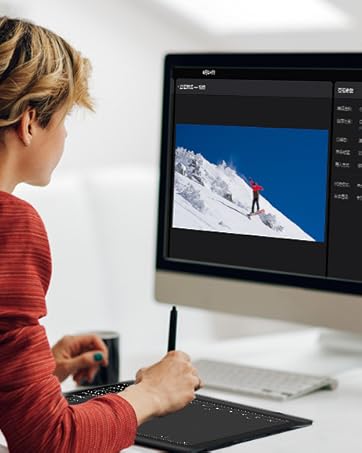
The XOPPOX Graphics Drawing Tablet features a large 10×6 inch active area and a battery-free stylus with 8192 levels of pressure sensitivity, delivering precise and natural drawing experiences. Equipped with 12 customizable shortcut keys and broad compatibility across Windows, macOS, and Android, it’s designed for artists, designers, and educators seeking a versatile, efficient, and portable creative tool.




| ASIN | B08TC1N6JS |
| Active Surface Area | 10 inches x 6 inches |
| Additional Features | Battery-Free Stylus, 12 Customizable Shortcuts Keys, 5080 LPI, 60° Tilt Support |
| Best Sellers Rank | #48 in Computer Graphics Tablets |
| Brand | XOPPOX |
| Built-In Media | 1 × XOPPOX drawing tablet, 1 × Battery-free passive pen, 1 × Pen case, 20 × Replacement nibs, 1 × Nib removal tool, 1 × Micro-USB OTG, 1 × Type-C OTG, 1 × Two-finger glove, 1 × Cleaning cloth, 1 × Tablet stand, 1 × User guide. |
| Color | Black |
| Compatible Devices | Compatible with Windows XP/7/8/10/11, Android 4.4 and above, and macOS 11 or later (not compatible with iPhone, iPad, or Chromebook) |
| Connectivity Technology | USB |
| Customer Reviews | 4.2 4.2 out of 5 stars (1,498) |
| Item Dimensions L x W | 14.2"L x 9.5"W |
| Item Weight | 2.65 Pounds |
| Manufacturer | VIN1060Plus |
| Model Name | VIN1060Plus |
| Model Number | cbefe1d4-7323-49c7-8094-fdaf714227e8 |
| Native Resolution | 5080 |
| Operating System | Windows XP/7/8/10/11, Mac OS, Android OS |
| Pressure Sensitivity | 8192 Levels |
| Screen Size | 10 Inches |
| Specific Uses For Product | Digital Drawing/Design/Online Teaching/Mouse Replace |
| Target Audience | Artist, Content Creator, Designer, Student, Teacher |
| Unit Count | 1 Count |
| Warranty Description | We provide a 12-month warranty for the drawing tablet from the date of purchase. |
T**.
ARRIVED IN PERFECT CONDITION, WORKS AS EXPECTED. PRICED RIGHT.
VERY GOOD DIGITAL GRAPHICS PAD. WORKS AS EXPECTED. YOU GRAPHICS DESIGNERS AND BOOK KEEPERS YOU NEED THIS. THOMAS W D
K**S
Amazing product! and huge thoughts on it!
the images i linked is the program screenshot and a old drawing i made with it! Ive been using this for several months now, for new buyers, you might have seen a review saying the program attached to the tablet is a "virus" ... that is completley false! it just boots up every time you restart your pc, this is what the program looks like, tablets require a driver program. another thing, the hotkeys are customizable and easy to use, the only downside is it bugged out when i first got it but it fixed itself after, its really good for its sale price (it almost always goes on sale) and its perfect! even the usable tablet zone is customizable by size if the tablet is too big! and it works with lazy nezumi (stabilizer program, its really good if you have shakey lines, $30 for 4 year liscense) the product itself is sturdy (ive dropped it on carpet a few times, oops) and is well for heavy usage, good for professional use and comes with lots of nibs, screen doesnt scratch and the nibs wear rarely (even after several months i havent changed the first nib, maybe should soon) its comfortable to carry and comes with a stand if you need to use one, the glove isint important, because its not a touch screen, but its still nice if you want to glide your hand against the screen or dont want sweat on it overall out of ten i would give.. 10! way better than a wacom tablet!
S**S
A little setup but a great tablet at the end of the day
Been doodling and doing digital art most of my life in one way or another but there’s always been a disconnect between my photo manipulation on the computer and drawings and sketches on paper. Decided to plunge in and try to assimilate the two and you do not want to do that with a mouse so inevitably a tablet was in order. Am I going to even like that? How difficult will it be to look at a screen and draw with my hand separately? Well I wasn’t going to spend a bunch of cash on a tablet to try it out so I caught this one on sale watched some YouTube videos and made the call. The build quality of this seems ok enough I wouldn’t drop it off a building or anything but if you’re doing that perhaps digital art may not be your thing. But everything seems well put together and the tablet is perfectly responsive and MOSTLY easy to use. My only complaint is that it took me about a week of trial and error and various YouTube how to’s to finally figure it all out. For me the issue was I kept losing pressure sensitivity and therefore couldn’t get the tapered lines. I could literally just walk away for an hour and come back and it wouldn’t work it was mildly infuriating but ended up just having to tick the box for “windows ink” in the driver and has been working flawlessly since so if you’re on windows 11 and having that issue check that box. All the extras were a nice bonus as well, just the glove would have been a nice addition but the inclusion of the stand was a very nice thing to have. It’s perfectly fine to just lay it down but having the slight elevation is nice and the stand is good quality metal construction so I’m not worried about breathing on it too hard and it exploding into bits. The pen feels slightly flimsy but I have no plans to mine ore with it in the immediate future and I’m an adult that attempts to take care of my things so it’s not really a concern. I do wish the usb cord was a removable cord but it’s not the end of the world just know that if you mess up the connecting cable you’re pretty borked unless you know how to solder. But again for the price it’s not a huge concern I’d just buy another one and go on about my day. Smaller tablets are just as good and comparatively priced but why wouldn’t you want the larger size? If you want to do your drawings on a post it note go for it it’ll work fine and not even be that awkward but personally I like having all the screen area for the same price. Overall this thing is pretty nice can’t give it a full five stars for the couple small complaints but shipping was fast, product works great after some setup and I would absolutely make this purchase again. Keep in mind your pc power has a bit to do with performance if your using this on an amiga then you might have lag and stuff but if your using an even remotely modern pc (I highly highly recommend the ACEMAGICIAN Mini Pc with the ryzen 7 and 32 gb of ram also available here on Amazon, it’s a beast and the size of a Bluetooth speaker) but none of that is a constraint of the tablet just a heads up if you’re new to this. Get this product and download Krita (a free open source alternative to photoshop) and you’re ready to draw badly like me. That’s it that’s all there really is, buy this.
S**M
Very good value
I don't have any previous experience with drawing pads, so this is a new journey for me. I initially purchased this drawing pad for taking digital and converting notebooks to digital notes. At first, drawing on a pad while looking at the screen was a bit awkward but after a couple of days, I got the feel for it. After that I've gained intuition of how to write while not looking directly at the writing surface, it all became much more natural. Now that I am comfortable with using the tablet, I can say whether or not it feels good to use; so does it feel good to use? It feels fairly natural and accurate. The pressure levels feel reasonable after adjusting it slightly in the bundled software. I really like that I can adjust the boundaries of my screen or drawing area, within the bundled software. It's a very large drawing surface. The additional multimedia control features are largely unnecessary and rarely get used. I often accidentally tap one of the buttons that I didn't intend on tapping. It comes with a strong and sturdy stand. While the stand functions fine if you leave it, moving it from one location to another often causes the stand to separate from itself, I imagine this is somewhat intentional but I would like some locking features so I can move the stand around without it coming apart. I used some zip ties to hold it together. It also came with a glove that covers all but your index and middle fingers, so that gliding your hand around smoothly on the drawing surface is easier to control. All in all, this inexpensive purchase was well worth it. If you need a large size drawing tablet on the inexpensive side, I would recommend this.
T**R
Yep, It’s alright.
Connected fine but accessing an app with it was not an easy process per se. I may have just not gotten the correct app or software. Very good size, the item is exactly as pictured.
J**A
Highly recommend
These are awesome if you are a digital art person. So many great accessories and works well with tablets, phones, and computers.
H**U
It worked well for about 20 minutes. At first it was super accurate, now its super jittery, everything is clean, I disconnected my mouse and even the keyboard to make sure there were no parasite signal but to no avail. I even use a special glove and put no weight on my wrist at all. Pretty disappointed. In addition, its pretty akward and doesnt feel natural at all to use a pen on a black surface and seeing it move on the screen in front of you. Would recommend saving for a real drawing tablet.
O**K
Ok
A**R
Didn't work. Didn't look like the picture in the ad. Returned.
Trustpilot
1 month ago
1 day ago