We remain fully operational. Our teams are working around the clock to ensure your deliveries continue safely.

DOWNLOAD THE APP


Copyright © 2025 Desertcart Holdings Limited
DOWNLOAD THE APP



Buy anything from 5,000+ international stores. One checkout price. No surprise fees. Join 2M+ shoppers on Desertcart.
Desertcart purchases this item on your behalf and handles shipping, customs, and support to Cyprus.
🖨️ Upgrade your print game—never miss a page again!
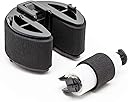
The Sonilco Pickup Roller Kit (CC430-67901, RM1-4426, RM1-4425) is a premium replacement part compatible with multiple HP and Canon laser printers. Manufactured under ISO-9001 standards and individually tested, it guarantees a perfect fit and long-lasting performance, effectively resolving paper feed issues and extending your printer’s life.


| ASIN | B08Z78QHZD |
| Best Sellers Rank | #98,904 in Office Products ( See Top 100 in Office Products ) #12 in Computer Printer Transfer Rollers |
| Customer Reviews | 4.4 4.4 out of 5 stars (112) |
| Date First Available | March 17, 2021 |
| Item Weight | 1.13 ounces |
| Item model number | HPRM1-4426/4425 |
| Manufacturer | Sonilco |
| Package Dimensions | 2.72 x 2.36 x 1.22 inches |
R**R
Easy fix for paper loading problems.
Works great, easy install. Saved me from buying a new printer!
D**H
YouTube Makes the Installation Seem Easier Than It Is ...
First, this 100% fixed the problem that my M451dn was misfeeding about half the time. Good product. Second, the install is more difficult than YouTube makes it seem. Doesn't require much strength, but it takes a lot of fiddling around to get the old rollers out and new rollers in. Here's free advice: (1) Watch the YouTube videos *carefully*. (2) Set up good illumination of the rollers in the printer. (3) Work on your inner harmony and patience. (4) Try to notice *exactly* what finally works in removing the old parts. Not much force is required when the parts are properly aligned. (5) Installing the new pieces is the exact reverse of removing the old parts (which is why it's important to notice how the old parts came out. Not much force is required when the parts are properly aligned. (6) Go have a couple of beers or glasses of wine to regain your inner harmony. (7) Enjoy having a working printer at a tiny fraction of the cost of buying a new one. MORE ADVICE: It appears that this roller may be almost microscopically too small in diameter, which in my machine caused repeated "cleaning" and then "misprint" events. There are a couple of ways to solve this problem, but the easiest way is to go into whatever control panel you have for the printer and force it to use "Media: Heavy 111-130g. That will slightly slow down the printer, which will fix the problem (or, at least, it did for me). A more difficult fix involves inserting a few layers of trimmed electrical tape under the rubber on the pickup roller. This slightly increases the effective diameter of the roller. If you google you can find a blog post describing this. I haven't tried it yet.
K**O
Worked perfectly
Fixed my constant paper jam errors that were due to the printer not picking up the paper. I am so happy too because it saved me hundreds of dollars because my color laser printer was perfectly fine other than this little problem.
K**M
Works great so far
Works good on the test pages after replacement. Will update if I have any issues. A little more difficult to install on the CP1215. You need to remove paper tray and cover the tray sensor (black square cutout in bottom rear right of printer) with electric tape. Then hold the resume button, turn on the printer, and continue holding the resume button for approximately 40 seconds. The pickup roller will turn to replacement position. Pull the two white clips apart and pull out the pickup roller. Just push the new one in until it clicks. It took a couple of power cycles to get it to rotate out of replacement position. It wouldn't rotate back while on it's side, but as soon as I laid it flat, it did. The separation roller has a piece that is clipped in covering it, remove that and the separation roller pops right out.
K**T
Exact fit
Perfect exact replacement. Packaged well.
B**R
Installing is tricky but these items work great
My CM1414fnw laser was jamming every time it tried to print more than one page. Support articles said these parts needed replacement. If you search YouTube, you'll find several videos that show you how to remove the old parts and install the new ones, but the videos make it look much easier than it is. The semicircle wheel was very hard to remove, but the new one snapped in easily. But the printer works great now, so these parts are definitely worth it.
D**D
Fixed my paper jam
these two rollers fixed my paper jam from the feeder tray rolling to the back of the printer. beware you have to enter the secret "2ndary service" menu and select change rollers for the roller to be properly accessible. you can find videos on YouTube on how to enter the secondary service menu for changing rollers. first time doing it and it took me about 20 minutes. someone that knows what they're doing it probably only takes 5 minutes or less.
G**J
Constant paper jams in HP CP2025
This product did not work in my HP CP2025 printer. I would print at most 1 page before the printer stopped with a paper jam issue. Returned.
M**S
The Part itself is a perfect replacement, but to change it ! It needs really hard work.. don't think it's easy to just order the parts and change it, it needs really hard work to change it or you could take it to a professional repairer around you, there is a youtube videos can guide you to replace the part, and it need to look at it carefully... thanks
あ**ー
約10年前に購入したキャノンのLBP5050が紙詰まりが多発するようになったので交換してみました。 本体下から簡単に交換でき、5分ほどで終了。 紙詰まりしなくなったのでまだまだ使えそうです!
M**T
Replacement rollers work well. The process is difficult but once you figure it out, it is not too bad. My printer is no longer showing printer jams and is up printing again.
P**N
The pickup roller did not click back in place. Had to modify the right wing on it to make it fit. Do not waste $20 on this as there is others brands that are way cheaper or buy an OEM one.
タ**ー
MF8280cwにぴったりです。交換にはなかなかテクがいりました。
Trustpilot
2 weeks ago
1 week ago