


⚡ Power your productivity with the speed that keeps you ahead of the curve!
The Toshiba OCZ RD400 Series is a cutting-edge 1TB M.2 NVMe SSD leveraging PCIe Gen3 x4 technology to deliver up to 2,600 MB/s sequential read and 210,000 IOPS random read speeds. Designed for professionals and enthusiasts, it offers a compact form factor, custom drivers for optimized performance, and a 5-year warranty, making it a future-proof upgrade for desktops, workstations, and mobile systems craving ultra-fast, reliable storage.

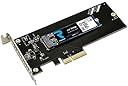

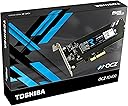
| ASIN | B01G4UN7VS |
| Brand | TOSHIBA |
| Color | Black |
| Customer Reviews | 3.7 3.7 out of 5 stars (212) |
| Date First Available | October 21, 2017 |
| Flash Memory Size | 1024 |
| Hard Drive | 1 TB Solid State Drive |
| Hard Drive Interface | NVMe |
| Hardware Platform | PC |
| Is Discontinued By Manufacturer | No |
| Item Dimensions LxWxH | 6.2 x 4.15 x 0.68 inches |
| Item Weight | 2.22 ounces |
| Item model number | RVD400-M22280-1T-A |
| Manufacturer | Toshiba America Electronic Components Inc |
| Number of Processors | 1 |
| Product Dimensions | 6.2 x 4.15 x 0.68 inches |
| RAM | 1000 GB |
| Series | RVD400-M22280-1T-A |
J**F
Fast M.2 drive that boots Windows 10 in <10 seconds installs OS in 10 mins & required no extra drivers, Bios setup or utilities.
Fast drive, great price ($204), easy install & good warranty! When I initially purchased this I was going to just clone my old drive, but that meant I'd have to clear a couple hundred gigs to another location. After looking at all the work that would require knowing Windows 10 would likely invalidate my license, I just decided to do a fresh Windows 10 install then add my applications thinking I would spend a half a day setting it up. Wow is all I can say! I prepared a USB Windows 10 install stick and powered down. My motherboard is a GIGABYTE AORUS GA-AX370-Gaming K7 (AMD Ryzen AM4/ X370/ RGB FUSION/ SMART FAN 5/ HDMI/ M.2/ U.2/ USB 3.1 Type-C/ ATX/ DDR4/ Motherboard) and I had to remove the Graphic Card in order to install the Toshiba OCZ RD400 in the M.2 slot. Luckily the screw was already installed on the board so I only had to remove it plug the RD400 in and re-insert the screw then re-install the graphic card. I had anticipated having to fiddle in the BIOS to set the boot to the USB stick and then set the order to the RD400 etc., but to my surprise the motherboard defaulted to boot the Windows 10 USB install stick and immediately saw the RD400 and proceeded to be the quickest most flawless Windows 10 install I've ever experienced. Within 20 minutes I already had the OS and a few applications done and to date it's been the fastest Windows install in my 30+ years of PC installations. Damn I love it when everything goes perfect and fast! I'm not going to waste my time & drive hours running speed statistics test because I'm happy with it as it is. My only concern was temperatures, since that will affect the life and/or throttling of the RD400.. Having the RD400 installed beneath my RX480 Strix card was a concern and I found by using the RD400 temperature in my fan curves for the intake fans pointing directly towards the RD400 & Strix card from the front and bottom of the case brought the temperatures to a manageable level between 47- 54C under load. Note: The graphic card triple fan seems to lower the RD400 a few degrees too, so keep that fan curve in mind while setting your temperature goals. I wanted to stay well under the RD400's reported throttling temperatures and extend the life of the drive. The RD400 was hitting 68 degrees prior to my custom fan curve setup which was too high. Temperatures never go above 54C now using Noctua Fan with Focused Flow and SSO2 Bearing, Retail Cooling NF-F12 iPPC 3000 PWM intakes set to 1000RPM at 47C with a steep curve that levels out at 54C in the high teens, but I'm still considering adding an additional heat-sink so I can lower the air intake speed and increase cooling capacity. Overall at the moment this RD400 512GB drive seems to be a good bang for the buck.
W**I
One of the best NVMe SSDs available
One of the best NVMe SSDs available. Benefits: - MLC NAND flash memory. It's much more durable for the intensive use, than Samsung V-NAND or Micron 3D NAND. In real life experience, I have number of Intel and OCZ MLC drives, which have petabytes of data written to them, and still working flawlessly. While 2 first Samsung EVO (TLC) drives are almost dead already. - Faster than previos leader - Samsung 950 Pro, with exception of very rare (yet) new Samsung 960 Pro, which promise 3200/2000 MB/s R/W speeds :) - Thermal control. 950 Pro may heat up to 105 degrees C, while this one starts thermal throttling at approx. 70 degrees. - Single-sided 512 GB model is best for cooling, and best with performance. Disadvantages: - PCIe adapter for RD400 is overpriced, as it does not provide necessary cooling (provided small piece of thermal pad is just a joke). Highly recommended to use PCIe->M2 adapter with heatsink, like Sintech one (ASIN B00QZ0WMK0) or buy any chinese PCIe-NVMe adapter (cheap as dirt - 3-5$) and use DIY heatsink. Notes: - Beware of on-board M2 sockets - to get maximum speed from the drive, these must be Gen.3 - 32Gbps (PCIe gen 3 x4). Some mobo vendors provides only 10Gbps M2 sockets, connected to PCH, rather than CPU's PCIe. Especially that true for systems, designed for CPUs with 16x PCIe lanes (all middle and low-end Intel Core CPUs). And even for Socket 2011 v3 CPUs, which are able to support up to 40 PCIe lanes, motherboard may not have all of them available via PCIe slots. I would always recommend to use E5-1600 series instead of Core i7 (better feature/price balance, capable for ECC RAM - critical for workstations). - There is a better option now - Samsung 960 Pro, but... These are announced but I never seen it in shops. The only seller at Amazon have these "out of stock", so looks like there are some problems with first of these new ultra-fast V-NAND SSDs... Hope, not like with smartphones from same vendor ;)
C**D
Bad product
Did not work. Having to send mine back. Plus they wdon't give screws or an adapter. Buy samsung pro. Much better product. It blew my motherboard. Used static wrist strap and followed instructions. I have brough multiple m.2 drives and never had one do this. Feels cheap made. Samsung pro may be a little slower but the quality is much better.
C**.
Don't install the Toshiba drivers if your MOBO has native NVME support! Good drive, bad drivers.
I really like this drive, but think twice before using the Toshiba driver. The drive itself is fast, very small (almost unbelievably so), and OS installation and everything went swimmingly. My BIOS recognized it immediately (ASUS X-99 Deluxe II, I-7 6900). The ASUS BIOS has built-in NVME support, and I believe this to be the source of the problem. After OS installation (Windows 10 Pro), and a lot of other software, the most recent updates, etc., I recalled reading that sometimes the Toshiba driver can enhance the performance of this drive, so I installed it. I have never seen so many Blue Screens of Death in my life, and I fiddle with my computers all of the time. Dozens of different failures commenced within minutes of installing the driver. The errors varied, and it didn't repeat itself, so troubleshooting was a bear. I went back to an earlier restore point... crash. I scanned the system files and tried to repair... crash. I "refreshed" Windows. Crash. I "reverted" to an earlier version... Crash. Finally, I formatted and reinstalled. Everything is fine! I decided to try the driver again. On a clean version of Windows (no 3rd party software, no updates), I tried the Toshiba driver immediately. CRASH! BSD! :( over and over. Again, a clean format and reinstall...everything smooth as silk. I'm not letting the Toshiba drivers anywhere near my system again without some sort of ironclad Toshiba guarantee of compatibility and a perceived benefit for doing so. 4 stars for a drive, no stars for the support/drivers.
S**O
2' spedizione, dopo che la prima è andata smarrita, velocissima. Da parte del venditore Goldpix 5 stelle, corretti (hanno restituito la differenza di prezzo senza batter ciglio dopo che questo aveva subito una variazione), celeri nel contatto e veramente professionali a tutto tondo. Sulla qualità dell'oggetto non si discute prontamente riconosciuto dal S.O. ho effettuato una installazione pulita di win 10 e il tutto si avvia ancora più velocemente che col precedente ssd Sata. Che dire, per ora felicissimo
J**N
J'ai mis ça sur mon PC, avec l'OS dessus. Ca dépote! Pour ce qui est de la fiabilité, on verra avec le temps. Reconnu sous windows, sous linux.
P**I
Questo oggettino è una piccola meraviglia. Al di là di benchmark e performance test che si possono trovare on-line, vi dico che nell'uso pratico di tutti i giorni è una vera scheggia! L'ho installato un mese fa su mobo Asus H270-PRO con slot M.2 PCIe x4 (che supporta appieno i 32 Gbit/s di data-transfer) con il driver NVMe Toshiba per Windows 10: rispetto alle schede M.2 più economiche che viaggiano su SATA III è un altro mondo. Tempo di caricamento OS sotto i 15 secondi, lancio di applicazioni (anche belle pesantine - uso Visual Studio ed altri ambienti di programmazione) praticamente istantaneo. Sembra di avere già tutto in RAM! Costicchia, ma secondo me li vale tutti!
V**C
I wasn't sure how or if this would work with asus z170i but oh boy it was plug and play. Ive installed bootable windows on it in a minutes and it was ready to go. Difference between and ssd is noticeable right after you start working with it. Its not noticeable as going from hdd to ssd but still its a big difference and for those who need that extra speed it really worth the money. 9/10 price per GB is still high for this tech but we are getting there
P**R
Fastest NVME drive I have tried get the 1000MBs+ write and 2000MBs+ read. No complaints at all.
Trustpilot
3 weeks ago
2 months ago