Desertcart purchases this item on your behalf and handles shipping, customs, and support to Cyprus.
🚀 Elevate your WiFi game—never miss a beat or a meeting!
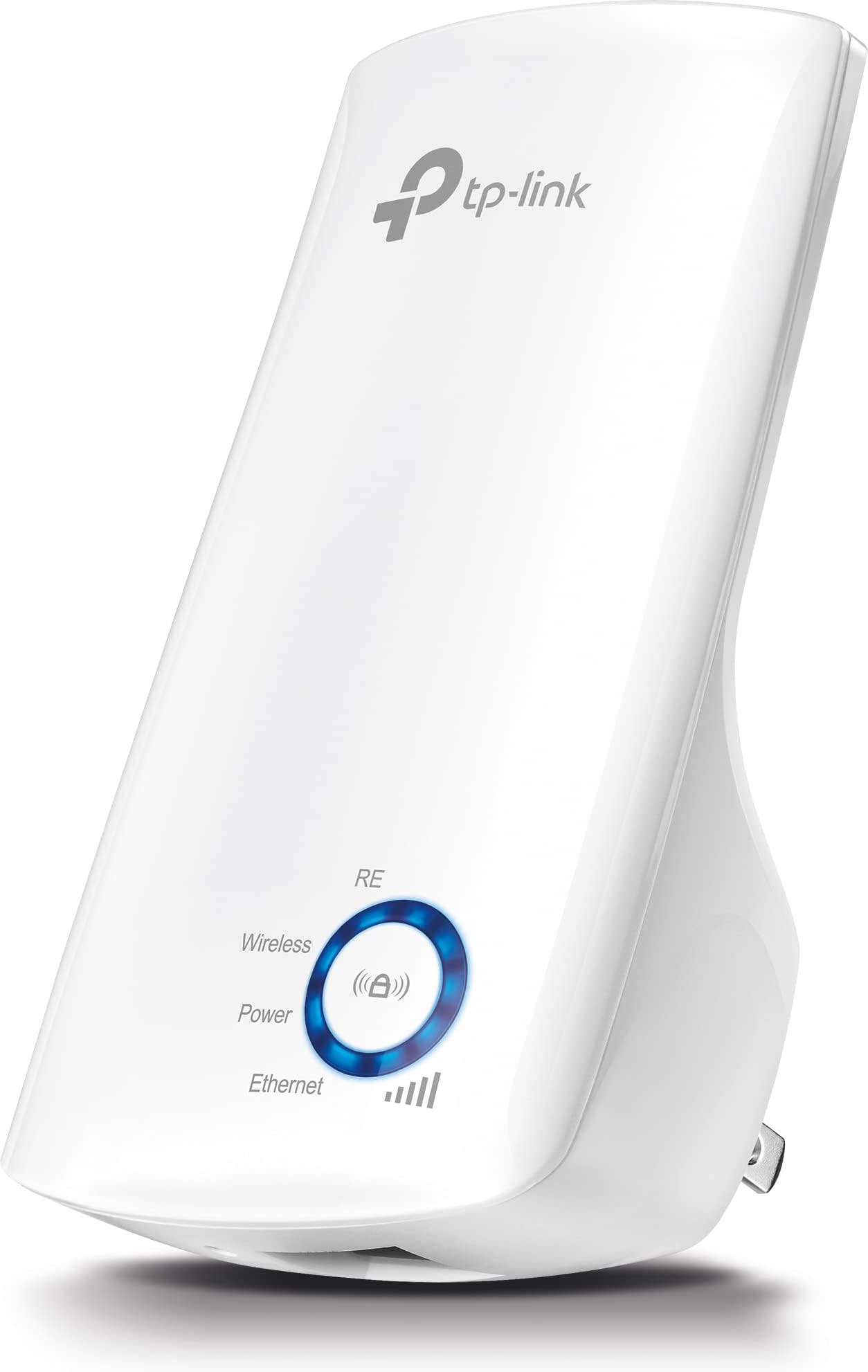
The TP-Link TL-WA850RE is a sleek, wall-mounted WiFi range extender delivering up to 300Mbps on 2.4GHz, expanding your network coverage up to 100 meters. Featuring plug-and-play setup, an Ethernet port for wired device connectivity, and smart LED controls with Night Mode, it’s designed to eliminate dead zones and keep your home or office seamlessly connected. Trusted by over 68,000 users with a 4.4-star rating and backed by a 3-year warranty, it’s the affordable upgrade your digital lifestyle demands.
| ASIN | B00E98O7GC |
| Best Sellers Rank | #2,025 in Computers ( See Top 100 in Computers ) #22 in Network Repeaters |
| Brand | TP-Link |
| Built-In Media | Range Extender TL-WA850RE, Quick Installation Guide |
| Color | White |
| Colour | White |
| Compatible Devices | TP-LINK Devices |
| Connector Type | Plug In |
| Customer Reviews | 4.4 out of 5 stars 68,724 Reviews |
| Data Transfer Rate | 300 Megabits Per Second |
| Data transfer rate | 300 Megabits Per Second |
| Frequency | 2.4 GHz |
| Frequency Band Class | Single-Band |
| Frequency Bands Supported | 2.4 GHz |
| Frequency band class | Single-Band |
| Global Trade Identification Number | 00132018562017, 00650135420145 |
| Item Type Name | TP-Link TL-WA850RE 300Mbps Universal Wi-Fi Range Extender (White) |
| Item Weight | 100 Grams |
| Manufacturer | TP-Link |
| Mfr Part Number | TL-WA850RE |
| Model Number | TL-WA850RE |
| Range | 100 meters |
| Special Features | Range Extender mode, Miniature size and wall-mounted design, LED Control function with Night Mode |
| Special features | Range Extender mode, Miniature size and wall-mounted design, LED Control function with Night Mode |
| UPC | 650135420145 845973070687 777004802038 132018562017 777004581032 857989006086 667562766524 807034603319 803982780577 |
| Unit Count | 1.0 Count |
| Warranty Description | 3 Year Warranty |
| Wireless Compability | 802.11b, 802.11g, 802.11n |
| Wireless communication standard | 802.11b, 802.11g, 802.11n |
M**I
Good
Affordable Price
S**I
Good
Good
A**N
Simle installation
Good👍
C**G
Highly recommend
Its working
A**M
Not as strong as expected
J**E
Not great
Decent price but doesn’t work well at all. Horrible in fact.
O**R
It’s working and it’s stable !
But don’t expect too much ! Download speed is 30 mb only knowing that my original internet download speed is 165 mb . Even if place the extender informs the router the download speed never change . Dual extending not available so you will have only g2 I decided to accept this (being slow and stable)
R**S
Ok
Ok
A**H
بشان المنتج
جميل جدا وجوده عاليه واتصاله بالنت كويس الصراحه انصح فيه وبقوى
M**D
Wish I'd found this sooner!!!
Wow, what a concept! I guess I should keep up more on tech trends, since I didn't even know that products like this exist, ahaha, but what a brilliant solution for "dead spots" in terms of wireless signal reach. Like many folks, my WiFi modem from the dreaded Xfinity cable company was stuck being near to the cable outlet. Since it not only talks to my TV, BluRay player and PS3, but also needs to be connected to my phone and home office area, limits on where to put it are frustrating when WiFi starts to drop, the farther your devices get from the modem. Put it where it works for some things, and it quits working for other things, and vice versa. Plus, back when I set this all up, years ago, I had devices still needing hard wiring (haha, seems so primitive now -- wires, LOL) so I actually wound up running a long length of cable to place the modem where, at that time, it was needed most, for wired devices. But, that meant WiFi signal no longer reached to the further realms of the apartment. It wasn't a problem, for years, but now with greater reliance on needing a good signal for smart phones and tablets (and avoiding going over the limits set by wireless carriers -- I rarely use my phone network WiFi when home wireless is available), over time it has become an issue that, like cave people of old huddled around a central camp fire, staying connected to the WiFi signal means not straying too far from the modem, which doesn't do much good as far as having a device that's wireless when you're stuck in one place in order to keep a connection. May as well have a wire then, right? Not being too tech savvy, I hadn't known how to solve my limited WiFi signal issue, and options I'd looked at, for "routers" and "repeaters" were frankly out of my range of understanding, even for what to buy, let alone priced within what I wanted to spend. Since stores nearby that sell such things had no answers -- being of the big store type with no customer service -- I had frankly given up hope, but nonetheless remained frustrated every time my signal would vanish if I wandered too far from my little signal area. Enter the TP-Link! Cue fanfare music! From what I could glean from reviews, it seemed you just plug this thing into a wall socket, it finds your current WiFi signal, and makes another one! Really?!? How awesome is that! Wherever you put it, BAM, more signal! And, for just thirty bucks? Brilliant! So, I ordered one up. Arrived, unboxed it, read the short blurb on use, plugged it in, and, like magic, instant bliss! Seriously, it was insanely simple. I didn't need to even use my laptop to introduce it to the rest of the family and, since it just extends your existing signal, any device that you have currently connected to your main WiFi will pick up the TP-Link -- it copies the existing network name and network password, so there's no added steps as far as accessing the signal sent out by the TP-Link. In terms of set up, I just plugged it in near my WiFi modem, pushed the WPS button on my modem, that tells my modem to let the TP-Link connect to it, the TP-Link did exactly that, and that was it! Skeptical of such powers, I then unplugged the TP-Link, moved it to where I figured it would best broadcast its new signal, plugged it back in, and, waited for it to malfunction. After all, what tech ever does all of what it promises, right? Well, it fired up, it remembered its connection, and faithfully started sending signal, bringing WiFi to previously dead areas of my little abode. Watching the lights on it, the device even tells you the best place to plug it in -- what works for optimum success is keeping it close enough to your main source of signal (in my case, my WiFi modem) that the TP-Link gets a good signal from your source, because the better source signal it gets, the stronger signal it sends out for you to use. So, in other words, put it too far away from your WiFi source, and it won't have much signal to send, meaning that it does have its limits, of course. You can't plug it in and expect it to shoot your WiFi all over town for you, but, within a house or apartment, it seems a genius solution for "re-broadcasting" your existing WiFi signal to a previously unreached area. As I said, thanks to lighted indicators that show signal strength, you can wander around, plug it in various test spots, and ultimately find the best place, which is one that brings your signal out as far as possible to where you want it, for bring signal to former dead zones, while still staying close enough to your main source for the TP-Link to get a solid signal to use, for re-broadcasting. I found that, in a spot where the TP-Link is only getting a signal of two or three "bars" (it has a lighted scale of 1 to 5, showing you the strength of the signal it is receiving from your main WiFi source) it isn't sending out such a great signal either, obviously, so the best place is one where your TP-Link is getting four or five bars. Then it sends a strong signal. To speed up placement, I actually found a "WifFi Analyzer" app on my Android phone, that has a cool beeping signal detector, for showing exactly how much signal my main WiFi modem is putting out, in any given area. I was able to walk around with that and find where my WiFi signal starts to degrade. At the point farthest from the modem that still gets strong signal, is where I put the TP-Link. Of course, as it turns out, there was no electrical outlet there (go figure!), so I ran an extension cord to that area, since my options for plug sockets was either one not far enough to give good signal extension, or one that was too far for the TP-Link to get a good signal to send out. I wall mounted the extension cord, tastefully, and I now have WiFi in the other half of my pad. Woo hoooo! Drawbacks? None, really, except just the limit, obviously, on how far you can go, away from your main signal source, in trying to reach a new area for signal extension. I'm not sure how it would work between floors, or across distances greater than my need. For me, I now have signal where I previously had very nearly none -- or none practical enough to use, really -- so for me, for thirty dollars, this has been an outstanding purchase. I went from WiFi in half my apartment, to WiFi in all of it. As an added bonus, it even has an Ethernet port on the bottom of it, so if you wanted to run a wired device off of this, from where you now have extended signal, it will even do that for you. Amazing. While I found no drawback for this, I should note that it does cast a mighty bright blue light -- for me that was a plus since it now lights a dark hallway area at night, but it might be annoying for someone if placed in a sleeping area, for those who don't like an instant nightlight added to their room. Reliability thus far has been perfect. I have even gone through a couple of power outages due to storms, and a period of my modem being down to Xfinity's usual screw ups, but in all cases, once my main signal was back up, the TP-Link didn't even need to be reset, it just found the signal again automatically, and started faithfully broadcasting. I think this is one of the coolest devices ever, in making our new WiFi world a more user friendly place. Maybe in the future, existing modems will be made to send better signals, but, for now, this is a supremely convenient little gadget for extending WiFi signal at an incredibly affordable price. HIGHLY RECOMMEND!!!!
M**O
Acquistati la seconda coppia dopo la discreta riuscita della prima, ma... funzionano solo uno per router!!
Fondamentalmente poco da aggiungere ad una mia vecchia recensione per altre due unità già acquistate mesi fa. Ottimo prodotto. Correggo solo sul fatto che il potenziometro led di segnale è sì utilissimo in fase di prima installazione (per il posizionamento), ma non è molto preciso e uno smartphone nelle vicinanze sembra leggermente più sensibile. Dopo alcuni mesi ho scritto questa email al servizio tecnico, sperando una risposta a breve (nel frattempo abbasso da 5 a 4 stelle... Per la prima volta abbasso la valutazione di una recensione): Hi, unfortunately I was not able to make correctly two repeaters (in this case, hardware version v5) placed in a house, since with DCHP disabled they are unreachable, while with DCHP set as automatic there are frequent disconnections (in this house the source router is linked to a Wind H3G optical fiber contract). In another house, the same repeater (the third sample I own), however, with DHCP disabled is efficient, does not present any problem (with DHCP set automatic, frequent falls, resolved disabling it). What can I do? I have updated the firmware to 2018-02-28. Sincerely, Matteo Xxxx. Mi rispondono dall'Assistenza in Italiano e cortesemente, ma, cito testuali parole "non possono essere usati due extender con lo stesso router", e io ancora: "scusate, ma nella scheda tecnica non c'era scritto oppure io l'ho letta molto distrattamente?"; e loro: "gentile cliente, l'informazione non è riportata in nessun documento, ma non è possibile prevedere tutti gli scenari di utilizzo". Avete letto bene: per TP Link comprarne due (in realtà ben due coppie per due case con un solo router a casa, ahimé) è uno "scenario di utilizzo" così anomalo da non scriverlo neanche sulla confezione che due repeater non possono funzionare bene nella stessa rete. Se a questo aggiungiamo che aggiornando il firmware nella pagina di regolazione dell'ora è scomparso il campo di regolazione dell'ora (puoi solo settare l'ora legale e il fuso orario) e che comunque specificando di tenere i led spenti (fastidiosi la notte), dopo un paio di mesi hanno preso a rimanere accesi a prescindere da tale impostazione (bug non risolto da ripristino del dispositivo), beh... che dire, a funzionare (uno solo per router) funzionano, ma non li ricomprerei assolutamente.
J**Y
Pretty freaking good!
I just got this and set it up so this is an initial review. Set up was very easy. I tried installing manually and also using the app. Both worked perfectly fine. In the app there is a Wi-Fi sniffer or you can just download one from the store. Find an area where your signal is not two weak. After configuring, I just unplug the unit and found a spot where this was the case. Plugged it in... After a few seconds it got signal and showed me the signal strength on the LEDs. I decided to see what the range was like by going outside. 200ft up my backyard I still had decent signal strength. I had no connection dropouts... Speed was good. Even going through four walls, I still have a decent connection on the other side of my house. (Roughly 70 ft away) I would strongly suggest downloading a Wi-Fi switcher app. The one I use is called Wi-Fi switcher but there are quite a few. (Look for the one made by f1widget.com) This app will allow your device to switch between whichever is the strongest access point as you move through your house. (Don't forget to turn off 5G priority. Your new TP access point runs on 2.4G!) 5G is faster, but 2.4 g go through walls and other obstacles better. once you install and configure the app, As you move around your house or go into the backyard your phone will automatically switch to whichever access point is strongest. I am very happy with this purchase. We'll have to see if degrades over time but so far I'm pretty impressed. My signal strength is excellent. Transmission speed is very good. Setup was a breeze. Initial impression is highly recommended!
M**A
Excelente repetidor! Llegó el mismo día de la compra!
Excelente repetidor! Muy fácil de configurar! Buenos potencia y capacidad para sostener la red sin problema de interferencia! Probé con laptop Smart tv celular y el resultado es excelente también!
Trustpilot
3 weeks ago
3 weeks ago