Desertcart purchases this item on your behalf and handles shipping, customs, and support to Cyprus.
💾 Upgrade your vintage tech game with GoTEK’s USB floppy emulator—because classics deserve a future.
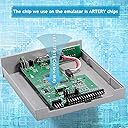
The GoTEK SFR1M44-U100 is a 3.5-inch USB floppy drive emulator designed to replace traditional 1.44MB floppy disks. Featuring a 34-pin floppy interface and 5V power supply, it supports up to 100 virtual partitions on a USB flash drive, ensuring compatibility with legacy industrial machines, music instruments, and other devices. Its plug-and-play design, built-in self-formatting, and intuitive LED display make it a reliable, modern solution for preserving and accessing vintage data storage.
| ASIN | B0762NCHC6 |
| Additional Features | Plug and Play |
| Best Sellers Rank | #62,970 in Computers ( See Top 100 in Computers ) #296 in External Solid State Drives |
| Brand | GoTEK |
| Built-In Media | USB floppy drive emulator |
| Cache Memory Installed Size | 1.44 |
| Color | Grey |
| Compatible Devices | Desktop |
| Compatible Video Game Console Models | Microsoft Xbox 360, Microsoft Xbox One, Microsoft Xbox SERIES S, Microsoft Xbox SERIES X, Nintendo Switch, Sony PlayStation 4, Sony PlayStation 5 |
| Connectivity Technology | USB |
| Connectivity technology | USB |
| Customer Package Type | Standard Packaging |
| Customer Reviews | 4.4 out of 5 stars 567 Reviews |
| Data Transfer Rate | 0.06 Megabytes Per Second |
| Enclosure Material | ABS |
| Form Factor | 3.5-inch |
| Hard Disk Description | USB Floppy Drive Emulator |
| Hard Disk Form Factor | 3.5 Inches |
| Hard Disk Interface | USB 1.1 |
| Hard disk description | USB Floppy Drive Emulator |
| Hard disk form factor | 3.5 Inches |
| Hard disk interface | USB 1.1 |
| Hard-Drive Size | 1.44 MB |
| Hardware Connectivity | USB |
| Hardware Platform | PC |
| Installation Type | External Hard Drive |
| Item Dimensions L x W x Thickness | 12.2L x 9.9W x 2.5Th centimeters |
| Item Weight | 80 Grams |
| Manufacturer | GoTEK |
| Media Speed | 18.0 |
| Mfr Part Number | 並行輸入品 |
| Model Name | SFR1M44-U100 |
| Model Number | 並行輸入品 |
| Number of Items | 1 |
| Read Speed | 0.06 Megabytes Per Second |
| Special features | Plug and Play |
| Specific Uses For Product | data storage |
| UPC | 727670341232 |
| Unit Count | 1 Count |
R**R
instructions
The only issue was no instructions, so it took a number of searches on You Tube to get it working. (Playing Midi files on a Yamaha PSR 640)
D**H
Retro
Great item highly recommended
S**H
Cheating
Don't buy this item
T**T
Life saver for a Korg Trinity owner with shoddy, ancient floppy disks
Easy to install. I opened the bottom of the korg trinity and slid the floppy drive out. The GOTEK fits in perfectly into the slot, connects to power and ribbon cable easily, and works well out of the box with a 2GB+ usb key. You can format the disk by either pressing both buttons as you boot the korg, or by using their windows software. It's far superior to floppy disks, but there are a few minor drawbacks you should be aware of: 1) The windows software only formats 100 disk partitions, not 1000 2) Does not work well under linux, Linux can only mount disk 000, the remaining disk partitions are invisible as they're coded in some proprietary format that only the GOTEK windows software can read. 3) switching disks while using the korg doesn't always work easily. Sometimes I change disk numbers, re-press the screen, and the light shows like it's reading, but it just sits there with the list of the former disk's files. I have to round robin the disk number and try again, and again, and again, until it finally takes and mounts the disk I want. It can take anywhere from 1 to 6 tries. It's the most annoying bug in the device. In spite of the few issues, this tool is infinitely superior to floppies and I'm extremely grateful it was made and sold. I'm considering writing some linux software to mount all 100 disks in linux if I can get my hands on the format spec.
A**.
Funcional ahorra mucho tiempo y no tienes que almacenar diskettes de 3.5
La instale en una máquina fresadora bridgeport discovery torq cut 22 CNC, utilice primero un USB de 32 GB, pero no la reconoció para formatearla, utilice una USB viejita de 2 Mb y de 8 Mb y formateo sin mayor problema, ya pude hacer respaldo de programas e incluso una USB de respaldo de todo el sistema...... Muy buen producto funcional y rápido!!
Trustpilot
1 month ago
2 months ago