

Buy anything from 5,000+ international stores. One checkout price. No surprise fees. Join 2M+ shoppers on Desertcart.
Desertcart purchases this item on your behalf and handles shipping, customs, and support to Cyprus.
🎯 Master your workspace with DEFT PRO precision and power.
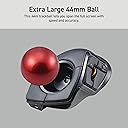
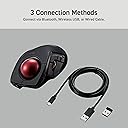
The ELECOM DEFT PRO is a versatile, high-performance trackball mouse featuring a precision optical sensor with adjustable DPI up to 1500, 8 programmable buttons for personalized workflow efficiency, and multi-mode connectivity including wired, wireless, and Bluetooth. Its ergonomic design and durable artificial ruby ball bearings ensure smooth, accurate cursor control with minimal maintenance, compatible across Windows and macOS platforms.


| ASIN | B07C9T4TTW |
| Additional Features | Bluethooth, Programmable Buttons |
| Antenna Location | Gaming |
| Are Batteries Included | Yes |
| Are Batteries Required | Yes |
| Battery Average Life | 3 months |
| Best Sellers Rank | #23,962 in Computers ( See Top 100 in Computers ) #706 in Computer Mice |
| Brand | ELECOM |
| Built-In Media | AA battery, cable, mouse, user manual |
| Button Quantity | 8 |
| Color | Black / Red ball |
| Colour | Black / Red ball |
| Compatible Devices | Personal Computer |
| Connectivity Technology | Bluetooth, Wired, Wireless |
| Connectivity technology | Bluetooth, Wired, Wireless |
| Customer Reviews | 4.1 out of 5 stars 2,041 Reviews |
| Embellishment Feature | Crystal |
| Enclosure Material | Plastic |
| Finish | Glossy (subject to availability) |
| Global Trade Identification Number | 04953103349100 |
| Hand Orientation | Right |
| Hardware Platform | Laptop, PC |
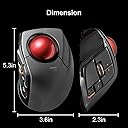
| Item Dimensions L x W | 13.3L x 9.1W centimeters |
| Item Type Name | ELECOM HUGE Wired / Wireless / Bluetooth Finger-operated Trackball Mouse, 8-Button Function with Smooth Tracking, Precision Optical Gaming Sensor (M-DPT1MRXBK) |
| Item Weight | 0.36 Pounds |
| Manufacturer | ELECOM |
| Mfr Part Number | M-DPT1MRXBK |
| Model Name | DEFT PRO |
| Model Number | M-DPT1MRXBK |
| Mouse Maximum Sensitivity | 1500 Dots per Inch |
| Movement Detection | Trackball |
| Movement detection technology | Trackball |
| Number of Batteries | 1 AA batteries required. (included) |
| Number of buttons | 8 |
| Operating System | Windows 10 |
| Power Source | Battery Powered |
| Range | 10 meters |
| Special features | Bluethooth, Programmable Buttons |
| Style Name | Modern |
| Theme | Video Game |
| Unit Count | 1 Count |
| Warranty Description | 3 year manufacturer |
S**T
Best for medium or small hands
I love trackballs, they make use of my fingers rather than my whole arm. I can just rest my wrist on the trackball case and do all the work with my fingertips. No carpal tunnel or other wrist/arm problems. This one is a great size for my hands (medium/large for a woman), and my fingers naturally rest on the curves in the case that they're designed for. The thumb handling the scroll wheel works out surprisingly well. The extra buttons on this device easily map to extra functions in games or to shortcuts in office apps or browsers. The manual that comes with it is in Japanese, but Elecom has beautifully translated manuals online. Another positive is that the one I bought can be used wirelessly or wired: I prefer wired, and the USB cord that comes with it is easily long enough for me. Unlike many wired devices, the cord attaches to a port. I like this because it will make it easy to replace the cord if it ever gets damaged. Downsides: it's not a good size for very large hands, but Elecom has a larger option with a similar layout. If it's your first trackball, be aware that learning to use a trackball will take time. Be patient with yourself.
R**O
Awesome!
Great comfort, very easy to use. Took me a week or two to completely adapt. I would love if the scroll wheel was infinite like the Logitech MX mouse
S**M
Fast delivery
User friendly
A**P
deft pro top!!
In sintesi, dopo l'huge ho deciso di passare alla tracball anche su portatile, optando per il compagno "deft pro" (l'huge wi-fi era troppo grande) primo impatto: Top! E cosa importante! non ho neanche dovuto modificarlo sostituendo le sfere originali perchè precise( a quando pare su questa versione pro ci stanno attenti a mettere le sfere precise)! Tempi di adattamento: gli stessi per l'huge! cioè per chi proviene da una trackball simile quasi zero per chi lo sua la prima volta ...ci vuole da prenderci la mano(anche con qualche videogioco) un po' scomodo è il pulsante selezione per i dpi che si trova sotto la base! avrei preferito il pulsante dpi al posto dell pulsante di selezione frequenza bluethooth(che sarebbe stato benissimo sotto) utilizzabile con bluethoot- wifi- cavo lungo 1,5 m.(nella foto vedrete una mia fissazione che di è proteggere le decalcomanie stampate... non fateci caso!) pro: -Platiche ok non danno la sensazione di essere cheap ,la parte superiore è tramata con un bell effetto dove poggia tutta la mano(circa 18 cm dall' medio fino all inizio del polso). -Posizione della mano risulta rilassata anche se più vincolata rispetto all' huge (e anche per questo modello su internet si possono trovare supporti da stampare in 3d per aumentare l'inclinazione è la comodità). -Buona la disposizione dei tasti principali; che sono ben disposti e facilmente raggiungibili. Anche se come tasto destro mi trovo meglio ad usare l'ultimo(fn3) con l'aulare mentre indice e medio controllano la sfera! -La sfera è 44 mm facilmente manovrabile (vola) è sopratutto le sfere che sono precisie (pare che siano apposta selezionate)! - utilizzabile con bluethoot- wifi- cavo lungo 1,5 m contro (ma lo considero proprio inerzia) -il pulante di selezione dei dpi è posizionato sotto la base e ogni volta per cambiarli si deve alzare il mouse, (con led visibile ma discreto che si illumina dagli spazi aperti dalla rotella, - rotella che risulta essere un po'rumorosa rispetto all' huge). - Avrei preferito il pulsante dpi al posto dell pulsante di selezione frequenza bluethooth ! software: software decente con possibilità di personalizzare il mouse con diversi profili. Essendo il mouse senza memoria interna, si deve avere in funzione il software in background per averlo personalizzato. e qui mi sembra che sia da migliorare! nel fatto che essendo "vincolato a tenerlo attivo) sarebbe bello che il software riconoscesse i programmi in uso, è in automatico caricasse il profilo in automatico (altri software lo fanno) invece ogni volta prima di utilizzare un profilo per un determinato programma lo si deve selezionare. pps per la elecom.... sarebbe bello se potete mettere sul mercato almeno la sfera trakball di ricambio, visto che è la parte che con l'uso può rovinarsi di piu !
E**E
Excelente mouse para autocad
Esta es la segunda vez que compro el trackball, se descompuso la rueda , ya no detectaba el sensor de moviemiento, me duro 3 años, trate de usar otro pero ya estoy super acostumbrado a este tipo. Para el uso de autocad es excelente, programando los comandos F3 y F8 es muy comodo, tambien si tienes rutinas, tipo lisp, puedes agregarlas a los botones programables. Una de las desventajas es que le dura poco la pila, tambien con el tiempo, un año, hay que cambiar los rodamientos de la bola. Lo recomiendo mucho.
Trustpilot
2 weeks ago
1 week ago