📼 Preserve your past, stream your future!
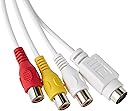
Elgato Video Capture is a compact USB 2.0 device designed to convert analog video sources like VHS tapes and camcorders into high-quality digital H.264 files. Compatible with Mac, Windows, and iPad, it supports all major video standards worldwide and comes with essential adapters and cables for an all-in-one digitizing experience.


| ASIN | B0029U2YSA |
| Best Sellers Rank | #18,483 in Computers ( See Top 100 in Computers ) #11 in External TV Tuners & Video Capture Cards |
| Item model number | 10020840 |
| Manufacturer | Elgato |
| Product Dimensions | 10.4 x 3.5 x 1.2 cm; 80 g |
A**R
The best in this category
With its easy steps to convert to better quality provided by outcome video and audio settings this is the best product I have found.
A**R
Easy to use. Converts vhs to mp4.
Very easy to use. Simple software. Converts analogue vhs tapes to mp4.
S**D
Thanks Elgato and Amazon
Today I received the Elgato capture device and tried it and it works great, I was afraid I would lose my memory tapes but the brilliant device saved my memories . My family and I are very thankful to you Amazon and to Elgato. Best Regards to you.
M**G
Works well, after some tweaking.
Finished copying 55 old mini-VHS tapes to my hard drive so great that old family videos are now 'safe'. However, I found that if I started recording before the video actually started transmitted any analogue/digital signal then either no picture was recorded, or the sound track was all choppy. All overcome after some trial & error. Only other gripe, and why it's not 5 stars is that the overall picture capture size is quite small, and there are no obvious options in the menu to change the resolution quality.
R**S
Facile à installer, efficace. Les numérisations sont parfaites. Basique mais on ne demande rien de plus. Le post traitement si nécessaire devra toujours se faire avec un autre outils que celui de la numérisation.....Mac a Imovie qui est largement suffisant. Rien à voir avec ROXIO EASY VHS to DVD.......qui ne mets pas ses programme à jour et qui fonctionne tres mal.
A**ー
VHSテープのデジタル化を考え購入。 Macで問題なく使えます。 アプリも簡単。映像を取り込んだ時点で切り取りもできます。
X**R
El dispositivo es robusto y con una buena longitud de los cables. diferentes elementos para adaptarlo a los distintos posibles aparatos, cámaras, vídeo cámaras o dispositivos con cables RCA. El que sea USB 2.0 no tiene importancia, ya que la conversión se realiza en tiempo real, Incluye software de Cyberlink (Este software se ha de bajar de su página web con el dispositivo conectado al ordenador) que nos servirá para realizar el traspaso y optando por diferentes formatos de salida. Buen producto, totalmente recomendable.
A**9
L'ho acquistato reduce da esperienza negativa con un prodotto analogo più economico. Ero quindi discretamente prevenuto, ma presto mi sono dovuto ricredere. Il software è essenziale, non aspettatevi di poter intervenire a livello avanzato sui vari settaggi. Badate bene, non lo reputo un difetto. Volevo un prodotto in grado di assicurare una buona qualità di acquisizione con pochi fronzoli, e utilizzabile da chi, come me ha poche conoscenza tecniche in materia di audio video. E così, filmati formato 8mm sono tornati a nuova vita, acquisiti e convertiti in formato mp4. La qualità è buona, per le mie esigenze e considerata l'età avanzata dei video (>20 anni) direi quasi ottima. Il prezzo non è dei più economici, ma ne vale la pena. Per abitudine leggo sempre le opinioni negative, ho deciso di provare, ed ho avuto ragione, non riscontrando nel mio caso i pochi difetti lamentati da altri. Ripeterei l'acquisto al 100%
T**9
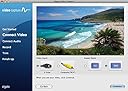
I find the product very easy and simple to use. After opening the package, I connected it to my computer, I went online to their support website, I installed the latest drivers for my machine direct from their website. I then connected my old VCR/DVD combo with the plugs supplied. Once the drivers were updated, I located the first set of cassettes to start converting. Simple instructions, confirm whether it is audio or video/audio input, choose the aspect ratio that best fits (4:3) or (16:9), I choose 16:9 for the widescreen aspect ratio every time. Then it asks you to confirm audio is working, hit the play button on your VCR, simultaneously hit record from the software button on screen. Then let the tape play, once it finishes recording, hit the stop recording button. The software will then work its magic, it will start saving/converting the analog video for you to a digital format. A 2 hour video tape will take 2 hours, you need to let the tape run. You have several options after the converting has finished, upload to YouTube is probably the most convenient way to share with family/friends. You can save this .mp4 file to an external drive, then move to a cloud based service or DVD-R. It has provided my family a means to have all those VCR tapes digitized, it has already provided countless memories to loved ones, it contains videos of loved ones who are no longer with us and you can't put a price on that. For the price value, these files will now live in a digital file for very low cost. Overall cost is low compared to professional digital conversion services, the ease of use makes this very simple for a beginner to begin recording within a half hour. The video quality is just as good as VHS tapes from previous decades, also a good VCR helps with auto tracking and automatic cleaning of the heads. One benefit of using this software is that you can let the VCR run during the day while you are not home, program it to automatically turn off after a specified time period and you also have the ability to mute the sound during the recording so it doesn't play over the external speakers of the computer. Once I complete the VHS/DVD videos, I'll be moving to cassettes and records that my family has stored for decades.
Trustpilot
1 month ago
2 months ago