


Desertcart purchases this item on your behalf and handles shipping, customs, and support to Cyprus.
🚀 Elevate your home Wi-Fi game — because buffering is so last decade!
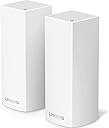
The Linksys WHW0302 Velop Tri-Band Mesh WiFi System delivers powerful AC4400 tri-band speeds and seamless coverage up to 4,000 sq ft, ideal for multi-story 3-5 bedroom homes. With easy app-based setup, parental controls, and Apple HomeKit compatibility, it ensures reliable, fast Wi-Fi for streaming, gaming, and smart home integration.


| ASIN | B01MSSUG2H |
| Antenna Location | Gaming, Home |
| Antenna Type | Internal |
| Best Sellers Rank | #41,031 in Computers ( See Top 100 in Computers ) #636 in Routers |
| Brand | Linksys |
| Built-In Media | Ethernet cable (x1), Linksys Velop (x2), Power adapter (x2), Printed Documentation, Quick Start Guide |
| Color | White |
| Compatible Devices | Laptop, Personal Computer |
| Compatible devices | Laptop, Personal Computer |
| Connectivity Protocol | Wi-Fi, Bluetooth |
| Connectivity Range | 4000 Square Feet |
| Connectivity Technology | Wireless |
| Control Method | App |
| Controller Type | homekit |
| Coverage | 4,000 Sq. ft |
| Customer Reviews | 4.3 out of 5 stars 1,766 Reviews |
| Data Transfer Rate | 4400 Megabits Per Second |
| Frequency | 2.4 GHz |
| Frequency Band Class | Tri-Band |
| Frequency band class | Tri-Band |
| Global Trade Identification Number | 00745883728183 |
| Has Internet Connectivity | Yes |
| Is Modem Compatible | Yes |
| Item Dimensions L x W x H | 7.9L x 15.8W x 18.5H centimeters |
| Item Type Name | Linksys WHW0302 Velop Wireless Whole Home Wi-Fi AC4400 Tri-band Mesh System |
| Item Weight | 1.08 Pounds |
| LAN Port Bandwidth | 10/100/1000 megabits per second |
| Manufacturer | Linksys |
| Maximum Upstream Data Transfer Rate | 867 Megabits Per Second |
| Mfr Part Number | WHW0302 |
| Model Name | WHW0301 |
| Model Number | WHW0302 |
| Model name | WHW0301 |
| Number of Antennas | 6 |
| Number of Items | 2 |
| Number of Packs | 2 |
| Number of Ports | 4 |
| Operating System | [Proprietary router firmware developed by Linksys] |
| Other Special Features of the Product | WPS |
| RAM Memory Installed | 512 MB |
| Router Network Type | wireless |
| Security Protocol | WPA2 |
| Special features | WPS |
| UPC | 745883728190 745883728183 |
| Unit Count | 2 Count |
| Wi-Fi Generation | Wi-Fi 5 |
| Wireless Compability | 2.4 GHz Radio Frequency, 5 GHz Radio Frequency, 802.11b/n/ac, 802.11bgn |
| Wireless communication standard | 2.4 GHz Radio Frequency , 5 GHz Radio Frequency , 802.11b/n/ac, 802.11bgn |
J**H
Easy to set up
Excellent product easy to use and setup
A**O
Mejoró mi conectividad
Este producto es realmente una mejora para tu red inalámbrica, tiene muchos beneficios tales como el alcance de la red, la estabilidad, la red de invitados, la restricción de tiempo conectado a internet (que es ideal para los pequeños de casa), la administración de los dispositivos desde su app. Creo que fue una muy buena inversión, a partir de qué tengo el equipo, ya no tengo problemas de conectividad
C**E
Fixed Consistency and Low Signal Issues - Home and Barn Setup
My setup is in the country. Our internet comes wirelessly from a tower so we were having major issues with consistency. I also wanted a setup that I can move to a pole barn that is 50 feet away from my home. Home to Barn: We were able to get a clear signal about 75% strength (as the pole barn has metal siding that caused some issues). I was able to place the Velop in a good position that got a great signal. We used this on New Years Day to stream the college football playoff for a party. No issues. Great connection. Between games I was able to pass out guest access (using the app) and play Quiplash on the Amazon Fire TV. Super simple - We had guest access turned off during the football games - but then could turn it on when we played games so everyones phones could get connected (as we were in a pole barn and no one got bars). Cable vs Wireless I did debate on running a cable to the barn - but the connivence of moving a velop - no wires no setup. It just made more sense to use this setup. I then took the velop back to the home and use it to get a better connection throughout my home. Keep in mind I did need to position the velop so the connection could be strong - so testing and just being smart with keeping them closer than convenient in this situation. At the end of the day - its the signal strength that mattered. Consistency: The original reason I purchased. I needed a better connection throughout my home. I purchased the home recently and it was setup with ethernet cables in every room. Now the home was built in 2003 - I purchased 4 months ago... Today in 2018 everything is on the go. Some devices (apple) only connect wirelessly so having a strong connection in every room of my house is a must. This fixed my dropped signals and have not had 1 issue. Work I work from home as a web developer and having a connection drop for months was driving me insane. This only added to the reason to purchase the velop system. Video calls - while 3 kids stream on 3 other devices - no lag - no connection loss. Connection Currently using a Mac Airpot 3TB Time Capsule as my router. I had a 6 year old linksys router that was under performing so i setup the airport and was having less issues but still issues. Adding velop again resolved drop or low connections. I highly recommend this product. It's packaging was amazing, its insanely beautiful in the home. Easy user friendly app. Simple color coded connection. I have owned other linksys products in the past - this is above anything else I have used with them.
V**S
Excelente producto
Investigando en internet cual es el mejor sistema mesh o malla disponible en México, me convenció este sistema, es super fácil de configurar a través de la aplicación disponible para los dos sistemas operativos en 2 minutos ya tenia configurado el sistema, es configurable en muchisimos parámetros, puedes monitorear los dispositivos conectados dar prioridad a ciertos dispositivos, bloquear otros y lo mas importante, por fin tengo internet en todo mi casa y estable tanto de subida como de bajada a cualquier hora, incluso más de lo que tengo contratado, ya que el router del proveedor es malisimo. La mejor inversión y Amazon lo entrego el mismo día que lo ordene
S**A
Solved our slow network issues!
Bought the 2-node system for a house that's just around 4,000 sq ft and am very happy with the results. We had tried range extenders before and just wasted money on those, so finally decided to see if any of the mesh systems will help. I found the set up pretty straight forward and easy. We had a FIOS modem/router combo so i had our old parallel wifi running while installing the Velop which made me more comfortable that we won't be stuck without connection if set up went wrong. It took about 30 minutes or so to set up both nodes, we have one in the upstairs office right next to the modem and the other one downstairs in the kitchen, probably roughly 22-23 feet direct line (through walls) from the modem connected one. Each node is supposed to cover about 2,000 sq ft which is a circle with a 25 ft radius (50ft diameter) around it. We get great and consistent speeds throughout the house, with the exception of our bedroom where we do get connection but it's a bit slower - however, our modem is to the one side of the house, not in the center, so we really need another node to have the full proper coverage there if we wanted it (bedroom is furthest away from the two nodes). This is probably obvious (though not really explained in the set up process), but if you do have a combo modem/router like we did, you should turn off the router part so you are not running two wifi networks which might interfere with each other. I found that pretty easy to do from FIOS's router/modem website. I did call Linksys support to confirm that I am supposed to do that, and found them easy to get through to and helpful. I am also not a techie by any means, though comfortable with technology. Overall, very happy with purchase. UPDATE 12/14: I bought an extra node (so now we have the 3-node system) to complete the coverage of the house. Setting that node up was very easy using their app, I did try initially a location that was a bit too far and the system made me move it to a spot that it links up easily with the 2nd node. The new one has been operating for just over a week and we have full coverage everywhere in our house now. COuldn't be happier with Linksys!
S**S
Muy bueno pero no funciona con Sonos.
Actualización Agosto 2019 Solo hay dos maneras de que funcione con Sonos: conectado via Ethernet alguna bocina de Sonos, o comprando un Sonos connect para que haga su propia red. Con cualquiera de esas opciones funciona perfecto! Excelente sistema si solo quieres una red wifi simple y básica. Es muy fácil de instalar y su desempeño es muy bueno y la cobertura excelente. El problema es su total incompatibilidad con Sonos. No funciona con múltiples bocinas Sonos en el mismo lugar. Ni el soporte técnico de Linksys o el de Sonos han podido solucionarlo, pueden verlo en sus páginas de soporte.
Trustpilot
1 week ago
5 days ago