Buy anything from 5,000+ international stores. One checkout price. No surprise fees. Join 2M+ shoppers on Desertcart.
Desertcart purchases this item on your behalf and handles shipping, customs, and support to Cyprus.
⌨️ Elevate your command center with the ultimate mechanical keyboard experience!
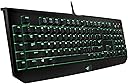
The Razer BlackWidow Ultimate 2014 Elite is a full-sized mechanical gaming keyboard featuring 104 fully programmable keys, 5 dedicated macro keys with on-the-fly recording, and individually backlit keys with adjustable brightness. Designed for precision and durability, it offers 10-key rollover anti-ghosting and a robust braided USB cable with additional USB and audio ports, making it a top choice for gamers and professionals seeking responsive, customizable performance.

| ASIN | B00IG3GPTS |
| Additional Features | Mechanical |
| Antenna Location | Gaming |
| Best Sellers Rank | #51,998 in Video Games ( See Top 100 in Video Games ) #1,225 in Mac Games & Accessories #2,463 in PC Gaming Keyboards |
| Brand | Razer |
| Built-In Media | USB Cable |
| Button Quantity | 104 |
| Color | Black |
| Compatible Devices | Gaming Console |
| Compatible Operating System Family | Windows |
| Connectivity Technology | Wired |
| Customer Reviews | 4.4 out of 5 stars 1,000 Reviews |
| Enclosure Material | Plastic |
| Global Trade Identification Number | 00048231291941 |
| Hand Orientation | Ambidextrous |
| Item Weight | 3.31 Pounds |
| Keyboard Backlighting Color Support | RGB |
| Keyboard Description | Mechanical |
| Keyboard Layout | QWERTY |
| Manufacturer | Razer Inc. |
| Mfr Part Number | RZ03-00384600-R3U1 |
| Model Name | BlackWidow Ultimate |
| Model Number | RZ03-00384600-R3U1 |
| Number of Keys | 19 |
| Number of Sections | 4 |
| Power Source | Wired |
| Recommended Uses For Product | Gaming |
| Series Number | 384600 |
| Special Feature | Mechanical |
| Style Name | Ultimate |
| Switch Type | Mechanical |
| Theme | drops, candy |
| Total USB 2.0 Ports | 1 |
| UPC | 803982983060 811254021136 048231291941 |
| Unit Count | 1.0 Count |
| Warranty Description | 90 Day Woot Limited Warranty |
Z**4
I really like this keyboard
I bought the Razer BlackWidow Ultimate keyboard because I wanted a quality mechanical keyboard, and I though I wanted Cherry Blue switches, but was attracted to the slightly shorter throw distance of these switches. Note that while I play some games, that's not the primary reason I purchased this keyboard, and I don't care much for the bells and whistles, software, etc. I did not install the software that came with it. Just the keyboard. The short: I really like this keyboard, and I would recommend it, though it's probably a little on the pricy side. The keyboard is solid and heavy. There's a very nice braided cable that carries 2 USB and the audio lines to the back of the computer. I only plug in the USB cable to the keyboard, though it offers another USB port and audio jacks. It's a full-sized keyboard with the number pad, arrow keys, etc. (the tournament edition is not a full-sized keyboard). I love the feedback of the switches. I regret not investing in a quality keyboard sooner. They feel just like the Cherry Blue switches. There's just something that feels good about typing on a good mechanical keyboard that makes every membrane keyboard just feel like mush. I can't tell any difference unless I have them side-by-side, so I consider this like any Cherry Blue keyboard, so I wouldn't put a premium on the shorter throw if I were to buy again. Some of the secondary benefits of this keyboard: I really like the positioning of the escape key. On my old keyboard, the row of macro keys was right next to the escape key, so when my fingers would hunt for Esc, I would often hit a macro key instead. On this keyboard, the escape key is in the upper left, on an island, exactly where it should be, so I can hit it correctly every time! Though not important, I also like the adjustable backlighting. It's a nice touch. If I'm working (or playing) at night, I can adjust the brightness until it feels right, and it's easy to do. There are a couple of things I'm only 90% happy with. The font on the keyboard is this modern gamey-looking font. Fine for teenagers, but I'm not a fan of it. I wouldn't buy this for an office environment; it just looks too gamey. Second, I really wish the media control keys were separate, as opposed to two-key combination. And last, the function keys are in a different position relative to where they are on other keyboards. If you're accustomed to hitting function keys often, this will require some re-learning. I only rarely use them, so it's not a major annoyance. I like that they're close to the number keys so the finger distance is manageable, and I also like the separation from the Esc key (a major plus for me), but it would take a lot of practice to hit F2 without looking down at the keyboard. There are a lot of other keyboards in this price range, and I think it comes down to what you like. I love this keyboard, but if I were to buy again I would look at other Cherry Blue keyboards in this price range and see if maybe I could get something that looks a little less like it's designed for teenagers and still have key layout that I like, but I have no regrets about buying this keyboard.
A**Y
Great Keyboard for Casual Gaming and Everyday Use!
I use this keyboard for everyday use and casual gaming. The thing that really sold me on this keyboard was the "green switches" and the price point. The keys feel good under the finger tips and the clicks are nice and crisp. They have a lifespan of 60 million keystrokes. The keys are all back-lit with a vibrant green light that draws the eye. I keep the light lightly dim just cause, if in the dark, these back lights can be bright! This keyboard also has five additional macro buttons on the left of the keyboard that are fully customizable. Now, on the right hand side we have a mic in and audio out ports as well as one usb port as well. The razer touch on each of there products come with lights and braided fiber cables which in my opinion is fantastic. However, thats not all it also has 1000Hz Ultrapolling – response and smoothness – if you’re not meticulous about polling you won’t notice the difference, 200 MB of hard disk space, and 10 key roll-over anti-ghosting - Certain high-end keyboards have "n-key rollover". This means that each key is scanned completely independently by the keyboard hardware, so that each key press is correctly detected regardless of how many other keys are being pressed or held down at the time. Disclaimer: You will need an internet connection to download the software synapse 2.0 for you to customize your peripheral. All in all, an affordable, all-around, and aesthetically pleasing keyboard! Hope this helps, Axiom Brevity
A**N
THIS IS THE GREATEST KEYBOARD EVER!!
The 10 Key Rollover is blatantly obvious as I macro and shift ctrl wasd 123456 all at the same time and doing everything to be the best in my games. The distinct tactile feel is apparent and is plain out sexy. I love this keyboard, totally worth the buy, I recommend this to anyone wanting to spoil themselves with something worth the money. First day I got it, it installed quickly (internet required) and within a minute I was playing it (also downloaded update, keyboard install itself was literally like 4 seconds). I got to type extremely fast again. Pros: - Amazing - Sleek design - 10 Key Rollover - Mechanical Switches - Tactile feel - Everything advertised and more. - Razer Synapse 2.0 lets you even make the lights pulsate and setup your macros. I can open up facebook youtube skype steam and league of legends in 3 seconds. Cons: - This thing is a creation of beauty, treat it as so. - I legit only drink from closed cups around it now. - Takes some getting used to not pressing the macros while trying to press CTRL or Shift, as I'm used to doing so with lengthy buttons that would make my pinkie stretch. - Makes me not want a Girlfriend. Summary: - Amazing, just like advertised and more. - Makes you want to go home and play on it instead of writing reviews about it at work.
D**C
The Best Keyboard I Never Thought I Needed
This keyboard absolutely cannot be beat for the price. It took me awhile to pull the trigger on getting a mechanical keyboard for a few reasons: price tag, clicky noise, and I honestly did not think it would actually make a difference. I was also reluctant to go with Razer just because their products tend to be very expensive. I have been proven wrong on all accounts. I am happy to say I am now a Razer fanboy and will never go back to using a non-mechanical keyboard. I quickly realized this price tag is actually right where it should be, if not a bit low, for the product you are getting. Razer's name in gaming is well deserved. The support program is very smooth and without glitches (at least that I have encountered). The keyboard also came with free Razer surround pro, which is essentially like a virtual sound card for your computer. It works very well in my experience. As far as the clicky noise, I realized I only hated it when my roommate was the only one making the noise, and I actually enjoy the sound now. Last but not least, keyboard performance. It performs as well as any mechanical keyboard if not better because of Razer's proprietary keys. The response is instant and will definitely enhance video game play over your basic tactile board. 5 star product for sure. Razer keep doing what you're doing.
D**H
Great keyboard, minor flaws but some have a way around.
It's been about a week or two since I've bought this keyboard. To me, it's a nice keyboard and it's the first keyboard I've ever owned that uses its own custom mechanical switches. Although like some others who've reviewed this item, I as well have some flaws that aren't majorly big as well as some amazing aspects about the keyboard. [1]: The keys are individually lit and brightness adjustable, while I like this aspect, it's only the main symbol that's lit. The secondary symbols (!, #, $, %, etc) are not lit. Reason why is the post that attaches to the main switch is in the way of it and thus canceling out the light. Also, the LED it mounted to the top of the switch, so even if the post was clear, it wouldn't be as bright as the main symbol. [2]: Although a great keyboard, the F1 - F12 keys are positioned a bit too close to each other... Normally (on the keyboards I've used in the past) the F1 key is somewhat above the "~" key and the "1" key. However these keys are above the "2" and "3" key which makes me reach farther. I use the media keys often so having them far away is a bit of a pain. However, I've instead used the 5 macro keys to be programmed to the media keys and they are much easier to reach! [3]: The indicator lights for the Caps Lock, Num Lock, Scroll Lock, Gaming Mode, and OTF (On The Fly) Macro keys are positioned UNDER the plastic. I don't appreciate this due to the fact that it's not as bright and that it looks a bit blurry and not aesthetically pleasing. I would have enjoyed it if it was just an LED above the plastic with the symbol above the LED on the plastic. [4]: The green switches in my opinion sound a little more louder than the Cherry MX Blues that they use in the 2013 Edition. It's not that much of a difference but it still feels like a Cherry MX Blue switch but with less actuation points which I feel are nice but for me ,who games only every once in a while, they are a little bit too sensitive. I barely tap it and it activates. Although I've gotten used to them. [5]: The audio and USB pass through are on the right hand side. While it's nice that they have these pass throughs, I work in a small space and my Deathadder mouse is right next to the keyboard. When I have a cable coming out of the pass through, my mouse is always smacking against it which doesn't make me happy. I would have enjoyed it more if they were on the left side or in the back but for me it's not a big deal since I don't use this often. [6]: There's no wrist rest. While the last keyboard I owned (I believe it was a Corsair K95? I'm not sure...) had once I feel that they should include one. While I know that it isn't that common for keyboards to come with a wrist rest, Razer should add an option if they would like a wrist rest or not (or if they even make wrist rests). But I've solved this by just buying an external one. Still, not a big deal in my books. Overall, the keyboard is fantastic. Nice green lighting to match my setup as well as the beautiful clicking sound of the keys (I love these like crazy). If you're a gamer, programmer, or just an ordinary person who wants mechanical switches, I would recommend this keyboard! The mat black finish is nice but I have heard you could get a mat white finish or something along the lines of that but the keyboard is aesthetically pleasing with the looks.
M**E
I do a lot of typing and so far its been great. You do hear the key strokes but they ...
Needed to replace a OEM keyboard that the letters were wearing off and not readable from lots of use. Also wanted an illuminated keyboard because of the dimly lighted area of the computer. This one had true mechanical keys vs what the cheaper illuminated ones had. I do a lot of typing and so far its been great. You do hear the key strokes but they are firm and connect every time. I do not hit 2 keys at the same time now, most likely because of the spacing and elevation of the rows. The programmable keys etc. I have yet to learn for the one or two games I play. Not the real reason I bought it. One real nice feature is the adjustable lighting. That is adjustable from being off if you want, to bright and everything in between. For the price and having true mechanical keys with back lighting and key lighting its a a joy. The one issue that I have to resolve is the headphone plug and mic plug (Razer's) when plugged in kills the sound to my speakers. I just unplugged them as i am not using them and my sound came back. Don't know if its a Computer thing or the Razer's thing. I'll figure it out...... But I do like this Keyboard and its keys feel real good.
H**E
Decent mechanical keyboard, poor quality control in general, pricey, wish it came with more LED options other than green.
This is a decent mechanical keyboard. i actually did extensive research before settling on getting the blackwidow ultimate. other keyboard i was contemplating included DAS Professional (the lack of LED killed it for me), and Corsair Vengeance K70/95 (infamous LED dying problems killed it for me). after going to the local frys electronic store, the first unit i picked up turned out to be defective. Razer's quality has been slipping in recent years. a few razer products i've owned in recent years have also ran into quality issues, the uber expensive Ouroboros for example. but i couldn't believe that once again another razer product i purchased was defective, as it happened, the left "shift" key would not register. i decided to return the unit, and on top of that, the razer MX Blue wanna-be was just too loud for me. i went back to the store to try the Stealth model, and decided i just did not like the MX Brown feedback, nor the MX Red in the Corsair. so i returned the defective unit and got a refund. after another two weeks of countless research, i was going to buy the new Corsair RGB keyboard, which supposedly fixes all the infamous dead LED problems, but decided the MSRP was going to be too much to swallow. so i decided to give the blackwidow ultimate another shot since Amazon had it on labor day sale, but this time i ordered a bunch of rubber o-rings with it hoping it'll do something about the noise. so with the labor day price drop, together with my Amex accumulated points. it came out to be a good deal. the O-ring (blue) mod really did a lot to help reduce the noise, and it sure still maintain the feedback of the clicky MX blues. it's no longer obnoxiously loud in the house, as i am typing right now, it's just loud, not obnoxiously loud. one thing you need to watch out for, which i haven't seen any reviews mentioned this. if you decided to do the o-ring mod, be careful when lifting up "enter" or "space" keys, or any larger keys. Instead of using multiple mechanical switches to hold the larger keys, Razer op'ed for a single mechnical switch with steel wires and plastic hold-down clips. so if you pull those large keys up too hard, you can pull the entire plastic clip out of the PCB. you have to gently pull those larger keys up, and carefully yank the steel wire horizontally away from the two plastic clips off the pcb. do yourself a favor, get a key puller. it's not expensive, and you'll thank yourself later. i reduced the product one star due to the general poor quality control (it's apparent across all the reviews at this point), and the fact that you can only get it in green. This one color fits all approach is not welcomed in my book. i personally would prefer different LED options for something that costs well over $150 after tax. Not everyone likes green Razer. overall, for the MSRP, i wouldn't say it's a good deal, consider the poor quality control in general, and the lack of LED option. but there isn't that many mechnical keyboard counter parts at the time of this writing. the closest competition are either DAS, which comes without LED, or Corsair, which has the infamous dead LED problem (google). outside of those three choices currently, you're left with ugly bulky designs. i wonder what would happen if one day an Apple designer decided to come up with a nice mechanical keyboard to replace all their Chiclets. i think hell will break loose. sometimes i hate apple for hogging all the good industrial designers. EDIT: i just want to add that i ordered a Blackwidow Tournament Edition for work. and surprisingly, the Tournament edition has a slightly different audible feedback. The Tournament edition is not as loud as the Ultimate. it's a bit odd, i can only guess that due to the LED implementation, perhaps the Tournament edition uses a completely different PCB making it not as loud. i can actually use the Tournament edition at work without the rubber o-ring upgrade. it's sounds just right. the general switch feedback still feels the same as the Ultimate. i thought this might be helpful for some. EDIT 10/4/2014 I thought i'd update that the Blackwidow Tournament i have in my office (which is seeing heavy use on a daily basis) started malfunctioning. the "O" key sometimes would register twice, or not register at all. the problem started becoming more frequent. it's only about a month into owning the Blackwidow Tournament and i am pretty disappointed. it reinforces the notion that owning a razer product is much like buying the lottery. you'll either hit a DOA, or they might work, or they might start dying on you relatively soon. taking one star off the rating. hopefully the store i bought it from will let me do an exchange consider it's only been a month.
A**R
A Recommendation With Reservations
This keyboard was a replacement for the 2013 version of the Black Widow Ultimate which unfortunately developed a few sticky keys after I accidently spilt a sports drink that splashed up on it. This is a great gaming keyboard in term of functionality and operation. Along with the keyboard, I use a Razer mouse and keypad for my MMO gaming. Obviously, I like Razer hardware products. As long as you don't have to deal with their customer support organization, you won't be disappointed. This low opinion of their customer support practices is based upon two separate warranty incidences occurring earlier this year. The first was related to replacing the pads beneath my Tartarus keypad which had come off. After getting a run around for four months by the Razer Support Team, I finally gave up in disgust with the quality of Razer's warranty support. The second incident occurred a few months later when the left button on my Razer Death Adder mouse failed. It took a month to obtain a replacement under warranty for this product. The lack of urgency on the part of Razer support in turning around my request for a replacement for this essential piece of hardware was infuriating, to say the least. Razer products are expensive versus their competitors which means Razer customers have a right to expect Razer to stand behind their warranties and provide adequate customer support. My next course of action, move to a better vendor when the opportunity presents itself.
S**R
Three Stars
Most of the keys not functioning within one year of purchase. No value for money!
S**O
Un teclado mecánico de alta calidad
Soy editor, traductor y gamer. Los teclados mecánicos son bastante costosos en comparación con los teclados "comunes", pero es hasta que utilizas uno que te das cuenta de que valen cada centavo, y si es de la calidad de este Razer BlackWidow, mucho mejor. Desde que sacas de su caja este teclado notas su calidad. El dispositivo se siente pesado y bien construido y de inmediato notas que el plástico es de alta calidad. Como editor y traductor, escribo miles de palabras diarias, y es ahí en donde he notado más la diferencia de este teclado mecánico a mi teclado anterior, una diferencia ENORME. Recomiendo ampliamente comprar un teclado mecánico a cualquiera que utilice mucho su computadora, ya sea para trabajar o para jugar videojuegos, y si es un teclado de alta calidad y marca reconocida como este, pues mejor.
M**S
Solid keyboard!
This is my first mechanical keyboard. I just love it! The first few days were hard because I had to get use to it (lots of misclick) but in a week I was typing in this as fast as I can type on my older keyboard (even faster I think). I love the clicky sound but it is very loud so keep that in mind if it's something to bother you. The LED lights are beautiful, and the jack and USB ports on the side are a sweet addition (I thought that they would bother me because they are on the right side next to my mouse but it's not a problem for me). Overall, it's a solid keyboard that lives up to it's reputation.
R**O
buen teclado
al inicio me esta costando acostumbrarme, pero es muy preciso , lo recomiendo si el dinero no es problema , excelente construccion y acabado , se ve muy duradero
A**.
It just generally feels better when you're using it
Very responsive and a pleasure to use. I've spent a lot of time playing games and typing in general, and I really appreciate having this keyboard to do it on. It just generally feels better when you're using it.
Trustpilot
4 days ago
1 month ago