Desertcart purchases this item on your behalf and handles shipping, customs, and support to Cyprus.
📄 Scan smarter, not harder — your desk’s new MVP!
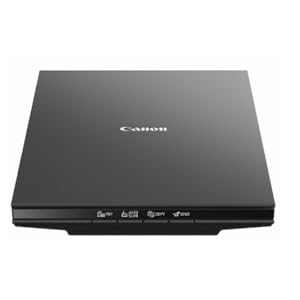
The Canon CanoScan LiDE 300 is a slim, high-resolution flatbed scanner designed for professionals who demand speed and precision. With ultra-fast 10-second scans, 2400 x 2400 dpi optical resolution, and intuitive one-touch EZ buttons including auto scan and PDF creation, it streamlines digitizing documents and photos. Its compact footprint and smart features make it an essential tool for efficient, clutter-free workspaces.

| Asin | B07G5XZVLQ |
| Best Sellers Rank | 15,809 in Computers & Accessories (See Top 100 in Computers & Accessories) 1 in Flatbed Scanners |
| Box Contents | CanoScan LiDE 400 Color Image Scanner, Setup CD, USB 2.0 Cable (USB A to Mini B) |
| Brand Name | Canon |
| Color Depth | 48 bits |
| Customer Reviews | 4.2 4.2 out of 5 stars (4,420) 4.2 out of 5 stars |
| Global Trade Identification Number | 00013803306507 |
| Greyscale Depth | 16-bit Internal / 8-bit External |
| Item Dimensions D X W X H | 25.1D x 36.8W x 4.3H centimetres |
| Item Type Name | CanoScan LiDE 300 Slim Everyday Scanner |
| Item Weight | 1.63 kg |
| Light Source Type | CCFL |
| Manufacturer | Canon USA Inc. |
| Media Type | Photo ; Receipt ; Business Card ; Paper |
| Minimum System Requirements | Windows 8 |
| Model Name | CanoScan |
| Network Connectivity Technology | USB |
| Optical Sensor Technology | CCD |
| Resolution | 2400 |
| Scanner Type | Document, Photo |
| Standard Sheet Capacity | 1 |
| Unit Count | 1.0 count |
| Upc | 013803306507 |
| Wattage | 4.5 watts |
User
great scanner
Great product that Scans well and can be adjusted for resolution, in black and white or colour
User
Help when setting up Canon CanoScan Lide 300
Anybody out there having trouble getting setup to complete or getting the error message about not being able toconnect to the scanner when trying to scan try this it worked for me.I am running windows 11 so right click on the start button and go to device managerlocate the entry for the scanner its imaging devices on mine click the little arrow next to it.Choose the bottom entry which says CanoScan Lide 300 right click and choose the top optionwhich is update driver and choose the option to search automatically this should fix it as it addsan extra part to device manager which does not seem to get added in setup and reads as Canon Lide 300 HTTP
User
Just what we wanted.
Very good, does just what it said it should do.
User
Nice
Works as it should
User
Will not print
I have used Canon flat bed scanners for many years, up dating as necessary as Window OS update, all worked well without problem. This year I decided to change over to Apple iMac and iPad and needed a replacement scanner. Following satisfactory performance experience, I purchased, this week, a new Canon Line 300. The only software provided was a CD rom for Windows (how last century?) so set about searching for suitable drivers, only to be advised that my iMac did not need additional drivers.I plugged the scanner in and after rummaging in settings and printers & scanners I put a page of text in the scanner and, with more than a little trepidation, pressed 'copy' button, nothing happened, some hours passed without progress back to the printers & scanners, nothing helpful to be seen I pressed the box overview option (why not scan button?) which brought the scanner to life and a copy of the document appeared on my screen. Yippee, excitement soon relapsed as nothing appeared from my trusty Brother Laser Printer. There it remains, nothing further action allowed it seems not. even a chance to move the screen image to be stored in the iMac's memory.I could buy another printer on the off chance that my Brother printer is at fault, but in the face of all the very bad reviews of the Cannon Line 300 sacaner I feel that would be an expensive experiment doomed to failure, easier, I think, to simply to put the Lide 300 back in it's freshly opened box and send it back to Amazon.
User
Very good item.
I managed to buy a printer without a scanner ( don’t know where my head was at that day) , this sits comfortably on the printer and is very easy to use, in fact it’s easier than the one on the original all in one printer I had. This is a high quality product so it all turned out well.
User
EXCELLENT PRODUCTS.
EXCELLENT JUST WHAT i NEEDED.
User
A Really Good Scanner
Just purchased this scanner to replace my Canoscan 4400F which gave up. This one is not a slide scanner but I didn't need that function. It had great reviews online and so far they are deserved. Excellent quality scanning.
User
Buen producto, fácil de usar
Llegó en buen estado.Simple de instalar siguiendo las instrucciones del manual.Escaneé un manual de 40 páginas sin problemas.Ese va a ser mi uso primario, digitalizar textos, recibos y manuales
User
Eazy to use
Very simple to use. Quite sturdy too. I recommend this for all scanning needs at home
User
14,5 x 9.9 is the size of the scanner, not the size of paper you can scan
Yeah, just in case some other guy is searching for a scanner that can take 9" x 12" and shops fast, this is a basic letter scanner, that can go up to A4. Just like i had. I personnaly don't care at all about the scanner's dimensions, what i want to know i the size of documents it can process. yay, got 2 scanners exactly same size from 2 brands.haven't tried it, i guess it works as good as my previous one... but i'll have to keep doing 4 scans to get a full 9x12 artwork digitalized. bleh.EDIT: it does scan a lot better than my previous, more focused and sharp, less blasted, and lot less noisy. So not 9x12 but still a good improvement
User
Better than the next versions
I used a older version of Canon scanner for 10 years without any issue. Then I bought Lide 400 and it had a huge issue with connecting to my pc. Had to return it. I bought this Lide 300 as a last try and it works like a charm. Very fast and pretty decent scanning. No hassle. Happy with this one.
User
Muito bom
Comprei para digitalizar fotos antigas. Cumpre bem a função. Achei que trabalha rápido. Fácil de instalar no computador.
Trustpilot
1 month ago
3 weeks ago