Buy anything from 5,000+ international stores. One checkout price. No surprise fees. Join 2M+ shoppers on Desertcart.
Desertcart purchases this item on your behalf and handles shipping, customs, and support to Cyprus.
🎥 Elevate your stream with 4K clarity and wide-angle confidence!
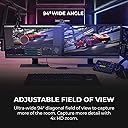
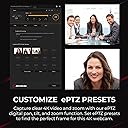
The AVerMedia PW513 is a professional-grade 4K30 webcam featuring a 94-degree ultra-wide lens and a built-in privacy shutter. Designed for gamers, streamers, and remote professionals, it offers plug-and-play USB 3.0 connectivity compatible with major platforms like Zoom, Teams, and OBS. Its fixed focus and ergonomic ball-joint mount ensure sharp, stable video in well-lit environments, making it a top-tier choice for high-quality streaming and video calls.


| ASIN | B08LZVCCGZ |
| Antenna Location | gaming, streaming, remote working |
| Are Batteries Included | No |
| Best Sellers Rank | #148 in Webcams |
| Brand | AVerMedia |
| Built-In Media | Live Streamer CAM 513 (PW513), Quick Guide, USB 3.0 Type-C to Type-A Cable (1.5 m/4.92 ft.) |
| Camcorder Type | Webcam |
| Color | black |
| Compatible Devices | Windows 10 |
| Connectivity Technology | USB |
| Customer Reviews | 4.0 out of 5 stars 588 Reviews |
| Display Resolution Maximum | UHD |
| Effective Video Resolution | 4 Kilopixels |
| Exposure Control Type | Program (P) mode or Automatic (Auto) mode |
| Features | Low Light |
| File Format | MP4 |
| Flash Memory Speed Class | C10 |
| Flash Memory Type | Micro SD |
| Flash Memory Video Speed Class | V90 |
| Focus Type | Fixed Focus |
| Form Factor | USB 3.0 |
| Has Image Stabilization | No |
| Image Aspect Ratio | 16:9 |
| Image Capture Speed | 60 fps |
| Image stabilization | False |
| Item Dimensions D x W x H | 6.7"D x 4.7"W x 2.7"H |
| Item Weight | 13.8 Ounces |
| Lens Type | Wide Angle |
| Manufacturer | AVerMedia Technologies Inc |
| Maximum Aperture | 2 f |
| Minimum Aperture | 2.8 Millimeters |
| Model Name | PW513 |
| Model Number | PW513 |
| Operating System | Windows 10 |
| Photo Sensor Size | 1-inch |
| Photo Sensor Technology | Other |
| Screen Size | 3.5 Inches |
| Sensor Type | Other |
| Shooting Modes | Automatic |
| Style Name | 4K30 Fixed Focus |
| Supported Audio Format | MP3, WAV, AAC, FLAC, or others |
| UPC | 795522966735 |
| Unit Count | 1.0 Count |
| Upper Temperature Rating | 104 Degrees Fahrenheit |
| Video Capture Format | ASF |
| Video Capture Resolution | 4K |
| Video Resolution | 4K |
| Viewing Angle | 94 Degrees |
| Warranty Description | 1 year limited warranty |
| Water Resistance Level | Not Water Resistant |
| White Balance Settings | Auto |
| Zoom | Digital |
J**D
The cheap, situational alternative to a DSLR
I've been making Youtube videos for a while now using an old Logitech C920 I picked up for $60 a few years back. Wanting to upgrade, I checked out a ton of reviews and found this webcam. Not disappointed. The resolution difference is astounding. Not only is it so sharp you can see the car hair on my shirt (great), the wide lens is covering twice as much area while doing it. The color and shading is also better than my old cam, although I can't quite get it to look ideal. Some reviews complained about the color quality, which is maybe not totally unfounded. It's a solidly built little sucker, part hard plastic, part metal. Probably the single most "duh" thing about its design is that the head itself rocks around on a ball joint to allow you to fine tune the camera's position, a feature missing from most even quality webcams. It also has a detachable USB-C cable which allows you to swap out a longer cable if needed. A lot of subtle decisions were made here that suggest they really thought it all through. There are some limits and downsides. It produces heat when in use, maybe a little less than an old 40W incandescent bulb, which is bizarre. It's thirsty for light too, which is where the bulk of the complaints come from. Slap this thing on your PC in your dimly lit WoW man cave and it's going to look grainy. For me, I'm using it in a studio lighting situation with softboxes so it's zero issue. There's also no zoom whatsoever, which means if you want to change shot you have to physically move the entire unit, nor is there any ability to manually focus things. You get one fixed focus, no frills. Basically, this thing fills a very specific niche highly effectively. You want a wide angle, high detail, stationary webcam in a well lit area and you don't need a lot of fancy zooms and options, you've found what you want at a price that is very cheap for what it is.
R**J
Probably the best webcam on the market in early 2021
This is a very high quality webcam that gets about as close as you can get to a DSLR while still having the simplicity and affordability of a webcam. Some early negative reviews were due to the fact that the early firmware in this camera required studio lighting to get a good quality picture. Recent firmware updates have dramatically improved camera performance in more typical lighting conditions although lighting can significantly improve picture quality like is the case for all cameras. I purchased this to run on my Linux system running PopOS 20.10, a derivative of Ubuntu. While you'll want access to Windows or MacOS to run the firmware update utility since the recent firmware updates profoundly improve the camera's performance and picture quality, the camera works flawlessly in Linux and is plug and play with no driver installation or special setup required. I would highly recommend this camera for people wanting a webcam capable of top tier image quality. I had also considered the logitech brio and the razor kiyo pro. While I haven't tried these other options, from what I gather reading and watching reviews, this camera is sharper and crisper than the brio although the brio has better color accuracy so consider which is better for your use case. The kiyo pro provides the best performance in lower lighting conditions. Additionally the kiyo pro reports a slightly wider viewing angle but suffers from a fisheye effect making rhe AVerMedia more desirable at a wide field of view. The AVerMedia does not have autofocus, which makes for a better experience for presenting so long as you're staying a normal distance from the camera. The logitech autofocus performs reasonably well although any autofocus can be annoying for typical use cases. The Kiyo Pro has terrible autofocus at time of release, but it can be disabled. The microphone quality on all of these seems reasonable, but I don't see the point of putting a microphone in a high-end webcam. I can't imagine that anyone would spend over $100 on a webcam and not use an external microphone.
E**G
High quality but gets concerningly hot even when idle
Cons: - It gets super hot even when not in use (but plugged in, ofc). That being said, it never seemed to cause any issues. I assume it may have an affect on the products lifetime. - Needs a little tweaking to get the best picture quality - The aver media software (CamEngine) is pretty bad, but works. - Kinda heavy, but understandably so. Pros: - Picture quality is great. - Aiming angle is tiltable to all directions. - Great design - Type C & detachable (very important for any product that uses a cable) Overall great product!!!
J**T
Not worth the hassle.
First of all, I'm a pro A/V technician, and one of my job was to take care of the inventory and firmware updates for a small production company. I've flashed a lot of firmwares before and never, ever made a mistake or had an issue caused by firmware flashing, *except for this camera*...! Now, first of all, this camera *is* capable of great quality; the only issue is, it takes an enormous amount of efforts to get it, and it simply isn't worth the hassle. It's also, most definitely, not viable for live-streaming because it's behaviour is absolutely unstable. Let's begin : the manual says that you do not need to install any driver. Sure - you will have a picture. The picture from a 2004 potato webcam is what you gonna get with it without the driver, unless your place is illuminated like an Hollywood studio...! Now. You will need to install the proprietary software and follow third-party instructions on YouTube. Upon following a tutorial - which I never ever thought I would be doing for a webcam that's quite appalling really - it appears that there is a "high quality" mode to *toggle on* if you want the quality this camera has to offer. Why in the world is this mode not the default one is absolutely beyond me. You're selling a 250 bucks webcam and putting it in low CPU consumption mode...?!!! This webcam is 5x the price of the average one. Your customers for this product *clearly* have a pro-level computer. That's ridiculous. But wait...!! There's more. I could live past this little annoyance IF said proprietary software actually worked... but the high-quality button to toggle? Well... it's gone. Literally. It's just not there anymore. I checked every menu on the software (Mac version AND Windows..!!!!) and it appears that they literally removed the high-quality option from the menu. At least, I don't have it. But wait... there's even more!! Their own software, proprietary that is, does not recognize their own product!!!! 6-7 out of 10 times, CamEngine V4 (the software in question) did *not* recognized the AverMedia 513, while plugged in, with the blue light flashing. What does the flashing light means then? I hope I could tell you... because the manual... does *not* mention it! :O It only mention a full blue light or no light at all. That's... weird. Why is there an off mode, IF there's a privacy curtain, AND no power button? How do you turn it "on" and "off" then? There literally is no power button on the device anywhere. A webcam like this is supposed to be always on. Hence why you have a privacy curtain. It's not rocket-science, yet they messed this up as well...!!! If there's a power button it should be to turn off the mic only for privacy concerns - but to be honest, your laptop as a built-in mic, your cellphone has one too, your smart devices all have microphones, so if someone *really* want to listen to you, they will (unfortunately) even if they have to hack into your hard phone line...! But the worst part? The firmware "update"... actually downgraded the quality. Literally. I have performed dozens of firmware upgrade. My laptop is always charged on. This one is super easy to do and only took 30 seconds. And then... worst quality. Like, significantly, *worst*. How? Why? What is happening? I don't know, but something with this firmware code is really wrong. So. In conclusion? AverMedia ruined what is supposed to be the best webcam on the market right now. Perfect form factor; quality is supposed to be great - demos from reliable sources prove it; but it suffers from the same problem as the ZCam E1, which is : - No proper documentation - No proper firmware (and a buggy that downgrade the quality even more after update! That's a first!) - Completely unstable - The user friendliness of a first-batch prototype - Unnecessary proprietary software - Random changes to the UX of said software hiding/removing necessary features This is my first AverMedia product, and it's the last. Save your money and get yourself 2-3 Logitech C920 and call it a day.
A**X
AMAZING CAMERA
**Edit: So this thing has started getting super hot for no reason. It's just sitting there. I started unplugging it any time it's not in use. Still works great though.** **EDIT of an edit: What the heck! I just bought it for $250, and now it's $180 for Prime Day. Wish I would have know this deal was coming** This is by far the best webcam I could have asked for. With the proper lighting, it looks damn near perfect. I bought this for streaming purposes, but it also works wonders for Zoom meetings. You'll look the best, and most professional out of everyone else in the chat. For sure. The wide angle is great, and the software from the website has an easy to learn interface that lets you adjust the exposure, lighting, and lock in a preset profile. The only thing I can think of that I didn't like was the lack of auto focus.
M**E
Fantastic cam for streamers
I've been using this cam solidly for three months and I can't recommend it enough. Its very useful for streaming. The software it comes with is amazing. The lack of autofocus is not noticed. The only thing to watch out for is how warm it gets. Make sure it has plenty of air flow and unplug it when not in use if that is a concern. But so far I haven't had an overheating problem, and I've run it with two monitors and a ringlight in 85f ambient temps. This is absolutely the best quality you're going to get at this price point. It might even the best quality you can get without going DSLR. The build quality feels very sturdy too. Not something I'm usually concerned with, but seeing as I travel, this has been a plus.
D**S
This is the best camera for a PC yet, and the worst webcam imaginable.
I'm considering returning this product because I know its potential and the cost behind it. Let's start with where this product differs from normal webcams, and how this makes this a very strange product to begin with. This camera's sensor is larger than a normal webcam's, and yet much much smaller than a normal camera's. You might say this isnt an issue because your phone and most laptops have camera's much smaller than this one and plenty of them do fine. This... is the only problem with this camera, and its a major one. Your phone's front facing camera works by taking the worst image you've ever seen, if you'd been able to see the raw to begin with, and using a lot of guess work and processing to get the image to what you see on screen. This processing includes color correcting, highly advanced noise removal, and in some cases, complete pixel synthesis to create the images we see today. This is not to say those sensors are bad, just that they are essentially all software. Webcam's feed on this same design, in that they take what should be a terrible messed up image, and use insane amounts of software on every frame of video to ensure that the photo that comes out might look blurry, out of focus, or like all the detail in the worst cases, is gone...but the image is noise free and in all likelyhood the best-case scenario out of these cheap sensors as they can squeeze out in hopes you enjoy it regardless of the horrible quality per bandwidth ratio now that USB3 has been a thing for so long. Big Camera's, DSLR sensors are of such a greater scale that much less of these various software tricks are actually necessary as they are consuming so much more light and have such better understanding of the raw input due to this amount of light, that they can see much closer to how the human eye sees, and in some cases, much much better as we can control the "Brain" that processes that light into an image. Pulling color and dynamic range out of places an eye would stumble in dark scenarios. However because of this lower processing, a DSLR may initially appear to produce a noisier image in low light scenarios in all but the best of cases. Good news with a DSLR~! You can take its raw output from the sensor and throw that into some video or photo editing program and apply those same post processing effects phone's use to a finer degree and produce an unparalleled image. It's range is so much higher that it is worth this trade off. This camera...Falls into an uncomfortable middle ground between these two, and because of it you have to do something crazy to make it work, so crazy in fact that I am considering returning it. Let me explain... See this webcam's sensor and range might be better than most webcams but...this says very little, due to the camera being so lacking in post processing, and its range not being high enough to make up for it. Much of what you can do with this camera in POST will make it look like a normal webcam without extreme amounts of light. To be clear, I am not talking DSLR amounts of light, it is much higher even than that. Where something like a Logitech webcam may lower its post processing as more light is introduced into the image, this camera has very little from the start, meaning right at the start, a lot of light is needed, and unlike a DSLR, its sensor cannot compensate for gain, at all. The moment even a little gain in the sensor is added, noise will be noticeable, and colors start to bleach out. I have an 1100 lumen bulb on my left, a 1600 lumen tv backlight, a 1600 lumen desklight, a 1600 lumen bedlight, a 1100 lumen bulb on my right, and a 1050 lumen bulb behind me. The image, is unusable for any description of recording. There is noise everywhere, and it is unfixable with manual settings...in a small room. Through my testing, I can drop exposure to -4 maximum with high gain (Below medium for this sensor, there is lots of noise) (-13 is the fastest exposure setting for the camera) This should imply that even with a focused bulb at 2800 lumen's the best I could do is drop exposure one more notch, or remove the gain setting (This camera's "Exposure Times" are doubled. Dropping one notch does nothing unless at the slowest exposure speeds, these means the software is lying to you) Also, noise and the "Gain" setting are not completely related (A slow exposure will still produce noise in the image even with gain disabled) Implying again that "Gain" may not be an appropriate word for what the software is actually doing, unless the sensor is noisy by default which by is disproven by watching videos of people with expensive video lighting. The above means the best combination for removing noise from the base image is to lower exposure to a -5/-6 with 0 gain for this sensor, naturally, without post processing (The least amount of post process work needed) Unfortunately, I have nearly 2200 lumens pointed at my face, and I cannot use these settings without high amounts of gain unless I put both bulbs by my face, which proved my theory, the camera at these settings is probably the best looking webcam I, have ever seen, even using its "Ai Framing" feature. To do this I need to purpose direct light at my face, and double the amount of light emitted by both of these bulbs combined, and to do so in a small room I need to design a lighting solution, or go with the D50 or Elgato Keylight (Not the air, or two, as it would be too dim) to resolve the issue with the sensor.... and I'm not certain a single one of these, will do the job, even combining them with the lights I have now..... And then I need to follow that image with a light bit of post processing to ensure the image isnt overly sharpened, as that is another post processing mistake this camera has (There is some post sharpening enabled that no setting in the app will remove)(Sharpening setting included yes). Usually, a camera like this wouldnt be the size that it is, as, it appears to be doing nothing itself (The app even tells you that noise removal will increase your computer's cpu load) and this would be a raw sensor (since USB3.0 has the bandwidth for this...from a DSLR) but the webcam being large usually means its doing some kind of processing itself (likely what that firmware update was for) that is not controllable by the software (which would explain mistakes in what is being picked up by the sensor) but I cant figure out what that would be as its post processing is simply not good. For ALLLL of that. I didnt buy this camera for streaming, or recording, I bought it for video calls as a comparable option against the Brio, and am underwhelmed as this "webcam" appears to be failing even in well lit environments for a "webcam" and a "DSLR", and the amount of work, and cost, to make it work well (For a webcam, not even a phone camera which should still destroy this thing in video) is astronomical. 3-500 dollars for a webcam with good lighting (2 lamps a keylight and the webcam) is enough to get you a cheap DSLR which with 1 keylight, or well... a lamp with decent bulbs in it... will blow this thing out of the water. My c920 produced a better, more noiseless image, with half the light im already giving the pw513 and as a reminder to all of you, thats a USB2 webcam, from 8 years ago when windows 8 was being thought up. To sum up, if you currently fit the following qualifications, buy this webcam. 1. You possess 4000 directed lumens aimed at your face (This is not a bulb, a bulb is not good enough, this is a directed softbox with bulbs totaling 8000 lumens, or a directed LED Keylight totaling 4000 lumens.) 2. You possess at least 2000 lumens worth of bulbs dedicated to side lighting from a lamp... (You must have both 1, and 2, to get a professional image) In any other scenario, buy a C920, or a Logitech Streamcam. The reason for this is the strange skintone coloring on the Brio, that will not be present on the other two. A DSLR for a tiny stream image is not worth it, and for youtube its only worth it if you regularly are NOT that bubble in the top left of the screen and are in fact making normal videos.
P**L
Must use AverMedia's software to work with OBS and StreamLabs
The camera is really nice with good image quality. I had to download and install AverMedia's software and then set OBS and StreamLabs to the software's virtual camera instead of setting it to the webcam. After doing so, it worked without issue. The software also allows you to tweak the image for the best look. The camera has a 1/4-20 thread to attach to a tripod if you use one
M**.
No funciona si se conecta por usb C
Funciona sin problema siempre y cuando no se conecte por usb C, ya que no lo reconocen los equipos a los que los he conectado, la calidad de imagen es muy buena y el ángulo de captura es amplio
S**T
A Good Buy
I was looking for a camera to use for conferencing with friends and students and for potential Vlog use. Yes this is at the high end of video cameras for general use however the picture quality is extraordinarily sharp. I can see however that I am also going to have to invest in added lighting to experience the full advantages of its potential. Yes there is a need for additional free software to control the brightness and coloration however well within the technical abilities of most people as I myself am no tech wiz and find it well within my capacities. I bought this after considerable investigation and researching reviews from different sources. I find that I can easily concur with the positive findings of other reviewers after purchasing this camera and, if you can afford the added cost which I myself strongly scrutinised before purchasing, this is a very good buy...
W**.
Best Webcam on the market
Easy to setup and install and the video quality is far and above any I've ever used. The CamEngine software works great for fine tuning image and the virtual cam is awesome for Zoom calls, Streaming and video recording. I was looking at this vs. another major brand with a higher end webcam with a "920" in the name, glad I went with the AverMedia 513 instead! Yes, you will be better served by having some external light sources as it does make a big difference in image quality, but that is not the fault of the camera, just the price of raising your game.
N**H
Useless item
This product for me was not to my expectations .Afer 5 minutes of isuage it stop working the camera was so laggy and gets stuck at some point of time I had to turn of my pc or unplug the webcam camera and plug it back.Price range is very high such low end item.
M**T
Lacks reliable Linux support. Manufactuerer AVerMedia #wontfix
If you're using this for 1080@30 on a Windows system for Zoom calls you're probably just fine. However, I tried to use this to obtain the advertised 4K@30 without success. It constantly overheated and become unresponsive. The only resolution was to allow it to cool down and switch to a different USB port and even then it only worked for a few short minutes. Tried the updated firmware from AVerMedia and mysteriously is now limited to 4K@5FPS or 1080@15FPS. Joy. Contacted the manufacturer who essentially told me it's not supported and try another computer. Obviously I'm not going to replace an expensive studio setup for the sake of this webcam nor is that even an option given supply issues. I will say that when it did work (for all of a couple minutes) video was great when lit properly. Unfortunately, 5 minutes runtime isn't going to cut the mustard. AVerMedia, please invest some additional effort into ensuring compatibility and resolving bugs like this and I'll be happy to eat my words. I really wanted to love this product. Now I'm up against very buyer-unfriendly terms from an Amazon seller who possibly wants to keep 20-50% of the refund along with having someone ship on their time. All while dropping the listed sale price a few days after purchase, go figure.
Trustpilot
2 days ago
2 weeks ago