Desertcart purchases this item on your behalf and handles shipping, customs, and support to Cyprus.
🔒 Elevate your security game with color night vision and AI-powered peace of mind!
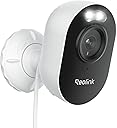
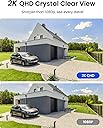
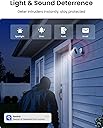
The REOLINK Lumus 2K 4MP Outdoor Security Camera combines cutting-edge 2K full-color night vision with dual-band WiFi for reliable connectivity. Featuring smart AI detection to minimize false alarms, it offers versatile alert options including siren and spotlight deterrents. With no subscription fees, users can store footage locally on microSD cards up to 256GB or use continuous recording via Reolink NVR. Designed for easy installation and robust outdoor use, it’s the ultimate proactive security solution for modern homes.


| ASIN | B08628J862 |
| Alert Type | Motion Only |
| Antenna Location | Outdoor Security |
| Best Sellers Rank | #64 in Dome Surveillance Cameras |
| Brand | REOLINK |
| Built-In Media | Camera*1; Bracket*1; Power Adapter*1; Quick Start Guide*1 |
| Color | White |
| Compatible Devices | Reolink Home Hub, Reolink Home Hub Pro, Reolink PoE NVR, Reolink WiFi NVR |
| Connectivity Protocol | Wi-Fi |
| Connectivity Technology | 2.4/5GHz WiFi |
| Control Method | App |
| Controller Type | App Control |
| Customer Reviews | 4.2 out of 5 stars 4,494 Reviews |
| Effective Still Resolution | 4 mp |
| Enclosure Material | Metal |
| Focus Type | Auto Focus |
| Form Factor | Bullet |
| Frame Rate | 15fps |
| Indoor Outdoor Usage | Indoor, Outdoor |
| Indoor/Outdoor Usage | Indoor, Outdoor |
| Installation Type | Screw In |
| Item Dimensions | 3.9 x 3.58 x 2.36 inches |
| Item Type Name | Wired WiFi Outdoor Spotlight Camera |
| Item Weight | 6.5 ounces |
| Light Source | Infrared |
| Manufacturer | Reolink Digital |
| Memory Storage Capacity | 128 GB |
| Mfr Part Number | Reolink Lumus |
| Model Name | Reolink Lumus |
| Model Number | Reolink Lumus |
| Mount Type | Wall Mount |
| Night Vision | Night Color |
| Night Vision Range | 33 feet |
| Number of Channels | 1 |
| Number of IR LEDs | 6 |
| Number of Items | 1 |
| Other Special Features of the Product | Color Night Vision; 2 Way Talk |
| Photo Sensor Resolution | 4 mp |
| Photo Sensor Technology | CMOS |
| Power Source | Corded Electric |
| Recommended Uses For Product | Outdoor Security |
| Room Type | Back Door, Driveway, Garage, Hallway |
| Shape | Bullet |
| Special Feature | Color Night Vision; 2 Way Talk |
| Specific Uses For Product | Surveillance |
| Unit Count | 1 Count |
| Video Capture Format | MP4 |
| Video Capture Resolution | 2k |
| Viewing Angle | 100 degrees |
| Voltage | 5 volts |
| Water Resistance Level | Waterproof |
| Waterproof Rating | IP65 |
| Wattage | 6 watts |
| Wireless Technology | Wi-Fi |
| Zoom Type | Digital Zoom |
K**R
Great System
Reolink makes a great product. Works well, easy to set up, and lots of control settings. Range is great, video is clear (both day and night), with adjustable sensitivity settings to help reduce recordings. This is a third camera that I just added to a 2 camera kit that I purchased.
C**S
REOLINK FOR THE WIN!!!
I was pleasantly surprised and how well these cameras worked! Installation and setup was seamless and easy! The option to use a micro SD card to capture footage for a long span of time was a game changer for me! They really mean NO SUBSCRIPTION NEEDED!!! I purchased this one, interior ones and door bell one that I will also review! These seem not to clog up my network either like my older Zmodo cams (garbage now!). If you’re questioning if these are good or not, don’t! They are GO FOR IT!!!!! You’ll love them!!! Pro tip: purchase the “Blink” brand micro SD card (currently $29.99) and use with these, cheapest on the market for that size and it is a true 256gb card that works wonderfully with these cams!
J**S
Camera
Great product is as advertised!
S**.
Easy setup, extra features, and good video quality
Update: Now that we've had it a minute, we're still pleased. It is a little hiccupy on Google home, but we're pretty ok with that. To be fair, it interrupts the music streaming to display the camera anyway, so we haven't done it that way much at all. The notifications are usually prompt on both of our android phones. When there is a delay, I'm pretty sure it has to due with the sleep status of the phone and not with the camera, though that's really just my theory. The picture quality is great. Being able to block sections out of the motion detection has worked nearly perfectly - the angle of the sun does affect some shadows stretching farther than what i have blocked in the morning, but I haven't decided whether to draw over that part, leave it be, or set up times when notifications are off. It's obviously not a big problem or I would have fixed it. So anyway, that's the update. We haven't needed to use the speaker or microphone, but we did test them. Neat things...you have to have the volume on your phone on to be able to hear the person! (Duh, I know. I always have mine turned off, though, so I just didn't think about it at first). Also downloaded the PC version, which was easy to set up and streams perfectly with no hiccups. Very handy while working, since I can pull the camera up that way and not interrupt my streaming music. And the light is very bright, according to my husband, who has to leave super early in the am for work each day. ;) Original review: Snagged this camera on a flash sale, but I had already mostly decided on this brand for good reviews, reasonable pricing, storage options, and Google compatibility. Before installing it, I plugged it in and set it up to make sure everything would work. No need to drill holes in the house until you verify it's not DOA! Setup if the camera and app was super easy, though there wasn't really anything in the instructions about it. The hard part was belly crawling through our super tiny attic multiple times to map, plan, and fish wires. The plug doesn't appear outdoor rated, but it didn't make sense to us to plug it in outside, anyway. I mean, then someone could just unplug it, duh. So in the teeny tiny attic I went. After several trips and most of the afternoon, we finally got the wires where we wanted. Since I had already set it up to test, all that was left was to mount the camera, plug it in, take a ton of tylenol, have some beer, and wait until the next day to aim it. As far as mounting, it's a nice and easy base, and they even include a little paper template to drill the holes for anchors. The night picture is before going back out to aim the camera, but you get the idea. The field of view is great. The motion detection is adjustable. Neat feature in there, too- you can mark off areas where you don't want it to detect motion. I've marked off the top right corner where it's still picking up the edge of the road and the paw print dangling toward the top left. Turned the motion detection down a few times to eliminate notifications for shadows, etc. Less than a day in and I think I've just about got it fine tuned to pick up a car in the driveway or a person walking up to the house, but to ignore headlights passing, leaves moving, etc. Picture quality seems great to me. I haven't viewed it on the TV yet, but it's more than enough resolution on a phone or Google hub display. I've played with saving pictures and videos. I've seen plenty of screenshots taken from a variety of other camera which were grainy, poorly lit, etc, and you wouldn't be able to identify anyone. These are much more clear than most I've seen, in case we were to need to ID a person or anything. Also, motion push notifications are prompt. The spotlight is plenty bright enough. The night vision is clear, both in grayscale and when it automatically switches to color. Pleased with all aspects.
M**M
Don't waste your time. Overwriting fails then basic recording fails.
Final update: It's 6 months later and both cameras are completely failing every few days. It will say "No videos available on this day" and stops recording. Factory reset did not fix the issue. It seems to work fine, and a day or two later stops recording on its own despite trying numerous SD cards. It's like Reolink programs the software to stop working as soon as the return window is closed. It was fine for around 28 days, then one glitch after another that piled up until the camera and app recordings weren't retrievable without constant resets. "Support" insisted my 4 different storage cards were faulty. After I spent an additional 2 weeks replacing the SD cards in my other non-Reolink cameras to see if I indeed had corrupt cards, they're all working with no recording or overwriting issues, which confirms this was a Reolink issue. Maybe the camera is fine and the app is garbage but regardless, I had to unplug and reset the camera every few days after it would give me a random "No videos on this day" error. I finally threw it in the trash and ordered another one of my more expensive cameras. This experience was an absolute waste of time. Original review: This camera worked okay until 2 days after the return window closed, when the 256GB microSD storage became full. I lost access to all recordings in the app and selecting any date in the Playback section gave me a "no recordings available" error even though everything was working yesterday before the max storage hit. The storage settings were on for overwriting recordings AND time lapse files. I tried selecting Format to erase the card to fix the issue, which didn't work, and from there it was a mess of glitches and it telling me to disconnect the camera and insert a microSD card when there was already one in there. It looks like we either got a defective unit or we'll need to do a full camera reset every time the storage gets full, which is roughly 4 weeks on a high traffic street. Before this issue, the camera seemed to reliably record any motion but I frequently had to close and restart the app to pull up Playback clips. They would either be stuck loading or I would get an unavailable error. So not a seamless experience at all but after an app restart, I'd be able to browse and watch recordings with no issue. The SD card was brand new so I don't think that's the issue. I have a new iPhone and the Reolink app was updated. The playback difficulty was tolerable but having all the videos disappear when the card gets full is too much of a pain for a camera that advertises a working override function. We won't be buying anymore Reolink cameras due to this. Update: I tried troubleshooting the issues with support, which was frustrating and didn't yield a solution. The agent asked me to repeat steps that I already told them did not fix the problem and the app is not letting me update the firmware via WiFi, meaning I'll have to disconnect it and update via my computer for each update. Our other security camera does this automatically with no errors so not sure what the problem is with the Lumus. We tried a second SD card that successfully had old recordings overwritten with the other brand camera. It also did not work in the Reolink and we're still getting locked out of all recordings once the card's storage is maxed out. Can't say I recommend the Lumus or the Reolink app for iPhones. Update #2: Wasted several hours this week trying 3 different newer microSD cards, from different brands and different storage sizes like support requested, only to have the same problem replicate and support telling me there must be something wrong with the SD cards. Absolutely avoiding Reolink in the future and going back to the brand we've already purchased from. It's a more expensive camera but less of a headache than this Reolink experience. Update #3: The camera now gives me a "No videos on this day" error when I try to access Playback on three different storage cards that have all been formatted using support's instructions. The errors are coming when the storage space is only half full. Support is still trying to tell me it's a microSD issue despite testing across 3 different ones from different brands. These cameras are garbage.
C**L
Wired Reolink Lumus security camera.
Working great. Reasonable video recording speed and clear. Loved the spot light.
F**K
Great System
This is a great System/Camera. The 2k wired (Electric plug) cameras are really great quality and very durable. No subscription needed, just local storage. Very easy to set up both on Android phone and the downloable program for Windows on their website. I HIGHLY Recommend this company!
S**E
Worked Great to Start -- then Stopped Working
I really liked these cameras when I first got them. Set up was a little confusing but not too bad. The picture quality is good and it did excactly what I wanted and that was alert me when someone was coming up my driveway or if there was someone at my front door. After a few months the camera stopped working and would say it was disconnected. Trying to reboot the camera and re add it was a giant pain. You have to reset the camera and take it down and scan it and several other steps that made it a big chore to reset. After doing this twice (with another camera as well) they both stopped working except maybe 2% of the time. Needless to say I bought new cameras from a different company. I would not recommend this product if you want something to work long term.
S**O
Melhor câmera, Versão 2K
Ótimo produto, chegou rápido, é a versão 2K, lacrada e nova, melhor câmera com integração com HA, recomendo!
P**T
Easy to setup, good image quality and very reliable.
As long you have a powerpoint, very easy to install and setup. Always stays connected to wifi and app is great. I have few of these outdoors and they have served me great. Worth it when on sale. Definitely recommend. Minor downside is that they get triggered by almost anything e.g light rain or an insect flying, hence give nonstop notifications. Image quality is good too.
L**Y
an outstanding solution for diy home security -- second to none imo
REOLINK Lumus, Upgraded 2K 4MP Outdoor Security Camera with Spotlights, 2.4/5GHz Dual-Band WiFi Camera Plug in, Smart Person/Vehicle/Animal Detection with Instant Alerts, Two-Way Talk, Local Storage So just a preface this review.. around my property I have many types of Wi-Fi based security cameras. Google , wyze, blink, and now ... plenty of these Reolink cameras. When blink first came out, they were absolutely groundbreaking because they were so cheap and they had relatively decent functionality, but it quickly faded because the Wi-Fi connectivity was extremely poor and only supported two gigahertz. It became super unreliable and kept missing footage. I then bought a few Google cameras thinking the expensive stuff works better.... Boy was I wrong. I then added wyze cams are on my property in specific areas and although they work fairly well, I was still a little bit disappointed with the reliability of capturing footage. The biggest Achilles heel for all of these models were the fact that it did had a really poor Wi-Fi connectivity.... They all generally only support 2 GHz. Some models for wyze and my newer gen Google cams claim 5ghz support , but they NEVERRRR connect over 5ghz. 2ghz is extremely congested around my hood and made every single camera very unreliable. I started using Reolink products starting with the doorbell. I was so shockingly amazed at how reliable it was. I decided to try a couple of these other models of reolink cameras to replace Google cameras. In the exact same spots, 50ft away from my house in the back yard, these Reolink cameras performed almost perfect. They are so reliable, that I can access the camera with my phone at any time no matter what from my phone anywhere in the world. There was never any drop-in connection during my extended period of testing ... after 3 months i basically swapped my entire house to reolink --- This camera REOLINK Lumus, Upgraded 2K 4MP is no exception . These cameras actually do support 5ghz (ENSURE you buy the 5ghz models because REOLINK does have some cheaper ones that only support 2ghz). For this reason Reolink Wi-Fi security cameras are simply hands down Superior to any of the previous product I've used around my property. Connection reliability is the number one reason I'm about to scrap all of my security cameras and purchase these instead. Even if Reolink were to have lower specs of video quality (which it doesn't) than any of the previous cameras I have used, I would still use reolink simply because it actually works, it records, it tracks, it does what you need it to do without interruption. Owning tons of cameras around my property The number one frustration is something happens and cameras didn't even capture it. Then what's the point of these cameras if they're so unreliable?? Having said that, I hope this is enough to convince folks to start switching out and use reolink instead. I'm not paid to say that... It's just the truth. In terms of video quality, it is absolutely on par with with my 2k wyze cams and can any any google cam on the market and let me just say I have all generations of Google cameras. Images are sharp and you can make out license, plates and details. Night vision is fantastic as well. You do have the option at night to also activate a spotlight if you want... But night vision is sufficient and a kind of like the stealthier non-spotlight mode. Footage is captured in an SD card. You can access the SD card footage via the cloud and on your phone app. The accessibility to the SD card video is absolutely fantastic and reliable. Again, this is because the Wi-Fi connectivity is superb and Superior to any other cameras I've used. Often cameras with SD card footage is extremely frustrating to access via the cloud... Very slow and sometimes simply doesn't work. But with Reolink camera , its lightning fast. And reliable. If you want to pay for subscription, you get the benefit of storing footage into the cloud so that your footage is safe even if the camera is knocked out. It's a nice option but so far I didn't subscribe. I think if they had an annual subscription for unlimited amount of cameras, I might consider. Aside from SD card you can also buy REOLINK home hub. Allows you to connect cameras to the hub instead so you can store ALL footage to local network (not cloud). Thus you own your footage. No subscription to cloud needed. I found that with homehub i can access my cameras quicker for some reason as a side benefit. I just want to take a moment to talk about the settings because the settings are absolutely flexible and have configurations that most camera systems do not offer. My favorite setting is the exposure and Shadow adjustment. You can adjust manually the exposure and Shadow sliders so that in your space it's not overexposed, or you can bump up the shadows to get a little more detail in the darker areas. If you keep it Auto exposure, there's a slider. Adjust the exposure compensation. I don't know of any camera system that offers this level of adjustment. Another setting that I really appreciate is the thresholds sliders that allow you to adjust when night vision turns on. If you find that in your space night vision turns on too early, then you can adjust it such that the threshold is higher. Once again, I don't think there are any cameras on the market that allow you to do this. In terms of notification to your phone, it's fast upon detection. I find it gets a bit annoying because you get so many notifications... So you may need to play with the detection sensitivities, or simply just turn it off. I think for me I like notifications but I need to play around a little bit more with all of the different sliders for sensitivity and object size min max etc.... There's quite a few sliders and settings to tinker with so for high traffic areas you do need to spend time on this. For low traffic areas I'm ok with default settings . So I'm fairly convinced I will probably be replacing most of my critical cameras on zones with this camera. But in areas that I don't have power, obviously I have to stick with my solar solutions. I highly recommend you try One camera and just check it out. I'm pretty sure you will be very impressed. I hope this helps
あ**あ
Nestから乗り換え もっと早く乗り換えるべきだったorz
Nest outdoor cam 2021年製が調子悪くなって買い替え nestの有線電源版と悩んだのですがHomeAssistantを試してみたくてこっちを購入 この価格でもう何も言う事ありません 完璧です。。。 なぜに今までNestで頑張ってきたのかマジで意味が分からないレベルです 多分このReolink以外のメーカーでも基本的にみんな一緒なんだと思うから、特別Reolinkが良いのかどうかわ分からないけど とりあえずAIに聞いて、HAで使うならどのカメラがいいの?っていう答えがReolink推しでして、完璧でした。 HAで使うのにこのLumusはファームウェアをアップデートしなければならなくて、そのファームウェアの探し方に若干のコツがいるものの そこさえ越えればもう本当に便利 この値段でこれですよ 家に余ってた書き込みスピードが、昨今のAction5とかではダメって言われる64GB class10 UHS-1最大85MB/s を差したけど 多分今の感じだと普通に30日〜40日程度は記録出来そうだし ちなみに同時にDoorbellもNestからReolinkに乗り換えたのですが。。。 そっちの方がまじでNest使ってきた意味が分からなくなる感じで。。。とりあえずこの7000円?程度で買えるこのカメラ 全く申し分ないです。ありがとうReolink
S**N
Good product.
still working, good clarity and easy for installation. you can buy this product.
Trustpilot
3 weeks ago
1 month ago