Desertcart purchases this item on your behalf and handles shipping, customs, and support to Cyprus.
🚀 Elevate your workspace: Power, speed & triple displays in one sleek dock!
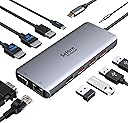
The Selore&S-Global 11-in-1 USB-C Docking Station is a professional-grade hub designed for Windows and compatible USB-C laptops. Featuring dual 4K HDMI ports, VGA output, 5 USB ports (3x USB 3.1 at 10Gbps), 1000M Ethernet, and 100W Power Delivery, it supports triple monitor setups and fast data transfer. Ideal for multitasking millennials seeking a clean, efficient, and powerful desktop experience with plug-and-play ease.


| ASIN | B08BF8XMZP |
| Best Sellers Rank | 1,912 in Computers & Accessories ( See Top 100 in Computers & Accessories ) 16 in Docking Stations |
| Brand | Selore&S-Global |
| Brand Name | Selore&S-Global |
| Colour | Light Gray |
| Compatible Devices | Laptops, Desktops, HDTVs, Monitors, Projectors, Keyboards, Mice, External Disks |
| Compatible devices | Laptops, Desktops, HDTVs, Monitors, Projectors, Keyboards, Mice, External Disks |
| Country of Origin | China |
| Customer Reviews | 4.3 out of 5 stars 1,711 Reviews |
| Data Transfer Rate | 10 Gigabits Per Second |
| Enclosure Material | Plastic |
| Hardware Interface | Ethernet, USB, VGA |
| Hardware interface | Ethernet , USB, VGA |
| Item Dimensions L x W x H | 5L x 4W x 2H centimetres |
| Manufacturer | Selore&S-Global |
| Manufacturer Part Number | SEUC3306-UK |
| Number of Items | 1 |
| Number of Ports | 11 |
| Operating System | Chrome OS, Linux, Windows 10, Windows 7, Windows 8, macOS 10.15 Catalina |
| Product Features | Fast Data Transfer, Plug and Play, Portable |
| Product Warranty | 2 Years |
| Special feature | Fast Data Transfer, Plug and Play, Portable |
| Total USB Ports | 5 |
| Total USB ports | 5 |
| UPC | 779584132307 |
| Unit Count | 1.0 count |
M**R
I have tried others and this just does the job
Brilliant - does the jobs where others couldn't
B**L
Plug and play
This docking station made my desk setup so much cleaner. Running dual monitors via HDMI with no issues, both screens are stable with good resolution and no lag. Plug-and-play with my laptop, and the extra USB ports are really useful for keyboard, mouse, and charging. Build quality feels solid and doesn’t overheat. Perfect for working from home or a multi-screen setup. Great value for what it offers.
P**L
A nice little USB-C Dock with plenty of outputs.
Works well generally, The only minor issues I have, sometimes I need to re-plug into the Surface Pro 7 for it to properly wake up everything attached, but more annoyingly (for me) is that it refuses to drive my dual 1920X1200 monitors in their native resolution at the same time. Yes I know this is an unusual resolution but that's what they are (DELL U2412M). This little dock seems to max out dual screens at 1080P which I guess for most is fair enough. I'm not sure if this is a Windows 11 issue but I don't think so as other (cheaper) USB-C docks I've tried worked at native 1920x1200 dual screen, but were missing the network port - which makes docking the Surface and making the most of 1GB LAN/Internet impossible, so I'm living with a stretched 1080P for now!
H**R
Great connectivity, straight out of the box
I bought one of these 2 years ago and it still works great, just bought a second one for another room. Works straight out of the box and has a huge number of connections. Compared with the £180+ Dell docking station that it replaced it is much smaller, has more connections, and allows power straight through, so you only have to connect a single USB C plug to your laptop.
A**N
Three high res outputs in one connector
The only USB C hub i could find that gave triple high quality outputs ( 2 x HDMI and 1 x DP but that was easy to fix with a DP - HDMI cable). Now we have three external screens and all the peripherals run through the hubs built in to the DELL monitors (connected to this adaptor). Such a neat solution as we need to use multiple laptops (work and personal) so we can switch between them easily. Most of our laptops can power the three screens and the internal screen giving a total of four screens which is amazing.
J**.
Seller sent a list of problems before the item arrived
Ethernet connection did not work even after following the instructions below. Knew I was in for problems when the following arrived on an email from the seller before I received the hub. Item 7 is about the ethernet. 1. This USB C docking station needs your laptop's USB C port to support DisplayPort/Video output. Please check if your laptop's USB C port supports DisplayPort/Video output. 2. About the docking station getting hot: It is normal if the temperature does not over 50°c due to the material design. please feel free to contact customer service if the docking station still gets too hot or does not work normally. 3. This docking station for the Mac OS system just support mirror mode, does not support extended mode (Extended mode for MacBook: The 2 monitors will be shown the same image but different from the laptop) 4. This USB C docking station support 2 HDMI+ VGA at the same time and the resolution will be 1080P (The Resolution is limited by the VGA port). Please enter "windows + P" that you could choose the extended mode. 5. What if the HDMI port does not work: ① Check if the HDMI cable is HDMI 2.0 (Please don't use the cable for too long) ② Please confirm if you have plugged the HDMI port is correct (The HDMI port needs an HDMI to HDMI port to work) ③Please plug and unplug the docking station, then enter the "windows + p" to active the laptop 6. About the charging issue: Please use a power adapter over 65W due to the docking station will be withholding a part of power (It is better to use your original power adapter if your laptop charging port is DC Power). It is normal below 50 ° C if the docking station gets warmer, but if it is too hot please contact me for a new replacement. Please plug the charging port(Power Delivery port) before you use the docking station (Sometimes the docking station will not work if your laptop does not have enough power) 7. About the Ethernet keep dropping: ① Please plug and unplug the Ethernet cable. (Use the power adapter over 65W, please plug the Ethernet cable after charging) ②Please set your IP address and MAC address acquisition method to automatic acquisition method if the Ethernet does not recognize. 8. About network interference: Please use the USB 2.0 port or plug the keyboard/mouse into the port which keeps away from the network port if the keyboard/mouse is slow to respond.
A**A
Intermittent lag
It worked excellently the first few days. Recently, my display has started lagging seriously and then it comes back to normal after a while. It can be annoying at times. Overall it’s a good portable product but I feel it won’t last very long.
J**Y
Great product and support
Bought the back in 2023 and the item worked very well, easy to use and reasonably priced compared to other products. There was an issue where the USB ports stopped working in June 2025 and spoke to the vendor who the sent a replacement pretty much straight away. Excellent service from them.
R**A
Buena calidad
Es de buena calidad. No se calienta. Y tiene todas las entradas necesarias.
C**N
Buono
Provato,funziona bene.
N**T
Perfect!
Works exactly as expected.
V**.
Bom produto
Compacto, rápido, muito conveniente. Funciona sem problemas.
C**N
Hub
Funciona perfectamente, solo hecho en falta que la conexión al PC no sea por un cable independiente
Trustpilot
2 weeks ago
1 day ago