🎯 Unlock your GPU’s full potential—no monitor needed!
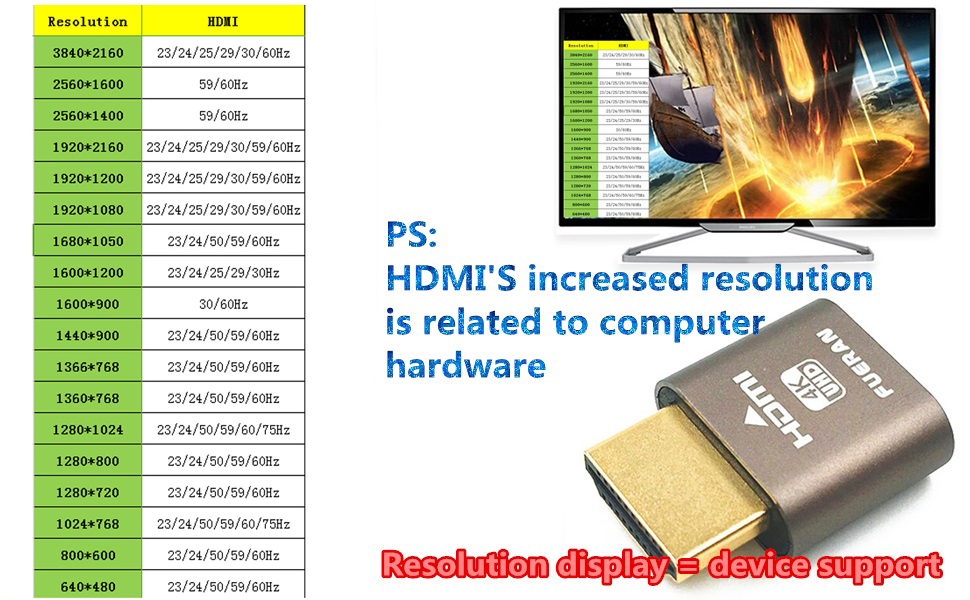
The FUERAN HDMI DDC EDID Dummy Plug is a compact, driver-free emulator that simulates a 1920x1080@60Hz display, ensuring your GPU outputs full resolution even without a physical monitor. Compatible with all major operating systems and graphics cards, it’s ideal for remote desktop setups, game streaming, VR, and GPU-intensive tasks like crypto mining.


| ASIN | B087R3NXC6 |
| Best Sellers Rank | 26,310 in Computers & Accessories ( See Top 100 in Computers & Accessories ) 69 in DVI to HDMI Adapters |
| Guaranteed software updates until | unknown |
| Item model number | 769891252546 |
| Manufacturer | FUERAN |
| Product Dimensions | 2.54 x 2.54 x 2.54 cm; 9.92 g |
C**S
Exactly what I needed for my remote setup
“Exactly what I needed for my remote setup. I use one of these dummy plugs on my headless server running Jellyfin and another on my main rig for remote desktop and game streaming — they trick the GPU into thinking a monitor is connected, so no more low resolutions or weird display issues when I’m connecting via Sunshine or RDP.” Both plugs are solidly built, plug-and-play, and support full 4K@60Hz as advertised. I’ve had zero issues with detection across multiple systems (NVIDIA and AMD cards). If you work remotely, stream games, or use a virtual desktop, these little things are a must-have!”
S**K
Works with sunshine and moonlight.
Perfect for sunshine and moonlight. I regularly use it to play games on other computers around the house or on the iPad.
E**O
Does not support HDR
Despite claiming it on the product page, this plug does not support HDR.
G**N
4K 120hz HDR (tweaking required) Moonlight Compatible!
***4K 120HZ HDR POSSIBLE WITH TWEAKING THE EDID & HDMI TO DP ADAPTOR*** So first of all, you can write EDID to this, which you must do to get the HDR aspect working. Out of the box, it works as 4K or 1440p 120Hz, but no HDR support. However, you can get HDR working on this with 4K or 1440p at 120hz. Via Windows, here at my steps: 1. Dumped my TV EDID using CRU (Custom Resolution Utility). FYI my TV is 144hz HDR/VRR capable. 2. Wrote the dumped EDID from my TV onto the HDMI dummy using EDWriter-beta2 (make sure you're writing to the HDMI dummy and not to your TV!!!!). 3. Buy ASIN B0B2ZF95KC which is a specific HDMI to Display Port Conversion Adaptor*. 4. Then connect the the HDMI dummy to the HDMI port on the adaptor and the DisplayPort connector into your DisplayPort on your PC GPU 5. Now Windows will allow 4K or 1440p 120hz WITH HDR Working!! Also gsync/freesync compatible *The ASIN product I referenced is a product called: YIWENTEC DisplayPort 1.4 to HDMI 2.1 Ultra HD 8K Male to Female Cable 0.25m Converter 8K@60Hz 4K@120Hz Directional Compatible with DisplayPort PC and HDMI Displays Tvs 4/5 stars as annoying it doesn't support HDR out of the box. But got it working with an adaptor and 10 mins work with the EDID dumping / writing.
P**E
Great dummy plug
Works well. Can be programmed too
G**S
Simple to use and Exactly like described
Good value for money. Bought for my headless VR gaming PC. Works perfect, exactly what I was looking for. Just plugged it into my RTX 3060ti and it works
T**Y
Used to keep PC active for Moonlight
Use it to keep my PC awake to use with Moonlight game streaming to my phone!
H**Y
Does not do 4k at 120Hz
Does not do 4k at 120Hz as advertised. Does otherwise work but this was the main selling point.
G**M
Si vas utilizar RDP no vas a tener problema, pero si quieres usar Parsec u otro sistema, la emulacion realmente solo va a 30 HZ
A**A
J'utilise parfois un moniteur externe mais pas a la maison donc pour simuler un deuxième écran sans devoir un brancher un c'est top, c'est beaucoup plus simple de mettre cette petite clef que de devoir se connecter à un véritable écran !
D**K
This just works, in a complex tech area. Windows will be positive you have a super fast 4K at 120hz display. There are no tricks or weird drivers to install. Any cloud computing software you might use like Parsec, Steam Remote Play, or Steam Link all work 100 percent with this. And so simply, you tell the headless computer to use *this* as its audio output (as if it were speakers) and boom everything just works. The audio caught me by surprise - this acts as if it were a high-end graphics card that has built in audio processing. Fantastic! I had no idea it would so cleanly "just work" for audio issues as well!
V**D
Rustdesk en deze emulator werken perfect zonder bijkomende instellingen. Plug&play
M**L
Great Dummy I used the steps of Gordon that you can find here. So now is 4K working with 120 Hz, HDR, VRR and G-Sync! I used the EDID of my tv LG CX and thanks Gordon!
Trustpilot
2 days ago
2 weeks ago