Buy anything from 5,000+ international stores. One checkout price. No surprise fees. Join 2M+ shoppers on Desertcart.
Desertcart purchases this item on your behalf and handles shipping, customs, and support to Cyprus.
🚀 Upgrade your storage game with blazing speed & cool efficiency!
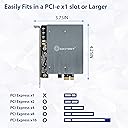
The IO CREST SI-PEX40153 is a dual M.2 B-Key SATA SSD PCIe 3.0 x1 expansion card featuring the Jmicron JMB582 chipset. It supports M.2 SATA SSDs in multiple sizes (2230 to 22110) with transfer speeds up to 6Gbps and max sequential read/write speeds of 850 MB/s. Its advanced aluminum heat sink ensures optimal thermal management, while FIS-based switching technology enables efficient multi-drive operation. Compatible with Windows, Mac, Linux, and NAS systems, it offers a hassle-free plug-and-play upgrade to expand SATA III connectivity and boost storage performance.


| ASIN | B07ZWVTHDR |
| Best Sellers Rank | #544 in Internal Computer Networking Cards |
| Brand | IO CREST |
| Compatible Devices | Personal Computer, Laptop |
| Customer Reviews | 4.3 4.3 out of 5 stars (3,532) |
| Global Trade Identification Number | 00857426008543 |
| Hardware Interface | ATA, PCI |
| Item Type Name | IO CREST Dual M.2 B-Key SATA SSD Converter PCI Express 3.0 x1 Expansion Card Heat Sink Jmicron JMB582 Chipset SI-PEX40153 |
| Item Weight | 0.3 Pounds |
| Manufacturer | IO Crest |
| Model Number | SI-PEX40153 |
| Operating System | Linux,Windows |
| Style Name | JMB 2-Port M.2 |
| UPC | 857426008543 |
| Warranty Description | 3 Year Warranty |
M**.
Make sure to set AHCI mode in BIOS
This is a fantastic add on card, particularly for adding SATA III ports to otherwise good motherboards that only have SATA II, or simply have too few ports. My workstation (Win7 64 environment) and gaming system is fairly robust, consisting of: Socket 1366 EVGA X58 SLI LE motherboard (circa 2009) Intel Core i7 970 hexacore CPU 12GB DDR3 EVGA GTX 570 Definitely not a slouch. What it was lacking in, was SATA III ports. I use an SSD on my boot drive, but its speed was being held back by SATA II. Having recently bought a SATA III 128GB OCZ Vertex 4 SSD, I wanted to appreciate the drive's very good performance, without plunking down a couple hundred dollars just for a SATA III motherboard for an outdated socket. Real world performance on the 128GB OCZ Vertex 4 was such that I could reasonably expect to see 450MB/s for sequential read/write speeds, with an optimal SATA 3 controller. Being fully cognizant that I am only spending a miniscule $17 on a budget brand card to add a couple SATA 3 ports, where there previously were none, I bought this with understanding that it would be unlikely for me to see the 450MB/s read/write performance that others were seeing as it were with more robust SATA 3 controllers. So I bought this IoCrest/Syba PCIE card. It delivered. Running several benchmarks with AS SSD, I tested the 128GB Sata III OCZ SSD as it performed with the onboard SATA II, versus this add on card's SATA III. Onboard SATA2- Read/Write average: 266/235 MB/s Add-On budget SATA 3- Read/Write average: 371/364 MB/s Great! Very respectable! This $17 card provided a nearly 50% increase in read/write performance over SATA 2, which exactly fits the bill for what I was looking for. As long as you are not expecting pinnacle performance from this, you can reasonably expect to see a decent speed boost if you are upgrading from SATA 2. There are some installation nuances that one needs to consider when installing this for bootable drives, that I think others who negatively rated this product may have not considered: -Set your BIOS SATA controllers to AHCI mode, not IDE. A lot of people forget to set this, as most motherboards default to IDE. IDE will artificially slow your drives and possibly create conflicts with this card. -The hardware/card should be installed first, without attaching any drives to it. This is so Windows can recognize the hardware and make the appropriate changes to the OS. Once booted into Windows, install the drivers (I went to the Syba website and downloaded the latest, rather than using those on the disk) and restart, insuring that the device is fully recognized. Failure to do this and you are almost guaranteed a blue screen. -Once you ensure that Windows recognizes this, turn off your computer and attach your boot drive to this card. Turn back on go back into your BIOS and make sure you set hard drive boot priority to this drive. Newer motherboards should have the ability to select and detect bootable add on cards. It should appear as "SCSI Add On Card" with your hard drive model listed next to it. Most consumer motherboards (Asus, Gigabyte, EVGA, Foxconn, etc) will support this. !! -If you are using a prebuilt PC, such as from Dell, HP, etc, your BIOS is likely locked down, and this card will probably not work for you if you intend to use it for bootable drives. If you are in this category, you will most likely only be able to use this for secondary non-boot drives. Overall, I'm extremely satisfied with this product and have picked up a couple more of these cards, to increase the number of drives I could attach to various computers. Zero problems to report on 4 wildly different PCs.
S**N
Great Product! Cheap too! Does what you need it to do.
Previously, I had an older PCI SATA RAID card that served my purposes well. I didn't use the hardware (simulated) RAID functionality on in, but rather had simply used the 4 ports available for SATA expansion. Unfortunately, after awhile, the card started throwing errors in Windows when I tried setting up a Windows dynamic drive using the old card. So, I began my search for something to replace it, and came across these! I purchased two of them for my needs (since these are only 2 ports, instead of my old one, which was 4 ports). They came nicely packaged in a small box, complete with a SATA cable as well( nice touch!). I didn't even bother with the instructions. A simple plug-and-play, and I was good to go! The drivers installed on their own, the SATA drives were detected, and I was able to build my RAID-5 dynamic drive in Windows. I now have double the capacity of what I previously had, and couldn't be happier. One thing to note - I now have a 3x2TB RAID-5 dynamic drive on my Windows Server. This works well, and I get decent transfer speeds. However, if I have a power failure, and the system goes down hard, when it's brought back up, the RAID drive is in a bad state, and must be rebuilt. I don't know if that's a fault of the cards, or a fault of using a Windows software RAID setup (I'd guess the latter). But I figured it was worth pointing out. Either way though, I love the card, and I love the compact form factor of it. It fits nicely! (Oh, and as others have said, the cover plate may be slightly out of alignment when you try to put it in your system. Simply unscrew the two screws a bit on the board, adjust the plate, and rescrew them together. No harm done.)
B**S
Works Beautifully On A Dell XPS Gen 4 WinXP,7&8
I purchased the IOCREST SB-PEX40039 with the Asmedia (ASM1061) SATA controller to add a LG Bluray (WH14NS40) SATA optical drive. My Dell XPS Gen 4 had all four SATA ports used to support two virtual RAID 1 drives that have served me well for several years now. So I needed an additional SATA port and this card offered to add two more SATA ports at an economical price. I did previously purchased a more costly Silverstone TEK PCIE card. But it played havoc with my Dell PC causing it to fail to boot. I quickly returned it since my PC boots fine without it. Thanks Amazon for your much appreciated return policy that keeps me coming back to make more purchases. According to the Dell specification for my PC the PCIE (PCI-Express) x1 port is capable of bidirectional transfer of 500 MB/s. This approximately fits the PCIE 2.0 specification of 250 MB/s (in each direction). So I assumed that the PCIE socket on this PC was a SATA II (300 MB/s) capable socket. For those of you who are planning to purchase this card you should be aware that the approximate transfer rate you will get with this card installed on your PC is primarily dependent on SATA specification of the motherboard and the specific PCIE socket you install it in (x1, x4, x16, etc). That is, if your motherboard only supports SATA I well you can only expect SATA 1 transfer rate and not SATA III with this card installed. That said this card can support SATA III if your motherboard’s PCIE socket supports it. For older PCs your best bet will be installing this card in a PCIE x16 socket for maximum transfer rate and not in an x1 socket if one is available. My PC had no x16 socket available so I was stuck with the x1 socket. I installed this card in my available x1 socket attached the Blu-ray drive and rebooted. The PC booted fine displaying the Asmedia boot information. The only problem was that the PC BIOS complained that I needed to depress the F1 key to continue or F2 to enter the BIOS. I latter discovered that I caused the problem since I disconnected and removed the old PATA optical drive and failed to disabled it in the BIOS. Once I disabled the PATA port the IOCREST card has been working beautifully so far but only as “Gen 1” SATA ports (SATA 1). That’s fine with me since burning Blu-ray disc is a slow process to begin with and a faster SATA transfer rate won’t help much. Yes, I can play Blu-ray movies with the open VLC player that buffers its input. Since my PC is a multi-boot system with Microsoft Windows XP, Windows 7 and Window 8 I was able to test the card in all three Operating Systems (OSs). The card works fine in all three as advertised. The tricky part was installing the driver for this card in each of the three OSs. The included instructions in the README file located on the mini CD disc are helpful but not correct. Apparently, they are in need of updating. For example, in Win7 after rebooting the system recognized the card as a “Standard SATA IO Controller.” Running the Win7 “Setup.exe” file installed the correct driver without incident. For Win8 I followed the instructions located at the Sybausa.com website to manually install the correct driver on the CD disc for my 64 bit Win8 system. For WinXP I cancelled the WinXP search for the driver and ran the WinXP “Setup.exe” on the CD without incident. So in summary the IOCREST card works as advertised on my multi-boot Windows PC albeit as SATA I ports. Installing the driver for the card is straight forward running the appropriate “Setup.exe” file located on the mini-CD or SYBIA website for WinXP and Win7. For Win8 you may need to manually install the approximate driver as per the SYBIA instructions located on their website. Lastly, I can recommend the card for similar Dell PCs as my Dell XPS Gen4 PC. Just make sure you have the lasted BIOS installed and disable in the BIOS any I/O ports you are not using or disconnected. As mentioned in many of the reviews make sure that ACHI is enabled in the BIOS. For my system that meant setting “RAID/ACHI” which in my case it was already set. Hope this helps! Thanks SYBIA I can now get a few more years of use out of my reliable DELL PC. You just need to update your driver installation instructions.
T**M
For those looking, it's a pass through so works perfectly and in raid, plug and play.
T**.
Si vous voulez du RAID performant, il vous faut une carte contrôleur RAID orientée performance, qu'on reconnaît à son prix et à sa ventilation notamment. Y'en a sur Amazon (LSI, Adaptec), comptez 200 euros. Si, comme moi, vous voulez juste connecter des disques supplémentaires en usages NAS ou standard, cette carte est PARFAITE. Un chip Marvell à la barre, comme sur les cartes-mère haut de gamme, et avec une ventilation passive prévue au cas où il serait bien sollicité. Une reconnaissance parfaite de la carte sans avoir rien à faire. 4 ports, pour voir venir. Idéal pour compenser un achat hâtif d'une petite carte-mère peu chère et avare en ports. Un prix très raisonnable pour une 4 ports. Vous pouvez également brancher des SSD dessus si vous en avez, mais je recommande d'utiliser plutôt les ports présents sur votre CM. La bande passante totale disponible sur la carte est de 500 Mo/s: c'est largement suffisant pour 4 disques mécaniques, qui auront du mal à dépasser les 100-120 mo/s individuellement, et tournent plus usuellement dans les 50-60. Ca ne suffira sans doute pas pour 4 SSD, mais perso je ne les ai pas :P Voilà, donc foncez Je trouve cette carte super dans son rôle, à savoir une connexion ultra-stable de disques supplémentaires et sans contrainte de goulet d'étranglement pour ce pour quoi elle est prévue (4 disques mécaniques qui consomment ensemble 100 mo/s, c'est pas commun). Chip Marvel qui va bien, aucune fausse note, prix raisonnable: bref, le meilleur du made in china.
D**N
10 Crest SY-PEX40039 2 port SATA III is a very good card. I got it today afternoon and installed it on my PCIe 2 slot (as suggested by the product manufacturer) and connected my boot ssd and set it as drive 1 (boot drive) through bios. I was in doubt, but it booted instantly. My motherboard supported only SATA II interface, which was bottleneck for my ssd and I could solve the problem with this card only at an expense of Rs. 1900/-. My statisticsare : Before installation (SATA II) : Sequential Read and write speeds : 257.6 and 204 Mbps; Random Read and write speeds : 160.9 and 63.9 Mbps After installation (SATA III) : Sequential Read and write speeds : 365.7 and 231.4 Mbps; Random Read and write speeds : 202.9 and 182.9 Mbps Not a jump indeed, but a formidable boost beyond doubt. I highly recommend this card for the SATA II motherboards for an easy and inexpensive upgradation (need not to change the motherboard)
D**M
No hace maravillas, pero incrementa la velocidad de transmisión de datos de discos sata III a placas con sata II. Para que funcione medianamente bien es necesario que el puerto donde se conecte sea, al menos, PCI Express revisión 2. He hecho test y a más velocidad del puerto PCI Express, algo más rápido es la transmisión de datos (tampoco muchísimo mas). Tiene que quedar claro que no va a llegar a la misma velocidad que una placa sata III, pero por muy poco dinero, puedes alargar la vida de ese ordenador al que tanto cariño le tienes. Tiene dos conectores internos sata II y se puede conectar en un Puerto PCI Express x1. Lo he probado en placas Gigabyte y HP y no me han dado problemas, aunque en equipos workstation de HP, no se por qué, no funcionaba en los PCI Express x4 y lo tuve que pinchar en el x1. En otros equipos lo he puesto en x16 que tenía libre. Ideal para conectar discos SSD. Me ha dado problemas con Windows 10 (va lentísimo, mucho más lento que usando los puertos sata II de la propia placa. En Window 7 funciona perfectamente.). La mayoría de las placas lo autodetecta sin problemas y no necesitas del CD de instalación que se incluye en la caja. Desventajas: No se puede hacer Raid sobre los discos montados en este adaptador.
L**T
This replaced a cheaper X1 card which had 4 sockets but would only run 2 disks at a time. Apparently it need a driver which wasn't supplied and I couldn't find on line. This X4 card with 5 sockets runs 5 disks simultaneously with no driver required. Includes the most current SATA specs which means it will handle latest HDDs and SSDs. Good transfer speeds - same as drives connected to my top end motherboard.
Trustpilot
2 weeks ago
1 month ago