Desertcart purchases this item on your behalf and handles shipping, customs, and support to Cyprus.
๐ Elevate your home calls with crystal-clear clarity and smart savings!
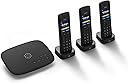
Ooma Telo VoIP offers a premium home phone experience with three HD3 cordless handsets, delivering crystal-clear nationwide calling over your high-speed internet. Featuring Pure Voice HD technology, smart home integration, and optional advanced services like telemarketer blocking and voicemail-to-email, itโs the top-rated, cost-saving solution for modern households.


| Answering System Type | Digital |
| Asin | B085RV13ZP |
| Best Sellers Rank | #24,166 in Office Products (See Top 100 in Office Products) #4 in VoIP Phones |
| Brand | ooma |
| Built In Media | 3 Black HD3 Devices, 3 Charging Cradles, & 3 Power Adapters, 3 Charging Cradle for HD3, 3 Sets of Batteries for HD3 Devices, Black Ooma Telo Device, Ethernet Cable, HD3 Quick Start Guide, Ooma Telo Quick Start Guide, Power Adapter for Telo |
| Color | Black |
| Compatible Devices | Ooma HD3 handsets |
| Conference Call Capability | 2 way |
| Customer Reviews | 4.0 4.0 out of 5 stars (1,092) 4.0 out of 5 stars |
| Dialer Type | Single Keypad |
| Enclosure Material | Plastic |
| Item Dimensions | 10.9 x 8.5 x 6.1 inches |
| Manufacturer | Ooma, Inc. |
| Mfr Part Number | TELO3HD3 |
| Model Number | TELO3HD3 |
| Multiline Operation | Multi-Line Operation |
| Number Of Batteries | 6 AAA batteries required. (included) |
| Number Of Items | 3 |
| Number Of Packs | 3 |
| Phone Standby Time | 150 hours |
| Power Source | Corded Electric |
| Recording Capacity | 22 minutes |
| Telephone Type | Cordless |
| Unit Count | 1 Count |
| Upc | 811008022914 |
| Warranty Description | 1 Year Limited |
User
Easy to set up & use; hardest part was entering billing info
Update/edit: one move and new computer purchase (M2 silicon Macs) later, and the Ooma is STILL going strong, with little to no problems. We use our own uninterruptible power supply, which has been a godsend with the storms and iffy power lines around here, and it keeps the Ooma system & our Internet up and running with no issue (so far, long enough for the power company to get things back up and running again.)My *only* complaint was that Ooma blocks our pharmacy robo-calls for no reason -- we don't have their prime service, so no blocking ability, and it was only affecting the robo-calls. Ooma Customer Service made our settings were right, then escalated the matter up. It's only affected the "your meds are ready" notices, which is really odd: irritating, but not a big deal. Even weirder, all the useless flood of robo-calls from our health insurance get thru with no problem.Still, a small irritation is a tiny thing, compared to the :)))) for all the $$$ we're not giving ATT.Important details: we use an older (2018) Intel Macs on AtlanticBB/Breezeline.We've used an ATT landline for years & have never had a cell phone or Internet phone; we're probably the last GenXers in the US to even have a landline, & since we barely use the phone anyway, never felt the need to switch. However, ATT's worsening service, horrible customer care, and persistent issues with our line finally drove us to look for other options. Ooma was recommended to us by folks on the Reddit sub for our city (r/Columbus).I was a bit concerned over the bad reviews here, I admit, especially since health issues require us to have a reliable 911 ability. After going thru the entire setup process, I'm now puzzled; the biggest problem we had was entering our credit card info.So, this is the basic Telo unit with three wireless/wifi handsets. Telo plugs into your modem/router, handsets' bases need to be plugged into a power source & the bases connect over wifi to the Telo unit. We've currently got two of the handsets in use; third is being saved as a backup.The setup directions (booklet & app) were clear and easy to follow: set up the account, plugged the Telo unit into the ethernet port of our modem/router unit & waited for all the updates to finish. That part took over an hour, mostly because our ISP had sent us new equipment the day before and THAT was having fits. Two reboots, one reset & a call to Breezeline support later, our Internet finally stabilized & Ooma's Telo finished its updates. Plugged in the wifi handsets, waited for the handsets to download their updates, got the "welcome" call from Ooma, and much cheering commenced.Our ATT line has been filled with static for the last couple months, ruining several important calls & making it hard for callers to hear us, too. As our first test, we had my elderly mother-in-law call us on the new temp number, and we talked to her on a perfectly clear connection on those wireless handsets while we walked around the apartment to make sure the connection held.It's a small apartment, roughly 600 sq ft, and the connection was clear & strong all thru it. We're surrounded by tons of other Wifi points/home networks, but there's no interference. We're still getting used to all the options & menus on the handsets (old phone is just a simple handset attached to an answering machine), but the documentation & shortcut card have been easy to understand & follow so far, and our phone needs are pretty basic anyway.the only major issue was getting the billing information entered in. For some reason, Ooma's app, website, & automated phone customer-service refused to accept any credit card info from us. Bank showed no issue with the account, but didn't show any declines or auth attempts from Ooma, either. Took two calls to Ooma Customer Service to resolve -- first rep referred us to the automated phone line (no go); second call rep had to transfer us to an actual supervisor to manually enter the billing into our account.Our old phone number finished its porting yesterday -- took only a week & works great. I'm dreading the ATT cancellation call, but that's ATT's issue. I'll add to this review after a month or so, after we've settled into and used Ooma a while. But so far? Impressed.
User
My 2nd Ooma
My first Ooma just died. I had it for over 10 years though so I'm pretty ok with that. I'm a little disappointed because I thought this was the Telo Air - which is totally wireless. And it's not. It has to be plugged in to the router/modem. So, you're pretty limited on where this can be. Why aren't they ALL wireless at this point?Other than that though. I've been using Ooma for years and really like it. I think it's a little expensive at $100+ a year and then you also have to pay taxes - which in my case are like $13 a month.911 isn't great. Someone was breaking into my home years ago. I called 911. They didn't get there for 4 hours because Ooma had sent them somewhere else. Part of that is a bad 911 operator who didn't listen when I gave my address. He just looked at what the phone system was telling him - and ooma was telling them I was in another city. So, I had a smashed window, cuts on my arm and the guy got away. Thanks ooma. I noticed that when I bought this new ooma there was a big note as soon as you open the box specifically saying, and I'm paraphrasing "Listen, 911 is awful on our service. You need to do this this and this to make sure it's even kind of accurate and even then please be specific to the operator and tell them you have an internet phone and they may be seeing false information."Other than those complaints - and they may be big ones for some of you - I do like ooma. I really like the call blocking and black list service. I like these new hand sets too. Since they're made for the ooma telo devices they work much better than any other average phone (which will also work)My old set had an answering machine. So, I had an answering machine and ooma's voicemail. I never knew where my messages were going. Some would go to machine, others to voice mail. And that kind of stunk. Now that I've replaced my very old beat up phones, I just have the voice mail. The phones have nice color screens. Are easy to use. Can be used as intercoms. And each phone can be programmed to ring with a different phone number. So, if you call me/the house these 2 phones will ring - my daughter has her own line so if you call her JUST her phone will ring. It's very convenient.Ooma isn't perfect and it has its problems but the good outweighs the bad. In my opinion.
User
Glitchy handset firmware and Godawful 3rd world tech support
I own an Ooma Telo with three HD3 handsets, and have had no issues. I convinced a friend of mine to order the same system, which he did through Amazon. It shipped during November 2022, which apparently was a terrible month for handset firmware. The displays on all 3 handsets will not turn off, draining the batteries rapidly. They are all set to turn off after 30 seconds, but do not. Mine work fine, but my friends do not. I Googled it, and there is a Reddit thread about 13 posts long with people having the exact same issue with handsets with firmware version 744.1. They all shipped around black friday. A call to tech support was a waste of time. Typical dumb questions asked by a person that can barely speak English. They escalated the issue to advanced support, of which those people never called the callback number I gave them. Also, the new unit my friend had would not connect initially. I had to reset it a couple times, and then it worked intermittently and rebooted on it's own like 3 times. I assume it was self-installing new firmware or something. It seems to work fine now, other than all 3 handsets are lit up 24x7, on or off the base. Audio quality is quite good, depending on your internet connection. A basic DSL connection is plenty good enough. If you are not tech savvy, I would either stay away, or have a friend help you set it up. Otherwise, the service works well, and will cost you only around $6/month for the taxes and fees (or add $10/month for their premier service, which gives you more spam blocking and remote access capabilities).Update 12/13/2022: After two very long calls to advanced technical support, and Ooma having no clue what the problem is or how to fix it (even though I have told them it is clearly a firmware issue), they said and engineer would call me back. No one ever did, either time. The issue persists. No support or help from Ooma whatsoever. Therefore, if you are one of the lucky people that get handsets in which the bright display does not shut off (regardless of time out settings), then your best course of action is to just return the entire system as non-functional. The problem with this is that it is nearly IMPOSSIBLE to cancel your service, and it is impossible to remove the credit card you put on file. Therefore, to avoid a 2 hour call with them like I did, just cancel your credit card and be done with it that way. They will get the hint...eventually.Update 12/27/2022: After never getting a call from their "engineer", I called customer service back. After 30 minutes of hold time, they looked up the case number, and it had been closed with no resolution. What terrible technical support and customer service.
User
Teleo Base Device Yes, Handsets Big NO
The telo base device itself works great and setup no problem. Its nice and clear and works perfect.The handsets on the other hand, they setup and sync to the base no problem. I had no problem syncing them. However, they will not ring when someone calls or even show someone is calling. I tested this with my cell phone. I unregistered them and registered, went through various settings but nothing seemed to work. In the end, I hooked up 3 panasonic handsets that I got from a local walmart and those are working great with the telo.I could not get the handsets to work no matter what I did and I am someone I would consider pretty good with tech and I have a lot of patience with trouble shooting. And man, I really wanted these to work.If I were you, I would buy just the ooma telo and a different brand of handsets (phones) of your choosing, do not get the HD3 handsets, they do not work. I am not sure what the problem is. But the problem was definitely with the handsets and not the base.Overall, I am happy with the telo base itself and phone service. I will also be happy with the amount of money I will be saving vs paying for a landline. Just disappointed with the HD3 handsets though.
User
Great for Home or SOHO phone service :)
I recently upgraded my home phone system to the Ooma Telo VoIP Home Phone with three HD3 handsets, and I couldn't be happier with my decision. This product has transformed my communication experience with its superior features and exceptional quality.Crystal Clear Call QualityThe HD3 handsets deliver outstanding call clarity, making conversations feel as though the person on the other end is right there in the room with you. The high-definition voice technology is truly impressive and a significant improvement over my previous phone system.Easy Setup and User-Friendly InterfaceSetting up the Ooma Telo was a breeze. The step-by-step instructions were clear and easy to follow, and I had the system up and running in no time. The handsets are intuitive to use, with a simple and clean interface that even less tech-savvy family members can navigate without any trouble.Versatile FeaturesThe range of features offered by the Ooma Telo is fantastic. From voicemail and call blocking to the ability to sync with my mobile phone, this system has everything I need. The intercom function between handsets is particularly handy for our multi-level home, allowing us to communicate easily without shouting across rooms.Cost-Effective SolutionOne of the best aspects of the Ooma Telo is its cost efficiency. The ability to make unlimited nationwide calls without a traditional phone service provider has significantly reduced our monthly bills. Plus, the option to add international calling plans at affordable rates is a great bonus.Stylish DesignAesthetically, the handsets and base station are sleek and modern, fitting seamlessly into our home decor. The handsets are lightweight but sturdy, with a comfortable grip that makes them easy to handle during long conversations.Excellent Customer SupportFinally, the customer support from Ooma has been top-notch. Any questions I've had were promptly addressed by knowledgeable and friendly representatives. It's reassuring to know that help is readily available if needed.In summary, the Ooma Telo VoIP Home Phone with HD3 handsets has exceeded my expectations in every way. It's an excellent investment for anyone looking to upgrade their home phone system with advanced features, superior call quality, and significant cost savings. Highly recommended!
User
Ooamas great, the handsets aren't
The 3 stars are mainly because of the sound quality of the handsets. When your place the call on speaker the sound quality is terrible to the point of annoying.Ooma itself was easy to set up and you can't beat the price per month for a backup hardline. My suggestion is if you decide to buy Ooma is buy the receiver but don't waste your money on the handsets. Spend your money on Panasonic or VeTec cordless which have far far better sound quality
User
Great alternative!
Let's start by saying I had 6 years of troubleshooting over the phone.This system is supposed to be plug-and-play. In my case, it was not. It seems like I was messing with the App before getting a dial tone, or the service got hung up in the server, which I don't know. What I do know is that I was able to get the Ooma device online. The phones didn't get a tone, and what I liked the most is the customer service, on a Sunday, and available, of course, for business communication; you are supposed to have technical support in place. After two technicians, one and a half hours, and many attempts of unregistering and registering the three wireless handsets, when the tech was about to give up and had already told me to return them, or he could send me new systems, but it would take longer than Amazon, I decided to power-cycle the Ooma device, and vuola!!!I finally got a tone ๐ตWhat I dont like about them is that when you save a contact, you're only saving a phone number, not a name. Also, the quality of the speaker is not great, is ok.Other than that, calls are clear. Of course, the system is connected to our router, which is getting 1 TB of fiber-optic speed.I do recommend this system.We chose to get it so our soon-to-be teenage girls dont use the iPads that much. The best thing is that they agreed to it.
User
Saves money!
Ooma was highly recommended by my internet provider technician (that has Ooma and our same internet provider) to save money. The basic Ooma is about $6.46/month and the advanced Ooma is about $10/month. He said you can also "port" your current landline phone number for $39 if you do not want to get a free new number. Many people have eliminated their landline phone because of unnecessary cost and because of cell phones. I wasn't ready to get rid of our landline phone in case of emergency and my children do not yet have cell phones. I did need Ooma tech support to help set up the Ooma internet phone lines. Once set up, these phones easily receive and make phone calls with the exception of one small problem. There is a problem when I make a phone call that has an automated computer on the other end. The automated selection does NOT recognize when I press a number selection option on my key pad. So far Ooma has NOT been able to resolve this flaw. They tried several times to remove battery, remove power cord and reboot, as well as remove internet router/modem power and rebooting that without success. Ooma then said it was a firmware bug with my internet provider. My internet provider insisted there is no such firmware bug. Frontier techs that came out, said there is not any problem with our internet router/modem. They also said an Ooma internet phone issue isn't anything they can fix or resolve and I need to contact Ooma support for resolution of the problem. I again contacted Ooma support. Ooma then said it may be a 3rd party error, and they would send notes to them and get back to me. I have had the Ooma phone since November 29, 2023 and the functionality issue with automated key pad selection has NOT been resolved as of January 11, 2024. Ooma internet phone works just fine for making and receiving calls with live people, BUT I have to use my cell phone to make calls to any company that has an automated computer selection answering service system. Update: recently our Frontier internet provider had to again replace our new faulty modem router and this time sent a skilled technician that knew what he was doing and tada-our Ooma system is fully functioning including the automated keypad selection. It was Frontier internet service that was the problem, not Ooma.
User
excellent product
worked exactly as advertised
User
Can not use the phones in UK
Bad choice made
User
Usefulness
Works fine, as should be expected.
User
Not the vendors fault
Upgrading was extremely annoying and frustrating. You need to contact them to do an upgrade to a new device, which requires calling a 1-800 that takes forever to get through. When you finally speak to someone they need to escalate the request and advised I'd be emailed when it was ready to be plugged in. A week later, I contacted them back, and they said it had been ready for days.Upgrading a phone modem should not be this hard.
Trustpilot
2 weeks ago
3 weeks ago