Desertcart purchases this item on your behalf and handles shipping, customs, and support to Cyprus.
🚀 Mesh Your Home, Master Your Network!
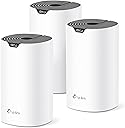

The TP-Link Deco S4 Mesh AC1900 WiFi System (3-pack) delivers reliable, high-speed dual-band WiFi coverage up to 5,500 sq.ft., supporting up to 100 devices simultaneously. Featuring advanced mesh technology, it creates a seamless single-network experience with easy app setup, Alexa integration, and robust parental controls. Each unit includes 2 Gigabit Ethernet ports with wired backhaul support, ensuring stable connectivity throughout your home or office.


| ASIN | B084GTH5LL |
| Antenna Location | Home |
| Antenna Type | Internal |
| Best Sellers Rank | #87 in Computers & Accessories ( See Top 100 in Computers & Accessories ) #10 in Whole Home & Mesh Wi-Fi Systems |
| Brand | TP-Link |
| Built-In Media | Deco S4 (3-pack) 3 Deco S4R Units 1 RJ45 Ethernet Cable 3 Power Adapters 1 Quick Installation Guide |
| Color | White |
| Compatible Devices | All WiFi Enabled devices |
| Connectivity Protocol | ethernet, wi-fi |
| Connectivity Range | 5500 square_feet |
| Connectivity Technology | Ethernet, Wi-Fi |
| Control Method | Voice |
| Controller Type | amazon_alexa, vera |
| Coverage | 5500 square feet |
| Customer Reviews | 4.5 out of 5 stars 29,500 Reviews |
| Data Transfer Rate | 1200 megabits_per_second |
| Frequency | 5 GHz |
| Frequency Band Class | Dual-Band |
| Item Dimensions L x W x H | 3.57"L x 3.57"W x 6.39"H |
| Item Highlight | Up to 5,500 Sq.ft. Coverage, Replaces WiFi Router and Extender, Gigabit Ports, Works with Alexa |
| Item Type Name | Whole Home WiFi System |
| Item Weight | 4.2 pounds |
| LAN Port Bandwidth | 1000 Mbps |
| Manufacturer | TP-Link |
| Maximum Upstream Data Transfer Rate | 950 megabits_per_second |
| Mfr Part Number | Deco S4(3-Pack) |
| Model Name | Deco S4(3-Pack) |
| Model Number | Deco S4(3-Pack) |
| Number of Antennas | 9 |
| Number of Items | 1 |
| Number of Packs | 3 |
| Number of Ports | 6 |
| Operating System | Linux |
| Other Special Features of the Product | Access Point Mode |
| Security Protocol | WPS |
| Special Feature | Access Point Mode |
| UPC | 840460605014 845973089726 |
| Unit Count | 3 Count |
| Voltage | 12 volts_of_direct_current |
| Warranty Description | 2 year manufacturer |
| Wi-Fi Generation | Wi-Fi 5 |
| Wireless Communication Standard | 802.11ac |
| Wireless Compability | 802.11ac |
J**.
WIFI everywhere in my house now!
The Deco S4 Mesh system fixed the issue I was having with bad WIFI around my home. My Verizon fios router was constantly dropping WIFI, and even when it was working the WIFI speeds were horrible. This is unacceptable in todays world of everyone working and doing their school work from home. We needed a solution that was affordable and could cover our entire house with good strong WIFI. I searched a long time and finally found the Deco S4 Mesh system here on Amazon, and I am glad I did. I purchased the three router Deco S4 Mesh system for my 2000 square foot house as we have two floors, a full basement, a breezeway, a patio and a garage that I wanted to cover with WIFI. I have one S4 hard wired into the fios ONT in my basement via a Cat5 Ethernet cable, and the other two S4 routers are set up wirelessly. The hard wired S4 going to my computer is located at one end of the house on the first floor. One wireless S4 is in the basement, and the other wireless S4 is on the opposite side of the house on the first floor. The set-up was very easy, and the Deco app made connecting all three S4 routers quick and painless. Thankfully I get a decent cellular signal at my house, so I was able to set up the Deco S4 Mesh system using my cell phone. You have to remember that once you disconnect your existing internet from your old router, you can't use the Deco app unless you have a good cellular signal and a device like a cell phone or cell tablet to do the set up. One other thing I especially liked is that I could name the S4 network whatever I wanted. This makes it easier for me to remember what the network is called as I no longer have to remember the very long alpha-numeric name of the old router. This makes connecting devices much easier and a lot less painful. The only negative I would give the Deco S4 Mesh system is that there are only two Cat5 Ethernet connections on each S4 unit. I have three Ethernet connections at my computer and I had to re-route one connection to one of the other S4 units, but I did not deduct a star for this because I knew about this before I purchased the Deco S4 system. The whole S4 Mesh system took about 30 minutes to setup, and I now have super fast WIFI everywhere, even in my garage, back yard and shed! With this new Deco S4 setup, I am now getting the full upload and download speeds via WIFI that I get with the hard wired Ethernet connection to my computer. This never happened with the fios router, even when it was new. With everyone now in the house all day long working from home and doing school work, bad WIFI is NOT an option. The Deco S4 Mesh system solved all of the issues with poor WIFI we were getting from the fios router. I would highly recommend the S4 Mesh system to anyone, especially if you have problems with your current WIFI around your house. The other great thing about the Deco S4 Mesh system is that with more and more devices all needing to attach to a home network, it says it can handle up to 100 devices! My fios router, even when it was working, was having trouble keeping up with the devices we have. It is amazing how many things we have now that require a good WIFI network. There are Echo devices, smart outlets, smart switches, smart bulbs, camera's, cell phones, tablets, lap top computers and on and on. It did not take long for us to go beyond 50 or more devices in our home that need WIFI, and this Deco S4 Mesh system has been able to keep up with all of them! At last count, we now have 59 devices and there are more on the way I am sure!
M**T
Strong Performance and Stability—When Configured Correctly
The Deco S4 is a fantastic mesh Wi-Fi system. It’s easy to set up through the app, and adding devices is simple and intuitive. Wi-Fi speeds remain consistent as you move from room to room, and the system handles multiple devices smoothly. It’s also easy to configure passwords and create a Guest Network. Newer S4 units include additional features like an IoT network option and the ability to manually assign which satellite Deco connects to which primary node—super helpful for optimizing placement. IMPORTANT TIP for Ethernet Backhaul Users: If you plan to use Ethernet backhaul (which I highly recommend if your setup allows), do not connect your Decos through unmanaged switches. You must use managed switches with loop prevention (such as STP or RSTP) enabled in the switch’s settings. I ran into a host of frustrating issues when using unmanaged switches: The main Deco would lose internet when opening the TP-Link app Satellite Decos would randomly report as offline Firmware updates would fail or not even check properly Changes in the app wouldn’t apply Echo devices struggled to stay connected Network optimization scans would fail If a single Deco lost power, it could take hours to get the system working again After replacing my unmanaged switches with managed ones that had loop prevention enabled, all of those problems disappeared instantly. Summary: This is a powerful, reliable mesh system that performs exceptionally well—as long as it’s set up correctly, especially if you’re using Ethernet backhaul. TP-Link did a great job with the Deco S4, and I’d definitely recommend it to anyone looking for stable whole-home coverage. Just don’t overlook the importance of your networking hardware if you're wiring things in.
A**O
Finally WiFi that doesn't feel compromised
I have Verizon FIOS bundled service, so I have my TV, phone and internet all-in-one. While I do love FIOS, one of the negatives is that I had to use their bundled Gateway modem/router because of my TV and phone services. My house does have a wired ethernet network running thru it, which is great for all my desktop PC's and Home Theater setup, but the FIOS Gateway router's WiFi performance didn't adequately cover my three floor house (the FIOS modem is in my garage, next to my home wired-network box). To help solve this issue, I tried using the very well reviewed Netgear EX6200 range extender, but I could never get reliable performance out of it...random drops, slow speeds...it just didn't seem to like working with my FIOS router. In looking for a better solution, my research led me to looking into Mesh networking, especially as these systems (supposedly) would not need to bypass my FIOS modem...it would work with it, just taking over the WiFi functions. I was apprehensive, so I wanted a cost effective product. Tp-Link's Deco series have gotten rave reviews and their latest S4-series was actually cheaper than the previous M4-series, so I took the plunge. Getting the Deco S4 up and running is so much simpler than traditional WiFi extenders and boosters...download the TP-Link mobile app, launch it, pick your TP-Link product and it guides you through the whole process. There were some hiccups during installation, mainly where the app failed in finding the S4 devices on the first pass, but hitting the Try Again button solved the issue. The S4 router unit (all three are identical) simply plugs into any open port on the back of the FIOS modem. Once the Mesh network is setup on this S4 router, you can now easily add the other units throughout your home using the app. The app has a lot of functionality...you can set-up usage profiles, "Blacklist" devices from using your network, monitor network health and utilization, etc. Two other benefits with the S4 Deco units are that each includes two auto-sensing Gigabit ethernet ports (useful for network switches/hubs or plugging in non-WiFi devices, etc.) and that they are compatible with all TP-Link WiFi devices, so expansion and upgrades are easy. Coverage is excellent. The big benefit to a Mesh network is that all the S4 units are essentially operating as one...so, as you move throughout your house (or even outside!), your devices simply pick-up the strongest signal from the best available S4 router. You don't need to manually switch from network to network like you would with a traditional WiFi extender. Speeds are surprisingly fast. I only have FIOS 100/100 service, but I am getting WiFi speeds of 100+ Mbps on my ground and third floors (both S4 units are wired) and almost a full 80 Mbps on my second floor with a non-wired S4 unit. Outside on my back deck, speed drops to "only" 60 Mbps...incredible! I spent about 4 hours stress testing the network and found it to be rock solid...very consistent and dependable WiFi performance. If there were two things I'd list as negatives, they would be the lack of a web-based network tool/programmer (everything has to be done on the mobile app) and that there was a way to identify/isolate usage between the 2.4 and 5.0 bands. This is a long review, but to sum it up, the Deco S4 is a great product. It's simple to set-up, works with your existing modem (a HUGE plus for Verizon FIOS users), doesn't act like a bottleneck and offers a huge area of coverage. And there's the very nice price. I finally feel like I'm getting all the WiFi I'm supposed to be getting!
W**N
Excellent performance and does cover 5000 sq ft
Excellent product, good solid coverage and speed. Fairly easy to set up if you have a bit of technical knowledge. Instructions are otherwise clear and can be easily followed even if you don't have a lot of technical experience. Would definitely recommend purchasing if you have blind spots with your internet from room to room and especially if you have concrete walls. Excellent performance and does cover 5000 sq ft
F**E
Simple setup, and the connection has been solid
Setup was painless. The app walks you through it and I had it up and running without any of the usual router headaches — no digging through admin pages or troubleshooting why devices won't join. Since then it's just worked. Connectivity has been steady across the house and I haven't had to think about it, which is really all I want from a mesh system. Devices connect, they stay connected, and I'm not power-cycling anything. Easy to recommend if you're replacing a router that's been giving you dead spots.
M**E
I'm a Network Engineer, These are Awesome
I work as a data network technician, and these routers are awesome. I bought two 3-unit kits to build a WiFi mesh network for a customer on a large, multi-million dollar mountain property with four buildings including the main house. I was expecting to have to run network cables and utilize long-range point-to-point transceiver antennas to get WiFi to the farther outbuildings, but the Deco routers were pushing strong enough signal and automatically connected to each other in a such a way that cable runs and extra antennas weren't necessary. The routers were extremely easy to configure using the Deco app, and deploying them across the property was a breeze. The range on the units is impressive, easily covering 70+ feet and going through dense log-cabin walls. I was extremely impressed when one particular router which was too far away to communicate with the main unit had its traffic automatically routed through the next closest unit in a nearby building, daisy-chaining itself so that it could be connected without any additional setup or configuration on my part. Speeds at all units were well within acceptable ranges, with all except one Deco getting over 100mbps download speeds. The mesh capabilities of the devices are very efficient and effective, with my mobile device automatically switching to the router with the best signal strength as I moved around the property. The Deco app made setup and management of the network very easy, with details like a network map, device heartbeat info, parental controls, and more. Adding all 6 routers to the network was easy and fast. This system ended up saving me time and materials, and saving my customer money because of how easy and effective it was at providing WiFi coverage around his property without the need for extra hardware or equipment. UPDATE I've just deployed a smaller mesh network in my own home using the same S4 routers that I bought for my customer. While these routers are not the newest and fastest option available, they're very affordable and completely capable of handling modern network traffic. I regularly have 10+ devices connected at a time including several game consoles, and never have any issues with network speeds that could be blamed on the S4 Decos.
P**R
First time mesh user, no complaints.
These are great. Pretty clear on how to set it up. Only issue is one constantly needs to be plugged into the router, didnt realize it, but no big deal. Easy to navigate, easy to monitor with the APP. Its a solid purchase.
I**W
FAST, simple setup, cheap mesh solution
After doing a lot of comparison shopping, I ended up settling on the TP-Link Deco S4. My biggest factors were price, reliability, and range. I have a three floor 4500 sq/ft house built in 2003. The Verizon Fios Gateway router worked, but it suffered considerable slow down as I got to the extremes of the house. With the new three node Deco S4, I get full speed internet at every floor and extreme. Previously, I was able to get 100mb/s maxed out at the router with minimal traffic, but dropped down to 10 mb/s at the extremes of the house, especially the basement and some bedrooms. With one of these on each floor (main on middle), I range from 95-120 upload and download (paying for 100) on all three floors depending on time of day. Interestingly enough, I haven't suffered much dropoff in signal strength with each mesh node as opposed to the main wired unit acting as the router. I've read countless time that unless I'm using a wired backhaul that there would be signal dropoff at the mesh points, but I haven't witnessed any significant drop. I also purchased this system as it had ethernet ports for backhaul (if I needed to improve speed) and accesspoint use on each node, but I don't use any other than one at the main router for my Phillips hue bridge. The design is simple and clean. I was debating on saving $10 and getting the M4 (identical internals), but figured I was already scraping the barrel on price point so may as well get one that wasn't as much of an eye sore. These are clean, simple, modern, and much better to look at then the Fios provided router. The app is simple and intuitive and makes most of the decisions for you. It ran me through the setup very easily. It has parental controls and allows me to prioritize devices as well as setting up a guest network. However, what was most essential to me was the ability to turn off 2.4 or 5ghz signals if I needed to set up a product that only worked on one (usually older products that use 2.4 only). This app is mostly for people that have basic technical skills, but not full on IT networking knowledge. I chose to replace my Fios router entirely and run ethernet from the Verizon modem (optical network terminal) instead of coax so I didn't have to run the Fios router in bridge mode. I called Fios tech support and the person switched the feed to ethernet in five minutes. Now I don't have to rent my router and have much faster internet without relying on bridge mode. If you aren't comfortable with running ethernet and swapping it out at the ONT, you can use the Fios router and connect the Deco S4 to their router instead. This also allows you to keep your cable box functionality such as guide and on-demand without a MOCA adapter. I have no such plans as I'm dropping cable for YoutubeTV. On average, my house has around 40 connected devices from Phillips hue bridge/bulbs, Ecobee thermostat, Ring products, several Nest and Echo devices, five smart TVs, smartphones, tablets, and laptops. Don't buy into the hype that you need wifi 6e. This supports gigabit+ speeds and the dualband is more then enough to maximize efficiency. In addition, you can add or swap out mesh points to this system at any time from any Deco system (E3, M4, M5, P9, etc.). You can literally improve on this system in the future if desired. This was one of the best purchases I've made in a while. Update 2.4.21: I recently switched to 200mb/s from my ISP (it is the lowest package they offer when only purchasing internet). With this, I've noticed download speeds at the main router at 270-300 and 300+ upload depending on network traffic. I have seen more noticeable drop-off at the mesh points with this speed, usually 170-230 download and 200+ upload on my first mesh extension node, and 160-200 download on the one in the basement. I also have the biggest variance in upload speeds with this one at 45-120 upload, depending on time of day and network traffic. However this was also the location I had the biggest issue with previous to installing my Deco S4 system. In general, I am still getting amazing speeds, far exceeding what I'm supposedly paying for, extremely stable at every location of my house including the far extremes of my yard. I have can rely on blazing fast reliable internet throughout my house and not have to have wired backhaul to achieve it. However, I can now see why some individuals suffer noticeable drop-off with higher internet speeds at the mesh points. If you figure the drop-off as a percentage and multiply it times the speed, the difference will be more noticeable at the ghz speeds. Overall, love this device, how much faster my internet is and how I am not paying my ISP for their outdated routers they try to dish on unknowing consumers. Best purchase I've made in years.
M**A
El más accesible wifi mesh kit
Fué sencillo de instalar, me tardé aproximadamente 1 hora en todo el setup, los equipos se conectaron rápidamente, incluso la impresora wifi con conexión wps fué sencilla de configurar y trabaja muy bien. Equipo excelente en el área de oficina apenas me llegaban 8-9 Mbps (con un repetidor) ahora tengo de 90-100 Mbps, mi computadora principal (una viejita Asus de 2012) a cada rato se caía el wifi y ahora está estable, también pude configurar mi streaming de música desde la oficina hasta la sala dónde se encuentra el Deco router y trabaja muy bien sin cortes.
M**H
Great Product!!
Recently purchased the TP-Link Deco S4, and I’m seriously impressed. It delivers consistently fast Wi-Fi speeds across every corner of my 4-bedroom double story house—no more dead zones or frustrating dropouts. Setup was a breeze, and the mesh system handles multiple devices without breaking a sweat. Highly recommend if you're after reliable whole-home coverage without the hassle. Great value for performance!
A**A
TP-link Deco una buena inversión.
Siguiendo las instrucciones de de la App. el TP-link Deco se instala fácilmente. Una vez instalado funciona correctamente. Mediante una RED DE INVITADOS tienes bajo control las TVs, Tablets, teléfonos etc. lo cual es muy útil, pues algunos chicos abusan de la nueva tecnología digital.
L**G
Works well and easy to set up
My home has 3 floors, and this works so well. Setting up was a breeze. And it looks aesthetically nice as well!
A**A
Buen repetidor
Da muy buena velocidad, muy fácil de instalar
Trustpilot
2 weeks ago
3 weeks ago