


Desertcart purchases this item on your behalf and handles shipping, customs, and support to Cyprus.
🎬 Elevate your AV game—never miss a beat or pixel!
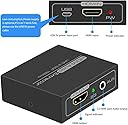
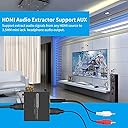
The DONGJIAN HDMI Audio Extractor is a sleek, plug-and-play adapter that splits HDMI input into 4K/3D video and separate stereo audio outputs via 3.5mm AUX and L/R RCA. Supporting HDMI 1.4 and HDCP 1.4, it ensures high-resolution compatibility with devices like PS3, Xbox, Fire Stick, and more. Its smart EDID management guarantees optimal signal performance, while its low power consumption design eliminates the need for external adapters, making it an essential tool for professionals seeking seamless AV integration.




| ASIN | B084RN22MW |
| Best Sellers Rank | #172 in Video Converters |
| Brand | DONGJIAN |
| Color | light black |
| Compatible Devices | PC |
| Connector Type | Auxiliary, DVI, HDMI, RCA |
| Current Rating | 0.3 A |
| Customer Reviews | 4.2 out of 5 stars 1,519 Reviews |
| Finish | Hdmi |
| Finish Type | Hdmi |
| Input Voltage | 5 volts |
| Item Weight | 0.21 kg |
| Manufacturer | DONGJIAN |
| Mfr Part Number | HD14AUX |
| Model Number | HD14AUX |
| Number of Items | 1 |
| Number of Ports | 4 |
| Package Quantity | 1 |
| Power Plug Type | Type A - 2 pin (North American) |
| Specific Uses For Product | TV |
| UPC | 745924750951 |
| Unit Count | 1 Count |
| Warranty Type | Limited |
D**R
Worked Great for Connecting my Roku to my PC
I had a Roku Express lying around and decided to attach it to my PC monitor through a KVM switch so I could stream shows \ movies at my desk. It worked great, except for the fact that the Roku has no audio jack and my monitor has no speakers. I.e., I needed a way to send the audio to a set of speakers, so I ordered this little box. Installation is simple - just plug in the HDMI cable from the source (my Roku) and then run an HDMI cable to the monitor (or TV) and an audio cable from the Aux port to your speakers (or plug in your headphones). The video quality is great, although I don't have a 4K display to test it with, and the sound quality is good, though that can depend on the quality of your speakers\headphones. I have not noticed any delay or audio sync issues. Note that if you use the HDMI output of your PC's graphics card as the video source, there is likely to be no audio, so don't blame this adapter for the fact that your PC's HDMI output doesn't include audio. Most desktop computers have separate audio outputs. If you're using a newer laptop, it should work fine, but most desktop graphics cards do not send audio through the HDMI port.
R**1
Fixed my problem
This was exactly what I needed. My new tv didn’t accommodate a sound bar and my antenna. If I used my sound bar the mouth did not sync with the words This ARC Audio Extractor fixed the problem.
L**Z
Works fine for Roku to old stereo and new TV.
Extracts sound from my Roku to go into my old-school Yamaha stereo-only integrated-amp, while passing the HDMI through to my relatively-new-school Samsung LCD TV (only 1080P, haven't tried 4K). Does a great job. Sounds good, looks good.
M**L
Works great with my Roku Ultra
Plug and play with connecting my Roku Ultra to a bargain sound bar. I did need to use the USB/auxiliary power to make it work, but power draw must be pretty low as I was able to use the USB on a projector for that! Would recommend.
F**.
Not doing it...
My laptop's 3.5 mm audio jack is providing annoying intermittent audio (they do that over time..). I wanted to use this device (that supports hdmi to 3.5 mm audio jack ) as an alternative way to get audio signal. But the audio will only work if I disconnect the hdmi from my display. I am disappointed considering I had to purchase another HDMI and audio cable. so if I want to use a good audio I have to disconnect that screen.
L**S
DONGJIAN HDMI eARC/ARC Extract...
It's great, the truth is that I was very surprised by its quality and for its price, it meets all the specifications, I highly recommend it
M**S
Amazon Fire Stick 4K 2018 Doesn't work, Fire TV Stick 2nd Generation - 2016 release Works
Frankly I was rather disappointed unable to get audio using my 'Fire Stick 4K 2018' Model with audio set to PCM. With that said, I tested it on other devices (PC and Gen 2 2016 Fire stick) and they worked fine. I had considered giving this a 4/5 due to the incompatibility, however the description didn't say it worked with the 4K version... so I'm giving it 5/5 as it works as described. Recommendations: - Reading though the other comments, it might be a good idea to use a magnetic usb cable to avoid stress on the usb port if you end up needing it. Troubleshooting: - Updated Fire OS to latest version. - Audio output set to PCM - Tried second 4K stick (Stereo output) - Tried PC - worked - Tried Stick 2016 model - worked -- Dolby Digital Plus Automatic (I suspect it is using 'Dolby Digital Plus OFF' as this product isn't compatible) -- Removed power and it continued to work from the HDMI power alone.
I**K
Worked for 4 months
I was using it to use a Fire Stick on a monitor and sound through a Red Dragon soundbar. Worked great for 4 months untouched. Then it stopped working and shorted out and pushed power back through the USB hub. It was tripping all the devices on the hub on and off. I tested each device separately the only one with the issues was the audio extractor. Even all the ports on the hub works until I plug in the audio extractor.
M**O
Horrible, no sirve
Al conectar apenas y se escucha definitivamente no sirve
N**S
Worth the money.
I plugged it all in, and it works perfectly. There is a few millisecond lag, but I guess that is to be expected. I have it downstream from an 'A/B' switch (from PC to TV) so I am sure that's the reason for the miniscule time-lag. I highly RECOMMEND this. FYI: I had ordered this one (https://www.amazon.ca/dp/B08R5RB41Q?ref=ppx_yo2ov_dt_b_fed_asin_title&th=1) that was completely unreliable , for $40). I sent it back, and ironically this good one is from the same manufacturers. The biggest difference was the $40 one had optic in/out. But it didn't do the job.
E**S
Go for it
it work fine , just plug it and don't touch it , if you keep moving it it will make noise of course I'm using dollars store cable :)
K**N
Fast Tech Support email
I couldn’t get the audio extractor to work initially. I emailed tech support and got a response that seemed like a human response within an hour. It didn’t solve the problem, but got me going down the right path. I figured out after another Google search that while the Raspberry Pi 400 has two HDMI ports, only one port has audio. I swapped my monitor cables around (two monitor setup) and suddenly I had audio. I do notice a brief crackle when audio starts playing. The crackle showed up on two different speakers. But it doesn’t last. I have only been using the HDMI extractor for a few hours, so I can’t say anything about its longevity. I believe I saw one comment about it stopped working after two weeks. I will see what happens, but so far good enough for me.
A**Y
Works great!
Very pleased with it so far. It does what it says it's supposed to do and no issue with the sound. I used this to pair regular chromecast to my old school stereo that only takes RCA jacks. It was the perfect solution to replace the AUDIO chromecasts that now don't work with the Google updates. Bonus: for some reason I didn't have to plug in the converter in this set up for power. I'm guessing the chromecast is giving it the power needed.
Trustpilot
1 week ago
1 week ago