๐ Elevate Your Digital Experience!
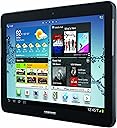
The Samsung Galaxy Tab 2 (10.1-Inch, Wi-Fi) 2012 Model combines a vibrant 720p HD display with a powerful dual-core processor, making it an ideal tablet for both work and play. With 16GB of internal storage and the option to expand via microSD, this tablet ensures you have ample space for apps, media, and more. Its lightweight design and long battery life make it perfect for on-the-go professionals.
| ASIN | B007M50PTM |
| Age Range Description | Adult |
| Aspect Ratio | 16:10 |
| Battery Average Life | 7 hours |
| Battery Cell Type | Lithium Ion |
| Best Sellers Rank | #977,369 in Electronics ( See Top 100 in Electronics ) #8,527 in Computer Tablets |
| Brand | Samsung |
| Camera Description | Front, Rear |
| Cellular Technology | 3G |
| Color | Black |
| Compatible Devices | Samsung GT-P5113 tablet |
| Compatible Flash Memory Type | microSD |
| Configuration | 10.1-inch Wi-Fi (2012) |
| Connectivity Technology | Wireless |
| Customer Reviews | 4.3 out of 5 stars 2,468 Reviews |
| Display Resolution Maximum | 1280 x 800 pixels |
| Display Type | TFT-LCD |
| Front Photo Sensor Resolution | 0.3 mp |
| Generation | Android 4 |
| Global Trade Identification Number | 00635753498493 |
| Graphics Coprocessor | 1500 |
| Graphics Description | Integrated |
| Hard-Drive Size | 16 GB |
| Hardware Interface | MicroSD |
| Headphones Jack | 3.5 mm x 1 |
| Human-Interface Input | Touchscreen with Stylus Support |
| Item Weight | 1.3 pounds |
| Lithium-Battery Energy Content | 7000 milliamp_hours |
| Manufacturer | ???? |
| Memory Slots Available | 1 |
| Memory Storage Capacity | 16 GB |
| Mfr Part Number | GT-P5113TSYXAR |
| Model Name | Galaxy Tab 2 |
| Model Number | GT-P5113TSYXAR |
| Model Series | Galaxy Tab 2 |
| Model Year | 2012 |
| Native Resolution | 1280 x 800 pixels |
| Number of Items | 1 |
| Operating System | Android 4.2 Jelly Bean |
| Operating System Family | Android |
| Photo Sensor Resolution | 3.15 mp |
| Processor Brand | Samsung |
| Processor Description | ARM Cortex A53 |
| Processor Speed | 1 GHz |
| RAM Memory Installed | 1000 MB |
| RAM Size | 1 GB |
| Screen Size | 10.1 inches |
| Set Name | 2012 Galaxy Tab 2 (10.1-inch, Wi-Fi) |
| Size | 10.1" |
| Specific Uses For Product | personal |
| Style Name | Sleek Modern Professional |
| Total Usb Ports | 1 |
| UPC | 635753498493 813774017767 635753499308 |
| Unit Count | 1 Count |
| Video Capture Resolution | HD 720p |
| Warranty Type | Manufacturer's Warranty |
| Wireless Compability | 802.11bgn |
| Wireless Technology | Bluetooth, Wi-Fi |
A**G
The Samsung Galaxy Tab 2 is a great tablet!
I have been using this tablet for just over a month now. I wanted to wait a while before writing this review to be sure I had tested it out thoroughly. I must say that I am extremely pleased with the performance of this tablet. I researched for months before I bought a tablet because I wanted one that wasn't restricted, had good reviews, but most of all, was affordable. I didn't want to drop $500+ into a tablet or an i-pad. I got this tablet and a leather case with a removable/rechargeable/bluetooth keyboard for under $350. That was one heck of a deal to me. Another good thing about this tablet is that it comes the the android 4.1.1 operating system. From what I read, the previous OS was somewhat restricted. I got this tablet from Amazon, so I wouldn't worry about getting an older version. (Update 5-25-13) Loved this tablet so much that my girlfriend couldn't resist getting her own. She too is very satisfied with the tablet. In fact, she likes this tablet over her I-pad Mini that she got from her job. (Update 8-26-13) Now my girlfriends mother got this tablet. Again, all three of us love it! I am now in my second semester using it. Still very satisfied. In fact, Samsung has updated the way the tablet works with external keyboards so now it is even more easy to use. It is much more like a laptop with control v,c,x etc. working better. Before,the tab button would set your cursor off the page instead of the next box down the list (if you were filling out a form like address info etc). Now it all works! One disappointment I still have is that the copy and paste problem still has not been addressed. It's too bad, that is really the only real complaint I have with this tablet. (Update 10-2-13) There was a new software update for this tablet that in my opinion, is an improvement from the previous layout. I have had a few weeks to use it and have enjoyed the update. The best part about this update is that the COPY AND PASTE WORKS!!! Finally, the only huge complaint I had with this tablet has been addressed! My tablet hasn't crashed using copy and paste since the recent software update! (Update 12-12-14) After countless hours of hard work, this tablet is still running. I will say, that my tablet started to run slow and had "choppy" internet browsing the last month or so. I finally had to move all of my important data to my SD card and factory reset my tablet. It now is running better, but not as it did when I first bought it. Keep in mind, I thoroughly used this tablet heavily for school among various other things. I can't believe that it has held up this long. It still works great, the only problem is that browsing the internet is a little "choppy" at times. I have just finished my degree and owe a lot of studying, written papers, and good grades to this wonderful tablet. Battery Life/Portability Every single day that I go to school I put this tablet through its paces. I take hours of notes, study/read books on it, watch videos, listen to music, I use everything daily on it. It's so nice to have the portability of a tablet. Especially in a crowded area with little space like a train. Unlike a computer, I can pull the tablet out and turn it on and off without waiting for it to boot up or shut down. It's also very nice to not have to deal with a permanent keyboard for situations like that. Battery life is amazing too. I start using it on the train at 7 am, go through the entire day at college, and continue to use it until I am back from my train ride which is around 4:30 pm. That's 9 and a half hours of near constant use with the wifi on and it still has around 25% battery life left. Note Taking It's very convenient for note taking because unlike an i-pad, Microsoft word, power point, and excel work on it for FREE! It comes with software that will run all of this, however, I prefer kingsoft office which was also free. It's just more user friendly. During note taking, I often get on Google and insert pictures into my notes. I must admit that it isn't quite as easy to do as a computer because you can't simultaneously have a word program up at the same time as the internet browser. But it does save your spot in the word program and in the internet browser so it's very easy to jump back and fourth. I have typed many papers and taken many notes for hours at a time and felt comfortable doing so. This is why I got the 10.1" vs the 7". I wanted to be comfortable because I knew I would be using this for long periods of time. I even typed this review on my tablet. However, keep in mind that I don't use the touchscreen keyboard for my typing. I got a leather case with a removable keyboard. GSAstore (tm) - 10.1 Inch Protfolio Case with Removable Bluetooth ยฎ Keyboard for Samsung GALAXY Note 10.1 (N8000/N8010/N8013). Black I am very happy with this product and recommend checking it out. The touchscreen keyboard isn't bad, just not efficient enough for long periods of typing in my opinion. There is one thing I discovered that can be annoying. When copying and pasting, it can cause the tablet to reboot. This doesn't happen every time you copy and paste, but either way, it's a pain. I did research online and apparently this has nothing to do with the tablet but with all newer Android operating systems. Phones and tablets are included. I am sure Android will fix this with an update in the future. This is one of the only problems I have found with this tablet. Update 5-9-13 (Note Taking) I recently found out that this tablet can have trouble with documents that are big. I mean VERY big. I have an anatomy notes document that is literally 160+ pages with loads of pictures that I inserted into it. The tablet takes a while to load it to begin with, but the larger problem resides with scrolling through the document. It's large enough to where the scrolling is no longer smooth but "jittery". Also, changes take a while to save. This is a HUGE document though. It's probably unlikely that most people will run into this issue with normal sized documents! Reading I know that some people as well as myself were concerned about this being strenuous on the eyes after long duration's of reading. I have not found this to be the case. The screen can be easily dimmed down while reading your book. You can pick what background color you want behind the text to help (kindle store). Another cool feature (amazon kindle store) is that while reading a book, if you see a word you don't know, you can select that word and the program provides you with a definition of that word. Web Browsing Browsing the web is crisp and smooth, so is watching videos via websites like Youtube or forums that don't have apps. The streaming for the apps works wonderfully too (most of my experience is with Netflix and IGN). The screen is amazing and clear, especially when watching a movie or show in HD. Memory The 16 GB of stock memory actually lasts a pretty long time. I have put all of my music (about 8 GB) on it, and have a whole lot of documents and apps installed with plenty of room to spare. You can always buy the micro SD card to extend the memory another 32 GB. You can connect this tablet to your computer via the cable provided and get anything you want from your computer. I simply drag/dropped my music into my tablet. Its very simple. Most of my music is in i-tunes, this tablet automatically converts the i-tunes files so they can be used. Email It is very easy to sync multiple emails to this tablet and also very easy to navigate those emails. You can attach any file just as if you were on your computer. Sound/Speakers The speakers on this tablet are in fact surprisingly loud. I would say they are about as loud as most laptop speakers. Obviously they don't make the music sound "full" with bass and other variations in tone but that isn't really a problem for me. I am impressed with the speakers sound quality. Video Chat My girlfriend and I use our tablets to video chat. It works very well, the picture quality isn't HD, but neither is my $1700 laptop. They look about the same to tell the truth. The system is very easy to use and is much more convenient through a tablet versus a computer! Update 6-18-13 (Screen) I have had this tablet for quite some time now and have no problems to report. I still use it every day even when I am not in school. It is just so convenient to have around the house for various reasons. I wanted to talk some about how well the glass for the screen has held up. I didn't buy a clear screen cover because I read that Samsung used "their own version of gorilla glass". I have had it in a case the entire time that I have owned the tablet. I have yet to see any permanent marks/scratches of any kind. I simply use glass cleaner and a microfiber cloth every now and then to clean the screen. So with that being said, I would say that if you have a decent case, you don't need to waste money on a clear screen protector. I will continue to update this review as I learn more about the tablet or if I run into anything problematic. So far, this has exceeded my expectations. It works so well and is very convenient on various levels. If anyone has any questions about this tablet, I would be more than happy to answer to the best of my knowledge.
D**S
Samsung Tab 2 10.1 WiFi - Very Detailed Review On The Many Excellent Features Of This Tablet.
Updated Review: April 23, 2014 - For getting close to 1 3/4 years now, I have been totally enjoying this excellent Tab 2 10.1 WiFi tablet and I continue use this very dependable tablet for hours each day---it has never failed me and still runs like a champ! Since I am a techie, I tested this tablet thoroughly and I have found it to be excellent for my everyday basic computer functions at home and on the road. And it is much easier to travel with than my heavy laptop. For you the reader, my goal here is to give you everyday and practical uses regarding the Tab 2 10.1 WiFi model. Last August, 2013, I updated to 4.2.2 as it has many improvements and my tablet is running perfectly and it is up to date. The update did remove the screenshot, however, I use the Power Key and Volume key and this takes a screenshot when needed. * Update sent by Samsung today December 14, 2013 - Just updated today my Tab 2 10.1 via the OTA (Over the Air) directly on the Tab itself. The update is not that large at 65MB and just took about 15 minutes from the downloading of the update to the re-booting and installing the updates into the tablet. Samsung is rolling out this update now to improve stability and improve the features on the Tab as it updates the 4.2.2 original update. Result I found after this update 12.14.13: WiFi working great, Amazon Videos loading and playing wonderfully. (I just double click the center of the Amazon Video for full screen). Also tried the camera and several apps and so happy to report that the Tab 2 is running smoother and faster since this update. PROS: - EXTERNAL SLOT FOR MICRO SD CARD - What a great feature! It is set to accept up to 32g SD, however, you can add a 64gb SD card, however, you will have to format it inside the Tab 2 and it will then be ready to add files. For me, I placed a 32g in mine for music, files etc. Note that this was one of the deciding factors that sold me on this tablet. *Keep in mind where External SD cards are concerned: They are JUST for your personal files: music, videos, photos, and other files. When you install apps from the Playstore or other sources, they store either in INTERNAL SD Card area or the main internal area. - WiFi Connecting/Speed of WiFi - This I tested using my home router and on the go at many hotspots with WiFi. What I discovered: The Tab 2 connected very quickly to my home router and has a high rate of speed no matter where I am located in my home (of course the closer to the router, the faster). Other hotspots: No problems at all connecting and staying connected on these. And I found the speed still high at home with several devices connected to the router, no loss in speed. **Note that I had other tablets before this one and for me, none gave me the quick connect and overall speed over WiFi as the Tab 2. **Newest observation--Today, I tested ALL my WiFi devices (phones and Tablets) and discovered this: Using my home router I noticed that the Tab 2's that I own (7 inch and 10.1 ones), connected faster and have far greater distance to my router than even my Android phone did as it seems to have the HIGHEST signal strength and longest WiFi distance). Then I took the Tab 2 outside and even in my back yard (furthest from router), still got a signal, moved in to back porch and got a very good signal. The same holds true when I travel, I am able to connect to many free WiFi hotspots, easily with great signal strength. - Internet & Webpage & Video Viewing - The stock browser does a great job, however, I use Maxthon Browser and installed archived flash so I have great internet flash video viewing results and it renders webpages quite fast for me. And I suggest the free app called Pocket from the Playstore so you can read internet articles later offline. Even TODAY after almost ten months of ownership, I still enjoy using this tablet for viewing internet pages, videos and more. - Reading/Creating/Editing Word, Excel, Text Files and much more on this tablet: This comes with a OK app for reading Office documents, however, I prefer Kingsoft Office which is a free app from Playstore. It is the best I have ever tried and I am very picky about so called Office programs. It is very compatible with MS Office as it reads, edits and creates Office files and reads PDF files, and it has more features of any other Android Office program that I tried. This app is a MUST have for tablet owners in my opinion. - Printing Using the Tab 2 - Yes, even with my older home printer, I print documents, photos, etc that are on my Tab 2 using the app Cloud Print and PrinterShare Mobile (both free from Playstore. In addition, there are many apps in the Playstore that will allow you to print using the Tab 2. (If you have questions about printing using the Tab 2 or any question, please ask in the comment section and I will answer). - Watching Online Flash Videos Directly From Maxthon Browser (regular one not the tablet one is best) - If archived flash is installed and Maxthon Browser or other good browsers, I can play videos online. All videos I have tried have played just fine. ***Please ask me in the comments if you need more details regarding watching online videos of any kind on the Tab 2 and also instructions on archived flash,etc... - Home Videos - The stock video player is OK and plays MOST home videos, however, may I suggest QQ Player (Free App from Playstore and the ONLY one I recommend as it plays every home video I tried). - Music Player/Sound Quality - Stock player has clear sound through the outside "speakers" and very clear using headphones. To sync easily with Windows Media Player may I suggest the Playstore app free) WinAmp for the tablet as it is very highly rated and the sound is SUPERB! **** SUGGESTION: If love watching videos and listening to music, may I suggest that you invest in a Bluetooth Speaker. There are many out there on Amazon most are OK and many low it cost. However, for me I use the EasyAcc Second Gen Bluetooth that Amazon sells and the sound is SUPERB! Also, it plays stand alone SD card music and Flash Drive music as it has the ports for that (the Flash drive and LARGE STANDARD SD cards play directly from the ports the music as stored on the Flash drive of SD CARD). - Battery Life- Excellent! This is what I have found: When I am on WiFi, I go to the websites I need and then as soon as I am done (reasonable time), I exit the browser (or YouTube, etc) and TURN OFF WiFi. However, I run my brightness at 100%. So on an average day, I get at least 8-12 hours using the tablet before I charge it (depending on how long my WiFi is connected). - OTG USB Compatible - You can add an optional OTG (On the Go adapter cable to the Micro port for copying files to your flash drive and from your flash drive to the Tab 2). You can also plug in a mouse, I tried it and it worked. *Note that portable external hard drives and portable DVD/CD drives will not work using OTG in the Tab 2 because these both require a lot of power to be compatible with the Tab 2 and most tablets that have the OTG. However, it is still good to know that you can easily plug in your flash drive and copy files to the Tab 2 and from Tab 2 to PC--what a time-saver. - On-Screen Keyboard - For me, I prefer to use the large keys on the on-screen keyboard so this one is PERFECT for me to type on. However, there are many great Bluetooth keyboards out there for the Tab2. - The tablet is very well constructed, however, to secure it better, I bought from Amazon a MoKo adjustable stand/case that I set it up in landscape mode and it has 3 positions. - Bluetooth Speed and Performance - The Bluetooth paired quickly with several devices and copied files at a great rate of speed. Speaking of Bluetooth: Also there are many great Bluetooth keyboards out for the Tab2. (Just make sure you purchase one for JUST THE TAB2 10.1). - SPECIAL FREE OUTSTANDING APPS I SUGGEST FROM THE PLAYSTORE: * Pocket App (This is a must app you can "save to" Pocket and read text later when offline so you can read text articles (you must be online to watch videos or view pictures however). * Cloud Print and PrinterShare Mobile (both free lets you print right from your tablet). * TV SHOW APP (free) is US TV & Radio Free and also get TV Guide app to go with this. This is an app that lets you watch many TV shows (but they are live so you will need TV Guide app to see what is on). These apps I have tried and the tablet plays the shows wonderfully in full screen. This app also has great radio stations on it. (Note that this app is HUGE almost 33MB but you can watch most cable TV shows on it LIVE). * Netflix (free in Playstore), You really need this app if you plan on watching Netflix using this tablet. * Hulu Plus, I recommend for movies and more. * TV.COM - gets SOME TV shows and some networks, but you can watch pre-recorded shows. Also great FREE apps: WiFi Analyzer (lets you know how strong your WiFi is), QQ Player, QuickPic (better than the Gallery), Maxthon Browser, AVG Antivirus Free, and I list more in comment section. - Wonderful Kindle Android App is pre-installed, and I downloaded several Kindle books with no problems. Kindle loads fast and this Tablet is a joy to read a book on either Kindle or any eBook or PDF booklet. CONS: (Just one con I found, however, this con is NOT the fault of Samsung) - New Adobe Flash is not supported, however, I found that archived flash gets the online videos to play. So I downloaded the older archived flash which gives me the ability to view many internet videos. *****Update August 30, 2013 ***** There is an AUTO UPDATE for the new OS that will be starting up the next time you turn on WiFi or very soon. It is best that you are aware that you MUST has at least 60% battery, or better yet 100% battery as this update takes up LOTS of space and take a long time to complete. (You can also turn off the auto update to prevent this from happening). Note that the update removes your soft key for the Screenshot and moves the soft keys into the center and lots of other changes. So you may want to take a look at the comment section as there is quite a bit posted these on this)... Bottom line: Would I buy this WiFi only model over again? Yes I certainly would, in a heartbeat! So if you are looking for a superb Samsung 10.1 inch tablet and you have great access to WiFi, this is the one to buy. Also, since I am somewhat of a techie person, I will be happy to answer any questions you may have through the comment section. Hope this review has assisted you and thank you for reading it. And also, we have a great discussion going in the comments. Should you have any questions, ask anytime and I will answer right away.
S**R
great buy!!!
First of all I'd like to thank all previous reviews about this product. They were my main source for making my decision. I was between getting an Ipad 2, the kindle fire HD 8.9 and the Galaxy Tab 2 10.1. I ruled out the ipad mainly because it was so expensive. Its screen resolution is poorer than the tab 2 and it doesn't have a micro sd slot. The kindle fire is definately a competitor pricewise but I've seen the operating system and it just seems so limited to amazon content, plus no widgets. The sound quality is like no other but that's what I have a home theater for. On the go I usually plug in headphones so no gain there. As soon as I saw the tab 2 10.1 priced down a hundred bucks I knew it was the one. I must say it was an excellent purchase!! Completely met my expectations. Even though the galaxy tab 2 10.1 is a weeee bit sluggish, its barely noticeable. I imagine that for intense gamers this may bother you after a while. Pros: - great screen size - new operating system is very clean and extremely versatile (like most androids) - front speakers give off great sound - memory slot can give you up to 32gb more. A total of 48gb for an extra 20 bucks instead of other tablets that would charge you well over 100. - great battery life. Normal use connecting and disconnecting wifi, downloading, reading and typing gives about 8-10 hours. - at 300 bucks. Great price. - 50 gb of dropbox space for a year.... FREE - at least mine came with an extension cable. The usb adapter is way to short but with this i don't have any troubles. Cons: - processor is a bit slow but for everyday use, movies and small games its more than enough. Make sure you free up tasks and memory. - keyboard is difficult to type with. I'm always tapping the shortcut button thats just below the spacebar. can't get beyond typing with two fingers either. Considering getting a bluetooth keyboard. - I'd avoid using the camera except for videochatting. Leave taking quality pictures to digital cameras. -touchscreen precision could be much better. Maybe its because of my butcher hands but I tried using a stylus pen and it was a bit off and wouldn't follow through when writing. I wanted to be able to take notes with a pen but it would be extremely frustrating. I read somewhere that the touchscreen precision is set by samsung but you can tweet it using the touchscreen tune app. All in all I must say this is an excellent purchase. If you're looking for a tablet for everyday use and doing some light work with office docs I highly suggest this tablet. I also recommend you get a case with it while you're at it. If I may suggest a few apps: - google chrome. Fast web browsing plus compatible with the PC version - google currents. Get news from different sources. Cool interface - Repli Go Reader. View, edit and add objects to PDF files. I use this for work all the time. Well worth the price. - flash player. Yes, you can use flash on this. The only thing is that it doesn't work on chrome but it does work on the default explorer. Just google adobe flash archives and download the APK 4.0 version. WORKS - Appsales. Shows apps everyday that are on sale. Managed to get some high end games and office docs app for 1 dollar each.
N**.
1st impression
First I have to say I love Amazon. The site is always my first stop shopping source. Now about this product. Note that this is a day 1 impression. The table was easy to charge up and pretty quick really. Initial setup was also very easy. Lovely display and a very responsive screen though I have fairly large fingers so I expect it will take some time for me to get precise. Registering my tab from tab was a failure. Registering it from a computer was only less frustrating because I got it to work. Sending email feedback form the site is rough too... i could not find tablets of any sort in the product options. Getting Norton Security registered after I paid for it took 9 tries. The first 8 resulted in network connection erros though my wifi connection was fine. The on screen keyboard is ok though why it takes away the @ and .com keys in the browser makes no sense to me. Maybe its a settings thing I have not found yet. Oh yeah... as far as I can tell so far there is no way to close an app from within the app. You to go back then open the task manager and drag the open app off the list. Crazy but maybe there is a way I have not found yet. Not ready to giveup on this tab yet but a disappointing day. Low stars right now but I am hopeful. 01/25/2013 update... Added two stars because I use this darn thing so much! Now that I've had this tablet for a fair while I figured it's a good time for me to add an update. First, I love the tablet form factor. It is far and away my most heavily used piece of technology. I still think this tab is a very good choice if you're looking for a tablet. I love it as an eReader, love the Kindle app and likely will never buy anything but eBooks ever again. There are tons of free apps that can be fun and useful and those that are not free often offer trial versions. Amazon's auto-rip is awesome. I still prefer to buy CD's though I rarely listen to them opting instead to add them to my collection after ripping them and then listening to the digital files from then on. Amazon's new service make's it crazy easy to listen to my music on multiple devices. Genious! I find that my favorite web browser for the tab is the Dolphin browser, which is free. Stupid Zombies and Jewels Pro are great, free games. Tried the Angry Birds games but they seem slow and clunky so I lost interest pretty quickly. File Manager HD is the best free file management app I've found and though Android is not very good at making it easy to grab images from the web and make them backgrounds, the free app Image to Wallpaper makes it very simple. I do not do social media in any form really so I have nothing useful to offer there though it seems like all that stuff would work well on this tab. All this having been said I do have complaints though my issues are, I believe, more with the Android OS than anything else. In general Android seems pretty much as closed to me as Apple's tablet OS sounds and I just don't like that though I imagine for many it results in a level of simplicity they would find comforting. I avoid Google's chrome browser because the limited options and `we know what's best for you' approach is just plain annoying to me. Give me Firefox any day. I'll throw in a little disclaimer here that I admittedly haven't done a great deal of research to try and find ways around my peeves but, honestly, I don't feel like I should I have to. I still hate that there is no way to simply exit an app when I'm done with it. Even if I leave an app I don't want to run anymore then tap the task list and drag the app in question off it seems like many of them actually stay running in the background. I guess the idea is that I shouldn't have to worry about how many are running but if I went along with that that my task list would simply end up long and cumbersome or I'd have to have cluttered home screens which I would never love. I also dislike that every time I unplug the charger the tab turns on. So I get up in the morning and although I just want to take the tab along with me whenever I'm going it wakes up like the only reason someone would unplug the device is to immediately use it. This next one really drives me nuts. Bear with me `cause this is gonna be a bit longwinded. I use my tab a great deal to play music. I have roughly 6300 songs on an SD card that pretty much never comes out of the tab. I've purchase 3 or 4 music apps and find I like Poweramp the best. As good as it is though it is the same as every other player with a `random' or `shuffle' mode. You always end up hearing certain artists/albums/songs more than others due to the nature of randomization technology not ever really being truly random. My way around this is to build a play list of all my songs then I randomize the playlist using Winamp on my PC. The idea is if I play a randomized playlist in order I will basically be getting a mostly random playback of every song I have without a single repeat. Now here is the problem... I have found no way, in any of the music players apps I've bought, to jump to a particular song within a playlist. Searching for a song will only bring you to that song in your library completely ignoring the fact that a second before you were listening to a playlist. Since all the music apps forget where they were if the tab hangs up, which does happen, or if the SD card is removed, I end up having to try to find where I left off in my 6300 song randomized playlist manually. Hugely annoying. I did research this issue some and it seems like it's a limitation of Android. Did I say hugely annoying? From the mixed blessings department, while I have received 2 or 3 updates to the Android OS (Samsung's flavor of course) and each one brought some noticeable improvements, each one also reset settings I had changed (I turn off the key-tap sounds and predictive text... Android updates turn them back on). I suppose it can't hurt to mention that every device manufacturer provides slightly different, or customized if you prefer, versions of Android so not every device see's the same changes/improvements after an OS update. So I guess that's it for now. I'll summarize by saying that if you buy this tab I doubt you'll be disappointed but for all it's good features there are things about the Android OS that I just don't like.
R**R
Samsung Galaxy Tab 2 (10.1-Inch, Wi-Fi)
This is NOT a rehash of the technical specs of the tablet. I received my Samsung Galaxy Tablet and a few moments later, I was up and running. I did the brief setup, signed in with my Gmail account and my existing account including calendar, applications were transferred to my new Tablet. Some applications which I favor on my Samsung Droid phone did not transfer as they are currently not compatible with the Tablet (Example CamScanner and others). Note that "Amazon Prime Instant Video" content is not currently supported on this Tablet. However, Netflix is supported. I removed the factory default home screen widgets (Game Hub, Movie Hub) as these are not important to me and replaced the home screen with application shortcuts, widgets and desktop background of my choice. The Tablet is a great "convenience" bridge between my laptop and Samsung Droid phone. For some applications, I prefer using the Tablet's larger screen rather than using the phone. The HD display is stunningly crisp and clear for watching movies or for reading books. Netflix streams flawlessly on the Tablet and the picture quality is ...stunning. The virtual keyboard is very precise and responsive even though I have the Otterbox screen protector over the screen. The built in camera is unimpressive in picture quality but I did not purchase the Tablet to be a camera. I have Nikon Pro DSLRs for that purpose. I did find that file transfer to the external microSD card was painfully slow but solved that issue by removing the card from the Tablet and doing my file transfers to the card while it is in a card reader instead. (32GB Class 10 microSD). Overall, I love the Samsung Galaxy Tab 2 considering the price point of the product. It it simply a great product. Update: June 28... I had a chance to listen to music using a decent set of earphones and using "PowerAmp" Application as the media player. 1. The sound quality is unbelievably awesome even with the equalization set to "flat" in PowerAmp. 2. I had a Logitech "Write-Away Bluetooth Tablet Keyboard Lite for iPad" hanging around and decided to test it on the Galaxy. It paired and works well on the Samsung Galaxy Tab 2 10.1! 3. In addition to the native web browser, Google Chrome and Firefox work smoothly and responsively on the Tablet.
B**E
Still functioning after three years, but practically obsolete.
I've owned this tablet for exactly three years, to the day, of writing this review. I purchased it in mid April of 2013 when tablets were all the rage. In hindsight, I will say, unless you are someone who consistently does small, face to face presentations, or has no need to type while traveling with a laptop, this tablet doesn't really have a function to justify the cost. For example: I have a 5.7 inch size smartphone, an 11-inch and 15-inch sleek laptops and a Kindle E-reader that three out of four get used daily, and all three pretty much offer a handful of cross-over tasks. For that reason, they all then leave this tablet practically obsolete in my personal inventory of gadgets. Rest assured, I used it quite frequently when I initially purchased it, but that use lasted for about 8-10 months. I find myself using it now only occasionally. The novelty has worn off, for the above reason, but also because the pre-installed software that it came with (Android 4.2.2 Jelly Bean) is no longer being upgraded for the model (current Android version for newer devices as of the writing of this review is Android 6.0 Marshmallow) With all that said, if you do decide to get this tablet, I will be honest and say that for it's size and it's power, it performs well. Not exceptionally, but well enough to get done what it is tasked to do. I am a petite woman with small hands but I find the size and thickness to be very comfortable -although I do eventually end up holding it with both hands when not scrolling or selecting. Images and color are clear and bright (whites are white without a noticeable grey or pink tint). Sound is good due to the placement of the speakers, but of course you will not get a symphony experience. The camera is lacking, embarrassingly so, but that is perhaps not a big deal as most people nowadays do not take many photos with their tablets. Currently, I use my fingers to navigate the touchscreen but during the first two months I owned it, I used a stylus but I quickly abandoned it as I didn't find the stylus to be as intuitive as my fingers. Pluses for me: - Still working well after three years of ownership (bought in 2013, reviewed in 2016) - Pictures and images are crisp and clear; whites are white - Sound is ok due to speakers being in the front instead of the back - Build and construction is top notch, for it's size - Great for watching YouTube videos and browsing social media networks Negatives for me: - Practically obsolete in today's (2016) world of larger smartphones and small laptop functionality - Camera is nothing to write home about - Model is no longer eligible for Android software updates (Stuck at 4.2.2 Jelly Bean) - Custom internet app it came with is very slow and lags, frustratingly so. (I downloaded an alternate browser but that too lags, so the lagging has more to do with the tablet than anything else) Overall Assessment: I'd say a solid 7 out of 10 in performance and functionality. Get a tablet (this or any other tablet for that matter) only if you must. If you're like me, a phablet-sized smartphone (Note 4) and small laptop that I already own individually and collectively, outperform this tablet. Tips for Accessories: I purchased the Moko Slim-fit cover case in black MoKo Slim-Fit Folio Cover Case For Samsung Galaxy Tab 2 10.1, BLUE (with Built-in Multi-Angle Stand) And the Boxwave Evertouch Stylus BoxWave EverTouch Capacitive Samsung Galaxy Tab 2 10.1 Stylus - Universal Touchscreen Stylus with Ultra Durable FiberMesh Woven Fabric Tip for Ultra Responsive, Smoother Glide, and Increased Accuracy (Jet Black)
J**M
Amazing Tablet!
I just received my Samsung Galaxy Tab 2 10.1 inch wifi-only and am completely blown away by this. There is nothing negative I have to say. This is THE tablet to have! Bar none! I also own the 7 inch Samsung wifi-only tablet, and this is a bigger, faster, better version of that (by a long shot) in the 10.1 inch size. I love Samsung's tablets. Perfect form factor and shape. And they are absolutely gorgeous. This 10.1 Tab 2 is amazing! It's very fast and snappy. Takes gorgeous pictures, the screen resolution and pixel density is amazing. The screen brightness (when turned all the way up) is brighter than anything I have ever seen on any device! It's blindingly bright! All my apps run perfectly well. It has stereo speakers that are nice and loud. It has Android 4.0 ice cream sandwich and a Samsung overlay over it. It's not overly bloated though. Seems very minimal with the Samsung specific software. The Peel app that allows you to control your TV, Direct TV, and audio receiver is a huge bonus. You can control any device. It's an amazing app and even let's you search for and schedule recordings, learns shows you like and will present them to you. Very well made IR remote control app for your home theater or television set. It can control everything. Netflix, Amazon, or Samsung Hub movies play in 720p HD and look amazing on this screen. The sound is amazing as well with the stereo speakers. The screen is actually 1280x800, and can do better than just 720 lines of horizontal resolution. The Chrome browser syncs with your desktop, phone, and other device browsers so that all your bookmarks, favorites, cookies, passwords, and recently viewed all show up on every device. Social media apps are optimized for the larger screen in a pretty amazing fashion. Twitter, Facebook, Google+ are all excellent and function very well. Your Google account backups everything, so you never lose a thing. Never lose another video, picture, application setting, or anything if your phone falls into a river. It's all backed up and can be restored. It even has a GPS radio so you can benefit from navigation, maps, places, geo location, and all sorts of services and apps that require location information. Reading books with the Kindle app is flawless. It keeps track of where you are on each page, makes life easier. Whether I am reading on my phone, or my Tab, or my desktop computer, you never lose your place, notes, markup, bookmarks. Pretty awesome. The battery life is amazing. Still haven't been able to run it out. It's been almost 2 days of usage. Not heavy usage, but surfing the net, downloading all my apps and setting them up, rearrange the homescreens, and playing some movies and songs. Samsung is the world leader in smartphone sales and this really shows why. They aren't overpriced products. They are well made and perform better than any other product out there. The Samsung brand is reliable and amazing!
K**T
Best tablet ever...step aside the "I" brand.
I am writting my review on the tablet. The keyboard is large and easy to type on. The screen is stunning, my photos are displayed so beautifully. I love that I can talk and it types for me. the choice of applications between the Google Play Store in Amazon app store is fantastic. You can organize your screen anyway you please. It even works as a remote control to your television. The touch screen is so responsive you barely have to even brush your finger on it. It has a very sturdy metal case. Some tablets have plastic back, making them feel cheap to me. The sound is really good you can listen to music and it fills the room in rich stereo sound. It supports Flash player I can play my Facbook game Candy Crush Saga. It is so smart you just start a word and it pops up you can just tap it in the bar above the keyboard if you like. The fact that it is 10.1 makes this keyboard so easy to type with two hands not one finger like with smaller tablets. I have a long e-mail address and after the first time it brings it up and the @ is on the keyboard, even a .com key. Talk about fast the web is like lightening. My old tablet had to search and then you waited while it connected. When I turn this on it is online all I do is swipe the beautiful lock screen. In the product description pictures you just see the standandard Samsung display, don't worry you can have any pictures you want on many pages. I kept that page but then put all my most used apps on one page. I have not one negative thing to say about this tablet. It is a fantastic value. You have unlimited possibilities unlike that big name "I" brand. Those are ok if that is your thing, but if you want more choices this is a better choice. I highly recommended this tablet. My neighbor has one and I had her input knowing how much she liked hers.
Trustpilot
3 days ago
1 month ago