🚀 Power your data, anywhere, anytime!
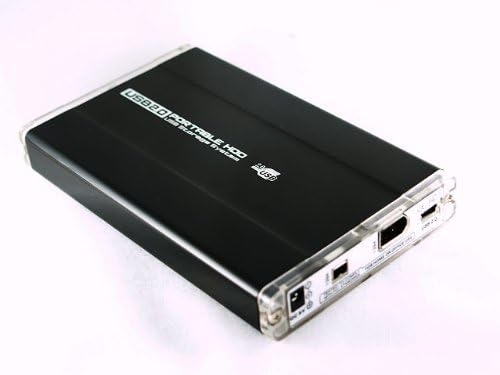
The Cubeternet Firewire 1394 + USB Hard Drive Enclosure is a versatile, bus-powered aluminum case designed for 2.5-inch SATA laptop drives under 9.8mm height. It supports multiple interfaces including USB 2.0 and FireWire 400/800, ensuring fast data transfer and broad OS compatibility (Windows, Mac, Linux). With dual power options and included accessories, it’s a portable, durable solution for professionals needing reliable external storage on the move.
| ASIN | B001P1D16I |
| Brand | Cubeternet |
| Color | Black |
| Compatible Devices | Laptop |
| Customer Reviews | 3.5 out of 5 stars 49 Reviews |
| Enclosure Material | Aluminum |
| Hard Disk Form Factor | 2.5 Inches |
| Hardware Interface | FireWire 400, FireWire 800, USB, USB 2.0 |
| Hardware Platform | Windows |
| Item Weight | 12 Ounces |
| Manufacturer | Cubeternet |
| Material | Aluminum |
| Supported Devices Quantity | 1 |
| UPC | 837654213032 |
D**N
Works as expected.
Works as expected. Works as expected. Works as expected. Works as expected. Starting to get the picture? I'm going to script this.
J**N
A little tough to install, but so worth it!
Be gentle with it, because getting the 2.5" laptop hardrive into it can be a bit of a squeeze, but the portability can't be beat! It powers itself directly from your computer's firewire port, so not only is it much faster than USB 2.0 drives, but it's easier to carry with you and dead simple to use. I couldn't be happier with it!
G**D
Poorly designed mechanically and electrically!
This drive enclosure is poorly designed both mechanically and electrically and it’s overall performance was marginal. The included instructions that were somewhat confusing and the cables provided are also of low quality. The drive is very tiny but that is actually problematic as it made for very tight tolerances. To insert the drive, you have remove the two plastic end caps (held by very tiny screws -be careful not to lose) and push the card out from one end to the other. The tolerances are so tight that it took a fair amount of force to push circuit card out of the metal enclosure ( I couldn’t pull the card out without risking damage). Once the card was out, I tried to install my 9mm standard 2.5 inch SATA IIII HDD but, again, very tight tolerances made this difficult. I then noticed a “can” capacitor was actually protruding into the space where the drive needed to reside. Further inspection revealed this capacitor was so tall, it couldn’t set soldered vertically onto the circuit board and still fit in the case. Hence the capacitor leads were left long (about 1/2 inch) and the component leads bent to lay the capacitor down sideways on the board. The Can was not tacked down with glue and the bent leads were actually touching. It would clearly have shorted had I not carefully separated the leads (makes me wonder if this device was ever tested after production). After pushing the capacitor out of the way (and verifying the leads weren’t touching), I was able to insert the drive. With some difficulty, I was able to screw the drive screws into the back side of the circuit card (again a very tight tolerance issue). I pushed the card back into case (again with more force than I thought should be required) and put the end caps on. I then noticed the on board connectors (especially the mini USB) didn’t quite fit through the end cap cutouts. I was planning to use the FireWire ports but still a poor design driven by tight tolerances again was evident. The cables provided are of marginal quality and it took several tries to get the FireWire cable seated securely with a good connection. After reading the Windows 7 & 8 use warning on a paper included with the drive (buyer beware) I connected this to my Mac-mini FireWire port. It was quickly clear it was having difficulty. I powered it all down and read the instructions carefully again noting that in some cases a separate USB 5 volt power supply is necessary to augment the supposedly “bus powered” FireWire drive. They don’t provide said power supply but they do provide a short power cable. After finding & plugging in a USB power supply and rebooting my Mac the drive finally was recognized but it took “forever” to come online. I tried to make it a bootable drive (the reason I bought this) but the boot up took minutes so I’ve given up on that idea. The enclosure runs very hot which is not good for HDDs and the case is so small there are no ventilation ports at all in the case, none! I had tested this HDD on my Newer Tech Voyager-Q FireWire capable, SATA drive test rig and the 2.5 inch drive worked great with Mac-Mini in that configuration. Hence I’m pretty sure it’s not the HDD which is the problem. My sense is this enclosure is aimed toward 7mm SSDs but nowhere is that indicated in the marketing. I’m not sure I’d risk an expensive SSD in this device however. Bottomline. Buyer beware. The product just didn’t show enough care in its design and seems to be problematic with non Windows 10 computers. It worked on my Mac but marginally. It’s going back to Amazon today.
G**N
Bus Powered? Yes and No.
The enclosure was easy to put together with a Seagate 320 gig laptop HD, just a couple of screws and it all fits together and seems solid enough to travel with. Also included a nice little carry case. It works fine being firewire bus powered with my new 17" MacBook Pro (MC024LL/A) but when I tried to power it with the firewire ports on my older 15" MacBook Pro (MB133LL/A) it wouldn't recognize it. Trying to power it over the USB port on the newer MacBook Pro didn't work either. I went ahead and ordered the power supply that is recommended for it (also available at Amazon) and with that the drive always works fine. One thing that would be nice is an on/off switch. I've never tried the drive with any desktop computer or any type of PC. All in all the drive works just fine, however, if I was to get a different one I'd look for an enclosure with an on/off switch, if there are any.
K**E
No Firewire 800 support, spotty Mac support in general
Be warned, it advertises as "compatible with 1394b Firewire 800 interface", which is a clever way of saying its not a Firewire 800 device. It also states the Firewire 800 to 400 cable is option, when infact its included. Plugged this into a Firewire 800 iMac and I get two big problems: - Its as slow as USB2 as its running the Firewire 800 port as an old 400, ie 30M/B a second instead of 70Mb/s+ - The iMac cannot see it at boot time (when using Firewire), meaning you cannot boot from it which was the whole point of this purchase. Its unsuitable for my purchase. If you just want a basic USB2 speed external enclosure, it might be ok.
R**D
Pretty good, overall
I got this to aid in replacing my MacBookPro's old HD with a new Hitachi 500GB. So I put the new drive in this case, but had a challenge with the last mounting screw securing the drive in this case; it didn't quite fit and had to be forced. On the other hand, the kit was well thought out and included a number of connecting cords (USB, FireWire), giving options for the installer. They also included a small Phillips head screwdriver and a soft case, which was appreciated.
W**R
Love it
Looks expensive, feels sturdy, and most of all it works. I can link it to my tab2 7.0 with no problems and my tab2 charger works perfectly as power for the drive. I reformatted he drive with a pc and now keep music and movies on this instead of my android, solves all memory problems. Great enclosure, love it.
G**N
Awful.
1. An oversized capacitor was installed that protruded into the disk drive area far enough that it was impossible to install a disk. Reason: They used a *100 Volt* electrolytic instead of a much smaller, lower-voltage part, probably because they ran out of the right parts. Also, the leads were very long and twisted almost to the point of shorting. Even a hobbyist wouldn't do that... I straightened it up enough to install my disk, and tested without the cover on, which would no longer fit. 2. All connectors were hand-soldered (one crooked) and the board was not defluxed. Not a good manufacturing procedure. Also, there was a blob of obviously contaminated flux on the pins of the controller chip. 3. Running FireWire AND with a 5V power supply via the USB connector, it would mount on my Mac, but dismount and re-mount about every two minutes. Useless... Installed my disk in another enclosure I had lying around and it worked fine. It came with 3 cables. Nice. I'm keeping the cables, trashing the enclosure.
Trustpilot
1 month ago
1 week ago