Desertcart purchases this item on your behalf and handles shipping, customs, and support to Cyprus.
♻️ Plan smart, erase waste, and own your day with Rocketbook Fusion!
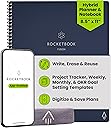
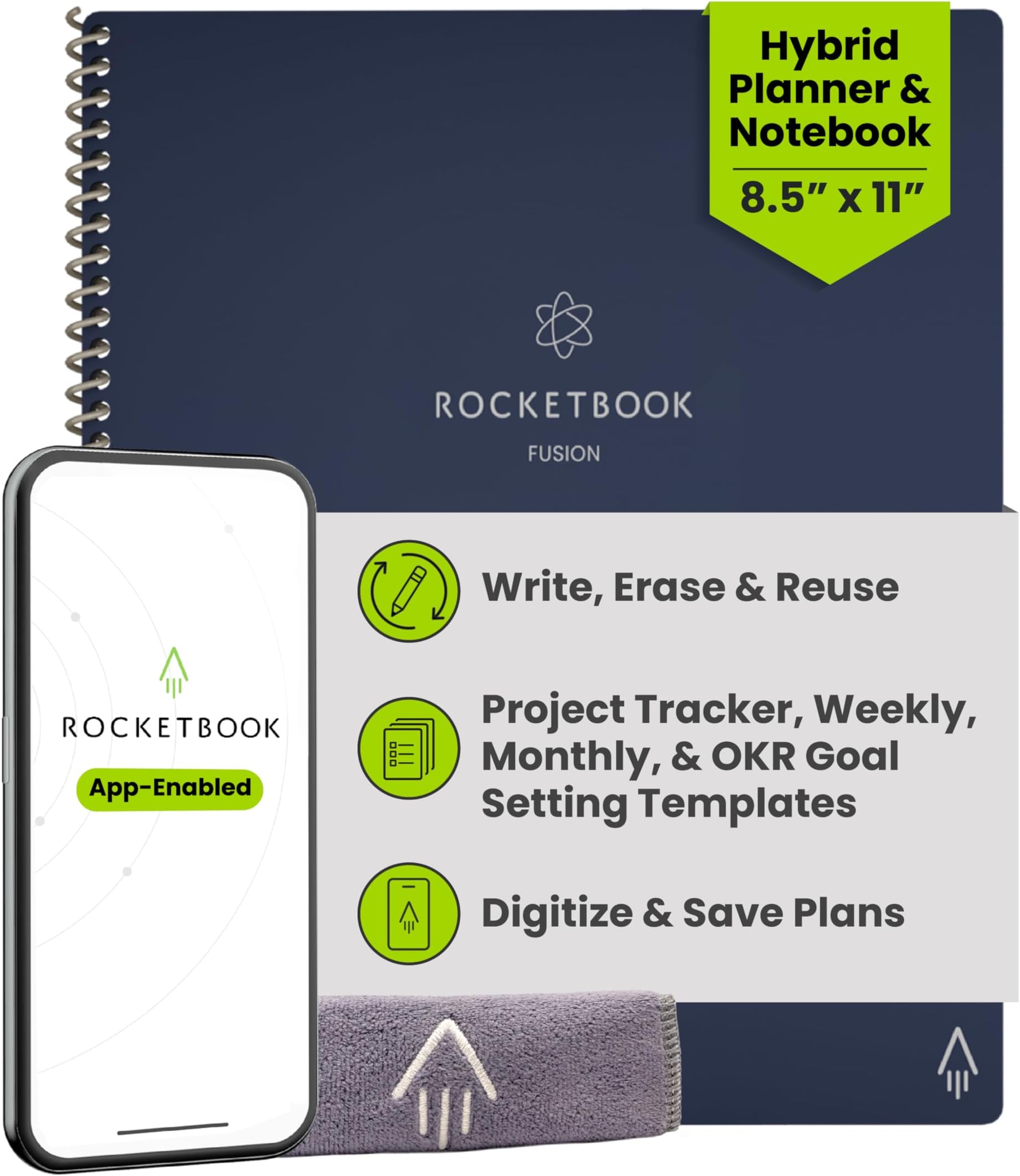
The Rocketbook Fusion Hybrid Planner is a premium 8.5x11 reusable notebook featuring 7 multifunctional page templates designed for professional and personal productivity. It integrates seamlessly with the Rocketbook app to digitize and organize notes across major cloud platforms. Crafted with durable faux leather cover and spiral binding, it offers an eco-friendly alternative to traditional planners by allowing users to write, scan, erase, and reuse pages endlessly.


| ASIN | B07ZHZFZGB |
| Best Sellers Rank | #4,655 in Office Products ( See Top 100 in Office Products ) #149 in Planners (Office Products) |
| Binding | Office Product |
| Brand | Rocketbook |
| Brand Name | Rocketbook |
| Color | Navy Blue |
| Cover Material | Faux Leather |
| Customer Reviews | 4.6 out of 5 stars 26,592 Reviews |
| Global Trade Identification Number | 00850007403577 |
| Item Dimensions L x W | 11"L x 8.5"W |
| Item Dimensions L x W x Thickness | 8.5"L x 11"W x 0.4"Th |
| Item Weight | 11.36 ounces |
| Manufacturer | Rocketbook |
| Number of Items | 1 |
| Number of Sections | 7 |
| Pages | 42 |
| Paper Size | 8.5 x 11 inches |
| Pattern | Blank Book |
| Ruling Type | Dotted |
| Sheet Size | 8.5 x 11 inches |
| Special Feature | Soft Cover |
| Style | Notebook |
| Theme | Book |
| UPC | 850007403577 |
| Unit Count | 1 Count |
G**S
I will never use another type of notebook again!
So this is my favorite notebook. I can't remember the last time I kept checking my orders to see if my order had arrived. Yet here I was like a kid on Christmas morning when it said it was out for delivery and I kind of started stalking the delivery guy by staring out the window and waiting for him to show up. I am the kind of person who likes to make a list and then check it off and then see things clean and finished. This is the perfect notebook for that. I can write everything down, I can check it off in multiple colors of pens, I can feel like I've accomplished something when I have finished, I can then scan it in if I need to or not, and then BAM I can wait to clean and start all over with a fresh slate. I have been such a nerd about this notebook. I may have taken it to a meeting and then sent my notes out to everyone before we even left the room. I might as well have been a salesperson for this company at this point. The notebook is kind of like a blankie now and is with me all the time and no one is allowed to touch it. Now that we are all stuck inside our right down hey checklist for my kids each day for their school work then scan it and print it for them so they can mark it off. Because everybody needs to have a list to check off and feel accomplished. I love all of the different pages. I wish there were a few more for the objective key results action reflections page. And I wish that they didn't actually have headings so I could use my own. That is the only page that bugs me because I scratch it out every time. I do wish there were a few more line pages instead of all the dot grid but I love both. I love the feel of the pages and they feel especially great to write on. I am hopeful maybe there will be additional pens in the future that were faster to try so I didn't have to wait so long before using my highlighters. I am a bit scatterbrained so by the time it dries enough to use the highlighter I may have forgotten what I was supposed to highlight to begin with. I really love the weekly planner pages and the task list pages. I love that I can just cross off a box at the bottom and it tells it where to send once I scan it. I do like they will automatically put the title in to my scans as long as I put hashtags on them.h However I kind of wish you just had a title box where I could write my title along the top line without having to have the hashtags that look weird in my scans. I am very glad that you have a page at the very beginning that allows me to remind myself where each thing goes to when I scan it. I love that you can combine pages when scanning. I would love to have the ability to have the OCR be a part of my PDF instead of being a separate file so I could keep my stuff slightly cleaner digitally. I just really love this notebook. And I know that I don't NEED one of every type of notebook that they make, but man, I REALLY WANT THEM ALL! I mean in reality, it's cheaper than all the journal books I've ever bought and I can save or delete whatever I want. I really want all the colors of pens too, but so far I am trying just to be happy with the three that I have in the highlighters. But wouldn't it be great if we could doodle with like all the different colors of colored pencils and have them dry enough for us to do that with and then scan in our drawings? I feel like that is something that will eventually happen in the future. This company seems to be forward thinking and it's fairly rapidly coming out with new options. Things can only get better for this type of notebook. Seriously, we all need this notebook in our lives. Oh, I also wish it came with two of the nice little rags so that I could have one to wipe off with and then one to clean off as I did it. Or maybe even three that way I could have a dry one so I wouldn't have to wait for it to dry. That's probably asking too much but it would be nice.
A**R
Indispensable Tool for Teachers and Students!
I absolutely love my Rocketbook Fusion! As a current student and future teacher candidate, I not only have notes from my college courses, but also have preliminary lesson plans and observational notes that are critical to my field preparation which means I am taking countless handwritten notes. As someone who cares about the environment, it matters to me that I am utilizing products that lessen that environmental impact, since you can reuse the pages. Oftentimes I don't even need to print the pages because I can view them in the easy-to-use Rocketbook App, and just print out what I need which is why the Rocketbook works for me. Additionally, some of my teachers in my college courses don't allow laptop use in the classroom. The Rocketbook is my #1 go to in these courses! I can just write out my notes, scan them after class, and still have a high tech solution for note taking while following the expectations for my courses. The Fusion is such a timesaver as it is so convenient to send my notes to my email so I can review them at my convenience. This has come into handy often. Case in point, I left my Rocketbook at home and I needed my notes for a school project, but couldn't drive two hours to go home, pick up my Rocketbook, and drive back with it because I needed them to collaborate with my colleagues. (Honestly it was embarrassing to admit that I left my notes at home too!) But because I had my notes both in my Rocketbook App and in my email, I could just could retrieve them them, print them out on a wireless printer, and my colleagues could view them right away and start work on the project not wasting any valuable planning time. Rocketbook saves the day! Of course you never want that to happen, but it is nice peace of mind knowing that once you scan your notes, your notes are with you at all times, via your Rocketbook phone app and/or email. The Rocketbook app is so easy to set up and use, permitting me more time to focus on my schoolwork or planning. I am not super computer savvy but basically you download the Rocketbook App, assign where you want your documents to go, write away, check off where you want it sent at the bottom of the page, and scan your QR code on each page. Super easy. (I also like that it will sort anything by name if you enclose the title into two hashtags before and after the title like this ##title## at the top of the page. This means I don't even have to think about how to file it, and will know how to find it!) When you get into the app, there are also some free pages you can download and print out for one use purposes that can also work with the app. These are awesome! There are more lined pages, music pages, and graph paper for math students. Why is this amazing you ask? These are nice for taking notes in if you are working in groups in class and have to turn in your work. Normally you wouldn't be able to keep a copy because you have to turn it in, but fear not! Because you have preprinted out pages beforehand and scanned them, you can now turn them in, and even email them later to the whole group! You can have a copy to refer to for studying for a future test! The possibilities with Rocketbook are endless! I prefer the Letter-size version since typically my notes should be on standard-sized paper. I find the 7 different template styles included in my Rocketbook very useful for my purposes. The planning pages help me view what "to do" items I have scheduled, the agenda helps me plan 2 weeks at a time, which is invaluable as a student, the calendar template helps me plan out a whole semester with assignments, idea planning template helps me with planning ideas for future lesson plans for teaching, blank pages help me map out and diagram lesson planning webs or visuals to work out projects. The lined paper is my favorite template since it helps keep my writing looking neat and organized. I love too that all my notes which are colored coded, actually scan in color, continually helping me to stay organized as sometimes I use different colors for different subjects and can tell at a glance which subject I am looking at without reading all the text. Just a few notes. I have only used Frixion brand products in my Rocketbook. I have never had any issues with not being able to erase notes or notes disappearing on me, however I am careful not to leave my Rocketbook Fusion in my car. I recommend using only Frixion brand just because it seems to work really well with these pages. The ink does need a sec to dry before turning pages because it can smear on occasion, but then I just erase it and rewrite it again, not an issue at all. Lasly, I like the thickness of the pages and quality of my Rocketbook. It is extremely durable. It also reduces the need for me to carry a number of notebooks to class, since now I just bring the one. I am extremely satisfied with my Rocketbook Fusion and highly recommend it as an indispensable tool for any student or teacher for all these reasons and more! Hope you give a try, as I am happy I did! I love it!!!
K**R
Perfect Note Taking System
I love taking hand written notes, it helps me retain the information more easily. This system is perfect for people who take notes this way and don't want a ton of notebooks taking over their office and home. I love that I can easily upload all of my notes to Google Drive and Microsoft OneDrive and many other places. I can easily access them from my laptop and IPad whenever I want to review and reorganize them. When I'm done with a chapter I just upload with my IPad camera and then I wipe the notebook clean and can reuse it. It's so easy and keeps your home and office uncluttered and I love how easy it is to locate my notes without having to dig through a bunch of notebooks!!!! This product has saved me so much time and money and has really simplified my university life!!! I highly recommend this product. I like the beginning pages, they help focus your mind and keep you on task by letting you list projects with due dates and estimate how long it will take to complete as well as a place to check off what projects you complete so you know what you've accomplished and what still needs to be done. The 2 week planner and monthly calendar are great tools to help you stay on top of your busy weeks! You get a page to write down objectives, key results, action plan and reflections. Sometimes I rename these to whatever it is that I need them to be at the time. You also get 9 pages front and back (so 18 sides) of grid paper (I use this mostly for charts and graphs) and lines paper (notes). If you haven't tried RocketBooks I highly recommend that you do. For university I use this book, the multi-subject notebook and the flashcards!!! I can carry all of my notes and flashcards and planner everywhere and studying is easy I just upload everything to my cloud or drive and can access it all from my IPad anytime anywhere.
L**E
Mostly an unwrapping/first impressions
Please excuse my kid with the background noise and my phone’s mediocre audio skills 😅 Check the whole package for the pen. It should be in a separate compartment on the side of the package the rocketbook comes in. It’s easy to miss. So far, so good. Leaving 4 stars because I don’t know what this will be like long term, but I like what I see so far. Since it’s spiral bound, you cannot add pages without taking it all apart. I did test erasing with the cloth and it works seamlessly—just be sure to let the ink dry for about 10 seconds. The eraser on the pen is only meant for regular paper and not the rocketbook synthetic paper. The pen works well and I’m one of those weird pen people who have a favorite brand and will likely unravel if the company stops making them 😬 There is the rocketbook pro (way more expensive) that I had my eye on while researching this one. That seems more likely what I’d end up buying (if I do like the rocketbook fusion—and it lasts) over the course of a year with this one. I value personalization of note-taking and quick/easy ways to change things based on my current focus, and you can easily switch out templates that work best for you with the Pro version. It also seems so sleek and has a hard cover already so no need to buy a folio (the one I have in this vid was $8 on Amazon or else I prob wouldn’t have one). I like the pro features but needed to see how much I use this one and how much use it can handle to justify buying the Pro or Pro 2.0. Will update if I upgrade. My pettiness surely will make me update if I end up back at regular notebooks and don’t find this to be better than the tried & true disposable pen & paper 😅😬 Good luck on your search for your fav notebook(s)!
A**.
Extremely Satisfied.
I found this product line by accident at Walmart and bought the first one, the regular Rocketbook which just had a dot journal. Looked online and found the Fusion notebook with a lot more pages available to store different kind of contact. But the letter size and the executive were still kinda bulky to carry. This product, the Rocketbook Mini, solved that problem. I use the Frixion pen that came with the Rocketbook Fusion: Frixion Clicker 0.05. I guard this pen with my life, as I can use it on other surfaces as well, but just so that I have the something to use with the Mini. I've read the negative reviews and had a very hearty laugh at the problems other people had. A lot of stemmed from the pen issues or that the design is wrong/weak. In my enthusiastic state where I was able to save on wasted paper, and be able to find old notes that were written on scrap paper, I went and bought many color pens and color markers of the Frixion line. I did not need any of the extras, but I bought them anyway. Yes, some of them weren't as good as my favorite: Frixion Clicker, but they still worked. If you decide to go cheap and buy knock offs or a generic brand, you're on your own. The Frixion pens work great with the pens that are recommended. In terms of design, yes it's annoying that there's no attachment for the pen, but you can totally buy a stick on thing to attach, or honestly keep it together. It's like whining that you have to carry a phone, keys and wallet and complaining that they aren't together. "Oh no, my first world dilemma of having to carry too many things. Whatever will I do?" If it's such a problem, get a purse or bag. If that's too much for you. Skip this product altogether and just use your phone. The design is not stiff, kinda bendy, but I don't use it for anything crazy. I bring it in my pocket and yes it's one more thing I have to carry. Also it's important to notice realistic expectations. The goal of this notebook is to be able to take notes, without waste. So no paper. And then you can scan the notes to the cloud/email/etc to save it for future reference. It's not designed to replace your phone/tablet/computer, it's not a smart tablet that recall the image or note that you took on the notebook. It saves paper and saves your notes. I've been using my notebook mini for a couple of months now. My friends saw it and I gave them this exact review and told them to manage realistic expectations. And they still bought it. TL;DR I love this product. I saved so much paper, and I have saved my notes that I took for later viewing.
D**.
Great for digital convenience with a true handwriting experience
I use Rocketbooks primarily for work note-taking. I learn and remember best when writing notes by hand, but I find the interface of using note-taking apps distracting to the point that it breaks my workflow. A lot of times I am called into meetings to jot down a page or two of notes relating to a project. After years of working on paper and being frustrated that it was clunky to connect scans of my paper notes to apps like Asana and Trello, along came Rocketbooks, which worked perfectly for me. I just write my notes as usual and snap them with my phone to quickly send them directly to folders where they can be stored. Set-up requires that you have a small spray bottle of water on you at all times for erasing, along with a Rocketbook microfiber eraser cloth. I had a handful of FriXion pens on hand already, so that wasn't a big lift in terms of use. You will also need to download the free Rocketbook app and spend 10-15 minutes connecting to folders where you can send the notes you've snapped. I use G-Drive, Box, Dropbox, and all worked seamlessly with the app. Enable OCR and adjust your settings to have an image-to-text file sent with the image or in a separate file (your choice). Once notes have outlived their usefulness, you can delete them from your app (and your folders) and erasing the polyester pages with water is a snap. I don't tend to leave the notes in the notebooks longer than a full day, so I haven't encountered any issues with staining. I have used FriXion blue, purple, pink, green, black, aqua, and maroon on the pages and all erase about the same. FriXion highlighters work great, too! Smeary erasures can be fixed with another spritz of water and a good wipe down. Really grateful for this productivity-boosting tool. I recommend it as a solution for students or workers who prefer to take handwritten notes or do their planning by hand as part of their flow, but need a digital outcome for record keeping purposes. A+
S**H
Exactly What We Were Looking For
If you are like me, you use a notebook for everything. I have stacks of paper notebooks sitting around that I now have no idea what to do with, as it feels wasteful throwing them away. As soon as my Rocketbook was delivered, it eliminated my need for these paper notebooks! It is so easy to take notes and organize them in a way that I know I can actually go back and review the important notes/thoughts/ideas I have recorded. I love the included templates in the Fushion, as it helps me organize several of my projects! It is so light weight that I can easily throw it in my purse (I have the Letter Size) and take it with me wherever I need to work. The pages are surprisingly flexible and light (I think I was expecting more of a laminated type feel and it definitely feels closer to just great quality paper). The cover feels like it will protect from basic every day wear and tear. After using it for a couple of weeks, I have easily taken notes, uploaded, and erased the contents of each page. I have touted Rocketbook's praises to nearly everyone I meet. My only con: I am having some issues with the microfiber cloth leaving behind a few fibers on the page. I am hoping when I put them in the wash it clears up this issue. Right now, I am using a regular kitchen tea towel to dry the pages. Tips: - I definitely recommend getting additional Pilot Frixion pens to go with your Rocketbook. The one it comes with feels a little thicker than the other pens I purchased (therefore takes a little longer to dry). Plus, I just love having multiple colors to work with. You can actually change your upload settings to make it "Best for Color Ink!" - If you do use color pens, I wouldn't leave the writing on your page as long as you would black ink. The red pigments within my purple ink seem a little more difficult to come off. - I plan to get a second microfiber cloth. To make cleaning and drying a little easier. The cloth it comes with is excellent quality. We now have plans to buy a second Rocketbook for my husband, as seeing it in action, he knows it will be a perfect addition to his work desk! This really is a must buy!
S**K
Brilliant and simple, now made inconvenient.
I loved the Rocketbook Wave (The original) but it seems like they are trying to out-do themselves with the Fusion and the other versions that are now available. This is the perfect example of how a simple and very functional concept has been over-tweaked and upgraded to the point of complication. I loved how the original wave notebook felt like pages from a traditional notebook. It looked like a notebook, and I could erase (using the Friction Pen) like a real notebook WITHOUT SMUDGES or having to "wait" 15 seconds to let ink dry before I try and erase my mistake. Which is what happens now if I use the Rocketbook Fusion. The Rocketbook Fusion feels like a dry erase board, that smudges and smears and (in my opinion) prevents me from quickly jotting down notes and flowing because if I do, I have to wait for each word to dry, and that becomes bothersome. Plus, the Fusion has way fewer pages then the Wave did, and is far more expensive. Annoying!! The original Wave writes and erases quickly and easily with nothing more than your Frixion pen. No fade, no smudge. Quickly upload your pages in their app, pop in the microwave and you have a new book! Brilliant!! BUT NOW, if I buy the new updated Rocketbook Fusion notebook, I not only have to carry the pen but now I have to carry a cloth and a spray bottle too if I want to erase the pages. What??? Really?? Or, what should I do if I'm in a meeting and I don't have a spray bottle with me, and I want to clean up my page errors before I send it to my group? Should I spit on the page? Ugh! Not only that, but the upload app is way slower now. Before I could power-upload all my pages in succession, NOW, I have to stop at every page and tap, tap, tap, this or that, before I can even upload a single page. 3x as long to upload simple pages than before. This is supposed to save time, and allow for consistent communication. The updated app and re-designed Fusion notebook as changed the simple functionality of their original and brilliant idea. The Rocketbook Fusion is an over-priced notebook that includes a more complicated workflow for its users. I will stick to the original Wave if I can still get it, and I will just scan the pages using an easier and less complicated phone scanner. You guys messed up a good thing.
E**Z
Great item
Great idea reusable no paper perfect
N**N
Beklentiye Uygun
Kaliteli ve sağlam paketliydi.. Hızlı gönderim 👍🏻
A**N
Excelente producto!!
Me encanto esta libreta! Súper fácil de usar, secado rápido y súper sencillo de pasar tus documentos a cualquier aplicación que tu desees. Recomiendo muchísimo ya que contribuyes a dejar de utilizar tanto papel y ayudas al medio ambiente. Las plumas frixion están increíbles se pueden borrar y la punta es finísima.
S**N
Rocketbook Fusion - A Game Changer for Personal Productivity
This is an extremely unique product—one that I didn't even know existed until I stumbled across it by accident. In terms of personal productivity, the Rocketbook Fusion has taken things to the next level. While I don't have a massive problem with taking notes on traditional paper, I mainly bought this for its reusable weekly calendar. I use the first couple of pages to plan my weeks, detailing exactly what I'm going to do each day. This method has been incredibly effective for my productivity. Rather than maintaining one big to-do list, I can now break it down into daily action plans, making it more likely that tasks will get done on the specified day. Pros: Reusable Weekly Calendar: The reusable weekly calendar is phenomenal for planning my weeks. It helps break down a lengthy to-do list into manageable daily tasks. Comprehensive Features: The Rocketbook Fusion comes with a pen and a cloth for wiping off notes. The wipe-off feature might seem strange at first, but it becomes very intuitive after a few uses. Versatile Pages: The book includes various pages, such as a project planner, which I've found extremely useful. It offers lots of pages that I've used extensively for different purposes. Easy Setup: Although I don't use the entire Rocketbook ecosystem, the process of taking photos of notes and storing them digitally is straightforward and easy to set up. Cons: Price: The product is quite expensive, especially if you're primarily using it for the calendar pages. However, even for that purpose alone, it has paid off in terms of productivity dividends. In summary, I highly recommend the Rocketbook Fusion to anyone who needs a reusable note-taking system. It has been an invaluable tool for planning and productivity.
L**.
Bien
Me encanta!
Trustpilot
2 months ago
1 month ago