📞 Elevate your business calls—only for the pros who mean business!
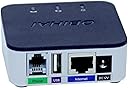
The Polycom OBI 300 Voice Adapter is a compact, matte-finished VoIP gateway designed exclusively for Google Workspace Voice paid subscriptions. Featuring USB and 1 FXS ATA ports, it enables seamless integration for professional-grade voice communication. Lightweight and easy to set up via admin configuration, it’s tailored for managers and professionals who demand reliable, premium connectivity—just be sure to have the right Google Voice plan to avoid compatibility issues.
| ASIN | B07FZYPD8T |
| Best Sellers Rank | #89,920 in Office Products ( See Top 100 in Office Products ) #35 in VoIP Telephone Adapters |
| Brand | Polycom |
| Color | black |
| Compatible Devices | USB-compatible devices |
| Connector Type | Auxiliary |
| Customer Reviews | 3.2 out of 5 stars 124 Reviews |
| Finish | Matte |
| Finish Type | Matte |
| Input Voltage | 12 Volts |
| Item Dimensions | 7.95 x 4.92 x 1.54 inches |
| Item Weight | 0.24 Kilograms |
| Item dimensions L x W x H | 7.95 x 4.92 x 1.54 inches |
| Manufacturer | Polycom Inc. |
| Model Number | 2200-49530-001 |
| Number of Items | 1 |
| Number of Ports | 2 |
| Package Quantity | 1 |
| Power Plug Type | No Plug |
| UPC | 610807882695 |
| Unit Count | 1.0 Count |
| Warranty Description | Manufacturer |
G**S
Works with Google Voice pro
There is confusion over what works with google and what doesn’t and let me be clear: This works with the professional version of Google Voice. If you have the basic version, as of June 2023, this is not compatible. Most standard Google plans that aren’t a paid plan fall into the basic category. With the pro version, I found the set up to be easy but know that you will need to wait for about a half an hour for the converter to make a proper connection and to perform its software updates.
S**H
Horrible customer service
I purchased this device to use with my Google Voice Business line. I received the product and set it up according to the instructions, however when attempting to add the device to my OBiTalk account (necessary to use the device), the device would not connect to the OBiTalk account. I called OBiTalk customer service and explained my problem, the agent said that they would add it manually on their end and that if it did not work afterwards I could send them an email to schedule a call back to resolve the issue. The device not only did not work afterwards, but the tech had added a different device to my account. I emailed scheduling a call back, however I never received the call from them. Several days later I received an email asking to schedule a callback again. I scheduled it and never received the callback, again. I called the support number again with another 2 hour wait time to talk with a person. They told me they found the problem and would fix it on their end and schedule another call back and that I could respond to their email if I had any questions. I don't know what they did on their end, but there was no change on my end of the system having no access to my business line due to this product not working. I also never received the call back I was offered from this latest phone call, nor did I ever receive a response to my replies to their email. I called them again two days later, waiting on hold for an hour again, and explained that I have been without a business phone for over 2 weeks now due to their faulty product and service and that I needed the device to be fixed in order to run our business. The agent on the phone explained that the engineer assigned to the case was in a meeting and they would need to call me back because the agent could not fix the issue for me. I was told I should expect a call back that same night and that they were escalating my issue due to everything that has happened. I'm sure you guessed by now but I never received my call back and my device still does not work. There are lots of reviews on here about flawless service and how great the devices are, and I'm sure that's the case if you don't have a defective device and don't have to deal with customer service, but after this experience I will be finding another provider and will never work with OBiTalk, Poly, or any other company related to this one due to the damage it has done to my business due to their incomitance and the complete disregard for their customers time or experience.
T**Y
VOIP Faxing
This is just what I needed to continue using the fax capabilities after switching our office phones to a VOiP provider (8x8). It has worked flawlessly and was very easy to setup.
J**.
It does not work
This product was originally sold under the manufacture Obihai. It worked flawlessly as an Obihai original product. I have an older Obihai branded one. But I also bought the new Polycom version of this same product. There are issues with the setup servers at Polycom for this product which makes this product unusable. You cannot configure this product without hitting a brick wall in the setup process. Polycom technical support is useless too! I threw my Polycom OBI 300 Voice Adapter in the trash because the Polycom version of this is garbage. I have noticed on eBay that there is an uptick in the purchase of the original older Obihai version of this product. Auctions are getting the sellers of the older Obihai version nearly double in price of the original because the old original one worked. There is a massive demand now for the older original version of this product by Obihai and not Polycom OBI 300 Voice Adapter version here. Buyer beware of this Polycom version. If you want one, then find and locate the original Obihai OBI 300 Voice Adapter version even if it is used. The Obihai version was built to live on for a very long time because the firmware can be updated. Again, this Polycom version is trash. Get the original Obihai OBI 300 Voice Adapter version, if you can.
A**R
DOES WORK WITH GOOGLE VOICE** - Must be paid google workspace on standard or higher package.
This WILL NOT work on the free version of google voice. It must be a Google Workspace account and must be the standard ($20) or higher service (not the basic $10 plan). It does not use OBiTalk for the registration like the old OBi devices. All setup is done in your google workspace admin account. It took some playing to finally get it working but I believe the following was what finally got it working. As of 3/4/2023 I can confirm the OBi 300 does work with Google Voice Workspace Standard or higher accounts. It took some frustration but eventually I got it working. When I added it directly as a device in my google workspace accounts (added deskphone, selected OBI300 then put in its MAC address), it did immediately connect to the device and flash the firmware however it never would show connected after that. I tried using the new password to log into the device that google showed in the admin page but it would not let me in. I then hard reset the device and tried over and over again with the same result. I believe what finally worked was resetting the device, changing the password manually to what the admin password was showing in my google console then rebooting. That last part may have been a coincidence but about 5 minutes later the device is showing online in my workspace account and I can make and receive calls just fine with it. Hopefully this helps some other people. Again, this is a paid google workspace voice account - standard edition, with a brand new POLY OBi300.
T**R
Well worth a little effort to configure
Mighty fine analog telephone adaptor, supporting up to 4 VoIP services/lines. Product is orphaned but works great. Don't expect any vendor support because ultimately HP bought the product and dumped it. Still it is easy to get working. My example was a "return" but absolutely no problem. See excellent article about "Crowdsourced updates for Obihai ATAs and IP Phones" and another out there about comparison of OBi200 vs OBi300. There is good configuration info in wiki at voip.ms I might add that configuration changes require a reboot to take effect. This could be a source of frustration to one who does not understand. The update to modern generic firmware takes 3 flashes, an old one plus a "bypass" one and then the latest. Fairly quick after you line them up. I did not expect nor would I use any google service. Don't expect any support; just go get open firmware and enjoy!
F**R
Forget it !
Would not work with Google Voice Business Plan. I'm pretty techie and tried everything. It came with the old firmware. I was able to find the newest (2023) firmware, after much searching. I installed it, reset everything and it still would not work. I checked many blogs and tried a lot of suggestions but nothing worked. Don't was your time or money.
W**R
Configuration is very problematic
This unit does *not* configure using the obitalk web as the old obihai unit did, even though they look identical, and the included pamphlet describes using obitalk for the configuration. I found this out after days of trying to get the unit installed through my obitalk web (at the **5**** step, it said "No call route available to complete your call". Googling this problem found blogs which suggested updating the firmware, trying multiple times, etc., but Polycom/support eventually got me a support agent and a case number. I got the return call the next day when I learned about the changes. To use the unit with my VOIP provider I had to call my the provider. The support agent said that they're now packaging the new documentation in the newly manufactured units explaining all this. As other reviewers have noted, Google Voice will work with the unit, but at a price, no longer free. You have to subscribe to Google Workspace which is pricy. Wow. I don't think they're targeting home users anymore. Update: 10/18/23: HP support found a solution which involved unlocking OBi device status and updating firmware. HP support was very dedicated and helpful in finding a solution.
Trustpilot
3 weeks ago
1 month ago