Buy anything from 5,000+ international stores. One checkout price. No surprise fees. Join 2M+ shoppers on Desertcart.
Desertcart purchases this item on your behalf and handles shipping, customs, and support to Cyprus.
❄️ Stay Cool, Work Smart — Because Overheating is So Last Season
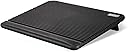
The Coolertek Laptop Cooling Pad features two large, ultra-quiet 160mm fans powered via USB, dual USB 2.0 ports for added connectivity, and an adjustable height stand designed for ergonomic comfort. Made from durable ABS material with a non-slip surface, it supports laptops from 11 to 17 inches, making it the perfect accessory for professionals seeking reliable cooling and enhanced productivity.


| ASIN | B07VRJCKSC |
| Best Sellers Rank | #4,609 in Computers & Accessories ( See Top 100 in Computers & Accessories ) #53 in Laptop Cooling Pads |
| Brand | Coolertek |
| Color | Black |
| Cooling Method | Air |
| Customer Reviews | 4.3 4.3 out of 5 stars (2,099) |
| Enclosure Material | Acrylonitrile Butadiene Styrene (ABS) |
| Item Dimensions L x W x H | 14.96"L x 11.02"W x 1.42"H |
| Item Weight | 712 Grams |
| Manufacturer | Coolertek |
| UPC | 778739048012 |
G**8
Works
This is a pretty good product it gets the job done. It came new in the box. It comes with a usb cord the fan of course. The sounds you can’t hear when the fan is on which is a plus. It cools my lap top down. It’s got feet so it tilts if need.
K**P
Great for Lenovo L13 ThinkPad
I have a 2020 model Lenovo L13 ThinkPad. I work in a corporate office, but usually work remote one or two days a week. I use a true desktop when at my corporate office and my laptop when I travel or work remote. The computer works well for my business / travel needs, but it has always struggled with overheating when connected to my docking station. This is especially true during video meetings. My L13 has shut down on me in the middle of meetings on more than one occasion. After reading some random Google searched articles, many said to buy a cooling pad. No rhyme or reason why I picked this brand. I just didn't want to spend a ton of money on something I wasn't sure would work. But I tried it, and it works great. My laptop doesn't even get warm, let alone hot when on it. The pad stays parked on my desk, so the weight wasn't a concern. That said, it is light enough to use in laptop mode if I wanted. The pad is roughly 17", so a little bigger than my 13" laptop. Where it sits on my desk doesn't bother me. The sound is a very quiet "hum". It doesn't bother me at all. The HVAC in my office is louder than the pad fans. Same with the internal fan of my L13. I've only had the cooling pad a couple weeks, so nothing to say about longevity yet. I am sure glad I tried it though. It has made all the difference in allowing me to stay online when working report.
G**H
Cool Operator!
Great size to cover my 16" Galaxy Power Book 5 360⁰.Very quiet! The CFM covers my needs when computer set to optimum function. The legs raise the platform to a very functional angle conducive for work over long periods. Would have been nice to have been supplied with a power brick to handle it. Very pleased with the item for the price.
A**R
It's a good product, buy one and try it. NOT BAD for a 2019 i9 macbookpro
It's impossible to find the perfect cooler base for laptops. This one is worth trying. It works pretty well for the (insanely hot) 2019 top of the line macbookpro. The fans on this item are certainly not slient, but they're "pretty quiet". They are in fact quieter than the jet turbines on a '19 macbookpro so that's a good thing. It does in fact keep the MBP a little bit cooler; in tests one day with and one day without the cooler pad, the MBP is MUCH MUCH noisier, so, this 20 bucks device will help keep your sanity. I only ever use an external keyboard (in fact, the from-another-planet steelseries apex pro tkl - once you use one for engineering, that's it) so I can't comment on use of the laptop keyboard. But (A) laptop keyboards are a joke (B) no normal human could use the keyboard on a '19 i9 macbookpro - your fingers will turn in to lava! Note that EVEN IF YOU DO NOT TURN ON THE FANS, this is a GREAT product to lift the laptop and get airflow. (It's absolutely impossible to use a 2019 i9 mbp with it laying flat on the desk - the desk, your home, and the entire city will melt to the center of the Earth, so forget that.) Worth $20 to try it if nothing else. Good product. Very sensible that it is impact ABS and NOT a shitty attempt at a metal stand, ABS is the right tool for the job.
I**I
Just what was needed
I spent hours looking for a good laptop cooling pad. I even returned one that I thought would be perfect and ended up teaching me a lesson. In fact I am surprised more people have not commented or had the issue I faced. The original laptop cooling pad I got has a metal grated top for the laptop to sit on. In fact it seems all the laptop cooling pads have this metal screen now. They even state that it helps keep the laptop cool and so promote it as a feature. However when I had my laptop on that first laptop cooling pad with the metal, my wifi connection suddenly went downhill. You might not notice too much if just browsing the web. You may not even notice when streaming video and chock it up to just normal wifi instability. But when I tried playing a game you could truly see how that metal interfered with the wifi signal. The lag I encountered was incredible and as soon as I lifted the laptop off that cooling pad and removed it, the lag disappeared. This makes sense, most articles suggest keeping your router away from metal objects that might interfere with the signal. To try and maximize wifi signal, you want to try to keep any metal from blocking the way. Why no one else has not encountered this issue, I am not sure. Granted I had not received my new laptop yet, so the laptop I used on that original cooling pad was about 10 years old. Maybe the wifi receiver in it, just was showing its age and simply was not as powerful and efficient as newere wifi5 and wifi6 receivers. So possibly my new laptop with the wifi6 would not have had issues. However, even if the newer laptop could have overcome the interference, they would have to work that much harder to do so and so you still likely are not getting the best signal. So I sent back that original laptop cooling pad and searched again. It was very difficult to find one that did not have metal on it. But this one popped up. It does not have the fancy LED lights or DIsplay. It does not have a USB HUb or seperate power cord. It only has the two fans. But it is all a fairly durable yet light plastic. I am not suggesting you can throw this around. Slam things on it or not damage the moving components inside if you are to rough with it. BUT, for the purpose this is supposed to serve, the plastic is quite durable. The grooves are also a nice feature to help channel the airflow, which I think is better than some of the flat metal grates. In fact some of the more expensive laptop coolers have the metal with channels added to increase the airflow underneath and not have the laptop flat on the metal. So this does it by having the plastic channels. No metal to interfere with the wifi (okay maybe some ball bearings and wiring for the fans, but not enough to be an issue). I purchased this for my ASUS ROG G15 gaming laptop. I had heard about the heating issues on that laptop and wanted to just have something to add a little more cool airflow and lift the laptop up. This serves that purpose perfectly. You can hear the fans, but they are not super loud and are easily lost in the background unless you focus on them. The cooling pad fan noise is usually drowned out by the Laptop GPU fan engaging during heavy gaming (which in itself is not super loud and will easily be lost in background). The laptop pad is light and fits in my small carrying backpack with the laptop. While it does have to be powered by USB, You can plug it into a USB HUB or into a surge protector that might have the USB charging power ports. Keep in mind though, that you will have to use the on/off switch manually when you have it plugged in to something other than the laptop or a laptop powered USB Hub. It will not win any beauty contrests. But my laptop sits securely and that slight additional cool air is a benefit along with keeping the laptop elevated and free of obstructions. Overall a good buy and product. Nothing outstanding or fancy. The average 3 stars means this does exactly what it is supposed to do.
A**N
The fans make a ticking noise even powered. When the power is cut and the fans are still spinning it's completely silent. Both fans do this.
G**.
Me gusto el tamaño, la forma, no hace ruido
I**L
Es silencioso y cumple su función pero el cable es muy corto para usarlo
Trustpilot
2 months ago
3 weeks ago