


⌨️ Elevate your game and workflow with the keyboard that adapts to you!
The Kinesis GAMING Freestyle Edge RGB Split Keyboard combines professional-grade Cherry MX Red mechanical switches with a versatile split design, delivering ergonomic comfort and precision. Featuring ultra-fast 1ms response, fully customizable per-key RGB lighting, and powerful SmartSet programming, it’s engineered for gamers and professionals who demand durability, speed, and style across all major platforms.





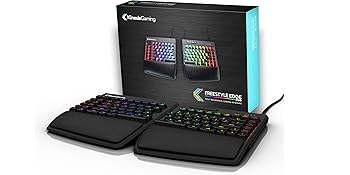
| ASIN | B07STXYG5T |
| Antenna Location | Gaming |
| Box Contents | Keybpard, Palm Supports, Quick Start Guide |
| Brand | Kinesis |
| Brand Name | Kinesis |
| Button Quantity | 95 |
| Colour | Black |
| Compatible Devices | ['PC, Laptop, Gaming Console'] |
| Compatible Operating System Family | Linux, MacOS, Windows |
| Compatible devices | ['PC, Laptop, Gaming Console'] |
| Connectivity Technology | USB-A |
| Connectivity technology | USB-A |
| Customer Reviews | 4.3 out of 5 stars 288 Reviews |
| Enclosure Material | Plastic, foam/rubber |
| Generation | 3rd Generation |
| Global Trade Identification Number | 00607998897522 |
| Hand Orientation | Ambidextrous |
| Item Dimensions L x W x H | 39.4L x 26.2W x 3.3H centimetres |
| Item Type Name | GAMING Freestyle Edge RGB Split Mechanical Keyboard |
| Item Weight | 1.27 kg |
| Keyboard Backlighting Color Support | RGB |
| Keyboard Description | Gaming |
| Keyboard Layout | QWERTY |
| Keyboard description | Gaming |
| Manufacturer | Kinesis Gaming |
| Manufacturer Part Number | KB975-RED |
| Model Name | GAMING Freestyle Edge RGB Split Mechanical Keyboard |
| Model Number | KB975-RED |
| Number of Keys | 95 |
| Number of Sections | 95 |
| Power Source | Corded Electric |
| Product Features | Backlit, Ergonomic, Hotkeys and Media Keys, Split Keyset Design |
| Product Warranty | 2 year manufacturer |
| Recommended uses for product | Gaming |
| Special feature | Backlit, Ergonomic, Hotkeys and Media Keys , Split Keyset Design |
| Style Name | MX Red |
| Switch Type | Linear |
| Theme | Gaming |
| UPC | 607998897522 |
C**R
Excellent split board with great features and customisation
This is my first split keyboard and I'm very happy with it after using it to code and type every day. It's a feature-rich board with solid build quality and lots of customisability. My typing experience has improved and I look forward to reaping the ergonomic benefits over time. One of the first things I noticed was the typeface on the keys, which is clean and only barely towards the gaming end of the font spectrum. Interestingly the secondary characters (@, #, $, etc.) are printed below the main characters but it didn't take too long to get used to. These secondary characters do let light through (unlike some cheaper boards) but it's not as bright as the main character, which is a nice touch. PROS - split layout with arrow keys and function row - long braided cable - programmable (9 profiles x 2 layers each) - premium feel, doesn't pick up fingerprints - powerful software (but not QMK) inc. ability to edit layout and lighting files in Notepad - wrist rest and tenting kit enhance the experience CONS - ABS keycaps - lighting effects are tied to the layout profiles - LED brightness can't be dimmed (they are very bright) except using RGB but that's not completely effective - 3.5u space bars, for which there are no 3rd party replacement options (make it 2u or 2.5u and add more buttons!) - not everything about the software is intuitive (you have to read the manual, which is actually very helpful) - somewhat difficult to adjust the middle cable and the cover doesn't fit back on easily with the cable extended Wish list - extra button between right alt & ctrl for menu, fn or win - more pronounced bumps on the home (J & F) and up arrow keys - "base" colour for breathe mode so it could be two-tone - function key pre-programmed to tap-and-hold mode for toggling function layer - rotary volume controller - QMK support Overall I am very impressed with this keyboard and would heartily recommend it to anyone wanting a split mechanical keyboard - gamer or not.
J**E
Not fit for gaming. Horrible to type on due to cheap build quality.
TLDR: Cheap build quality vs. proper high end keyboards. This makes for a bad typing experience and wasn't ideal for gaming. For the price, I expected a *lot* more. If you are a typing enthusiast, this is not the keyboard for you. I can type over 85wpm at the moment, am in high 90's when not in pain. I am looking for ergo options to help fix my RSI hand and back strain. I am on my computer quite a lot due to running a web design company and gaming is a big hobby. I like having a properly nice keyboard as as I am on it so much. This is on me for not looking at it closer, but I also thought that this came with built in tenting, but nope...that's an extra £26 pounds-ish plus shipping, which added to the price with the current build quality, is horribly over priced in my opinion. The cable between the two, while long enough, was a pain to get to 'tuck into' the hidden compartments, which have a cheap plastic cover like the back of a remote. It seems like a design flaw that I have seen other splits handle in better ways. I am coming from a DasKeyboard 4Q. It has a magnificent build quality with nice tactile and slightly clicky switches. This Kinesis said it was 'tactile', and this supposedly has Cherry MX switches in it like my Das, but the Kinesis keys feel squishy like a cheap membrane keyboard. I also have a low profile wireless Logitech TKL, which is very small and light that I use for travel. I don't love it, but it is still a much better typing experience than this Kinesis. It also felt very clunky for gaming. Because there are all of these extra keys on the left side...out of reach from a pinky...they are not of much use for gamers on the fly. These extra rows of keys also made it feel off balance while I tried this thing in a few games of COD. Plus the escape key isn't in the upper left, it is some weird large key. The only good thing I can say is that the software seemed to be decent. It was easy to program the lighting. Didn't go further than that with macros, etc, so cannot comment on anything but the lighting portion of the software, but it looked intuitive. I wanted to get a split keyboard due to pain between my shoulders and a split was recommended to me. After a lot of searching I went with these as they seemed like the best option available in the UK. I tried using this today for work and for COD. After my third round of multiplayer, I gave up as it just felt so cheap. I can't get over how bad the quality is, how cheap everything feels. It is *horrible* to type on vs. my DasKeyboard. I'm sadly returning this and hoping that Das comes out with a split of their own with a proper build quality.
O**D
Great keyboard
I bought this to replace a Kinesis Freestyle Edge (non-RGB with blue keys) that met an unfortunate accident. I've been using Kinesis split keyboards for years as they are the most comfortable for my wrists and shoulders. Standard keyboards force my arms to angle inward in a way that is not quite natural, and causes some fatigue. Though you mostly get used to the standard keyboard arrangement, it is always so much better to be in control of the angle as you can when your keyboard is split in half. The older Kinesis split keyboards were membrane keyboards, so I had switched to a standard mechanical once mechanicals were available, as I prefer the feeling. Also, I like backlit keys as I tend to keep my office dark to reduce glar. When Kinesis started offering mechanical, backlit, split keyboards, that was excellent as they combine the three main features I look for in a keyboard. This RGB has a bit different layout to the previous Freestyle, so if you are switching there will be some learning as the ESC key is now small and placed next to the F keys instead of being big at the top of the macro keys (though you can reprogram that top large macro key to be ESC if you want, but you'll have to avoid accidentally hitting the real ESC key when you reach for F1). Also 7 is now moved to the other side. Overall, they are very similar. Some points of interest: -when the keyboard is in FN mode, by default, there are no LEDs. This is normal. You can use the configuration utility to assign LEDS (I recommend a different color scheme so you can easily see if your keyboard is in FN mode or normal mode). -the keys themselves have a slightly dusty coating on top for better traction. My previous Freestyle either didn't have that (or maybe it had but wore off over years of use) -this keyboard comes with a wristrest, so you do not need to buy it separately. It is detachable should you not want to use it or use a different one. This wristrest has cushions built in instead of the flat plastic Kinesis ones. They feel nice, though it took a little adjustment as I switched from my old keyboard due to it raising my hands just a little. -You can turn LED backlighting on/off with a toggle switch -The arrow keys are in proper inverted-T layout and have a raised bump on the up arrow for touch placement. This is a small but nice feature; no keyboards I've used before have had the touch bump on these keys. This keyboard is great not just for gaming but for general computer usage and typing when you want something that is easier on your wrists and shoulders, and has mechanical switches for accuracy.
S**E
Je ne m'en passerais plus.
Courbe d'adaptation requises. Bonne qualité.
S**K
Best keyboard so far
So far it's my best keyboard. There is no better on the market. Next one will be DIY. A little noise, it doesn't make click noise, but when you hit button it reaches bottom at some point and that makes noise. Cable between left and right parts is extensible. btw must notice that cover on cable holder is so loosy, if I'm trying to move my keyboard up on table by holding keyboard from top, it's just opens. Functionality is great! rgb is nice, fully customizable, could set it to soft dim light and different colors for FN layer. It doesn't have lifts, unbelievable, so expensive keyboard and I have to buy a separate lifts to adjust angle of the keyboard on the table.
J**N
Would recommend!
Hands down my favourite keyboard so far
M**N
Perfeito
Vale cada centavo. É de um conforto indescritível. Para eu que sofro com tendinite e túnel do carpo foi a melhor aquisição em muito tempo. Amei demais!
Trustpilot
4 days ago
1 month ago