Buy anything from 5,000+ international stores. One checkout price. No surprise fees. Join 2M+ shoppers on Desertcart.
Desertcart purchases this item on your behalf and handles shipping, customs, and support to Cyprus.
🔍 Unlock the unseen world—because details matter.
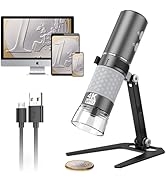
The Bysameyee USB Digital Microscope offers a versatile 40X to 1000X magnification with 8 adjustable LED lights, compatible across major operating systems except iOS. Designed for professionals and enthusiasts alike, it features image capture, video recording, and Windows-exclusive measurement software, all packed with a metal stand and carrying case for ultimate portability.


| ASIN | B07SR7YPV5 |
| Best Sellers Rank | #311 in Camera & Photo Products ( See Top 100 in Camera & Photo Products ) #35 in Lab Handheld Digital Microscopes |
| Brand | Bysameyee |
| Color | USB Microscope |
| Compatible Devices | Laptop, Personal Computer, Smartphone |
| Customer Reviews | 4.0 out of 5 stars 10,293 Reviews |
| Enclosure Material | Metal |
| Item Weight | 0.57 Pounds |
| Light Source Type | LED |
| Magnification Maximum | 1000 x |
| Manufacturer | Bysameyee |
| Manufacturer Part Number | SA-00 |
| Material | Metal |
| Model Name | Microscope-1000x |
| Model Number | SA-00 |
| Objective Lens Description | 40x-1000x |
| Power Source | Corded Electric |
| Unit Count | 1.0 Count |
| Voltage | 5 Volts |
I**D
Cool inexpensive microscope
Edit: The seller reached out about the microscope and fully refunded and sent me a new one. I appreciate them backing up their product. I still think it's a pretty cool thing for an inexpensive price. I'm pretty sure I got a used one so leaving 2 stars. Wasnt boxed, just the carrying case with my other orders and there were lil specs inside the scope. I didn't want to deal with an exchange so I cleaned with an alcohol wipe. Other than that pretty cool scope for a lil over $20. I used it to check my scalp since I've been dealing with some hair loss. I wanted to see if I could see any new hairs from starting minoxidil. Pretty easy to use. I downloaded the OTG view app, used the cable and usb-c adaptor plugged directly into my phone and it worked right away.
A**C
WOW!
I recently found myself to have both the time and renewed interest in "Cherry Picking" pocket change in the hopes of finding that "Million Dollar Coin" I realize my chances of winning the lottery are probably just about as good but at least this way I can still "cash in" all my losers for face value and seem to have more fun playing the "game" When the bug hit me, all I had at my disposal was an old plastic lenses, 2X Loupe. Quickly I realized that was woefully inadequate and began searching for something better. First as the 20X loupe. Awesome but very limiting and going back and forth between the two loupes often gave me motion sickness and horrible neck and head pains. I shopped around and bought and returned many items before I started looking into both standard and digital microscopes. Being on a fixed income, most of what I saw was well out of my price range to try and justify spending for a "maybe" hobby. I just was unable to take such risky leap into the unknown. When I came across the "bysameyee" USB Microscope with included case and stand for only $21.95 I eventually came to the decision to just go ahead and order it. This really was just such a great entry level price point and although I did see some unfavorable reviews regarding the stand, I have no regrets. What I like about "bysameyee" is it is everything they claim it to be. Their Software is very easy (and free) to use. Specific uploads for specific devices, I was quickly and easily able to get the scope to hook up to my Android phone,(which I can connect wirelessly to my 52" T.V) My Chrome book and Win 8.1 Laptop, also connectable to the TV. NO issues whatsoever. The Microscopes cable offers regular USB style with a nice little flip up connector end that fits your phone and an additional 3rd style separate adapter piece that I have not needed but have just in case. Both the "Amcap" and the "Cooling Tech" software's are easy to use. Mostly I just use the "Amcap" photo capture s.w. on the laptop. In the "options" tab of that s.w. , you can go into the "video capture filter" tab where you can enable zoom function or leave that off and select different "filter" options which can be very helpful, especially with newer "shiny" coins. What I don't like: Not much really, I was expecting it to be less than more and I just don't think I have any reason to be dissatisfied with my purchase. So where is it' limitations? First you will read up that the stand "sucks"... For what I am doing, I have found it can be difficult to get it focused under higher magnifications just because is so light, just thinking about the focus can cause it to wiggle. What I do is set it where like you see in the pics, the most of the coin I can see at once is probably seen best with the "AMER" photo, I put the edge of my laptop so it rests on the base of the scopes stand, then I use a piece of paper to slide the coins around under the lenses. The LED lights are really only on or off, not much of a graduation there but I can elect to turn off the LED's and direct sunlight or other light source when needed. One thing that can be difficult to determine sometimes is doubling due to reflection of shiny, well plated coins. One trick I quickly found was to view the same suspect areas from different angles. Viewed from one direction you might think you see doubling but as you shift the viewing angle you will see the reflections shift. Also, the 20x loupe is another quick way to double check what you thought was going to be the big one. This get's easier to deal with and recognize with a little practice. You can see in the pics, especially with well circulated samples, there is more than enough detail and depth to quickly spot any errors or differences. Now this is NOT a 5mp or better scope, so sometimes it can be difficult to actually get down "into" some of the cracks and crevices, especially with trying to use the light weight stand BUT I didn't buy this for the stand and the manufacturer does offer a big discount on a better stand, that if they had included initially, would have driven up the price point beyond what I may have been willing to pay. I wanted an "entry level" digital scope at a reasonable price and am very pleased with what I received. If you have any interest in digital scopes but are unsure about just how much scope you really need, I highly recommend giving this one a try, and get the one with the case too, I think that was maybe $2 more but it sure comes in handy holding more than just the scope. NOW, while this may NOT be the $500 plus microscope that one day I hope to trade for some penny I find , this is the scope I will find that penny with! Lastly, Customer Service: Awesome! I only contacted them to inquire about their Big Discount offer on the Better stand. Terrence happened to be on vacation initially but still got back to me in a timely enough fashion that I truly expect would be even quicker for the next person. Also, sometimes it can be difficult with language barriers when trying to read directions or communicate in person, NOT HERE. One thing I was particularly impressed with, was the super simple and no nonsense user guide. Nice job guy's, I use to have redline digital product user guides before...... It took my company 6 pages to describe how to remove a battery door cover and install 3 batteries even though it was shown in raised plastic lettering on the units battery door and compartment??? Sincerely, "future millionaire" Andy C :-)
S**K
Great value for price, zoom can be manually adjusted
This is a decent entry-level digital microscope, for the price. I bought it to examine coins in greater detail, but I was about to return it due to zoom features not working for Mac users. However, I managed to find a workaround (explained below) to manually adjust zoom and it’s now suitable for my purposes, so I’m keeping it. Some pros: I have a MacBook Air (intel chip, if that matters) and it was plug and play. It works with PhotoBooth as well as the app available on the seller’s website, but I haven’t played enough with them to notice any differences. The carrying case is nice and seems rigid enough to bring with on travel (looking forward to snooping through my relatives’ coin collections). There is a dimmer dial on the cord so you can adjust the brightness of the LED lights. Images are clear once focused and you can see enough detail on coins to identify errors. Some cons: Zoom button doesn’t work for Mac users, so I couldn’t zoom out enough to view the entire coin (fixed via workaround, explained below!) 40-1000x is laughable (Despite what other reviewers have claimed, you’re not gonna see bacteria or skin cells. Even hair strands aren’t really magnified enough to see anything cool. It’s good for bugs, coins, fingerprints, and fine print.) As others have mentioned, the zoom dial is really just a fine focus dial. Stand is flimsy and it experienced an immediate RUD but was easily reassembled (although if you visit the seller’s website, you can upgrade your stand for free - eagerly awaiting mine). Before I explain how to adjust zoom, I’ll clarify the problem I was having. Since Mac users don’t have a functioning zoom button, the only other way to “zoom” is to physically move the scope closer to or further from the object, and the only way to adjust focus is by twisting the 40-1000x dial. In my image titled “Max Zoom”, I’ve shown what I was able to see right out of the box at 40x (portion of coin, including date) and at 1000x (portion of one digit of the date). 40x produced a clear image at a distance of about 1 inch, and 1000x produced a clear image at about 1/2 inch. This was not the range of zoom I was hoping for - the detail is great, but there was no way to zoom out to view the entire coin at once. After a bit of off-manual tinkering, I am now able to view an entire coin at once. First off, the thing that needs to be adjusted will henceforth be referred to as “the thingie” since I couldn’t be bothered to look up its actual name. (It’s the part that contains the lens, see image titled “the thingie”.) To access the thingie, you need to twist off the clear plastic cone at the end of the scope. The thingie is fully retracted at 40x, so to bring it out of hiding, do NOT try to pull it out with pliers like I did. Instead, simply twist the 40-1000x dial all the way to 1000x. Then, you can adjust the thingie by screwing/unscrewing it. If your images are too zoomed to begin with like mine were, you need to screw the thingie in further. If your images are not zoomed in enough, you might need to unscrew the thingie a bit. See my image titled “the thingie” that shows it screwed all the way off (probably don’t do this) to see how many threads you’re dealing with. I tested the full range of zoom/focus to see what was possible. My image “Max Zoom” has the thingie screwed all the in, and as mentioned earlier, you have to get really close (within 1”) in order to be able use the focus dial. “Min Zoom” has the thingie unscrewed as much as possible without it falling off. At 1000x, you have to be point blank but can still get amazing detail. At 40x, I could get a clear image of the penny and its environment from a few feet away! (I promise it’s clear, my iPhone decided to just focus on the foreground). So the Goldilocks zone for me was with the thingie screwed 2/3 of the way in (see “Med Zoom”) so I got a clear image of the entire penny from about 6” away at 40x, and can still see fine detail 1000x at point blank. I also included images saved from the app itself, after finally adjusting the zoom to my liking. All three images of the penny are taken with the same zoom setting, but at different distances/focusing (my point being, you really only have to manually adjust the zoom once, no need to keep messing with it - the focus dial can take care of the rest). Hope this helps someone out there, it would have saved me some trouble!
E**E
Great deal!
If you thinking about buying this, quite wondering, and buy it. I use these to evaluate cracks on aerospace parts at my job. I was given a large amount of old coin from my grandfather and was having trouble reading the dates. I'm on the older side and need readers to see small print. I knew what the microscope could do from using it at work, so I looked into buying one. I couldn't believe how inexpensive they were. I've used mine at home on several devices and it works great. These could be used for many things around the house, working on electronics, or even in a garden. My dad had said that's what he would use it for. Examining plants for diseases.
C**A
One of the worst
I mean it's barely usable You got a zoom function is basically just a function you use to get the picture clear You have to push the camera almost right on the object zoom in and out until you get a clear picture after about 3 months I just gave up using this thing and went back to my old camera which I got like 4 years ago then my old camera broke recently so I plug this up and the LED lights don't work it's literally been sitting inside of its box it came with in my basement on top of the cabinet there is nobody who touched it the last 3 months and somehow it breaks on its own even when it was working it was horrible once you get everything lined up properly you can do what you need to do but to call it a zoom function it should be called a focus function
M**I
digital microscope
its a cool item, connected to my laptop, opened the "camera" app and began having fun, it zooms in pretty close, video is sharp enough to see good details, it has a twist dial on the cable to adjust LED light brightness, zoom is on the camera itself, you twist the body to zoom in and out, it has two red buttons, nothing happens when I press them, and there are zero instructions included, so Im not sure if they work or are there for other models of this camera? who knows... the holder thing isn't the best, I mean, it will hold the camera, but its wonky, can't really adjust the zoom without the whole base moving or the camera unclipping entirely, best thing for me is to just hold it in my hand and press right onto whatever im looking at, this will stabilize the camera and image
V**D
Good for the price
Pretty amazing little microscope when you consider the price. The first photo is at max magnification of the black space around George Washington on a 1 dollar bill, the other photo is of the same area on the bill but at the minimum magnification. pros. Cheapest one I could find, but does what I need it to do which is mostly to look at and identify insects. Setup on windows 10 was pretty easy although I was originally pretty confused by the usb connector which can be adapted to a micro-usb. Photo's are plenty clear enough for my purposes. Light also seems perfectly adequate for most uses. Considering the next step up would cost $100 dollars more, this is an excellent microscope to play around with and see if it will work for you. Cons. The stand that it comes with makes focusing extremely difficult, you will need to buy or rig a better one if you're going to use it at max zoom a lot, but if you're only using it at it's lower settings then the stand it comes with is fine. Also, there is a weird issue where when you're using the middle of it's zoom range the focus point is inside of the plastic light diffuser, meaning you can't focus on an object bigger than the diameter of that plastic piece because you have to actually put the thing you're focusing on up inside to get it close enough to the lens. Once you zoom in more, the focus point moves further away again and it's not an issue. Since I will mostly use the extremes of the range it's not an issue for me, but might be for some people. Finally, I wish all digital microscopes would find a better way to list their magnification, in case you're not aware the magnification that a digital microscope claims is not equivalent to what you would see on a regular microscope. I wish I had a regular microscope to compare but I do not, so the photos will have to do.
K**.
A cost-effective digial microscope with surprising quality
I needed a digital microscope to assay mineral samples. My budget was for a scope under $50. I noted other positive reviews for the Bysameyee USB Digital Microscope, so I thought why not? I received the scope and the packaging was professional and scope was in good shape with no damage. Included a softcase to store the scope while not in use. I'm a Linux user and one requirement was compatibility with Ubuntu. I connected the scope via the provided USB cable and followed directions to use with Cheese, an app integrated with Ubuntu. The scope worked with my Ubuntu PC the first time I plugged it in. The picture quality is good although limited to 640x480. The LED are bright and make for good image lighting and contrast. The documentation says the scope zoom button does not work on Linux but I did not find that as an issue since there is a manual zoom dial which works across the 40x to 1000x range. I also tested with my Samsung Android Galaxy phone, and the scope works with the OTG Camera app from Play store. Worked the first time I connected to my phone via the provided USB-C adapter. Overall for the low-cost this is a good value!
H**I
Dont buy it.
I got this but it doesnt fit my phone and even when I found an application on windows device it worked poorly. Also it shows that it comes with a cse. Well. There is no case.. I dont recommend it at all.
フ**ク
フイルターやマスクの穴の大きさまでわかる
小さいものの大きさまでしっかり見たいと思ったが、撮影したときにスケールを表示できそうなものははっきり書いて無くてわからなかった。この商品はルーラー(定規)がついており最悪定規との対比で分かると思い購入した。結果としてPCに「CoolingTech Microscope」のソフトをインストールすることで、画像にスケールも入れることが可能になった。2000円台の価格で1000倍が可能でスケールも表示できるのは素晴らしい。 PCにインストールする際の注意(マニュアルは英語です) coolingtech microscopeと 日本語で検索すると参考になるマニュアルがありますが肝心なことは記載されていないので注意 (a) レンズカバーを外す (b) ソフトをインストール CoolingTech Microscopeが私的にはスケール表示できる点で気に入っている、ほかにwindows10のカメラやAmcap、 xploviewがある 問題1:USBデジタル顕微鏡をソフトが認識しない→webカメラが競合していたのでwebカメラを外すことで認識した 問題2:スケールが初期設定のままで変更できない→CoolingTech Microscopeソフトをダブルクリックで起動させず、右クリックでadministratorとして実行を選んで起動で変更できた。 撮影例 (1) レンジフードフイルタ(レンジフードを油汚れから守る) フイルター奥まで見えるように透過で撮影。目は粗く0.2mm程度の穴が見える。 (2) エアコンフイルタ(エアコンの外に張り付けて花粉粉塵をキャッチ) レンジフードフイルタよりかなり密に詰まっている。0.1mm以下の穴で繊維が密に詰まっている部分もあるが、0.1mm程度の穴が開いている部分もある。花粉30-40ミクロン(0.03-0.04mm)を完全には取れそうもない。商品の説明としては「花粉・ほこりなどをしっかりキャッチ*花粉などを完全にカットするものではありません」と記載されており、しっかり逃げの一手を打っている (3)マスク1 ( 3層構造不織布マスク、花粉やウイルス飛沫を95%以上カット) 外側の層でも0.1mm以下で密に詰まっている、空いている部分も奥にさらに繊維が見える。 花粉はほとんどキャッチされると思われる。 (4)マスク2 ( 立体4層構造不織布マスク<KN-95> 柳葉型(ダイヤモンド型)、KN認証規格0.3ミクロンサイズの粒子の侵入を約95%以上遮断) 外側の層でも10ミクロン以下に詰まっている部分から50ミクロン程度穴が開いた部分がある、内部の層はもっと密なのかもしれないが見えない。
M**H
Worst product
Worst product and no use of it , absolutely rubbish . For the first time we have experienced this bad behaviour of Amazon and the service about the return policy is also rubbish.
F**L
Magnifique
On branche le microscope sur un port USB, on télécharge le(s) logiciel(s) et cela fonctionne immédiatement. C'est bluffant. Le microscope permet de voir à l'écran les détails qui ne sont pas visibles à l’œil nu (ou mieux voir pour ceux qui ont une vue déficiente !!). C'est du bonheur de pouvoir s'affranchir de loupes ! Au delà de cette utilisation de confort, il permet d'effectuer des soudures sur des petits composants facilement. Je regrette que le mat d'origine soit un peu court mais une potence est disponible sur le site du constructeur si besoin.
K**R
Perfect device easy to use
The product is perfect, easy to use, to handle, to sharpen the picture. You can snap on the device or on the phone and it stays in gallery of the app and you can share the picture, really good stuff for that money.
Trustpilot
1 month ago
1 month ago