


Desertcart purchases this item on your behalf and handles shipping, customs, and support to Cyprus.
🚀 Upgrade your storage game with ICY DOCK’s ultimate M.2 to U.2 converter!
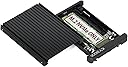
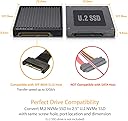
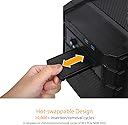
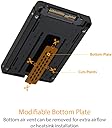
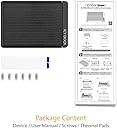
The ICY DOCK EZConvert MB705M2P-B is a premium adapter that converts M.2 PCIe NVMe SSDs (2230 to 2280) into the 2.5” U.2 form factor, supporting PCIe 3.0/4.0 speeds up to 64Gbps. Built with a durable U.2 connector rated for 10,000 insertion cycles and an integrated heatsink, it ensures reliable, high-performance storage upgrades for desktop professionals.




| ASIN | B07T8LJY23 |
| Best Sellers Rank | #423 in Internal Hard Drives #6,264 in Computer Internal Components |
| Brand | ICY DOCK |
| Built-In Media | Convert your M.2 NVMe SSD into the 2.5” U.2 NVMe form factor with 9.5mm height) |
| Color | Black |
| Compatible Devices | Desktop |
| Connectivity Technology | SATA |
| Customer Reviews | 4.0 out of 5 stars 157 Reviews |
| Data Transfer Rate | 32 gigabits_per_second |
| Enclosure Material | Aluminum |
| Global Trade Identification Number | 00884826508205 |
| Hard Disk Form Factor | 2.5 inches |
| Hardware Interface | Solid State Drive |
| Hardware Platform | PC |
| Item Dimensions L x W x H | 3.97"L x 2.75"W x 0.37"H |
| Item Weight | 3.2 ounces |
| Manufacturer | ICYDOCK |
| Material | Aluminum |
| Mfr Part Number | MB705M2P-B |
| Model Number | MB705M2P-B |
| Number of Items | 1 |
| Product Dimensions | 3.97"L x 2.75"W x 0.37"H |
| Supported Devices Quantity | 1 |
| UPC | 884826508205 |
| Unit Count | 1 Count |
| Warranty Description | 1 year |
J**E
Excellent compatibility and build quality
Excellent device, highly recommended: works well with M.2 SSDs and Avago/Broadcom 9400 series HBAs. The HBA did not work with many similar M.2 U.2 adapters, so I'm so happy to found this item which really WORKS. By that, we can check disk status (Health, temperature and other details, as allowed by this tri-mode HBA) in Hard Disk Sentinel software too.
D**S
pay attention to the photo !!!!
pay attention to the picture and heed the warning ! it is not for the dual slot , and conversely the 703 version of this item is not for the single slotted nvme drives . pay attention or you will have a janky set up !
T**E
This Handy Adapter Allows Full Use Of A Super-Fast M.2 NVMe SSD
With the fast approaching era of total solid state drives being the norm, this adapter provides an owner of a M.2 NVMe "stick of gum" SSD to achieve full use of that SSD in a conventional 2.5 hard drive bay. Although the SSD will only communicate at SATA II speeds (since it's not attached to an direct PCIe interface), it will, nevertheless, be a very speedy little devil, and never add any latency to the SATA II interface. This is a very good use for an earlier model M.2 SSD that you might have laying around, and is helpful to reuse that storage potential. Try it, you'll like it! Enjoy
P**T
Make your M.2 2280 removable
I put this in a Syba 2.5" U2 mobile rack using a 3.5 to 5.25 converter. I used the DiLinKer M.2 to U.2 cable to connect to the M.2 slot on my motherboard. Now we have a easily removable M2 2280. Worth noting is that the mobile rack requires the SATA power for the M2 to work, for me this was a bonus as I can then use my KingWin 6 port SATA power switch to turn it on or off. With the help of Y power cables, I am going to put one set of drives on a single switch and other sets on different switches, thus making it easy to switch OS and configuration - Love It. I have not done an official test of the speed, but it seems very fast, just as fast as when the M.2 was on the motherboard. My only con for this solution is the pricing of the U2 backplanes and mobile carriers is high. I used this hardward solution as I do not like using software based multi-boot.
C**A
Works on Qnap TS-h973ax NAS...but BAD QUALITY CONTROL!
The Good: - Qnap TS-h973ax NAS recognized my NVME via this U.2 enclosure and can run Gen3x4 full speed although the highest I've seen Qnap Performance Test measured was 2.6GB/s from a max of 2.8-3.0GB/s my ADATA sx8200pro 1TB can achieve. Close enough! <thumbs up> Love the screw-less clamps to fasten down the NVME stick. Why didn't motherboard manufacturers think of this instead of using cumbersome screws?!? The Bad: Documents claimed screws are enclosed with the package but mine is missing. Good thing my NAS does not need screws to fasten the enclosure. Also read some other reviewers that their thermal pads are missing. Obviously there is some serious problem with its quality control department. Potential buyers beware!! [Update April 23, 2022] Placed another order for another one. This time it arrived with NO THERMAL PAD OR SCREWS!! I had to supply my own thermal pad. Nice going, IcyDock. YOU SUCK! Your brand cannot be trusted. I'm banning you for life! [Update November 19, 2022] Icydock, you are now worth less than 1 star!!! It appears to work initially but in actual fact, IT'S JUST SMOKE SCREEN!!! When used as cache, transfer speed can sometimes dip to ZERO MB/s, even if 6 x SSD RAID5 is used. FYI. standalone 6xSSD without cache can transfer at 9xx MB/s. So, 6xSSD RAID 5 and Icydock NVME U.2 cache dips to 0 MB/s is just jaw dropping to say the least. I have always suspected Icydock is the culprit but could not find proof....I had to buy 6 x SSDs to find out and now I have. DO NOT BUY!!!
L**N
Works with Dell Precision 5820 Tower
The Icy Dock M.2 to U.2 worked successfully within my workstation's Flex Bay #1 slot. Pros - Excellent build quality with the heat sink - Excellent value - Compatible with the Dell Precision 5820 Tower Cons - Requires some effort to disable the Intel Volume Management Device (VMD) controller for Flex Bay #1 in the UEFI/BIOS settings - VMD enabled supports Raid configurations which is undesirable for my setup.
G**H
Waste of time
Somewhat functional as m.2 to u.2 adapter. Does not support R740XD front 2.5 inch bays properly at least not with the mixed Crucial P3 and Inland Professional M.2 SSDs I tried to use. I could get 4 of them online for a brief time before PCIE training and downlink errors began to manifest. 2, regardless of brand, proved stable enough to get me through a few days until I could buy proper U.2 drives. I have no issues after replacing these with Micron 7450's. If you want u.2 just buy a proper drive.
R**I
Want to boot an old system off an M.2 NVMe?
I can finally boot off of NVMe M.2 drives on my old workstation. I'm running Windows 10 on a SuperMicro X9DAi dual Xeon motherboard with no M.2 or U.2 slots. I've installed a Broadcom/LSI 9400-16i 16-port controller, two LSI Logic Cable P/N 05-50065-00 cables which support four x4 NVMe drives. I'm using these fantastic ICY DOCK Tool-Less M.2 to U.2 Adapters to mount four Samsung 970 EVO Plus NVMe Series 2TB M.2 PCI-Express 3.0 x4 Solid State Drives. I've currently testing using the SilverStone TP02-M2 Heatsink for M.2 SSDs. The old BIOS is set for UEFI boot mode and will detect the controller and NVMe drives. Windows 10 will boot from them out of the box using the stock driver without issues and no speed issues at all. I couldn't be happier with the combo. I just can't see upgrading my motherboard and Xeon CPUs until Intel moves to PCIe 4.0 and has a die shrink on their Xeons to 7nms. And no I'm not swapping to AMD and their no ECC junk. I'll wait for Intel and move to a 7nm Gold-something Xeon with PCIe 4.0 and full ECC support when the time comes! This bring new life to my old system running dated Intel SATA SSDs off an LSI 9200 series SAS controller. This is the best best upgrade I've done since install the nVidia 2080 TI card. I would highly recommend the combo to my geek friends!
G**I
Otima qualidade
Otima qualidade! recomendo o produto.
L**O
Muy mal artículo
Es una verdadera lástima que Amazon venda este tipo de productos. El cliente lo compra para poder instalar una unidad SSD nvme en una laptop y las entradas de conexión son diferentes. Terrible experiencia. En realidad así no vale ni 1 peso.
Trustpilot
3 days ago
1 month ago