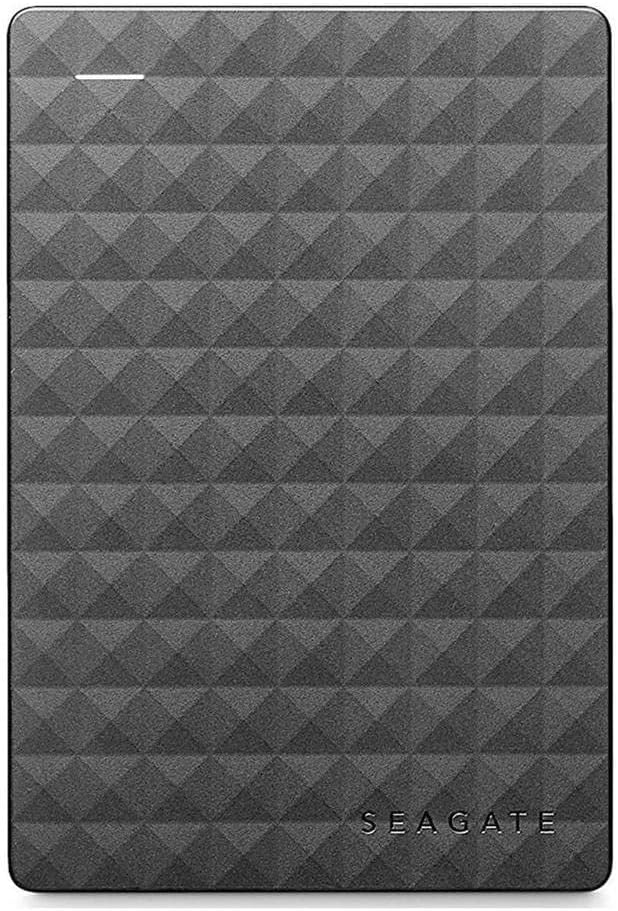
Desertcart purchases this item on your behalf and handles shipping, customs, and support to Cyprus.
💼 Elevate your digital workspace with storage that keeps pace with your ambition.
The Seagate Expansion Portable 2TB External Hard Drive offers a sleek, compact solution for professionals needing reliable, high-capacity storage on the go. Featuring USB 3.0 for rapid data transfer and plug-and-play compatibility with Windows PCs, it simplifies backups and file management without extra software. Its durable design and trusted brand reputation make it an essential tool for managing large files, media libraries, and business data—perfect for the millennial manager who demands efficiency and style.


| ASIN | B00TKFEE5S |
| Additional Features | Portable |
| Best Sellers Rank | #252 in External Hard Drives |
| Brand | Seagate |
| Built-In Media | Seagate ExpansionPortable Drive 2TB USB3.0 |
| Cache Memory Installed Size | 2 TB |
| Color | black |
| Compatible Devices | Laptop, PC |
| Connectivity Technology | USB |
| Customer Package Type | Standard Packaging |
| Customer Reviews | 4.6 out of 5 stars 103,881 Reviews |
| Data Transfer Rate | 5120 megabits_per_second |
| Digital Storage Capacity | 2 TB |
| Enclosure Material | Aluminum, Glass, Ceramic |
| Form Factor | Portable |
| Global Trade Identification Number | 00763649064887, 07636490063435 |
| Hard Disk Description | Drive |
| Hard Disk Form Factor | 3.5 inches |
| Hard Disk Interface | USB 3.0 |
| Hard-Drive Size | 2 TB |
| Hardware Connectivity | USB 3.0 |
| Hardware Platform | Windows |
| Installation Type | External Hard Drive |
| Item Weight | 6.4 ounces |
| Manufacturer | SEAGATE |
| Media Speed | 1 |
| Mfr Part Number | STEA2000400 |
| Model Name | Expansion |
| Model Number | STEA2000400 |
| Number of Items | 1 |
| Special Feature | Portable |
| Specific Uses For Product | 1 |
| UPC | 667562731676 763649064887 |
| Unit Count | 1 Count |
| Warranty Description | 1 Year Manufacturer's Limited Warranty on Hardware against manufacturing defects only |
R**D
Yes even you can upgrade your PS4 HDD, no experience necessary!!
I had read on a couple of forums that this HDD is one of the most economical ways to upgrade space on the PS4. I purchased 2 of them, one to use in the PS4 and one for the backup and to load movies on for the car trips so this will be a review as well as a little step by step for those of you looking to use this unit for the same thing. DISCLAIMER: I have never opened a computer on purpose and am not trained in any way on how to do what I did, but it was super easy following the steps laid out by Sony. In order to use this drive for the PS4 backup I used my laptop to format the drive to FAT32. The default format is ntsf and will not work for the PS4 backup. Plus there is some install files that are not needed for this use. I then used this drive to back up the nearly 500GB of apps and player data following Sony's guide for this which is here: [...] It took about 3 hours using this drive because of the write speed. A solid state drive would have been faster and probably twice as expensive. Then I formatted the other drive keeping the ntsf format but ridding the drive of the unnecessary files. Removing the drive from the case is fairly simple using the smallest screw driver I had in my set from about a half inch away from a corner sliding it along the seam towards the corner until one of the clips pop. The lid then comes off easily under fingernail power. NOTE: this will void the warranty so make sure you have formatted and tested the drive prior to breaking the case seal. Be careful not to crack the case, we are going to use it later. The drive is held in the case by 4 rubber screw covers that keep it snug. Turn it over and with a gentle tap it falls loose. Take the covers off the screws and remove the screws. There is a foil cover protecting the usb adapter which you should remove carefully and set aside with the screws and rubber covers (I'll explain why in a bit). The adapter comes of easily with a little wiggle. Installing the drive is super easy thanks to Sony having the foresight to know 500GB just wouldn't be enough memory. Follow these simple directions to install the drive: [...] Make sure to download the reboot update file to a thumb drive prior to restarting your PS4. You will also need your PS4 controller cable to use the controller until the initialization is completed. DO NOT SIGN INTO PLAYSTATION NETWORK UNTIL YOU RESTORE YOUR PS4 FROM THE BACKUP DRIVE. It takes as much time to restore as it did to backup so be ready to do something else for a bit depending on how much data you have... oh wait, I have an idea, lets use the old PS4 drive to make another 500GB external drive! Put the drive back together using the removed USB adapter, screws, rubber covers, and aluminum sticker shield. DO NOT START THE FORMAT PROCESS UNTIL YOUR PS4 IS INITIALIZED, RESTORED, SIGNED INTO PSN AND YOU HAVE CHECKED FOR ALL OF YOUR DATA, APPS AND GAMES. YOU MAY REGRET NOT LISTENING TO THIS ADVICE IF THE DRIVE IS CORRUPTED. Unfortunately you are not able to initialize the PS4 drive the same way you can the other HDD. You have to manually delete each partition and format from Computer Management. I found the step by step on this here :[...] The hardest part was finding where to go to find the drive because the author of this post missed a step on how to get there. What I did was went to CONTROL PANEL> SYSTEM AND SECURITY> ADMINISTRATIVE TOOLS> COMPUTER MANAGEMENT and found the drive the same way you would on file explorer. The rest of the instructions are fairly straight forward. Now having used the PS4 for about a week I can tell you that it works great, has plenty of storage room, and is quiet during operation. I did a lot of research on solid state drives prior to picking this drive instead because for me the speed gained was not worth the extra money watching the side by side reviews like this one : [...] I feel like I made the best choice for my budget, experience, and needs. I have since also installed the second drive into the other PS4 we have and used the 500GB drive I made from the first PS4 upgrade for the backup.
V**Y
Quality No Frills Storage Expansion Drive, Fast USB 3.0 Connection
The 2TB Seagate Expansion Portable USB 3.0 hard drive is excellent expansion storage choice in an attractive package. This basic drive has a lot in common with other USB 3.0 compact drives including a similar price. This is the current model of the older and well received Seagate Expansion STBX2000401 still available on Amazon. I have used a number of Seagate and Western Digital external USB 3.0 hard drives. Over time the newer drives tends to operate a bit faster than my older ones. That is my sense with this Seagate 2TB USB 3.0 drive when used with USB 3.0. This drive has been used in a Windows environment and it plays very nice. Some older Seagate drives did NOT play nice on Linux systems unless the drive's sleep mode was disabled with the Seagate tools. If you plan to use the drive on Linux you may need to change the settings using Seagate tools on a Windows computer before use on Linux or sleep mode might cause loss of access until it is re-plugged. In my casual testing (copying a 9GB folder of updates, iso files, and many mixed large and small files) performance is on a par with other recent Seagate and WD drives I have for my own business and for clients. At this point I think the USB 3.0 external drive market is pretty much a commodity space. The drive fits easily in a pocket and as typical it uses a single cable for power and data making connections simple. The drive is compatible with USB 2.0, albeit at slower USB 2.0 speeds. The form factor for the drive is similar to the WD MyPassport Ultra and thicker than the WD My Passport Slim which are both more expensive. We are not talking about any big difference in size. The drive comes packaged with the drive itself, a shortish USB 3.0 cable, a quick start guide, and 1 year warranty. No fancy premium software is included. Just the basics. The Seagate Expansion 2TB is an economical commodity storage expansion. It clearly hits the target for the commodity USB storage market. Because it works quite well for a good price I'm giving this drive 5 stars. UPDATE Nov 6, 2017: In the just about 2 and a half years since getting this drive it still to works fine. First in it's role as a backup drive. Next as a carry along scratch drive in my kit for visiting clients. It has worked dependably as I was expecting for whenever purpose I've needed it. No problems. Since this drive was released as a top performer at the price in March 2015 this model has done. Now there are newer drives I would pick today. I see very few 2017 model drives from Seagate (or their subsidiary LaCie). I've had very good luck with recent WD My Passport drives though they seem to have uglyfied their cases... I think that while dated this Seagate Expansion drive has served me well and continues to do so. I still feel it deserves 5 stars.. Hope this helps someone.
L**L
Giant storage capacity, sleek design, fast transfers, and DURABLE!!!
It still blows my mind how far technology has come in the last 20 years. Ok, so call me outdated or old, but I still remember the days of 56k dial up modems (If you were a teenager in the mid 90's I'm willing to bet money you can perfectly repeat out loud that AOL dial up noise), and the "gigantic" maximum storage capacity of about 700mb from floppy discs, DVD's, and Smart Media. Now just 1TB is equal to 1,000,000MB!!! In case you're wanting to do the math, in order to store 1TB of data back in the mid 90's you would need around 1,430 DVD's. Meaning you can fit your ENTIRE N'Sync and Backstreet Boys discography's onto your hard drive without even breaking a sweat. Now DVD's are just typically reserved for High Speed chases in Action movies because they OBVIOUSLY contain either the cure for the virus the mad scientist started or America's nuclear launch code sequences. Anyway, I digress. Seagate has been my go-to for simple extra storage ever since WD failed me twice several years back. I've also used Seagate's customer service line once because I could not figure out a format issue and my problem was immediately solved by a professional and courteous customer representative. If if I need to back-up important files. save data as to not use my laptop's built in hard drive, or if I want to format it for my Xbox 1 or PS4 so I do not eat up all the space on the consoles themselves, Seagate is a perfect choice. And as a bonus concerning gaming consoles, you can take that backed up data, plug it into another console, and continue playing just as if you were at home, eating nachos, and sobbing as 12 year old's show you no mercy in online gaming modes. Pro's: 1) Enormous amount of space for data storage (different options available for how much storage you will need). 2) Price ($69.99 is absolutely a bargain for a 2TB external hard drive from a reputable company) 3) Durability - Oh my Lord, I cannot stress ENOUGH how durable this hard drive is. If you're like me and like to drop expensive things, you will not be disappointed. I've probably dropped my drive 3 times (about 3 feet onto tile or asphalt) since purchasing it a week ago and it's as if the engineers at Seagate made drop protection a priority when designing their drives. 4) See #3 5) Optional carrying case if you are worried that you may possibly drop your drive out of a vehicle involved in a high speed car chase. Nice little add-on, but as I mentioned before I own about 4 external Seagate drives right now for different reasons, and have never used a carrying case. They all still work perfect, and I am definitely not the most careful person when handling them. Bravo Seagate. Cons: 1) ? I've got nothing.
N**R
.
UPDATE: I've ordered 5 of these External Hard Drives, they work great, I have had 0 defects other than windows 10 not wanting to read the FAT32 formatted by a windows 7 (this problem has been resolved). I'm about to step up from the slim version and order myself a 5 TB external HDD because I love these so much. I like to put movies on 1 and watch off my xbox 360 it will only support up to a 2TB but I can hook the 5 TB up to my computer and keep a running record of all my movies then possibly use another for TV shows. I still complain they advertise at 1TB and it's 931GB, but that's life, lucky they aren't like the gas station charging you 9/10ths of a penny. UPDATE: Months later I've filled up the 1TB and the 2TB so I've bought the 4TB drive. I run these external drives hours on end day after day streaming movies and tv shows from them, I haven't had a failure yet. Plugged right in to my computer and loaded right up. In as little as 10 minutes the first 40 gigs of data already loaded on. I might buy 2, surprisingly small. You see the picture next to the pencil, but man, that thing really is small! Dropping this post to a 4 star review, the cord that comes with the portable hard drive is really short, 1 foot 6 inches doesn't give you much to work with. Also I have a bone to pick with whoever is calling these drives 1TB, OK GOOGLE "How many gigabytes are in a terabyte?" One TB contains 1024GB, well that's nifty however my drive only has 931GB. Yes 931GB is a lot of space but roughly 100GB short of a terabyte. UPDATE: Moving this post up to 5 of 5 stars. I am now on my 2nd drive, and I love it. This product also might have changed me from a Sony Playstation user to an XBox user. Yes I had the Playstation Playstation 2, and still the Playstation 3. I bawked at XBoxs bulky controller, but they slimmed it down. Playstation will not accept external hard drives, XBox will. Still has a short cord, would prefer usb to usb connection for an easier cable replacement. UPDATE to the UPDATE: 1 TB filled rather fast, I'm currently debating upgrading to the 2TB or simply buying another 1 TB.
S**O
has been working fine with my newer MacBook Pro
I am not a tech-oriented person so I am just not equipped to write about write speed, reading speed, etc. with this hard drive. But for non-techy people, I will tell you how I used this and how it is working out for me, and hopefully that will aid your decision. I got a new MacBook Pro a few months ago and I wanted to get a new backup drive to go with it. My computer has a 500 GB capacity, and I had somewhere read a recommendation to use an external drive with about twice the capacity of the hard drive for Time Machine backups. So I bought the 1 TB drive at this listing. I did reformat this with Apple's Disk Utility before using, it was pretty simple but not 100% hitch free (for some reason, the first time I tried, Disk Utility crashed, but I restarted the process and it worked after that). Iif you encounter this same kind of problem, try again (at least once or twice more) before giving up! This is pretty small and doesn't require external power (I think the lack of external power has been a thing for awhile, but the last time I bought an external 1 TB hard drive was in early 2010). If you are using it with a new Mac, you'll need an adapter (USB C/USB A) because this has an older style port. (if you're buying for use with most current PCs and gaming systems, you should not need an adapter.) But those adapters can be had inexpensively from Amazon and you will probably want a few for other devices, anyway. (I have not tried using this from a USB hub. I am under the impression from reading specs on it that you require a powered USB slot so I don't think it would work with a hub.) Backups seem quick. I don't have a ton of stuff on my hard drive, and I do usually just plug this in (Time Machine automatically detected it and asked if I wanted to use it as a backup disk) and let it go without paying a lot of attention. I try to use it at least once a week. I've had my computer for maybe two months and done 8 or 9 backups and haven't had any errors. This hasn't made any strange noises (of the sort you would hear if it was struggling to read/write). Once when one of my cats knocked into it and it came detached from my computer, I just plugged it back in with no ill effects. Anyway, I've been happy with this so far and would buy the same one if I had it to do over again.
H**N
Good if you use them for what they should: backup storage
I always get incensed when I read reviews of people shooting down external drives for failing. Failures will sometimes happen, even if you do not do anything wrong with your drive because nothing is 100% safe. Now many of the people giving one star are complaining that they lost data due to the failure and that is what incense me the most since these external hard drives should only be used for either backup or data transfer. Let's recap the storage options from safest to least safe: - Cloud storage. It is very safe since it is guaranteed by very large corporations that will likely have many backups. The downside is that you will have to share your data with them so it is a question of how much trust do you put in them. The other downside is that it is not a cheap option past a few gigs. - SSD drives. No moveable parts. All storage is electronic. The downsides is that their lifespan is smaller than regular drives (theoretically) and that they are more expensive per gigabyte than any platter based hard drive. The upside is their very large transfer speeds and very small sizes. - Internal Hard drives in Raid. The upside is that they are not too expensive to own these days. The downside is that because they duplicate every bit, you need two 1GB for instance to get 1GB of data. The other one is that it is more technically difficult to instal and it can only be used internally (not much transport feasibility) unless you use a NAS. - Simple internal hard drive. Because you are not likely to move your computer a lot, it is reasonably safe. - Last is the external platter Hard drive. It has moveable parts, its transfer speeds depend on the USB connection. It is much more likely to fail. So why did I buy this Seagate 4GB external hard drive then? The answer is simple: for backup of my internal hard drives and for transferring large amounts of data from one PC to another. It also allows me to backup my data in another physical location than where my desktop is operating. I had the misfortune once to have a fire in my building and I had left my backup hard drives in my apartment. I was left with nothing. So I did learn to backup my data regularly and to store the backup at a different location. Now why the Seagate over any other brand? For no real reason but the price and the fact that Seagate has proven to work well in most cases. It is running at 5400 RPM (most internal HD are running at 7200 RPM) but still provided me reading speeds in the range of 100MB/s. So, for its intended use and for what it is worth, 5 stars!
M**C
great for extra ps4 storage and easy to set up
this drive has been a lifesaver for extra storage on my ps4 and getting it set up was way easier than i expected. the ps4 detected it immediately and after a quick format i was good to go and downloading games onto it. the 2tb of extra space means i can finally stop deleting games every time i want to download something new which was driving me crazy. really solid reliable little drive and i would recommend it to anyone who needs more storage.
E**D
FABULOUS -- best back system u can have cause Cloud slow -- you need Cloud for off site, but you get "more-better" adding this.
These are amazing -- hook them to one PC USB 3.0 best, then use networking to share all your PCs (and Linux and AIX and SCO and any Unix that does netbios -- Samba being the king there) -- and then back up all the time. I use Vice-Versa Pro with the VV Pro Scheduler -- I am backed up every 2 minutes on my critical data. It has a real time mode in the software but reality is it take 2 minutes anyway. The VV software is the only one of 6+ I tried that works well with Unix shares. Of course, you should have a means of some sort of off site backup. If you are at the office and go home just get two, dismount one and replace with the other each day. Our office is at home so I do a daily Cloud backup. But restoring from the Cloud is SLOW SLOW SLOW and tedious. Having it right there on site and fast is great if you have a major need for large amounts of data. Add to that, the VV software keeps (at your settings) many copies of backups (so many per day, week, month, year, etc). I use their default, which works well. You are working on code (I am a programmer) and make a tragic mistake ... OK ... the 2 minute older version is there, 4 minute older is there, etc -- some quick file comparisons and you usually find the problem -- or if you went stupid just restore an older copy. My point is -- Cloud is good for off-site automated backups. I use DriveHQ which is very good. But there is only so much bandwidth so I limit that -- critical still goes to the Cloud pretty often but nothing like a local drive. And all these copies are much cheaper locally. And 4 terabytes is a LOT. I actually do the backups to one all day long, then each night back one to another on a different computer in the network but at a different physical location. Fire -- grab them and run. But I would still want an off-site as well. So this is best for anything but total disaster, Cloud is best for total disaster. And this is ALL opinion, I know others will disagree, please don't flame me -- there are other valid views, I recognize that -- but for me this works well.
S**�
Très eficaz
Super
F**L
Sağlam
Hala çalışıyor. 😀
Z**N
Best for PS4 and PS5
The product does what it is meant to. Been using it to store ps4 games from ps5 and it has been doing its job. Game Performance is still the same which is a plus.
C**️
Le encantó a mi hermano para utilizarlo con su PS4
El espacio que mi hermano tiene en su PS4 original es de 500 GB y como sabrán no es lo suficiente como para tener muchos juegos. Teniendo Red Dead Redemption 2, Star Wars Battlefront II, Uncharted 4 y otros juegos indie su espacio libre básicamente desapareció jaja. Le obsequié este disco duro externo para que pueda tener un poco más de espacio y después de haberme comentado de su experiencia creo que también adquiriré uno para uso propio jeje. A continuación escribo la opinión del producto basado en los comentarios de mi hermano después de haber tenido el producto por casi un mes. Lo que le fue más atractivo a mi hermano obvio fue el espacio adicional que tendría para descargar más juegos (le compré el de 1 TB) El hecho de que también lo pudo configurar por si solo fácil y rápidamente fue otro aspecto muy positivo para el. Básicamente solo tuvo que conectar el disco duro externo al puerto USB frontal #1 de su PS4 y lo detectó de inmediato. Realizó el proceso de formateo (requerido por el PS4) y le indicó a su PS4 que cualquier juego descargado o instalado se almacene en su nuevo disco duro. La única observación que se debe de hacer con respecto al uso del disco duro con un PS4 es que SOLAMENTE lo podrás utilizar con tu PS4 (desconozco si este es el caso con un Xbox) así que no podrás utilizar la mitad del disco para almacen de archivos en general y la otra mitad para juegos de tu play aún así le quieras hacer particiones. -En cuanto a su desempeño mi hermano me comenta que juega sus juegos sin ningún problema. La unidad no se sobrecalienta ni hace ruidos excesivos fuera de lo normal. Lo deja siempre enchufado a su PS4 sin tener que conectarlo y desconectarlo cada vez que la encienda y lo ha leido siempre sin problema alguno. Cumple con todos los requisitos para utilizarlo con un PS4, funciona al 100% y mi hermano está muy contento con la unidad. A mi me alegra que le haya gustado y por su parte lo puedo recomendar a todo aquel comprador que busque ampliar el espacio de almacenamiento de su PS4 :)
A**E
Ürün iyi kargo rezil
Ürün güzel. Amazon’un mng gibi rezil bir firmayla çalışması kötü. Kargo firmasını seçebilmeli satın alımda insanlar. Söz verilen teslim tarihinden 2 gün sonra kavga dövüş getirtebildim adresime.
Trustpilot
2 days ago
3 weeks ago