✍️ Elevate your iPad experience—write, draw, and create without limits!
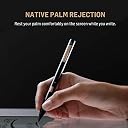
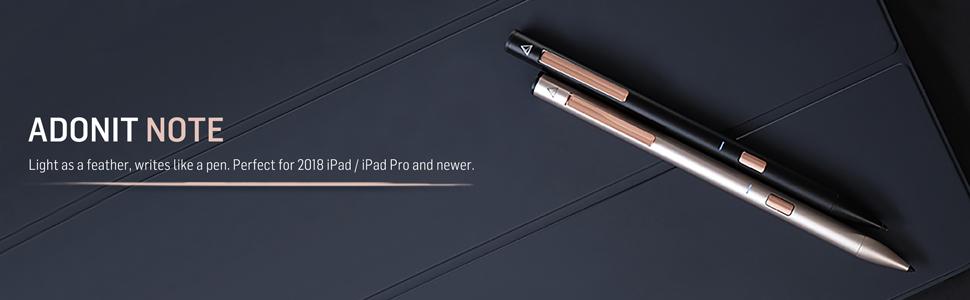
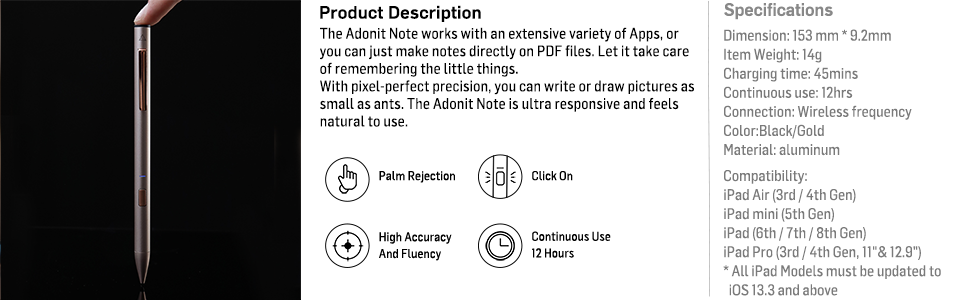
The Adonit Note (Black) is a premium aluminum stylus designed for a wide range of iPad models, featuring a precise 1mm tip, natural palm rejection, and effortless no-Bluetooth connectivity. With up to 12 hours of continuous use and a quick 4-minute charge, it’s built for professionals and creatives who demand accuracy and convenience. Compatible with hundreds of iOS apps, it’s the sleek, reliable alternative to pricier styluses, backed by a 12-month warranty and crafted for durability in Taiwan.


| ASIN | B07R9HPSYN |
| Battery Average Life Standby | 12 hours |
| Battery Description | Lithium-Ion Polymer |
| Best Sellers Rank | #221,850 in Cell Phones & Accessories ( See Top 100 in Cell Phones & Accessories ) #4,095 in Styluses |
| Brand | adonit |
| Built-In Media | Adonit Note*1, Micro-USB Cable*1, User Guide*1 |
| Charging Time | 3 hours |
| Color | Black |
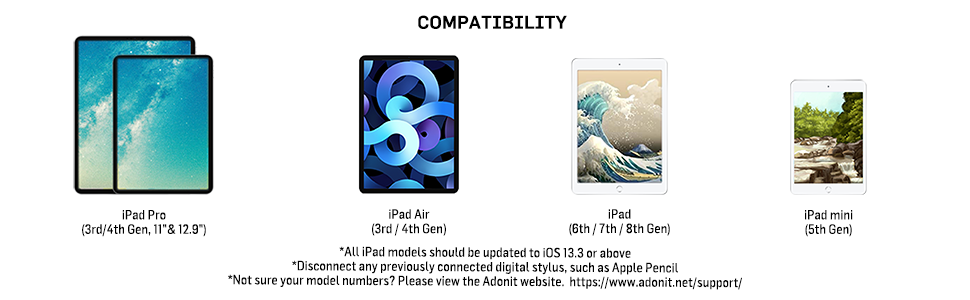
| Compatible Devices | iPad Air (3rd / 4th Generation) iPad mini (5th Generation) iPad (6th / 7th / 8th Generation) iPad Pro (3rd/ 4th Generation, 11" & 12.9") |
| Compatible Tablet Computer Models | Apple iPad (6th generation), Apple iPad (9th generation), Apple iPad Air (3rd generation), Apple iPad Air (4th generation), Apple iPad mini 5, Apple iPad mini 6 |
| Customer Reviews | 4.3 out of 5 stars 1,381 Reviews |
| Enclosure Material | Aluminum |
| Global Trade Identification Number | 00847663023379 |
| Item Dimensions | 0.36 x 0.36 x 6.02 inches |
| Item Weight | 3 g |
| Manufacturer | Adonit |
| Material | Aluminum |
| Mfr Part Number | ADNB |
| Model Number | ADNB |
| Number of Batteries | 1 Lithium Polymer batteries required. (included) |
| Number of Packs | 1 |
| UPC | 847663023379 |
| Unit Count | 1 Count |
| Warranty Description | 1 year warranty |
J**Z
Great alternative to the Apple Pencil
I was looking for something a little cheaper to the Apple Pencil for my 2019 iPad Air as I'm not an illustrator or designer and wanted a simple, but accurate stylus to write notes and for simple sketches. I did some research and found that Adonit was releasing a new stylus to compete against the Pencil and Crayon. After watching some reviews, I decided on the Note for ease of use (just turn it on, no Bluetooth needed to connect), there's a great feel like you're holding an actual pen (with palm rejection) and accuracy with little to zero latency from what I've noticed. It also looks stylish in the black version I got. There are a few downsides if you're looking for something more. There is no pressure sensitivity. Again, it's really for note-takers than artists. There's also a micro USB port (not a big deal for me). And lastly, the placement of the power button can get in the way at first when you grab it and turn it on, but a simple adjustment in your hand and it's out of the way. Again, not a big downside for me because all the pros outweigh the cons for what I need it for. In summary, it's a great stylus for half the price of the Pencil, but it provides a lot of value in its simplicity if you need a good note-taking stylus.
S**O
Great Apple Pencil and Logitech Crayon alternative
I have only had this for a day, but I’m really enjoying it. I have the second gen Apple Pencil for my iPad Pro, and a Logitech “Crayon” for my iPad mini 5 and the iPad Pro. I use the styli for note taking and annotations, not for drawing. The Crayon and Note don’t have the same feature set as the Pencil, but since I don’t use them for drawing, I don’t miss those features (except the double tap to erase). I really wanted one stylus to use on both my iPads (the second gen Pencil does note work on the mini). That’s why I got the Crayon. It works fine, but it’s fugly looking, feels awkward in the hand, and it takes a prolonged press on the on/off button to turn it on/off. The Note looks great, connects and disconnects instantly with a quick press of the button on the barrel, feels great in the hand, and, importantly for me, has a clip on it for your pocket, or, in my case, clipping it to the cover I have on the iPad Mini. I’m always afraid I’m going to lose the Crayon. They all write about the some, with very little latency and similar feel across the glass. I really love how easy it is to turn on/off the Note, the pocket clip, the feel in the hand, and the price. Can’t beat it!
K**A
great apple pencil replacement for note taking - read if have poor pencil grasp/fine motor control
overall, i highly recommend this stylus as an alternative/replacement for the apple pencil for anyone who isn’t a serious artist. though i have some suggestions, i think this stylus is GREAT for the price and i am very happy with it so far and plan to keep using it. for students, the apple pencil is NOT worth it & you should instead buy this stylus. my apple pencil did not even last halfway through college, but did last long enough for my warranty to end and leave me forced to pay full price for a brand new one. instead, i opted to replace it with this stylus and i really like it. i originally switched to digital notetaking due to poor/inadequate pencil grasp, poor fine motor control, & pain associated with handwriting using a pencil and paper. i was constantly rewriting, erasing, and pushing very hard i would rip through paper. sometimes with the apple pencil the pressure and tilt sensitivity was actually annoying to me when trying to handwrite and the differences in line quality had me rewriting often and at certain tilts you would have to push kind of hard or adjust your grasp. i also noticed some glitches with the apple pencil regarding palm rejection. the adonit stylus resolves all of those issues because it does not have tilt or pressure sensitivity at all and this means neater handwriting and an easier writing experience for someone like me who has trouble regulating fine motor control. the tradeoff is that this may not work for you if you need it for art. however this stylus has better palm rejection in my opinion & is also lighter and the tip of the stylus is softer on the ipad screen. my only critique is that the power button is in a poor location. you are prone to accidentally pressing it but also, because of where it is, i don’t think i can get a pencil grip on without messing with the power button. additionally, the material on the outside is kind of slippery though i have to mention that it is nice looking and makes the stylus have a high quality appearance which i understand. however, i have an interdigital brace pencil grasp normally, but i’m trying to correct it and i find this stylus very difficult to hold as dynamic tri/quad and slightly less difficult as lateral tri/quad. either way it keeps slipping still, so i tend to stick to the interdigital brace and don’t think i could correct my grasp without a pencil grip unless i death grip the stylus. the current solution though seems like taking an xacto knife to one of my grips and cutting a hole for the power button (though it would be nice if this company sold custom grips... hint hint). however, it is worth noting that i still had more pain handwriting with the apple pencil with a grip than i do with the adonit note with no grip due to the adonit being much lighter. further, the clip on the top is basically useless and this product would be a lot more streamlined without it & i suggest the power button be moved there instead.
E**C
This is the best!
I have been using it for 2 months now and no skipping! Every other pen I have tried ends up skipping. The battery lasts several days. plus it has a push button for on/off. I despise all the others that have a touch top. They turn on by accident in your pocket or in you pack when you reach in for another item. I haven’t had a problem with the nub unscrewing and falling off. I can’t see any wear on it yet either. On top of all this, the pen looks classy! And the clip is so handy. Definitely worth the cost.
A**.
If you're still on the fence...trust me, just get it!
I absolutely love this pen! I use it for taking notes now that I've gone back to school. I hate keeping up with notebooks but still like hand written notes compared to typing. It fits comfortably in my hand and doesn't skip or lag like other styluses I've used. The battery lasts about as long as my iPad battery so I just charge them at the same time. Connecting was effortless, I literally just turned it on and started writing. The only issue I had is that the writing started skipping a bit, but it turned out that the tip just wasn't screwed in completely. Awesome product for an awesome price.
B**S
Gah. I want to love it, but come on
While I love this pen and love that it is fairly priced (and some ridiculous $100), this design flaw is the MOST annoying ever: leave the pen in your bag and the tips are guaranteed to come off on their own. And the pen doesn’t work on tablet without them. I’ve lost 2 already... it’s not like I’m throwing my bag around or using it in a wrestling match. But anyway, buy the tips with it. Annoying, but still half an apple pen.
A**E
Frequent missed strokes and erratic page behavior due to flawed palm rejection hardware.
The main purpose of this purchase is of course to write on the iPads that it supports. However, if it works like a broken pen with frequent missed strokes, erratic page behavior (e.g. eccentric sudden page movements/jerks/fast scrolls) due to some issues in their palm rejection technology, etc, then this stylus is rage-inducing and unproductive, especially for a post-graduate student trying to solve his already frustratingly tough stochastic differential equations. Another issue with this stylus is that when using it on my app (Notability), it frequently causes another issue that somehow triggers the long taps even though I have already lifted up my pen. This causes my writings to become some jumbled mess as the app thought I was trying to draw some shapes. I would have to say it's the stylus' fault since I have not heard of others having such issues with the app. So I would suggest giving this stylus a miss. Maybe it's just a luck of the draw that I got a faulty stylus, but for this price, you might want to look at the Logitech Crayon. It's simply not worth the frustration you had to put up with when using this stylus. I have just emailed their help desk in an attempt to initiate a refund and we will see how that goes. I will probably update this as it progresses. EDIT: Amazon gave me a refund and since it was past the return window, I got back 80% of the item's price. Since returning it, I got myself a Logitech Crayon and this erratic page jumps/behavior and frequent missed strokes are non-existent; goes to show that it's an Adonit engineering/technology flaw which isn't too surprising since they weren't licensed with Apple's pencil technology so they probably tried reverse engineering it but quite apparently, it's not perfect. So my advice: If you are going to use the pen for long, get either the Apple Pencil or the Logitech Crayon since the latter is an official Apple partner to produce a cheaper Apple pencil for the education market. If your digital ink usage is very limited in time (e.g. just the occasional notes in a business meeting or continuous usage less than 45 mins), then perhaps this would be adequate.
M**S
Works with Scribble in iOS 14!!
I have loved this stylus since I got it: it looks good, it is a very fine tip but remains accurate, and it does all the fancy things that the Apple Pencil 1 did for literally a third of the price. But now? Now it’s one of the coolest things I own. Why? Scribble!! Scribble is such a cool new feature of iOS 14 on iPad. I thought that only Apple pencils would be supported but lo and behold: so is this guy! This little third-of-the-price scribbler! It’s also recognized as an Apple Pencil in good notes and notability, so things like palm rejection are supported within the app. All in all, the thing just Works and I love it!
M**R
GO FOR IT!!
I’ve been using this amazing stylus on iPad (7th Generation) for 2 months now and I can positively tell that this stylus is the PERFECT REPLACEMENT for Apple Pencil (1st gen). Things I loved about it: • Palm Rejection works fine: EPIC for drawing and taking notes • On/Off button: Saves battery somewhat. • Charges real quick. • Precise and Accurate Things that might bother you: • No battery indicator to tell the remaining battery percentage unlike Apple Pencil. • Uses microUSB as the charging port. Not lightning or C type. • NO WARRANTY That’s all folks! :)
S**M
Perfect!
This is a repurchase, the last one accidentally got wet but it stayed with me for FOUR YEARS… Totally worth it and would recommend!
E**A
Fácil de usar, excelentes funciones y buen precio
Es muy bueno, se siente sólido, no frágil y la batería es duradera Es preciso a la hora de usarlo y fácil de implementar. Yo lo uso en ipad air 4 de 2020 Por el precio lo vale y más si solo lo vas a usar para tomar notas. Aunque si tomaría en cuenta que solo son 600 pesos se diferencia con la versión plus que es usb c,botones de acceso directo y detectar presiones. Yo lo compre por que estaba de oferta a 600 pesos
J**M
Perfekte Alternative zum Apple Pen!
Wer, wie ich, keine 100€ übrig hat für einen Apple Pen hat mit dem Adonit Note Stylus die perfekte Alternative gefunden! Der Stift kommt in einem schönen schwarzen und rosegoldenem Design. Er liegt perfekt in der Hand und lässt sich durch den An-/Ausknopf leicht bedienen. Ich nutze den Stift in Kombination mit meinem iPad 2018 und der App Good Notes 5 für die Uni. Der Stift wird inklusive Ladekabel geliefert (ein USB Kabel, es wird kein Adapter für die Steckdose geliefert, aber den hat man üblicherweise sowieso zu Hause). Die Akkulaufzeit ist sehr gut und das Aufladen geht schnell. Allgemein kann ich diesen Stift nur jedem empfehlen der eine Alternative zum Apple Pen sucht und dabei Geld sparen möchte!
A**D
Better than
Used on iPad Pro 11 ,Amazing for taking notes and doing basic graphics work and compared to the apple pen It’s a great value for money, it feels more like an actual pencil in terms of weight and feel when compared to the apple pencils 2. Doesn’t have the same gesture, magnet or wireless charge but I do prefer this over it. The charging is an issue for some people but honestly me being a university student, I haven’t face any issues
Trustpilot
1 month ago
2 weeks ago