Desertcart purchases this item on your behalf and handles shipping, customs, and support to Cyprus.
♻️ Print smarter, live greener — the future of ink is here!
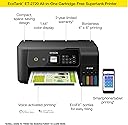
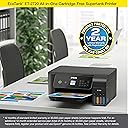
The Epson EcoTank ET-2720 is a wireless all-in-one color printer featuring cartridge-free printing with supersized ink tanks that yield up to 4,500 pages per refill. It combines high-resolution scanning and copying with advanced Micro Piezo Heat-Free Technology for sharp text and vibrant colors. Designed for eco-conscious professionals, it offers wireless convenience, voice control compatibility, and a compact footprint, backed by a 2-year limited warranty.
| ASIN | B07PW3Q92W |
| Additional Printer Functions | Copy |
| B&W Pages per Minute | 10 pages_per_minute |
| Best Sellers Rank | #68,357 in Office Products ( See Top 100 in Office Products ) #35 in Ink Tank Printers |
| Brand | Epson |
| Built-In Media | EcoTank ET-2720 all-in-one, manual, CD-ROM for product setup, power cord, 1x bottle 522 Black (65 mL) and, 1x bottle each 522 Cyan, Magenta, Yellow (65 mL)(2) |
| Color | Black |
| Color Depth | 24 bpp |
| Color Pages per Minute | 5 pages_per_minute |
| Compatible Devices | Tablets |
| Connectivity Technology | Wi-Fi |
| Control Method | Voice |
| Controller Type | Amazon Alexa, Android, Vera |
| Customer Reviews | 4.4 out of 5 stars 5,650 Reviews |
| Display Type | LCD |
| Duplex | Simplex |
| Global Trade Identification Number | 00010343946927 |
| Hardware Interface | USB |
| Ink Color | Cyan, Magenta, Yellow, Black |
| Item Dimensions D x W x H | 13.7"D x 14.8"W x 8.7"H |
| Item Type Name | Multifunction Printer |
| Item Weight | 8.8 pounds |
| Manufacturer | EPSON PRINT |
| Maximum Copy Resolution Black and White | 2400 dpi |
| Maximum Copy Resolution Color | 5760 x 1440 dpi |
| Maximum Copy Speed Black and White | 10 pages_per_minute |
| Maximum Media Size | 8.5 x 14 inch |
| Maximum Print Resolution Black and White | 5760 x 1440 dpi |
| Maximum Sheet Capacity | 100 |
| Maximum print Resolution Color | 5760 x 1440 dpi |
| Model Name | ET(EcoTank) ET-2720 |
| Model Number | ET-2720 |
| Model Series | EcoTank |
| Number of Trays | 1 |
| Other Special Features of the Product | Borderless Printing, Compact, Display Screen, Voice-Activation |
| Paper Size | 4" x 6", 5" x 7", A6, Half Letter, Letter, A4, Executive, Legal, User definable (from 2.2" x 3.4" to 8.5" x 47.2") |
| Print media | Paper (plain) |
| Printer Connectivity Type | Wi-Fi |
| Printer Output Type | Color |
| Printer Type | Inkjet |
| Printing Technology | Inkjet |
| Processor Count | 1 |
| Resolution | 5760 x 1440 |
| Scanner Type | Flatbed |
| Series Number | 2720 |
| Special Feature | Borderless Printing , Compact, Display Screen, Voice-Activation |
| Specific Uses For Product | Home, Office |
| Total USB 2.0 Ports | 1 |
| Total Usb Ports | 1 |
| UPC | 010343946927 |
| Unit Count | 1 Count |
| Warranty Description | 2-year limited warranty in the U.S. and Canada, second year requires product registration |
| Warranty Type | limited warranty |
| Wattage | 13 watts |
S**E
Amazing print quality
Let’s start off with the fact that I am so glad I bought this printer. My whole life I have used an inkjet printer with those ridiculously priced cartridges and enough was enough. I am a college student in a STEM field so I print pretty much everyday roughly 10-70 pages depending on my assignments. Printer comes sealed and taped down very nicely and safely. It comes with the cord to connect it and turn it on, the packets with instructions and the cd, and the four bottles of ink. No the CD is not necessary for setting up via WiFi, also your WiFi needs to be atleast 2.4GHz in order for this to work. Setting it up through the computer didn’t work for us so we just did it through the printer, the manual entry was a bit tedious but only necessary the one time and now we can print from anywhere around the house. The set up is pretty self explanatory, follow the steps on the paper and you’ll be set, don’t cut corners because the printer does need to register the ink and everything in order to work properly. Do the ink first before turning it on! While there’s ink in the printer do not flip it. When you fill up the ink you should be left with maybe 2-3 ml but after the whole setup is done you can fill the rest of it up and throw the bottles away. Once everything is being setup, for the best ink quality you’re going to want to do the setup which will use a bit of your ink but it’s worth it, it’s going to print out different boxes and ask which ones are the better quality. This is important for good printing quality! Printer quality is awesome, we did the setup and took our time with it and it prints great! I don’t see anything wrong so far with it, and like I previously mentioned it has been a very pleasant purchase. I’m glad I switched to this type of printer, If you’re debating it still...I think you should do it! Thanks for tuning in to this long but hopefully helpful review :)!
K**T
Easy to use printer
This Epson printer was bought after my Canon decided to quit working just outside of its warranty. Which isn’t the first time I’ve had a Canon product do that. So I switched to Epson with an extended warranty, making sure I get at least four covered years out of this one. It’s a standard 3 in 1, just print, copy and scan (no fax, but if you want that, shop for an office printer, not home). It feeds paper from the back and the front tray must be pulled out manually. This one also doesn’t do duplex printing (two sided) but you can still manually flip it for a two sided job. What made this most appealing is the Ecotank, which gets you a lot more ink and was so easy to line up the bottles. You hear a light chugging sound as it fills, which stops when it’s full, no mess or drips when removing either. I don’t have the steadiest hands but that didn’t make it more difficult. It’s very easy to set up to the WiFi, just make sure that both the device you’re using and the printer are on the same 2.4 bandwidth channel. If you’re not tech savvy, modern routers/modems are usually equipped with two bandwidths: whatever you named the router and usually a 2G or 5G added after it. 2G is usually slower but has better reach, while the faster one (5G) tends to have a shorter reach. Whether or not your signal reaches everywhere, this printer will only look for the 2G. For smartphones and tablets, it’s best to download the free Epson Print app to send your printer jobs from a device. If you’re using this printer in conjunction with a desktop, purchasing a printer to USB cable between them makes sure that computer can print, regardless of whether WiFi is working. Very helpful if you work with offline manuscripts and your internet service is down. Always good to have a wired solution, just in case. The start up guides make it easy to setup but if you need more options, Amazon does have the PDF manual in the product description page to help. Even easy set-ups can be intimidating for those who aren’t tech-savvy but Epson does a good job with thorough explanations that aren’t difficult for beginners to understand. While I did sacrifice some options (like printing on discs) with this Epson printer, I actually didn’t use the many features of an office printer so this pared down version actually suits my usage better. In summary, if you don’t need a huge loading tray, duplex printing or fax, this is a great choice. Ecotank printers save you tons on ink and if you’ve got the money, you can still get those options on different models. If saving money on ink is a priority, this is a definitely a must have. I’m not sure why anyone would buy generic ink for an Ecotank; Epson’s refill bottles are actually very cheap. I was paying that much for Canon’s one-time-use cartridges, if not more. They do warn you against using generics, but at the Epson prices, it’s not even a consideration.
S**N
Well pleased with speed and ease of use
Works well, pleased with not having to fill ink cartridges often, easy to use, fast printing.
D**E
NO MORE STUPID INKJET CARTRIDGES!!!
I just received this printer today, so I can't speak to its reliability, therefore 4 stars. I actually ordered this before reading the customer reviews. When I took the time to read the reviews I was a little concerned by reports of messy ink fills, problems setting up wifi, mediocre print quality, etc. BALONEY! Here's my experience in setting up this printer: 1) If someone made a mess with the ink they either didn't follow the instructions or they were very clumsy with it. Each of the ink bottles is keyed to fit in only the proper tank filler. No ink is dispensed unless the bottle is firmly seated. You don't pour or squirt the ink in, you have to insert the ink bottle onto a fill pipe on the tank. When you remove the bottle, even if it still contains ink, it shuts off the ink flow. I don't see any way you could possibly make a mess with this. 2) I did have a little difficulty connecting to wifi via the computer app, however I had no problem at all connecting via the front panel of the printer. For some reason the computer app found all of my neighbor's wifi systems, but not mine. The front panel of the printer found it immediately, and the set up process was exactly like the setup process for other wifi enabled inkjet printers I've set up in the past. If you know the name of your network and your wifi password you should have no difficulty setting up this printer. Cycling through the ABC, abc, and 123 character sets to enter your password 1 character at a time is tedious, but simple and easy. 3) I haven't tried photo printing yet, but the print quality on plain paper is on par with the better of the inkjet printers I've used, and the color rendition seems to be quite good. This *IS* an inkjet printer, so don't expect the same results you'd get with a color laser printer costing several times as much. The print is relatively crisp, you can easily read very small text (4-6 pt), but it is very slightly washed out and muddy like all inkjets. If you want super bright colors, super black blacks, and super crisp edges, spend a grand and buy a laser printer. I found ZERO compromises with this printer over other inkjets, and the benefit of not having to run out in the middle of the night to your local 24hr superstore to buy cartridges to finish printing that document you must have tomorrow morning, or buying refillable cartridges with messy syringe-injected ink from a bottle, easily covers the extra cost.
S**E
The Eco Tank is a great idea!
We liked the idea of of a printer without the waste associated with all those cartridges. So far so good! The printer was relatively easy to set up and has performed well. Scan and print quality, both black-and-white and color, is fine for everyday use. It does not produce double-sided documents--if you want those, you must manually turn the paper over and print on the back. However, due to our small print volume, that was not a deal breaker for us. We are happy with our purchase and would recommend this printer to others.
J**S
So many issues...
I think this may be my first negative review ever on Amazon. I have had the printer for four years now and it's been nothing but issues since the first day I got it. First, something about connecting it via USB has a major bug. In some computers after installing the drivers it simply will not print, other computers no matter what you print it simply prints out a white sheet with a bunch of random characters on, and other computers it will print out part of a page and then just stop and freeze the printer. The only way I can use it is through Wi-Fi or the print from email feature. The next issue is that the print jets get clogged literally within a day or two of not using it. I may be need to print something once a week and when I do it turns into a 45 minute process of repeatedly going through the cleaning and alignment process over and over until it will actually print. Even then it's typically pretty splotchy. I have never had it print a decent looking image in all of these years. When you print a picture it has missing lines of color, random lines were the colors off, etc. Customer service has been horrible. Concerning the connectivity issue, they quickly realize they do not know what's going on every time I called and then I get continually passed off to somebody else does the same thing. Concerning the print quality issues, anytime you call they just tell you to run the printer head cleaning cycle, when I tell them that doesn't work, they forward me on to another customer service person and the same thing continues.
D**L
Couple of things you should know before you purchase this.
I am not complaining this printer is bad but there are couple of things you should know before you purchase it. It is the best one we ever had and the cheapest ink tank printer among Epson printer lines but I figured out couple of things I should have known. I just want to share my experiences. First, WiFi antenna is not that good. Thankfully it comes with USB ports. so use USB instead. USB cable not included though. I think all Epson printers have the same issue. Second, Ink tank quickly drains than you expected. even while it's cleaning ink head you can see the ink gauge is decreasing quite rapidly. So, you should keep an extra replacement ink bottle. however you could see the ink bottle is all sold out from amazon. now you know why. Third. Paper is top loading. this printer is quite compact. width is just a little longer than 11" letter size paper. (14.8") but you see the depth is 22.8" which is longer than the width. because this is the top loading printer, you will need way more space than what it says(I mean more than 22.8"). otherwise you will easily have some paper jam. Ah one more thing. You must to do paper alignment before you use it!!! if you don't do this you will see white lines on your printing. When you install the printer it will guide you to do it. just follow the direction then you will be fine.
T**G
So far, I'm loving this printer!
I don't do a lot of printing. A recipe here and there, some pictures on photo paper for my daughter's class projects, occasional other documents. I've had this printer a few weeks now and I just love it. It was incredibly easy to set up, the instructions were clear and easy to understand, the wireless setup worked without a hitch and the printer just works. The software is great, too. It detected new updates during the install and I grabbed the Epson Photo+. It's just a simple, "print my photo now" type application that does exactly what I wanted to do in a way that was intuitive. So far, I've printed a number of photos on premium glossy photo paper as well as documents on plain printer paper. The text is sharp, and photos look at least as good as prints I would order from a 1 hour photo printing place. I've read some reviews that print quality degrades over time. If so, I'll post an update if that happens. This printer is a dream compared to my last. I fought with that thing, had so many paper jams and lockups - I hated it. This printer is a dream compared to what I had before. (Different manufacturer, fyi) Update: I've had this printer for over 8 months now and still loving it. I can print from anything, tablet, phone, laptop, computer, and it never glitches. It's worked flawlessly and the print quality is excellent. So far, it's been very easy on the ink. The ink tanks are still nearly full, although it seems to go through black faster than other colors. I've also done a fair amount of photo quality printing for my daughters' school projects and they turn out great. I could definitely recommend this printer if you want something that "just works".
D**S
Loving this printer!
Love this printer! So happy to do away with having to buy ink all the time. The ink tanks are supposed to last 2 years and we’ll have to wait and see if that’s the case. But it prints great is super easy to set up and also to connect wireless so we can print from our phones.
A**R
SO FAR, SO GOOD!
After reading many reviews I was hesitant to order this printer, but decided to give it a shot regardless. I had no problem connecting to wifi like many stated in their reviews. Even connected easily to my 6 year old dinosaur tablet. Print quality seems good. Printed documents from my phone, tablet, and PC...everything is working great. Knock on wood!
A**B
Easy to set up
I was printing within an hour after taking the printer out of the box. Printer works really well. Good bye to those expensive HP ink cartridges.
C**C
Update....Printer Epson ET 2720
Now I know I received a used printer and the ink already in it which I didn't know until I received my USB cable to try it out and install it. Easy install. It did not print well at all. Found a way to clean the heads a dozen times. Then it said the Black ink was too low. Uses lots of ink. I did not appreciate all the anxiety I experienced. If I had to do it all over again, I would of bought another type of printer with cartridges. The ink is easy to refill tho. Never buy a last one of anything.
A**A
Used!
I purchased the Epson eco tank 2720 after hearing and seeing great reviews. I was super excited! Once the printer arrived, I unboxed it and thought it was strange that the ink was already loaded. Looking around the printer and reading the serial number, nothing matched. I opened it up and it was used. Totally used. Very disappointed, i send it back and going to bestbuy to purchase one.
Trustpilot
2 months ago
1 month ago