Desertcart purchases this item on your behalf and handles shipping, customs, and support to Cyprus.
๐ Elevate your smart home game with instant, voice-activated garage control!
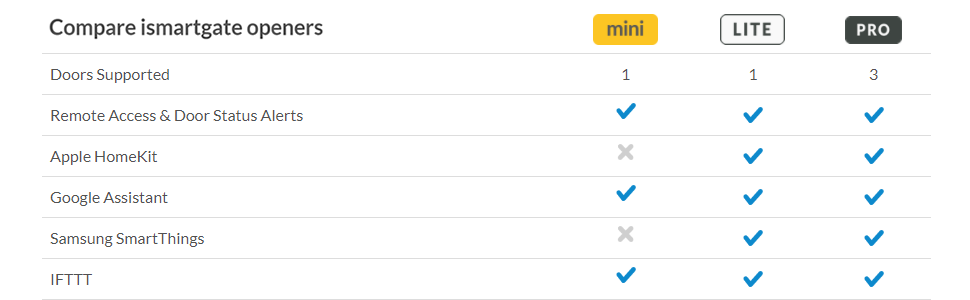
The ismartgate PRO is a cutting-edge smart garage door opener compatible with all major smart home platforms including Apple HomeKit, Amazon Alexa, Google Assistant, IFTTT, and Samsung SmartThings. It supports up to three garage doors, offers customizable voice and app controls, integrates with IP cameras for live monitoring, and features GPS/time-based automation for effortless, secure access. Installation is straightforward, and its reliable Wi-Fi connectivity ensures seamless operation without the common delays or errors found in competing products.


| ASIN | B07PZDKMZ9 |
| Additional Features | Universal, Voice Search |
| Battery Type | Type-N |
| Best Sellers Rank | #423,801 in Tools & Home Improvement ( See Top 100 in Tools & Home Improvement ) #540 in Garage Door Opener System Parts |
| Brand | ISMARTGATE |
| Built-In Media | Wi-Fi Standard PRO Garage Door Opener |
| Compatible Devices | iPhone, Amazon Echo, Google Home, Samsung SmartThings, IFTTT-enabled devices |
| Connectivity Technology | Wi-Fi |
| Controller Type | amazon_alexa, google_assistant, homekit, ifttt, smartthings |
| Customer Reviews | 4.0 out of 5 stars 193 Reviews |
| Global Trade Identification Number | 08437019447175 |
| Item Type Name | Wi-Fi Standard PRO Garage Door Opener |
| Manufacturer | Remsol Europe S.L |
| Max Number of Supported Devices | 3 |
| Maximum Number of Supported Devices | 3 |
| Mfr Part Number | iSG-02WNA102 |
| Model Name | 02WNA102 |
| Model Number | 02WNA102 |
| Number of Batteries | 2 Nonstandard Battery batteries required. (included) |
| Number of Items | 1 |
| Special Feature | Universal, Voice Search |
| Unit Count | 1 Count |
C**.
works perfect with absolute stable HomeKit integration
I bought it to replace the Liftmaster MyQ Home Bridge connected to my garage opener and MyQ Smart Garage Hub connected to my sliding gate with a Liftmaster motor (both are Liftmaster Security Plus devices). Both were terrible, made an extremely loud beeping sound for 1 minute before opening or closing, delaying each command. Most annoying, the MyQ constantly showed a non responsive error - most of the time for the closing command ending up with an open door, when using it from away. It also required frequently new pairing, which was annoying. I bought the ismartgate PRO Garage Door Opener and use it with hardwired sensors for the gate and garage door. I bought the ismartgate sensors, but it even works with my previous installed sensor (normally open) I used with the MyQ. Installation was most simple, connecting to the hardwired switch inside the garage and required only to run the cable for the sensor, where I could have also used the included wireless sensor, but chose the hardwired one for reliability. My only wish would be for a cover for the wire connection block and clamps to secure each wire in place as well as a second screw hole for more stable connecting the ismartgate hub to the wall. The app lets you deselect the opening/closing delay and sound, which is great, when coming home late. Adding the hub to HomeKit was straight forward and simple (no comparison to the lengthy procedure of the MyQ) and the response is instant. Some reviewers comment of a HomeKit delay, which does not happen in my case, neither for the door nor for the gate. It appears to be very reliable so far and I did not have any connectivity error since I installed it 1.5 months ago - fingers crossed. I regret choosing the MyQ in the first place and suffering for the past 1.5 years with the unreliable connection and should have chosen the ismartgate right away, but who could know that a third party device will be so much more reliable than the original manufacturer. I can only highly recommend the ismartgate Pro.
D**E
Plugs in - no connection issues.
I bought the Pro garage door opener after wasting 8 hours of my life troubleshooting issues with MyQ video garage door keypad over several months. Installation was straight forward taking 10min total. The connection issues I had with MyQ were non-existent and itโs working flawlessly. It also plugs in so no batteries to swap out. If youโre frustrated with your MyQ swap it out. Trust me - you wonโt miss the keypad.
G**D
๐๏ธ ismartgate PRO Smart Garage Door Opener Remote Review: Promising, but Installation Issues
โ Why Trust This Review: I needed a smart garage door opener compatible with Apple HomeKit for seamless control versus using the MyQ App. The ismartgate PRO Smart Garage Door Opener Remote seemed like the perfect choice despite known compatibility issues with Chamberlain, Craftsman, and LiftMaster openers. Hereโs my honest experience. โ๏ธ Quick Summary: The ismartgate PRO Smart Garage Door Opener Remote requires an adapter for certain Chamberlain, Craftsman, and LiftMaster openers. Installation is straightforward with clear steps to follow on the app, but the app presents significant connectivity issues and then doesn't provide enough information to solve the issues experienced. Despite several hours of troubleshooting, I struggled to get consistent control of the garage door. The product has potential, but the company needs to improve the installation information and app functionality for a better user experience. ๐ Design and Build: โข Adapter Required: An adapter is necessary for some Chamberlain, Craftsman, and LiftMaster openers; Which we did purchase. โข Installation: Clear app to guide you through the installation process, but limited if you have issues. โข Limited Instructional Videos: The included instructional videos are limited and do not cover all scenarios. โ๏ธ Practical Use: โข Apple HomeKit Compatibility: Designed to work with Apple HomeKit, though connectivity issues persist. โข App Connectivity: The app frequently presented errors and struggled to initially connect and then maintain a connection. We do have ultra-fast internet as well. โข Control Issues: Despite successful connection, gaining control of the garage door was never achieved. โญ Advantages: โข Clear installation steps for standard installation scenarios. โข Designed for Apple HomeKit compatibility. โข Potential for seamless smart home integration. โ ๏ธ Considerations: โข Requires an adapter for specific garage door openers. โข Significant app connectivity issues. โข Limited instructional videos and documentation. โข Unable to gain control of the garage door. ๐ In Conclusion: The ismartgate PRO Smart Garage Door Opener Remote offers promising features and Apple HomeKit compatibility but is hindered by significant connectivity issues and very limited instructional support. The requirement of an adapter for certain openers adds to the complexity. While the product has potential, the company needs to improve the app functionality and provide better installation guidance. This product may work for those willing to troubleshoot extensively, but others may find the experience frustrating. ๐ก Buying Guide: โข Who It's For: Ideal for those looking for a smart garage door opener compatible with Apple HomeKit and willing to troubleshoot connectivity issues outside of standard installation scenarios. โข What to Look For: Compatibility with your garage door opener, clear installation instructions, and reliable app connectivity. โ FAQs: โข Does this work with Chamberlain, Craftsman, and LiftMaster openers? Yes, but it requires an adapter for compatibility and may require additional troubleshooting. โข Is the installation straightforward? The installation steps are clear for standard installation, but the app may present connectivity issues or be problematic for unique installations. โข How reliable is the app? Users may experience significant connectivity issues, making control inconsistent. โ๐ผ Final Thoughts: This review was written by U N O V I S I O N, where we focus on providing honest and detailed reviews to help consumers make informed decisions. I hope you found this review helpful.
M**N
Use Ethernet if setup is failing. Worth it because itโs rock solid
Update 8/9/20: I will get a life after this update, but my inner nerd has been really happy with how reliable this device has been for the past several months โ when you use wired connections. (1) Connect it via Ethernet cable to a WiFi router. (2) Get the Gogogate 2 wired sensor to detect when your garage door is open or closed. It includes two wires that are plenty long enough to reach between your device and the door, assuming your garage is pretty standard. Itโs easy to install when you follow the directions. Anyway, my point is what someone else wrote in their review: wire everything. Even if you have strong WiFi, you will be more frustrated than if you use wires. Update 4/26/20: Turns out its wifi connection isn't so rock solid, long term. We have a strong wifi signal throughout the house, including the garage, but the iSmartGate would only have dial-up speeds some times, which meant occasionally it would show as "not responding" in the iOS Home app. And the settings would never load -- too much data over too weak of a connection. The solution has been to connect it via ethernet cable (needs a USB adapter) to our Google Wifi puck thingy. Now it loads the settings via the iOS app quickly and, hopefully, it won't be incommunicado with HomeKit any more (although that was rare, and certainly not as often as the Insignia door controller I used to have). I think the wifi component inside iSmartGate must be pretty cheap, so the hard-wired connection seems to be the way to go. Update 3/23/20: Still rock solid. It hasnโt missed a command once when approaching on foot or in-car via CarPlay, and it always reports the correct status. If you have an Insignia controller and are frustrated with its reliability, ditch it and get this. You wonโt regret it. Update 3/16/20: Wow this has been rock solid โ no dreaded โNo Responseโ, like I often saw with my Insignia controller. And it works immediately when outside and beyond the WiFi range. The status is always correct in the Home app and the Home control center widget. Hoping it stays this reliable. ๐ค โโโโโโ Just wanted to comment on the setup, in case it helps anyone. These are instructions for connecting to HomeKit using an iPhone. Itโs tricky if your phone uses the 5GHz band on your WiFi network โ which is why Iโm posting. This device only operates on the 2.4Ghz band, and your phone and this device need to be on the same band during setup โ almost impossible if you have Google WiFi or Eero or something that chooses automatically for you and doesnโt let you manually switch bands. After hours trying to get both devices on 2.4, I gave up and tried connecting the iSmartGate to a WiFi router via Ethernet (needs a USB adapter to fit into iSmartGate). That did it. My phone was still on the 5 band and it was able to add the device via the Home app quickly. So if your phone is connected to the 5GHz band, donโt try to change that. Save yourself lots of frustration and just connect the iSmartGate to the internet via Ethernet. Itโs a small pain, but far less pain than the alternative. Just be sure to follow iSmartGateโs instructions carefully. You will probably need to reset it periodically if youโre struggling with the setup. Get a paper clip and push the tiny button on the back for about 10 seconds until you hear a sound; then let go. It will eventually reboot. You need the WiFi symbol to be blue to set it up. If it blinks red, you will need to use the paper clip to reset it. I recommend doing the full setup and not stopping at the minimal HomeKit setup. There are videos online to help you with this. The full setup lets you adjust the beep volume and other things that HomeKit doesnโt. Wish this device could use the 5GHz WiFi band for setup, but I suspect itโs either a cost-saving decision or a limitation of many smart devices to only use the 2.4 band. Anyway, once itโs set up and configured to connect to your WiFi, pull out the Ethernet cable and it should connect wirelessly (green WiFi symbol says it has). You may need to pull out the power cord and put it back in to allow it to restart โ but donโt use the paper clip to reset it. So far itโs working reliably, which is why I bought this. I had an Insignia one, which was much easier to setup, but wasnโt particularly reliable. (I have strong WiFi in my garage.) Not great when youโre in bed at midnight and your garage says itโs wide open, when it actually isnโt. Even worse when youโre abroad and you get a false status like that. Anyway, this review isnโt about the reliability of iSmartGate; itโs more about installation headaches and how to solve them. Wish it had been easier.
J**S
Best Smart Garage Door Opener
I purchased and installed 2 new ismartgate Pro garage door openers and I could not be happier. The installation was easy, with a simple wired connection to the garage door opener and then attaching the wireless sensor to the garage door (which I did with screws instead of the tape). Adding them to HomeKit was quick and easy, and HomeKit has worked flawlessly. While I mostly use the Apple Home app, the ismartgate app works well and provides control, information, and software updates. After using another HomeKit garage door opener for years, my 2 new ismartgate Pro garage door openers were easier to install, work perfectly in HomeKit, and have a better app.
S**5
Great, smart garage door opener; excellent alternative to MyQ
I had a myQ garage door opener for many years. It gave me nothing but trouble. After one excruciating reset that took hours on the phone with MyQ tech support, I decided I needed something new. Read about this product online. Easy to install, and it operates almost flawlessly. The few times it gives me trouble, I simply disconnect power for a few seconds, reconnect, and everything goes back to normal. (In fairness, this usually only happens after a power outage in the neighborhood). If you are an Apple HomeKit user, this is an excellent alternative to MyQ and its cumbersome retrofit requirements. It has some fun, quirky features, like being able to upload an audio snippet that plays whenever you open the door. Also, the door sensors thermometers built in, so you can see the temperature in your garage using the iSmartgate app. Integrates nicely with HomeKit.
J**A
Works as advertised
This product was easy enough to install, and seems reliable enough; however there is one huge problem: When I drive up and say "Hey Siri, open garage door," Siri responds by saying that I must first unlock my phone. WHAT? This was intended to add simplicity to opening the door, but if I must first stop the car, pick up the phone and unlock it before it works, then how is this convenient? So it's back to the cheaply-made Overhead Door remote, which requires pressing the button numerous times before anything happens. Of course, if you're using an Android phone, then the product might not have this problem. UPDATE! I resolved the "iPhone unlock problem" by using Apple Watch, and was a happy user, until about 3 months ago when it stopped working. Still connected to wi-if, as indicated by the green indicator light, but it says "accessory not responding." Have searched for a replacement but no other brand comes close, so I am considering ordering another one.
M**O
ismartgate PRO Smart Garage Door Opener Remote. Set up
The unit it self was very easy to set up and is working well.I am using it to control 2 garage doors.the #3 position is wired to my driveway alarm the video integration was a little bit harder to set up but the customer support was very good a got me sorted out the problem is it takes about 5 to 10 seconds to load.
M**K
Best Smart Garage System for HomeKit
This is the best smart garage system for Apple users. It works seamlessly with HomeKit and is easy to install with a little bit of time and setup. Customer support is very responsive through email and willing to support. The system shows in my Apple CarPlay and you can automate the open and close when leaving or coming home. This system replaced the brutal chamberlain myq system I tried initially.
Trustpilot
2 weeks ago
1 month ago