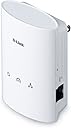
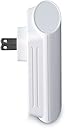
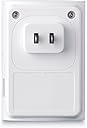
โก Power your home network with speed and securityโno wires, no worries!
The D-Link PowerLine Adapter AV500 Mini Starter Kit delivers up to 500Mbps over your homeโs electrical wiring, featuring a gigabit port for high-speed devices, easy plug-and-play setup, backward compatibility with HomePlug AV, 128-bit AES encryption, and QoS support to prioritize your internet traffic.
| ASIN | B004YW7W1A |
| Best Sellers Rank | #1,323 in Powerline Network Adapters |
| Brand | D-Link |
| Color | White |
| Compatible Devices | Desktop |
| Compatible Operating System Family | Windows |
| Customer Reviews | 4.0 out of 5 stars 82 Reviews |
| Data Link Protocol | Gigabit Ethernet |
| Data Transfer Rate | 500 megabits_per_second |
| EU Spare Part Availability Duration | 7 years |
| External Testing Certification | FCC Part 15 Class B\nCE EMC Class B\nUL\nCE LVD\nK21 |
| Global Trade Identification Number | 00790069347641 |
| Hardware Interface | Ethernet |
| Item Weight | 4.96 ounces |
| Manufacturer | D-Link Systems, Inc. |
| Mfr Part Number | DHP-501AV |
| Minimum Required Operating System Version | Windows 1 |
| Model Number | DHP-501AV |
| Number of Items | 1 |
| Number of Packs | 2 |
| UPC | 071090288111 132017693842 778889321805 151903029275 666672922684 072090532266 072090528368 353791852823 778890631788 191120038902 999994763025 790069347641 777781896046 |
| Unit Count | 2 Count |
| Warranty Description | 1-year limited |
D**Y
BELIEVE IT OR NOT POWERLINE WORKS
When you are looking at either choice #1- Wireless which unless you spend many $ is spotty when you are watching videos or movies (i.e. streaming from internet, aka Netflix, etc)..... or a difficult #2 choice where you run Cat5 or Cat6 wire from your internet source (router) to where you want to use (i.e. TV in living room of Bedroom, computer in office or another bedroom) A lot of work and often a lot of $ to achieve. ............. consider this as option #3 which personally have been using for over six years, five with another product and one year with this one (the other still worked but internet provider blaming their problems on the older powerline, I bought a new one (buy at least 200 mnps and 10/100/1000 if possible) ........... This UNIT BEING REVIEWED JUST WORKS. ........ Plug one powerline unit in wall outlet near internet source. run cat5 cable from Internet source (router) to powerline unit............... plug another powerline unit in wall outlet near TV in living room (mine runs cat5 to a 4-outlet switch to run cat5 to TV-AV amplifier-BluRay player/ media player for internet access (Sony) )- .............and all FOUR sources for using the internet (i.e. netflix/Hulu/Amazon etc.) work from the single powerline when using the switch. ...............(FYI- there are some units which have 4 outlet on powerline which eliminates the switch (mine is powered and still not expensive)...................... Most run as many as four powerline or more in network........................ and is almost as fast as one TV where Cat5 cable was run directly from router to media streamer (Sony) to TV. (i.e time it takes for system to boot and give full menu at media streamer desktop- cat5 is a little faster but not enough to run cat5 around a home.. not in my world and pocket book.
J**N
Works like a charm - FAST FAST FAST!
I purchased this starter kit because one of the adapters from my old set (Netgear XE102G) failed one day. I tried connecting wirelessly in my home but the response time was much too slow. At first I could not decide if I was going to replace my one failed old adapter or buy something else, so I did some research and read reviews and found this product. Well, now that I see how fast my connection speed is with this D-Link set I am actually glad my old ones stopped working. I am not techy enough to measure mbps, but I can say that the response time with these is noticeably faster to me than any other type of connection I have tried. And the set was easy to set up (just plug both adapters in and they work!) I had read somewhere that when these adapters are plugged in they take up the whole wall outlet...but I have mine plugged into the top of a standard 2 outlet wall plug unit and I can still fit another plug in the bottom socket...so that was a pleasant surprise. I would highly recommend this product to anyone.
R**N
Works pretty well ..
This product does not get 5 stars because it would not work in the same configuration as an old netgear powerline unit. The throughput is much better, on it, 500mbps vs 65, BUT it would not extend the network nearly as far as the one would. Ended up going back to the old one at my client's location and now using the d-link model at home where it works great, much faster than the wireless extender I was using before, 4x the speed! I was transferring files between computers at 1mb/s or less. now it is around 4mb/s or greater, hit almost 7mb/s.
A**E
A Great Product!
Poweline adapters are a great alternative to WiFi or if you live in a rental and can't run in wall Ethernet cables. I've used the PowerLine AV500 adapters for over a year with great success. The only issue I had was adding the Dlink 4 port PowerLine AV gigabit switch. When only connecting the switch to one other PowerLine product it was extremely simple and hassle free. However when adding it to both of the adapters it would always kick one of the PowerLine AV500's off the network. The setup guide for the PowerLine AV is useless. It states that they can't be used across outlets on different circuits/breakers. This is incorrect. I use them across my entire home, from the basement to my second story master bedroom. The directions also state you only have to press the simple connect button for three to five second...this is wrong. I have to press them for 20-30 seconds and then momentarily press the button once again before they activate, but once the do...wow. An internet connection through my homes electrical wiring...awesome! The PowerLine AV500's are a little big to share an electrical outlet with another device. I share every outlet I have with a PowerLine device and a power strip. To accomplish this with the AV500's simply turn them updside down.
J**R
Works but is lacking
Works but the through put is lacking... There is not enough Documentation on what the household Wire requirements should be for top performance. It does work well for low bandwidth needs
G**5
Regretfully, I Have to Return It
Two problems on my wireless home network are a personal PC at great distance from the Access Point/Router [AP] and a heavy resource user in the form of a security DVR. After reading reviews re the PowerLine technology for extending an Ethernet circuit I bought this D-Link Starter Kit that was advertised to get up to 500 Mbps for devices connected to a router by bridging the distance through the house wiring. Before purchasing I called D-Link Technical Support and discussed the limitations of the equipment and the technology. I was told I could obtain nearly the same speed and signal strength for devices located far away from the router, AS LONG AS BOTH ADAPTERS WERE ON THE SAME ELECTRICAL PHASE. The Technician repeated and EMPHASIZED, the operating constraint was the PHASE of the wiring, not the circuit segments. I understood his comments to mean, in modern house wiring two legs or phases are connected to the customer distribution panel from a utility transformer. Customers then distribute the wiring throughout the house for phase to ground circuits [120 VAC] and phase to phase circuit [240 VAC]. If BOTH ADAPTERS are ELECTRICALLY connected on the SAME PHASE, regardless of the individual circuit location, then the D-Link PowerLine Device will operate as advertised. Any OTHER connection WILL yield unpredictable or inoperable results. Because the PC problem was in the section of my house that was electrically two distribution panels away from the AP, I was not too surprised that the PowerLine solution did not work. I WAS surprised with the results from connecting the DVR, which I determined WAS on the same phase as the adapter connected to the router. My DVR is currently "networked" through a Linksys Wireless-to-Ethernet Bridge, just like my color laser printer is connected on a separate Wireless Linksys Bridge. Unfortunately, when I access my DVR from a wireless device, i.e., laptop, remote desktop, etc., the network bogs down. Based on how the researchTechnician described the operation of their PowerLine devices, I thought I could simulate extension of the Ethernet to my peripheral devices and release some wireless demand resources to other equipment. It did not work. As soon as I accessed the DVR from one of my PCs the middle/House Icon [ which represents the quality of the Ethernet signal], would flash red. When I removed the wireless PC access, the middle light would continue to flash red then go to solid red. A different D-Link Technician said all three lights should illuminate green at all times to indicate proper high speed operation. If the middle icon "drops" to amber, then the signal/speed is deteriorating. If the icon "drops" to red, the speed is 50 Mbps or less. He said the FLASHING was an indication of data transfer. When I asked why the system did not refresh to green when the wireless access was removed, he did not have an answer. The only way I could restore the system to green was to PHYSICALLY remove/re-install one of the adapters from the power circuit. This made the device UNACCEPTABLE, so I am returning it. I performed one other test. I connected the PowerLine devices to my network printer. On THAT device, which is also on the same electrical phase as the router device, the adapters appeared to operate as advertised. So, it may work well for devices like printers. For that reason, I rated the device as Fair or 3-Stars. I would have given it another Star, but I had some problems communicating with the initial Technician on this second call. I believe the problem was associated with insufficient training.
D**D
D-Link PowerLine AV 500 Adapter Kit (DHP-501AV)
This is the second set of D-Link Powerline adapters that I have purchased and will continue to buy more as needed. A great way to extend your wired network without running additional wiring. I just finished pairing one to the master and am using it to provide high speed wired connections to my my TV, DVD Player, audio receiver and a Roku. The output from this adapter goes to a D-Link 5-Port Gigabit Desktop Switch (DGS-1005G). The additional four ports on the switch provide the connections to the components listed above. I have had no problems with these adapters. Switching from wireless to wired has made a big difference in streaming to my components.
N**P
Cannot get a good signal anywhere
The reason you buy this product is because your computer is no where near your router. Well, as soon as you leave the circuit where your one plug is plugged in, you get about zero signal. I have 50 mpbs internet, and usually get around 30 wireless -- I got 5-8 mbps with these. It only worked well when they were on the same electrical circuit, but again, unless you live in 500 sq ft, when the heck are you going to be on the same electrical circuit?? It defeats the whole purpose of using these things!!!! Just as an FYI for set up- be sure to do the first steps while they are on the same circuit. They find each other super quickly and makes set-up easy. If only I got an actual signal.....
P**T
Great alternative to Wi-Fi
This was easy to setup and works like a charm. Its a great alternative to Wi-Fi, especially if you need a reliable connection for stuff like online gaming. It'll only work in a house though, I'm told this technology does not usually work in an apartment.
C**K
Better than WiFi speeds... but beware of interference from microwaves and kitchen/bathroom fans
I've "wired" my house using two sets of DHP-501AV and they work wonders, freeing up the WiFi bandwidth for the mobile devices. The only downside is that there is a significant speed drop on particular unit locations when the kitchen fan or bathroom fans are turned on... but not enough to make me switch back to WiFi.
T**R
Decent when used Right
Did not work at first when I had them on two seperate circuits. However when they are both on the same circuit they work great. Better for people who have a basic understanding of home wiring.
J**W
Doesn't work with Siemens AFI breakers
I was really excited to use powerline ethernet to connect my bedroom to my home network, but unfortunately it didn't work in my house. (I sometimes had connectivity, but a *lot* of packet loss and very slow speeds when it did connect.) It turns out that the arc fault interrupter circuit breakers (AFI breakers) now required in bedrooms can filter out the powerline ethernet signal, and one of the brands of that filters out powerline ethernet is the brand I have, Siemens. Since you can't mix and match breaker brands, I had to return the powerline adapters and ran some ethernet instead. Really wanted this to work; it's too bad they didn't in my case!
E**O
One Star
Not able to get it to work consistently.
Trustpilot
2 months ago
2 weeks ago