Buy anything from 5,000+ international stores. One checkout price. No surprise fees. Join 2M+ shoppers on Desertcart.
Desertcart purchases this item on your behalf and handles shipping, customs, and support to Cyprus.
๐ฏ Dominate your desk and game with precision, power, and freedom.
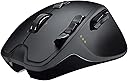
The Logitech G700 Wireless Gaming Mouse combines 13 programmable buttons, high-precision laser tracking, and ultra-responsive 1000Hz wireless technology to deliver professional-grade control. Designed with ergonomic comfort and onboard memory for up to five profiles, it supports AA battery power with USB charging during useโperfect for millennial managers and gamers who demand performance and convenience without compromise.
| ASIN | B003VAM32E |
| Additional Features | Wireless |
| Antenna Location | Gaming |
| Are Batteries Included | Yes |
| Are Batteries Required | Yes |
| Battery Average Life | 2 Hours |
| Best Sellers Rank | #39,663 in Video Games ( See Top 100 in Video Games ) #1,238 in PC Gaming Mice |
| Brand | Logitech |
| Button Quantity | 13 |
| Color | Black |
| Compatible Devices | Mac |
| Connectivity Technology | USB, Wireless |
| Customer Reviews | 4.3 4.3 out of 5 stars (1,236) |
| Enclosure Material | Plastic |
| Global Trade Identification Number | 00097855067326 |
| Hand Orientation | Ambidextrous |
| Hardware Platform | PC |
| Item Weight | 1.05 Pounds |
| Manufacturer | Logitech, Inc |
| Mfr Part Number | 910-001436 |
| Model Number | 910-001436 |
| Movement Detection | Laser |
| Number of Batteries | 2 AA batteries required. (included) |
| Operating System | Windows, macOS |
| Power Source | Battery Powered |
| Range | 10.0 meters |
| Style Name | Modern |
| UPC | 033584226450 100177260914 071030580091 001910285440 001910071197 666669862061 763615783842 097855067326 071030215573 988889305174 999994532041 666669862078 777785483754 163120778850 079531991378 887592268854 |
| Unit Count | 1.0 Count |
E**A
This is a great mouse!
This is an amazing mouse and at the current price there is no reason not to buy this mouse. This mouse has 13 programmable buttons and if you can't see all 13 buttons let me lay it out for you. First are the 4 buttons by your thumb these are the G4, G5, G6, and G7 buttons they are the biggest buttons and are very responsive and the perfect size for any thumb, accidental button presses are very rare, in my case I accidentally pressed the wrong button once I was learning to use this mouse. Next are the G8, G9, and G10 buttons on the top left of the mouse on the left click buttons. These 3 buttons are smaller but easy to access with your index finger and I have never accidentally pressed the wrong one of these buttons. And then is the G11 button in the middle of the mouse which can be programmed but is by default the button used to cycle through each of the 5 different profiles of this mouse. Right above that button and below the scroll wheel is the Hyper Scrolling Button which is non-programmable (more on that later). Now if you're keeping up that's only 10 buttons, G1, G2, and G3 were skipped, well there are no G1, G2, and G3 buttons on this mouse but instead there are three programmable features of the Scroll Wheel. By default the Scroll Wheel has the three functions of the middle click, and left and right scrolling, but fortunately these three can be programmed just as much as the other G-buttons! I personally set the left and right movement of the scroll wheel to volume up and volume down and the middle click to muting, but you really can set it to anything. So now to the actual programming part; all of these buttons and what can you do with them? Well that is up to the user and their imagination with this mouse. What do you want the buttons to do? They'll do it. While the software take a little while to get used to once you understand how it works it is easy to program the buttons. There are 5 profiles on this mouse (cycled through by the G11 button by default) so that means if you keep the G11 button as the cycling button you can actually program 60 different things on this mouse. There are computer functions that are easy to setup like Volume Up, Volume Down, Show Desktop, etc. But if you really want to get into it you can record key presses and insert mouse clicks into a single button and even include delays between each key press. For instance I have one profile on my mouse that has all of my online account info saved into it. So say I go to my Gmail account I then press the button I set up for Gmail and then it logs me in. I was able to achieve this by having the software record my type in "[email protected] TAB userpassword ENTER" it's as easy as that! You really just have to play with the software to appreciate all it can do. Next is the battery life of this mouse. Some of you may just want to keep this mouse plugged in, like if you only use this for a desktop computer and make it a wired mouse. This mouse can be charged through the wire and used without the NANO Receiver being plugged in. Otherwise I've been seeing good battery life. I usually turn my mouse of when I am done with it but now I just leave it on until night when I turn it off and then back on when I use my computer in the morning. Using the latter method I get about two days of use on it. This includes playing Assassins Creed for a few hours and then typing in documents, browsing the web, etc. Most of my day is on my computer. I will update this review with extensive battery testing in a few weeks. Lastly is the hyper scrolling function of this mouse. It might not seem like much, but it is cool. Normally the Scroll Wheel has that mechanical clicking as you scroll through pages, stopping every time you roll it so it doesn't just spin. That's what the hyper scrolling does though, it just spins! You press the button below the Scroll Wheel and it's like a gear disengages and then when you spin the scroll wheel it just keeps spinning smoothly with no problems. Sometimes I just keep hyper scrolling on because it is so nice and smooth. Anyway overall this is a great mouse for everyday use and for gamers. Like I said I only play Assassins Creed so I'm not a heavy gamer but this mouse does great in everything I do! Get it and you'll enjoy it! Let me know if my review was helpful or not!
J**M
Fantastic gaming mouse
I purchased the G700 to replace the aging mouse that came with my MX3200. The MX3200 was not intended to be a gaming mouse, but that is how I used it - and I found it to excel for that purpose. My MX3200 lasted for nearly 5 years and still has life left in it, the replacement was not mandatory. Enough about the MX3200, this review is about the G700. I decided to go with the G700 instead of a Razer or Corsair gaming mouse because it closely resembles my old mouse in terms of extra button placement and how it is designed to fit in your hand. Software is also one of Logitech's strong points. The Corsair mice were top on my list until I found out that the software that came with the first batch of them was absolutely terrible. Personally, I am unfamiliar with Razer's software and I was unable to find a mouse of theirs that I felt would really meet my needs and have button placement that was comfortable to me. This mouse is very feature rich, and every feature works flawlessly. I love being able to switch the scroll wheel between the sort of accurate ratcheting action and the fast smooth action. I have not made use of being able to store profiles in the mouse's memory, though I think some may find that very handy. The only drawbacks I have found are that the battery has a very short life span and the exposed metal part of the scroll wheel can get kind of a nasty slimy feel to it after a lot of heavy gaming use (hands are gross things). In terms of customer service, the first one I received from Amazon was defective - the scroll wheel was broken. I contacted Logitech first and within 24 hours of contacting them through e-mail, they offered an exchange... *however* the lady I spoke with had the intelligence and foresight to recommend that I try Amazon's exchange feature since they are known for their speed and ease of transaction. I took her advice and Amazon shipped me another mouse the same day that I initiated the exchange. This is not the first time I have dealt with Logitech customer service with very positive results. Pros: -Fits comfortably in my hand -Very feature rich and easy to use software -Buttons are easy to reach and you always know which one you're pressing -Can use it either as a corded or cordless mouse -Legendary Logitech Customer service -Comes with a Sanyo Eneloop battery pre-installed Cons: -Really drains the battery, I get about 1 day per charge from any of my batteries. I have extras and keep 2 spares charged at all times. Comparably I would get a week to several weeks of use out of my MX3200 mouse. Your mileage may very, I am very hard on my mouse -Scroll wheel can get to feeling a little gross after a lot of hard gaming use I would highly recommend this mouse to anyone serious about gaming.
A**ใผ
ๆใ็ฒใใพใใใ ไบๅใงใใใฒใจใคใใจๆใฃใใใใ ใชใใชใใชใใงใใญใ ้ปๆฑ ้ฃใใงใใ
K**S
Other wireless mouse are laggy because of polling rate, but this have a very high 1000hz polling rate instead of 125hz that makes mouse fluid and responsive not just in game but for work too. 1 con is that it eats battery with that polling rate... good thing is that you can use the mouse while its charging.
J**R
I really like pretty well everything about this mouse. The weight is nice, the button setup is great, the battery life is awesome, the scroll wheel couldn't be better. I suppose If you don't like heavy-ish mice, or customizing the buttons to make navigation easier, this isn't for you.
C**N
Fast service - arrived before expected date! Works great - my son is very happy!!!
A**X
The item is in perfect working condition. The only downside is that it didnt include the original eneloop battery, thats sad cause your old regular rechargeable batteries will not last a day here. :(
Trustpilot
1 month ago
2 weeks ago