Desertcart purchases this item on your behalf and handles shipping, customs, and support to Cyprus.
🛣️ Navigate smarter, drive safer, and never miss a moment on the road!
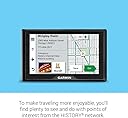
The Garmin Drive 52 is a 5-inch touchscreen GPS navigator preloaded with detailed maps of the U.S. and Canada. It offers quick Wi-Fi updates, driver alerts for safer journeys, and rich points of interest including historic sites and national parks. Designed for easy setup with included mounting and power accessories, it’s the perfect companion for daily commutes and epic road trips alike.


| ASIN | B07MMZNLHG |
| Additional Features | Touchscreen |
| Audio Output Mode | Mono |
| Battery Average Life | 1 hours |
| Best Sellers Rank | #15,543 in Electronics ( See Top 100 in Electronics ) #18 in Car In-Dash Navigation GPS Units #31 in Vehicle GPS Units & Equipment |
| Brand | Garmin |
| Built-In Media | Garmin Drive 52, vehicle suction cup mount, vehicle power cable, USB cable, quick start manual |
| Compatible Devices | Smartphone |
| Compatible with Vehicle Type | Car |
| Connectivity Technology | USB |
| Control Method | Touch |
| Customer Reviews | 4.3 out of 5 stars 4,384 Reviews |
| Display Type | WQVGA color TFT with white backlight, resistive touch |
| Global Trade Identification Number | 00753759211776 |
| Human-Interface Input | Touchscreen |
| Item Dimensions L x W x H | 5.5"L x 0.8"W x 3.3"H |
| Item Type Name | Car GPS |
| Item Weight | 13.6 ounces |
| Manufacturer | Garmin |
| Map Types | City Tour, Street |
| Mfr Part Number | 010-02036-06 |
| Model Name | 010-02036-06 |
| Model Number | 010-02036-06 |
| Model Year | 2018 |
| Mounting Type | Suction Cup Mount |
| Number of Items | 1 |
| Number of Packs | 1 |
| Operating System | Windows |
| Resolution | 480 x 272 |
| Screen Size | 5 inches |
| Special Feature | Touchscreen |
| Sport Type | Snowboarding |
| Supported Satellite Navigation System | GPS |
| Touch Screen Type | Resistive |
| UPC | 753759211776 |
| Unit Count | 1 Count |
| Vehicle Service Type | Car |
| Warranty Description | 1 year limited warranty |
M**S
Great 2nd GPS for our car
We have several older Garmin GPS's and love them, except when we have to update the old ones. This new one is better!! Much Better. You can update with through wifi and it updates in just a few minutes, not hours like the old ones. The display is nice and bright and works by touch or voice and connects to your mobile device via bluetooth so you can enjoy hands-free telephone calls.
C**.
A Good Resource to Have Onboard
I knew nothing about Garmin till I used this Garmin Drive 52 for the past two weeks. To be clear, I suspect they offer more advanced features on the upgraded devices. I still need to explore the settings where I can tweak the routes results, I suspect. In regard only to my experience so far with this entry level Drive 52, I find it kind of like running an old Atari video game. I'd almost consider this a good toy for a preschooler these days. I guess that means it's easy to use. Having said that, this Garmin Drive 52 has gotten me out of a couple of jams, and for that it deserves 5 stars. There are too many new roads, highways and addresses being built in Florida for the Garmin updates to keep up. With completely updated maps, this device does not know where to go, a lot. It will take you to construction zones and closed roads where the Google option is smarter. But, again due to the growth, there are certain areas I just can't get connected to a cell tower to start the GPS signal on my smartphone. So, moral of the story, no brainer to carry this inexpensive navigation device as it will help you out of a jam once in a while. Overall, I like it a lot. It compliments and provides certain helpful tidbits and features. But the voice instruction is sometimes slow to evolve and adapt and does not give enough heads up to make a turn on occasion. Bottom line is, if driving professionally, you need multiple options on board because when you don't know where you are and the navigation shuts down, better have a map downloaded to your device and a compass. When the data runs out on this Garmin it's like the whole world melts away, like when I drove to the northern newest ends of one of our ever-expanding highways down here. Updating the maps with the most current data is easy enough through an app on your computer with the provided cable for the purpose. I have more peace of mind, hundreds of miles away from home, with this Garmin Drive 52 onboard than without, so I definitely recommend.
H**R
Works well but can be buggy at times
I wanted a handheld GPS to use on trips without having to rely on my cell phone. The Garmin Drive 52 fit my price point, and I also know that Garmin is one of the leading names in the navigation industry. I figured it was worth a shot to try. The navigation system does work however it's not the easiest to use. Typing in an address can be a nightmare at times. It is almost like the keyboard is stuck or does not register the letters I am selecting. I have been given wrong directions twice- it sent me in a big circle- randomly changed my directions to head back to the location I was leaving and sometimes cannot even connect to the satellite to get me directions. Do not get me wrong it has also worked flawlessly on other occasions. Glad I made the purchase but could definitely use some improvements. Maybe if I had more money to spend on one of their higher end products, I would not have these issues. I still trust the Garmin name.
B**Y
I have 3 older Garmin that are outdated but this one I really like.
At first I wasn't sure about unit - it is different from my other GPS units. But after using it for a while, it sure has others beat - you have to understand what changed. I like that the road you are on is named, Turn it on and it is on within 1 second. Has lots of added features such as trip advisor ratings, National parks, restaurant ratings. About the only thing I don't like is that the icons for ID places a liked are not there anymore. Example: Medical with the blue cross is gone, along with others I had on my older GPS. But it is an improvement otherwise over previous GPS models. Recommended.
L**I
Easy, fast, affordable, and accurate.
This is a a good screen size - the bigger one that I had was bigger, and I had to keep fiddling with it to keep it visible. This is a great value for the money, and it's brand new. The Garmin has been improved over the version from three years ago. I now can just key in "Kroger" from the gym and it automatically detects the Kroger near the gym and that's ALL I had to do. I used my smartphone before, but this is easy, fast, and accurate. I'm an appraiser so I drive a lot, hunting for addresses so it's an indispensable partner in my working life.
U**J
works like a charm
This is a good GPS, we have had it for about a year, and has come in very handy when going to a new doctor or when I go out to a new client's house for the first time. We are very rural and sometimes the roads and homes are not very well-marked, but I have not missed an appointment or had to call for directions yet.
J**T
I hate the Garmin Drive 52 - BUY A MICRO SD CARD IF YOU PLAN TO DO UPDATES
Update: I used my phone and the Garmin at the same time on my trip to SC and for the first three hours, both gave the exact same directions, but as expected, once I got to the part of I40 that was closed, my phone knew to go around the closure and the Garmin tried to send me directly through it. I had the map up on my phone and the Garmin and I could see the Garmin wasn't routing me around the section of I40 that my phone showed was closed. Before I pulled up the maps, the Garmin was showing a shorter drive than my phone and I was hoping maybe it knew something my phone didn't (sometimes Google Maps doesn't always send you the quickest way), so I skipped the exit my phone was telling me to take, but after that exit, it was just me and one other truck on the highway - everyone else had already gotten off the highway and I started to get nervous so I looked at the maps and took the next exit my phone told me to take, even though the Garmin was still telling me to stay on the highway. Even after I exited the highway, the Garmin was telling me to turn around and get back on the highway and it kept telling me to turn around for a while. By skipping the first exit, it ended up adding time onto my drive b/c I had to get back to the detour route. If I only had the Garmin, I'm curious where it would have taken me and what the route would have looked like. I turned the Garmin off once I realized it kept wanting me to turn around and get back on the highway and I only used my phone on the way back from SC and my phone worked perfectly. I'm confident the detour my phone sent me on was the correct way to go because it was a lot of one lane (each way) back roads and there was lots of traffic on those roads. Original review: I'm enraged right now. I have a last-minute unexpected trip coming up and my phone was spotty the last two times I needed to use it for GPS so I thought I would be better off buying an actual GPS unit. I'll be driving by myself this time and can't depend on someone else's cell phone like I did the last two times. Of course, I looked at a ton of GPS units and decided on this one partially because of the brand name, partially because of the reviews (on multiple sites, not just on Amazon) and in big part, because they make a big deal of saying it's ready right out of the box. That was important to me because a lot of the other/cheaper units I looked at needed a separate SD card and needed updates right out of the box, etc. This was an unexpected expense, and I'll hardly ever use it, so I really didn't want to spend a bunch of money, but in the end, I decided it would be worth it to spend more and go for a name brand unit. I thought it would be better quality and more reliable. So anyway, the GPS arrived yesterday, and I was excited to look at it and get it setup and make sure I was good to go for my trip. Imagine my frustration and honestly, panic, when I put my sister's address into the GPS, and it couldn't find it. What the heck. The sticker on the GSP says there may be updates available online, so I hook it up to my computer and look for updates and sure enough there is an update available. Great, I start the update. OH WAIT. NOPE. You need a micro-SD card bigger than 4 GB but no bigger than 32GB in order to do the update. WTF. I specifically looked all over the listing to see if I needed an SD card b/c so many of the listings for other units needed one. I didn't see anything that said I would need an SD card. So, I had to go to Walmart the Thursday before Christmas (might as well be in actual hell) to get this stupid SD card. Got the card, did the update, which thankfully was very fast. The update says it can take a few hours, but it only took a few minutes. I have no idea what the update did. It STILL can't find my sister's address. I used my hotel address instead and it found that, but I have to drive through TN to get to SC and the GPS is trying to send me through the section of I-40 that's closed because of damage caused by Hurricane Helene in September. Google Maps says that section of I-40 is closed until 2028. It's been closed for a while now, so how is that not updated on Garmin's maps. Thankfully I've made this drive a few times before, so I know the drive is usually around 5.5 hours and when Garmin showed me a route that was 5.5 hours, I knew that was the original route, not the route detouring around the closed section of I-40. Google Maps and MapQuest show 6.5 hours, so they're both accounting for a detour. So anyway, I absolutely hate this GPS and I'm panicking about having to rely on this for my trip, but I don't have time to buy something else. Maybe my expectations are too high since I'm so used to using Google Maps and haven't had an actual GPS in a very long time. On Google Maps, I love that I can switch between the map and reading the directions so I can get an idea of what roads to be looking for, etc. Obviously, I don't do that while I'm driving, but I don't see an option to do that on this GPS so that's frustrating. Maybe you can, I need to keep digging around. Also, the other person who wrote about the cord being extremely short is absolutely correct. The cord for the car is fine, but the one you need in order to plug into the computer or into the wall is extremely short and you can't use this GPS unless it's plugged in, so I had to mess around with it and look for different addresses and try to change my route, etc., while hunched over 3 inches away from the plug in my surge protector that sits on the floor. Very frustrating. I don't even know if I'm going to take this with me on my trip. I might be better off using my phone since I'm not confident in this GPS at all. At this rate, I don't see how this GPS is better than the $60 random brands.
B**O
Garmin Drive 52, GPS Navigator
Garmin Drive 52, GPS Navigator with 5” Display, Simple On-Screen Menus and Easy-to-See Maps
T**A
Muy buen producto
Excelente producto lo compré para un viaje a Los Ángeles sabia que tenia que rentar un coche y necesitaba un gps, es preciso y dinámico no necesita de nada solo actualizarlo
A**M
Unable to use in ASEAN countries
Only usable in US and no maps to download for ASEAN countries
D**T
the best GPS
great GPS--audio great, navigation fast and accurate to a tee. I like the smaller screen--why do they make 7" screens anyhow??
9**N
Item delivered was as described at the website complete with North America maps
The Garmin unit works well
M**L
Good unit
Another quality Gramin unit.working exactly as described. Thank you.
Trustpilot
1 month ago
2 months ago